SMTP Gateway placement

smtpWhere and how should I place my SMTP gateway in the security infrastructure?

I saw this question going around in one of the mailing list I am subscribed and would like to share some thoughts about it. This is old school stuff since our IT security perimeters are being diluted from a well-defined structure to unclear points taken by the new mobility, apps and cloud ecosystem. Every day new threats are exploiting the border-less network and mobile platforms are a prime target. However, companies still need the old and traditional security perimeter and its always good to refresh the old network security infrastructure architecture and concepts.In addition SMTP is a popular vehicle of malware infection and distribution.

To answer this question, there is no right or wrong answer since it all depends on your organization size and risk appetite. Designing a specific network security solution for a business of any size its a engineering and creative task. However, there any plenty of industry guidelines and best practices that you should follow in order to have a layered security approach with defense in depth using redundant and overlapping security controls that mitigates or reduces the risk. Lets review 3 technical suggestions for deploying your perimeter SMTP gateway.

Single-arm deployment : You can have a single-arm configuration in your perimeter firewall. This is a simple solution and makes routing and switching easy. In this DMZ you will position your SMTP appliance.  This appliance normally will be from one of the many SMTP GW products outhere like TrendMicro IMSS, Ironport ESA, eSafe Gateway, etc. This SMTP appliance will normally do Anti-Virus and Anti-Spam (both ingress and egress). With this solution you will have a single physical network interface. You will run all the services on this interface. This means the SMTP traffic to the internet and to the internal MTA such as Microsoft Exchange. You will also run all the management protocols like HTTPS, SSH for accessing the management interface, SNMP for monitoring, Syslog for logging and others like LDAP. This solution is very simple with almost no complexity and low maintenance costs. It wont need any special routing and switching and will be easy to troubleshoot. However, your security posture wont be the best and you wont have segregation of data, which means management and production/data traffic will run on the same interface. Plus you need to consider that running all these protocols on one interface it might consume significant amount of bandwidth from the physical interface.

Two-arm deployment : With this configuration you will have one interface connected to the outside, typically the external firewall and one interface connected to the inside, typically the internal firewall – Its also possible to create a two-arm solution with a single firewall – The appliance needs to have 2 physical interfaces each one in different subnets. Normally you call the external interface the frontend and the internal interface the backend. Management traffic will only be accessible trough the backend interface.

Three-arm deployment : If you must have management traffic separated from data/production traffic this is the best solution. Of course your security infrastructure framework should already support this kind of model in order to have proper routing and switching. This setup will require 3 physical interfaces each one on different subnets. Normally the management interface will be in the same subnet as other security infrastructure appliances management interfaces. With this solution you will have great control and flexibility over the data and management traffic which means better security. At the expense of routing and switching complexity you will gain great flexibility and control over the traffic . This solution is normally harder to troubleshoot.

Those three models are the ones typically seen in the enterprises from small, medium to large corporations.

In addition to the positioning you should also have defense in depth for the SMTP protocol. This means you should consider different layers of AV/Anti-Spam inspection. Normally, you will have inspection at gateway level, then at the MTA level and finally at the client level. You can further complement these levels with a layer 2 inspection gateway before or after your SMTP gateway. Do not forget to have IDS doing SMTP inspection trough the traffic path as part of robust network defense solution. Furthermore, you also need to address DNS concerns for SMTP to work properly. Apart of MX and A records for SMTP deliver you might need PTRs, SPF and others properly registered.

PS: If the time permits I will add some diagrams to illustrate each one of the deployment models.

Tagged , , ,

Bitcoin – My story

Image retrieved from Bitcoin.org

I thought it was worth to share with you my experiences with Bitcoin, so here it goes!

I’m always keen on learning new things, similar to an eternal student. I like to read and search about new stuff and how it works, especially in the IT security realm. While I do this and, because I have more interests than time, I normally keep notes about something I have seen or have read to further look into it. So, in December 2012 I was reading a new technical paper released by Sophos named Zero Access Botnet – Essentially the details about a botnet for massive financial gain. It was quite interesting how Evil was getting ways to monetize trough fraud and having a economical gain trough Bitcoin mining. It was the first time I have read about Bitcoin. It was novel and creative. I wrote it down on my notebook as something that I would like to further research. Time has passed. In January 2013, while I was doing a research about botnets and how they evolve and emerge, I wrote this article – Step-by-Step Bot Infection process exploiting bad password -. At the time I was writing I came across  a great amount of channels dedicated to mining and activity related to bitcoins in different IRC networks. Here it started to raise my interest. It was out of the ordinary and motivating.

But once again other priorities came across and only on the 10th of April 2013 when I was watching CNN that I saw this crazy commentary about bitcoins. They were talking and showing that the bitcoin price had went mad and 1 Bitcoin was valuing more than 250$. It followed by a crash in the next days to 77$ and I thought, OH MY GOD! I definitely had to educate myself more about this. It was going to be a game changer.

From this date onward I started to read more and started to take it serious. I made a deep dive and among others I read the FAQ maintained by bitcoin.org as well as the original paper – Bitcoin: A Peer-to-Peer Electronic Cash System – by Satoshi Nakamoto, who remains anonymous in an intriguing mystery. Then I started to get more familiar with this disruptive and innovative technology that may have an positive impact on payment systems. End result, I figure out that I needed a electronic wallet.

I started registering and creating an online wallet from Blockchain. Then, in order to buy Bitcoins, I needed to use an exchange. So I opened an account on MtGox – the reliable exchange at that time –  I sent them a scan of my ID, proof of residence and after 1 long week I got verified – the queues for verification were enormous due to the April boom-. After having my account verified, I started to buy and sell Bitcoins. I could also deposit and withdraw fiat money. In the meanwhile I took a great degree of risk and wired some money from my bank account to MtGox account in Hong Kong. It took me 4 days until the money was available in the exchange for trading. After that I bought a couple of Bitcoins and started to trade them and in the same time was learning myself more about the concept of mining and the whole bitcoin ecosystem.  I powered up all my computers at home – including my wife’s laptop – and begun mining with them using CPU. Very soon I realized that was worthless due to the difficulty change and electricity costs. I got further and bought the most powerful GPU available on the market for mining which was a ATI Club 3D Dual 7990. It was hashing at 1.8Gh/hashes per second and making a lot of noise. For mining I had to point the client mining software (cgminer) to the Slush pool which was very reliable and trustworthy. I used the GPU for more or less 3 months and then it also became obsolete. In parallel with some price crashes, DDOS to the exchanges and pools plus all the exciting ride I never got to make the money I invested in the GPUs. However, I believe that the bitcoin protocol can have an impact in the future even if it’s not the “bitcoin” we are definitely going to have electronic cash protocol. Following this, I bought a specific machine to mine Bitcoins using ASICs from KncMiner which arrived last October and was worth it. During the summer/autumn 2013 It has been a hell of a drive, extremely interesting and rewarding.

At the moment I am more aware how the system works from a user perspective for the good and the bad. More recently I also read this good explanation on how the protocol works. Noteworthy, are these 3 great videos on C-Span library that were recorded back in November 2013 when different key people in the US testified on digital currencies with remarkable questions and answers.

Furthermore, to follow the price volatility and go into trading mode I use Bitcoinitity charts . At the moment to be part of the mining community and  to be worth of you need to buy specialized hardware e.g, from KncMiner, a client miner like cgminer and then mine in a pool like Slush.

For news and other related matters I follow some threads in Bitcointalk forum, Reddit.com/Bitcoin and Coindesk.

Bottom line, to start create an online wallet, register yourself and get verified with a exchange such as Bitstamp. Wire some money – the one you afford to lose – and buy some Bitcoins. Store them on the online wallet or buy some stuff. Keep in mind that if you store money or Bitcoins in a exchange or on a online wallet you accept the risk of losing it due to a breach like many others that have occurred in the past or being seized by a government since Bitcoin is still an experiment without regulation backing it up. If it is a significant amount of Bitcoins you can store them in a offline wallet or even a paper wallet. After you are familiar with the basics you can move up to trading or mining 24/7.

Have fun and enjoy the experience!

Tagged

CVE November Awareness Bulletin

[Following previous month’s CVE Awareness Bulletin below the November release]

The CVE November Awareness Bulletin is an initiative that aims to provide further intelligence and analysis concerning the last vulnerabilities published by the National Institute of Standards and Technology (NIST), National Vulnerability Database (NVD) and the IDS vendors’ coverage for these vulnerabilities.

Common Vulnerabilities and Exposures (CVE) is a public list of common names made available by MITRE Corporation for vulnerabilities and exposures that are publicly known.

This is the most popular list of vulnerabilities and is used as a reference across the whole security industry. It should not be considered absolute but due to the nature of its mission and the current sponsors – Department of Homeland Security (DHS), National Cybersecurity and Communications Integration Center (NCCIC) – it is widely adopted across the industry.

Based on this public information I decided to take a look at what has been released during the month of November. There were 389 vulnerabilities published where 56 were issued with a Common Vulnerability Scoring System (CVSS) score of 8 or higher – CVSS provides a standardized method for rating vulnerabilities using a scoring system based on their different properties from 1 to 10. From these security vulnerabilities, I compared the last signature updates available from products that have a significant share of the market i.e., Checkpoint, Tipping point, SourceFire, Juniper, Cisco and Palo Alto. The result is that SourceFire has the best coverage with 23%. TippingPoint, Checkpoint and Juniper rank second with 16%. Cisco ranked third with 12% followed by Palo Alto with 0%

The following graph illustrates the mapping between the CVEs published in November with a CVSS equal or higher than 8 by vulnerability type and the vendor coverage:

cve-november

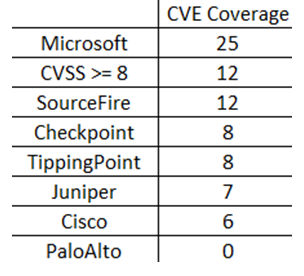
In addition to looking at all the vulnerabilities released, it is also essential to look into detail for specific coverage like Microsoft products vulnerabilities. On the 12th of November the Microsoft Security Bulletin (a.k.a Patch Tuesday) announced 25 vulnerabilities. From these 12 have a CVSS score equal or higher than 8. From these the vendor coverage is shown in the following table:

msbulletin-november

The vendors analyzed have provided signatures on the same date (12 of November) or few days later. The mentioned signatures and patches should be applied as soon as possible but you should also fully evaluate them (when possible) before applying it production systems.

In addition to that, following signature update deployment, you should always check which signatures have been enabled by default.  Plus you should be evaluating what is the impact in your environment for the CVEs that don’t have coverage.

Bottom line, the vendors that were analyzed have a quick response but the coverage should be broader. September we saw 56 vulnerabilities with a CVSS higher than 8 but only 23% of them have coverage in the best case (SourceFire). This means 77% of the published vulnerabilities don’t have coverage. Regarding the vendor response to the Microsoft Security Bulletin Summary for November 2013, the coverage is better and goes up to 100% in the best case (SourceFire). Interesting to note that some of these vulnerabilities are related to software that don’t have significant share in the market. Even if the vendors would have 100% coverage they would not apply to all environments. Furthermore, the likelihood of these vulnerabilities to be successful exploited should also be considered since some of them could be very hard to pull off. So it’s key that you know your infrastructure, your assets and mainly where are your business crown jewels. Then you should be able to help them better protect your intellectual property and determine will be the impact if your intellectual property gets disclosed, altered or destroyed.

Tagged , , , , ,

CVE October Awareness Bulletin

[Following previous month’s CVE Awareness Bulletin here and here, below the October release]

The CVE October Awareness Bulletin is an initiative that aims to provide further intelligence and analysis concerning the last vulnerabilities published by the National Institute of Standards and Technology (NIST), National Vulnerability Database (NVD) and the IDS vendors’ coverage for these vulnerabilities.

Common Vulnerabilities and Exposures (CVE) is a public list of common names made available by MITRE Corporation for vulnerabilities and exposures that are publicly known.

This is the most popular list of vulnerabilities and is used as a reference across the whole security industry. It should not be considered absolute but due to the nature of its mission and the current sponsors – Department of Homeland Security (DHS), National Cybersecurity and Communications Integration Center (NCCIC) – it is widely adopted across the industry.

Based on this public information I decided to take a look at what has been released during the month of October. There were 582 vulnerabilities published where 78 were issued with a Common Vulnerability Scoring System (CVSS) score of 8 or higher – CVSS provides a standardized method for rating vulnerabilities using a scoring system based on their different properties from 1 to 10. From these security vulnerabilities, I compared the last signature updates available from products that have a significant share of the market i.e., Checkpoint, Tipping point, SourceFire, Juniper, Cisco and Palo Alto. The result is that Juniper, SourceFire and TippingPoint has the best coverage with 13%. Checkpoint and Cisco rank second with 12% whereas was the last Palo Alto with 1% coverage.

The following graph illustrates the mapping between the CVEs published in October with a CVSS equal or higher than 8 by vulnerability type and the vendor coverage:

cve-october


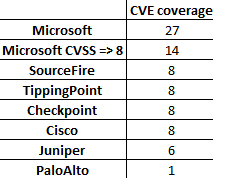
In addition to looking at all the vulnerabilities released, it is also essential to look into detail for specific coverage like Microsoft products vulnerabilities. On the 8th of October the Microsoft Security Bulletin (a.k.a Patch Tuesday) announced 27 vulnerabilities. From these 14 have a CVSS score equal or higher than 8. From these the vendor coverage is shown in the following table:

msbulletin-october

The vendors analyzed have provided signatures on the same date (8 of October) or few days later. The mentioned signatures and patches should be applied as soon as possible but you should also fully evaluate them (when possible) before applying it production systems.

In addition to that, following signature update deployment, you should always check which signatures have been enabled by default.  Plus you should be evaluating what is the impact in your environment for the CVEs that don’t have coverage.

Bottom line, the vendors that were analyzed have a quick response but the coverage should be broader. September we saw 78 vulnerabilities with a CVSS higher than 8 but only 13% of them have coverage in the best case (SourceFire, Juniper and TippingPoint). This means 87% of the published vulnerabilities don’t have coverage. Regarding the vendor response to the Microsoft Security Bulletin Summary for October 2013, the coverage is better and goes up to 30% in the best case (Juniper, SourceFire and TippingPoint). Interesting to note that some of these vulnerabilities are related to software that don’t have significant share in the market. Even if the vendors would have 100% coverage they would not apply to all environments. Furthermore, the likelihood of these vulnerabilities to be successful exploited should also be considered since some of them could be very hard to pull off. So it’s key that you know your infrastructure, your assets and mainly where are your business crown jewels. Then you should be able to help them better protect your intellectual property and determine will be the impact if your intellectual property gets disclosed, altered or destroyed.

Tagged , , , ,

Crypto Basics

“In order to understand security in cyberspace, you need to understand cryptography. You don’t have to understand the math, but you have to understand its ramifications” – Bruce Schneier

Following my previous articles here and here about Public Key Infrastructure (PKI) let’s reinforce and review the crypto stuff  that makes its foundations.

Confidentiality ensures that a message can be read only by the intended recipient. Confidentiality is achieved through the use of encryption. Encryption is the mathematical transformation of plain text into ciphertext using an algorithm and a key. There are two types of encryption systems:

  • Symmetric Encryption: Also called shared-key encryption or secret-key cryptography, A symmetric encryption algorithm uses a single key that both the sender and recipient possess. The same key is used to encrypt and decrypt data and is shared by both parties.  If Alice wants to send Bob a secret document they agree on a cryptosystem and a common key. Alice encrypts the secret document (plaintext) using the agreed algorithm and the secret key. This will produce a encrypted document (ciphertext) that she will sent to Bob. Bob will decrypt the document using the same algorithm and same key and reads it. Example of symmetric encryption algorithm are DES, 3DES, RC2 or AES. The following picture illustrates this process.
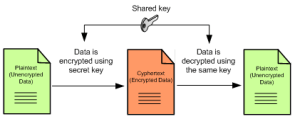
Symetric crypto

Let’s see how we could encrypt (enc) a plaintext document (-in) using a symmetric algorithm (-des3) using a key (-k) to produce a ciphertext document (-out). This will be done on a Linux command line with OpenSSL.

$openssl enc -des3 -k secretkey -in plaintext.doc -out ciphertext.bin

Now that we have our encrypted the plaintext document lets dump the contents of both files in hexadecimal and ASCII (hexdump -C) both files to see the plaintext and the gibberish.

$ hexdump -C plaintext.doc
00000000  74 6f 70 73 65 63 72 65  74 0a                    |topsecret.|
 0000000a
$ hexdump -C ciphertext.bin 
 00000000  53 61 6c 74 65 64 5f 5f  2a 34 ce d4 6f 43 6b 93  |Salted__*4..oCk.|
 00000010  2f 41 5e 00 aa 14 e7 60  ce 89 66 35 2c 08 60 99  |/A^....`..f5,.`.|
 00000020

We can also encrypt files on Windows system by taking advantage of the EFS functionality. To do this operation we will need to first generate a new certificate and key (cipher /K). Then we could encrypt (/E) a plaintext document using a symmetric algorithm. This will be done on a Windows command line with cipher /E. We can then display information about the encrypted with (/C).

c:\TopSecret> cipher /K
EFS certificate thumbprint for computer HOST:
7FE0 9328 7CBF 915D 672C B617 2368 A34E BC33 FE7E
c:\TopSecret> cipher /E plaintext.doc
Encrypting files in c:\TopSecret
plaintext.doc [OK]
1 file(s) [or directorie(s)] within 1 directorie(s) were encrypted.
c:\TopSecret> cipher /C plaintext.doc
Listing c:\TopSecret\
New files added to this directory will not be encrypted.
E plaintext.doc
Compatibility Level:
Windows XP/Server 2003
Users who can decrypt:
 Host\Alice [Alice(Alice@Host)]
 Certificate thumbprint: 5DFF 4841 DA18 6D3B 5646 246B 71E3 EC3B 735A 9BC6
No recovery certificate found.
Key Information:
 Algorithm: AES
 Key Length: 256
 Key Entropy: 256
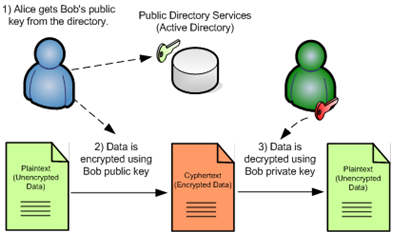
  • Asymmetric encryption: Unlike the symmetric encryption that uses the same key, asymmetric encryption uses multiple keys. There are two mathematically related keys. It’s a key pair consisting of a public key and a private key which are used for the encryption and decryption process. If the public key is used for encryption, the associated private key is used for decryption – this is the encryption process. If the private key is used for encryption, the associated public key is used for decryption – this is the signing process. The private key should be kept secret and the public key can be freely distributed. The public key which can be an attribute of a digital certificate is usually published in a public directory service such as LDAP or Active Directory. You can also combine public-key encryption with hash algorithms to produce a digital signature. If Alice wants to send Bob a secret document they agree on a public-key cryptosystem. Bob then sends Alice his public key. Alice encrypts the secret document using Bob’s public key and sends it to Bob. Bob will decrypt the document using the same algorithm and his private key. Example of asymmetric encryption algorithms are RSA, DSA, ElGamal, and ECC. Below is an illustration of this process using a public directory service:
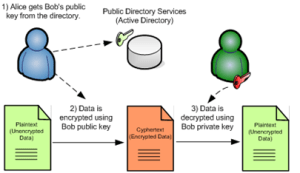
 Assymetric crypto

Let’s see how Bob could create a RSA key pair (genrsa) and save it to a file (bob-privatekey.pem). Then Bob will export his public key  (-pubout) and save it a file (bob-publickey.pem).

Bob@host:~$ openssl genrsa -out bob-privatekey.pem 2048 Generating RSA private key, 2048 bit long modulus

..................+++
......................................................................+++
e is 65537 (0x10001)
Bob@host:~$ openssl rsa -in bob-privatekey.pem -pubout -out bob-publickey.pem writing RSA key
 

Alice can now use Bob public key to send her a encrypted version of the plain text document. Alice will use the RSA algorithm (rsautil -encrypt) with Bob public key (-pubin bob-publickey) to encrypt plaintext (-in plaintext.doc) and save the ciphertext to a file (-out ciphertext.bin).

Alice@debian:~$ openssl rsautl -encrypt -pubin -inkey bob-publickey.pem -in plaintext.doc -out ciphertext.bin

Alice then sends the cipher document to Bob. Bob can now use is private key to decrypt the file and read it.

Bob@debian:~$ openssl rsautl -decrypt -inkey bob-privatekey.pem -in ciphertext.bin -out plaintext.doc

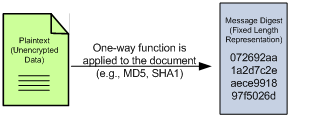
Integrity assures the recipient that a message has not been altered. Integrity is achieved through the use of hashing functions. Hashing is the mathematical result of taking the plain text (arbitrary length data) as input and producing a fixed-length output. The result is called message digest or fingerprint. Passing the same plain text through a hash function always produces the same result. If a single character is changed in the plaintext document, the resulting message digest will be different. Hash algorithms like MD5 and SHA1 are commonly used. Hash functions are used in digital signatures, since they can be efficiently used for detecting message tampering. If Alice wants to send Bob a document and they want to ensure the document has not been changed. Alice and Bob agres on the hashing algorithm. Alice produces a one-way hash of the document. Alice sends the document and the hash  to Bob. Bob produces the one-way hash of the document using the same hash function. If the hash match the hash generated then Bob can attest its integrity.
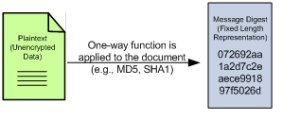
Hashing function

Let’s see how we could produce the  plaintext document message digest using a  hashing algorithm (sha1). This will be done on a Linux command line with OpenSSL and/or sha1sum.

user@debian:~$ openssl sha1 plaintext.doc 
SHA1(plaintext.doc)= a5e1d5a106a4dc55eb5bf7b4c6c32b411702e358

user@debian:~$ sha1sum plaintext.doc a5e1d5a106a4dc55eb5bf7b4c6c32b411702e358 plaintext.doc

On a Windows system we can produce the  plaintext document message digest using a  hashing algorithm (sha1) using the Microsoft fciv utility.

c:\TopSecret>fciv.exe -sha1 plaintext.doc
//
// File Checksum Integrity Verifier version 2.05.
//
0e029f230b119861e0358978f6b088752216221e plaintext.doc

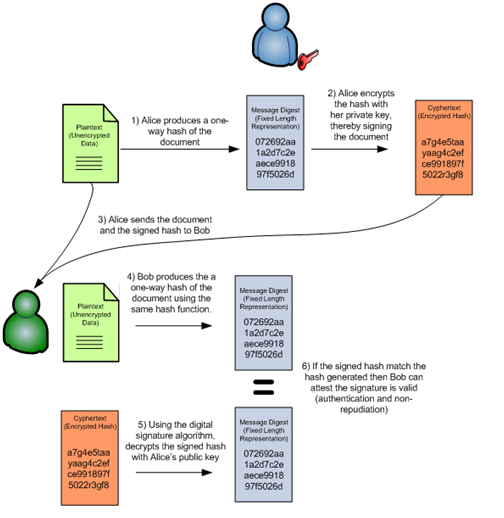
Authentication and Non-Repudiation assures the recipient of  a message that the originator participated in the transaction and is who he or she claims to be. Authentication and non-repudiation is achieved through a combination of asymmetric encryption and hashing functions. Although encryption can keep data secret and protect against alterations, a digital signature proves the senders identity (authentication) and ensures the participation of the signer cannot be denied (non-repudiation).  If Alice wants to digital sign a document and sent it to Bob they both agree on digital signature algorithm. Alice produces a one-way hash of the document. Alice encrypts the hash with her private key, thereby signing the document. Alice sends the document and the signed hash to Bob. Bob produces the a one-way hash of the document using the same hash function. Then using the digital signature algorithm, decrypts the signed hash with Alice’s public key. If the signed hash match the hash generated then Bob can attest the signature is valid (authentication and non-repudiation). The following picture illustrates this process.
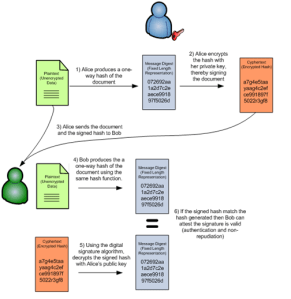
Digital signing

Lets demonstrate how we could digital sign a message using OpenSSL. To sign plaintext.doc you need to calculate its hash (dgst -sha1)  and then encrypt (-sign) that hash using your private key (privatekey.pem) and save the result to file (alice-signature.bin).

Alice@host:~$ openssl dgst -sha1 -sign alice-privatekey.pem -out alice-singature.bin plaintext.doc

Then Alice sends the signature and the plaintext to Bob. Alice public key is made available to Bob (e.g Ldap, ActiveDirectory, etc). Bob then can verify the signature of a message attesting its proof of origin and integrity.

Bob@host:~$ openssl dgst -sha1 -verify alice-publickey.pem -signature alice-singature.bin plaintext.doc Verified OK

Hopefully, with this article you now have a slight better understanding on how cryptography protects users by providing functionality for the encryption of data and authentication of other users. Symmetric-key encryption is a excellent method for quickly and securely encrypting data. However, the condition that sender and receiver must exchange a secret key before data can be exchanged is its weakness and limitation. Combining symmetric algorithms to encrypt the data with public-key algorithms to exchange the secret key produces a solution that is both fast and scalable.

It was also described with illustrations how someone can achieve confidentiality trough the use of symmetric and/or asymmetric encryption systems. How hashing functions are used to achieve integrity. Moreover how to combine encryption systems and hashing functions to produce digital signatures and achieve authentication and non-repudiation. With the use of the most famous characters – Alice and Bob – in modern cryptography examples were complemented with the usage of simple OpenSSL and Microsoft EFS commands.

Cryptography is a colossal, fascinating and mysterious world. If you like cryptography and you want to better understand the techniques and concepts behind it then a indispensable reference is the Applied Cryptography: Protocols, Algorithms and Source Code in C by Bruce Schneier. For a brilliant review of the history behind cryptography than David Kahn’s The Code Breakers is essential. If you would like to read about the intriguing stories of espionage behind the history breakthroughs of codes and code breaking then Simon Singh The Code Book is a must.

For a more hands-on approach the CrypTool – project started by Prof. Bernhard Esslinger – is the most complete e-learning tool available to raise awareness and increase the interest in cryptography. CrypTool v1 was originally designed as a business application for information security training but is now an important open-source Windows project in the field of cryptology. Successors are CrypTool v2 (for Windows .NET) and JCrypTool (for Unix, Windows and MacOS). As a complement to these offline CrypTool programs there is the MysteryTwister C3 (MTC3) international cryptography competition. This website offers four levels of cipher challenges from simple challenges consisting in breaking a Caesar cipher or solving the “Greetings from Russia with love” to complex crypto problems like RSA factoring — most of them embedded in interesting stories.

References:

B. Komar, Microsoft Press, Windows Server 2008 PKI and Certificate Security
B. Schneier, John Wiley, Applied Cryptography: Protocols, Algorithms, and Source Code in C, 2nd ed.
J. Viega; M. Messier and P. Chandra, O’Reilly, Network Security with OpenSSL
CrypTool 1.4.31


Tagged , , ,

PKI a Security Enabler

Image retrieved from http://www.cartaodecidadao.pt/

Image retrieved from http://www.cartaodecidadao.pt/

Now that you know which security mechanisms a Public Key Infrastructure can provide let’s review some cases where a PKI framework can be a security enabler. A PKI is normally deployed in a organization to fulfill a business requirement. For example the use of secure email might be one of the most popular ones. Below is a list of popular use cases that can influence the adoption and deployment of a PKI in a organization:

  • 802.1x Port-Based Authentication : A client/server-based access control and authentication protocol that restricts unauthorized devices from connecting to either an 802.11 wireless network or a wired LAN. EAP-TLS is one of the 802.1x mechanisms that will support the usage of client to connect to the the network infrastructure using certificate-based authentication.
  • Remote Access : Trough the usage of VPNs, remote users can connect to a private network by using a variety tunneling protocols. Certificates increase the strength of the authentication mechanisms used for either IPsec or SSL based VPNs.
  • Secure Email : Majority of people will hesitate to send plans, contracts or other confidential data in unsecure envelopes trough the postal service, however they do send the same type of content tough unsecure email. Worst still is how easy is to spoof an email. By using certificates the email security will be enhanced. Using certificates its possible to verify the sender digital identity, the proof of origin and message authenticity. Plus the content can be protected trough the use of encryption.
  • SET for E-Commerce Transactions : The Secure Electronic Transaction (SET) is a protocol designed for protecting credit card transactions over the Internet. It is an industry-backed standard that was formed by MasterCard and Visa (acting as the governing body) in February 1996. SET relies on cryptography and digital certificates to ensure message confidentiality and security.  Note that SET failed to be adopted by the industry.
  • Software protection. Digital signatures can be used to protect software. By signing the software, the integrity of the software is assured when it is distributed. The signature may be verified when the software is installed trough code signing processes to ensure that it was not modified during the distribution process and to prevent the installation of unauthorized software.
  • Web Authentication and Encryption : The Secure Sockets Layer and Transport Layer Security (SSL/TLS) are cryptographic protocols for securing bidirectional communication channels. SSL/TLS are commonly used with TCP/IP. One of the most powerful advantages of these protocols is that can use certificates to do server and/or client authentication allowing mutual authentication.
  • Internet Protocol security : Certificates can be used to authenticate the two endpoints participating in an Internet Protocol security (IPsec) connection. Once authenticated, IPsec can be used to encrypt and digitally sign all communications between the two endpoints. Certificates do not play a part in the actual encryption and signing of IPsec-protected data—they are used only to authenticate the two endpoints.
  • Smart Card  : The usage of a Smart card as a form of authentication that supports certificate-based strong authentication is ideal for critical security uses (e.g banking transactions, e-ID). Examples of such implementation is the Portuguese e-ID card which can be used to access specific applications, digital sign emails and documents with legal binding or authenticate the user. To perform these tasks,  a user must possess the smart card and he needs to know its personal identification number (PIN).
  • Data Encryption : Ability to encrypts data at rest by using a combination of symmetric and asymmetric encryption methods.

References:

B. Komar, Microsoft Press, Windows Server 2008 PKI and Certificate Security
B Ballad; T Ballad; E Banks , Access Control, Authentication, and Public Key Infrastructure, Jones & Bartlett Learning

Tagged , , , , ,

Security Mechanisms powered by PKI

digital-keyPublic Key Infrastructure (PKI) is a solution to manage digital keys which are used to provide a mechanism for securing electronic transactions and securing the exchange of information in public networks. PKI provides confidentiality and integrity of information, along with identity authentication by performing digital signatures and other cryptography functions, combined with registration and verification processes.

Long ago I was privileged enough to participate in PKI projects. One of them was for sure one of the most interesting projects I ever did. Under tight security procedures a Public Key Infrastructure was built following what is known as a Root Key Generation Ceremony. The RKGC is a set of strict steps carried out under tight security and careful assessment by international auditors. This resulted in a cross certification with one of the industry PKI vendors. The project was executed during 18 months and the security spectacle known as the ceremony took 48 hours. During the project the auditors reviewed documented policies, standards, and, procedures and ensured that the generation of the Root Certificate Authority (CA) keys adhered to the strictest and most rigorous globally-recognized standards. A remarkable project, I still remember the gigantic amount of documentation produced, documents such as Certificate Policies (CP) and Certificate Practices statement (CPS) were completed along with the development of security policies, operational procedures, business continuity routines, support and other documentation.

History apart, PKI can be a very interesting but also a complex topic. There is plenty of literature available on this topic but would like to write about key security mechanisms that form the foundations of a PKI. Eventually will be easier to start understanding and to familiarize with the concepts. Let’s start the high level description of 4 key security mechanism that a PKI can offer, using the terminology from the Internet Security Glossary [RFC 2828] :

  • Authentication: The process of verifying an identity claimed by or for a system entity.
  • Confidentiality : The property that information is not made available or disclosed to unauthorized individuals, entities, or processes.
  • Integrity: The property that data has not been changed, destroyed, or lost in an unauthorized or accidental manner.
  • Non-repudiation : A security service that provide protection against false denial of involvement in a communication.

How can a PKI solution offer such things?
Trough the usage of public key encryption and digital signatures. Lets looking into more detail how a PKI provides those security mechanism :

  • Authentication can be ensured trough the usage of digital signatures which are used to verify the senders identity. A combination of username and password can be used to establish identify but is better to use public-key signatures because they offer strong authentication mechanism. DSA, RSA and ECDSA are examples of digital signatures algorithms. in a PKI the digital signature will associate the users identity to a users public key. In addition that association with additional set of properties will be signed by a certification authority (CA) wrapping all together in a certificate.
  • Confidentiality can be ensured trough the usage of asymmetric and symmetric encryption. The symmetric encryption uses the same key for cipher and decipher. AES and DES are examples of symmetric encryption algorithms. This is analogous to your house door key which can be used to lock and unlock the door. On the other hand the asymmetric encryption (also called public-key algorithms) uses a pair of keys that are different but mathematically related. One of the keys is private and the other is public. RSA and Diffie-Helman are examples of asymmetric encryption algorithms.
  • Integrity can be ensure through the usage of hash functions (MD5, SHA-1), Message Authentication Codes (MAC) and Keyed HASH Message Authentication Codes (HMAC). These mechanisms will ensure the data is not altered while in transit or stored. In practical a digital signature can provide integrity because it uses hash functions (also called. message digests or fingerprints).
  • Non-Repudiation can be ensured trough the use of digital signatures which bind the identity of a party to a transaction so that the participation on that transaction cannot be denied. With this property when a transaction occurs either the sender or the receiver can prove that the alleged sender sent the message. To digitally sign a message you need to use your private key therefore guaranteeing the origin of the message.

With this I have introduced the four principal security mechanisms that form the foundations of a PKI. Much more and in much more detail can be written. In the future I plan to further write about PKI components and give illustrations so you can become more familiar with the terms and the security mechanisms used behind the scenes.

References:
B. Schneier, Applied Cryptography: Protocols, Algorithms, and Source Code in C, 2nd ed. (New York: John Wiley & Sons, 1995).
W. Stallings, Network Security Essentials: Applications and Standarts, 3rd ed. (Prentice Hall, 2007).
IETF PKI Working Group

Tagged , , ,