Category Archives: Malware Analysis

Malicious Documents – Word with VBA and Powershell

E-mail continues to be the weapon of choice for mass delivering malware. The tools and techniques used by attackers  continue to evolve and bypass all the security controls in place. These security controls  could be a simple home based UTM device or a big corporation security infrastructure with all kinds of technology. Social engineering methods, combined with latest encoding and obfuscation techniques allow e-mails to be delivered straight to the end user mailbox. These phishing e-mails attempt to steal confidential data such as credentials using all kinds of deception techniques to lure users to click on links or open documents or give their information. In the last days I came across some of these documents. The below steps describe the mechanism behind one of these documents (MD5: 4a132e0c7a110968d3aeac60c744b05a)  that when opened on Microsoft Office lure the victim to enable macros to view its content. Even with macros disable many users allow the macro to execute. What happens next?

  1. The malicious document contains a VBA macro.
  2. The macro is password protected. The protection can be bypassed using a hex editor and replacing the password hash with a known password hash to see its contents.
  3. When executed the VBA macro writes 3 files on disk. A batch file”ntusersss.bat”, a VBS script “ntuserskk.vbs” and a powershell script “ntusersc.ps1”.
  4. It invokes cmd shell and executes the batch file which calls the VBS script
  5. Microsoft Script Host (cscript.exe) is invoked and the VBS script is executed which calls the powershell script
  6. Power shell script is executed and it downloads the malicious EXE
  7. The malicious file is stored on disk and renamed to crsss2.exe
  8. The trojan is executed and the machine is infected.

The following picture illustrates the previous steps.

feodo-docmechanics

The downloaded malware is very sophisticated and is known to be a variant of the Feodo ebanking trojan (aka Cridex or Bugat). This trojan contains advanced capabilities but the main feature is to steal credentials by performing men in the browser attacks. These credentials are then used to commit ebanking fraud . After execution, the malware contacts the Command and Control server and the machine becomes part of a botnet and starts capturing and stealing confidential data.

Another new document used recently in several phishing campaigns it also uses a VBA macro inside the word document (MD5: f0626f276e0da283a15f414eea413fee). But this time the VBA code is obfuscated. Using the Microsoft macro debugger its possible to execute in a step-by-step fashion and determine what it does. Essentially it downloads a malicious executable file from a compromised website and then it executes it.

feodo-vba

Again, after execution it contacts its Command and Control via HTTP. The computer will be part of a Botnet and it will start to steal credentials and other confidential data.

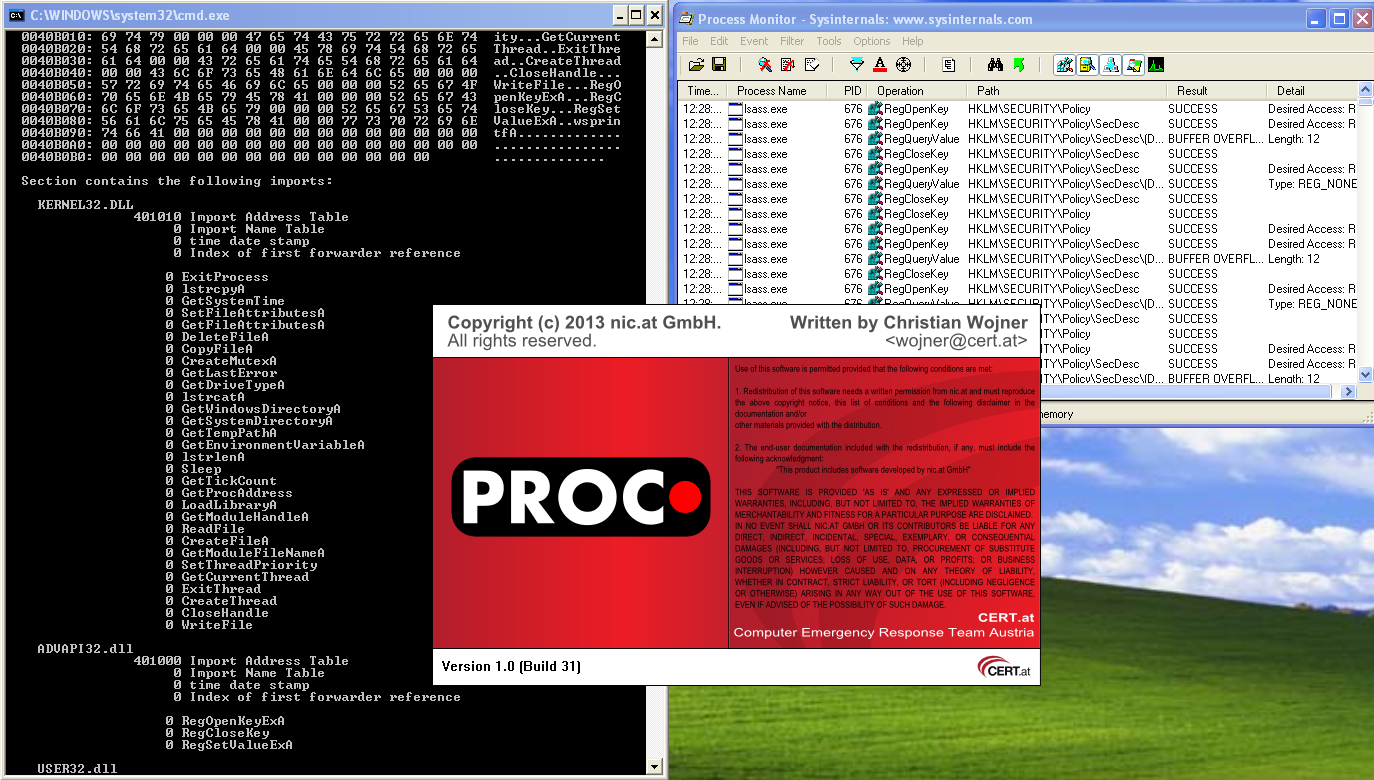
Below a visual analysis of the malware behavior starting with the Winword execution. This graph was made using ProcDOT which correlates Sysinternals Procmon logfiles with packet captures to create an interactively graph. A great tool created by Christian Wojne from the Austrian CERT. This can be of great help for a faster malware behavior analysis. It is also unbelievable to visualize how complex is malware these days. I will leave a how-to on how to produce these graphs for other blog post.

ProcDot
From a defense perspective, the US-CERT put together excellent tips for detecting and preventing this type of malware and to avoid scams and phishing attempts applicable to home users and corporations. Note that these documents were not detected by the AV engines at the time the phishing campaign was seen. Virustotal was reporting less than 5% detection rate. Even running on a limited privileges user account the attack would still be successful. A key recommendation is to use Enhanced Mitigation Experience Toolkit 5.0 from Microsoft as part of your layered defense.

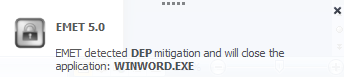
feodo-emetThis is a free product from Microsoft for the endpoint and will prevent the execution of the attacks described previously and many others. Exploit mitigation technologies do not guarantee that vulnerabilities cannot be exploited. However, they raise the bar and increase the costs for the attacker to make exploitation successful by making it harder to be executed. On a windows 7 SP1 with EMET 5, when opening the documents and running the malicious VBA macros, EMET would prevent its execution.

Email attachments can be dangerous. Use caution with Email attachments!

Tagged , , , , ,

Malicious Documents – PDF Analysis in 5 steps

tojan-pdf

Mass mailing or targeted campaigns that use common files to host or exploit code have been and are a very popular vector of attack. In other words, a malicious PDF or MS Office document received via e-mail or opened trough a browser plug-in. In regards to malicious PDF files the security industry saw a significant increase of vulnerabilities after the second half of 2008 which might be related to Adobe Systems release of the specifications, format structure and functionality of PDF files.

Most enterprise networks perimeters are protected and contain several security filters and mechanism that block threats. However, a malicious PDF or MS Office document might be very successful passing trough Firewalls, Intrusion Prevention Systems, Anti-spam, Anti-virus and other security controls. By reaching the victim mailbox, this attack vector will leverage social engineering techniques to lure the user to click/open the document. Then, for example, If the user opens a PDF malicious file, it typically executes JavaScript that exploits a vulnerability when Adobe Reader parses the crafted file. This might cause the application to corrupt memory on the stack or heap causing it to run arbitrary code known as shellcode. This shellcode normally downloads and executes a malicious file from the Internet. The Internet Storm Center Handler Bojan Zdrnja wrote a good summary about one of these shellcodes.  In some circumstances the vulnerability could be exploited without opening the file and just by having a malicious file on the hard drive as described by Didier Stevens.

From a 100 feet view a PDF file is composed by a header , body, reference table and trailer. One key component is the body which might contains all kinds of content type objects that make parsing attractive for vulnerability researchers and exploit developers. The language is very rich and complex which means the same information can be encoded and obfuscated in many ways. For example, within objects there are streams that can be used to store data of any type of size. These streams are compressed and the PDF standard supports several algorithms including ASCIIHexDecode, ASCI85Decode, LZWDecode, FlateDecode, RunLengthDecode, CCITTFaxDecode, DCTCDecode called Filters. PDF files can contain multimedia content and support JavaScript and ActionScript trough Flash objects. Usage of JavaScript is a popular vector of attack because it can be hidden in the streams using different techniques making detection harder. In case the PDF file contains JavaScript, the malicious code is used to trigger a vulnerability and to execute shellcode. All this features and capabilities are translated in a huge attack surface!

From a security incident response perspective the knowledge about how to do a detailed analysis of such malicious files can be quite useful. When analyzing this kind of files an incident handler can determine the worst it can do, its capabilities and key characteristics. Furthermore, it can help to be better prepared and identify future security incidents and how to contain, eradicate and recover from those threats.

So, which steps could an incident handler or malware analyst perform to analyze such files?

In case of a malicious PDF files there are 5 steps. By using REMnux distro the steps are described by  Lenny Zeltser as being:

  1. Find and Extract Javascript
  2. Deobfuscate Javascript
  3. Extract the shellcode
  4. Create a shellcode executable
  5. Analyze shellcode and determine what is does.

A summary of tools and techniques using REMnux to analyze malicious documents are described in the cheat sheet compiled by Lenny, Didier and others. In order to practice these skills and to illustrate an introduction to the tools and techniques, below is the analysis of a malicious PDF using these steps.

The other day I received one of those emails that was part of a mass mailing campaign. The email contained an attachment with a malicious PDF file that took advantage of Adobe Reader Javascript engine to exploit CVE-2013-2729. This vulnerability found by Felipe Manzano exploits an integer overflow in several versions of the Adobe Reader when parsing BMP files compressed with RLE8 encoded in PDF forms. The file on Virus Total was only detected by 6 of the 55 AV engines. Let’s go through each one of the mentioned steps to find information on the malicious PDF key characteristics and its capabilities.

1st Step – Find and extract JavaScript

One technique is using Didier Stevens suite of tools to analyze the content of the PDF and look for suspicious elements. One of those tools is Pdfid which can show several keywords used in PDF files that could be used to exploit vulnerabilities. The previously mentioned cheat sheet contain some of these keywords. In this case the first observations shows the PDF file contains 6 objects and 2 streams. No JavaScript mentioned but it contains /AcroForm and /XFA elements. This means the PDF file contains XFA forms which might indicate it is malicious.
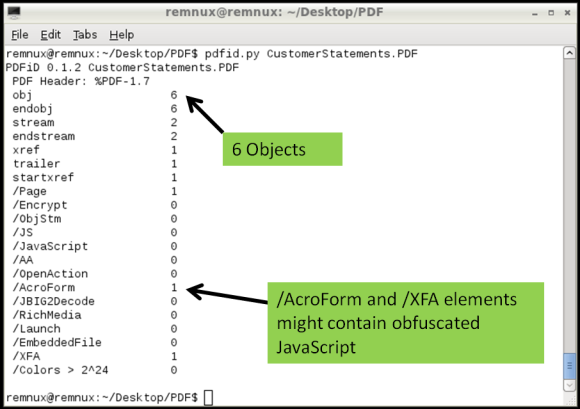
mal-pdf-step1-img1


Then looking deeper we can use pdf-parser.py to display the contents of the 6 objects. The output was reduced for the sake of brevity but in this case the Object 2 is the /XFA element that is referencing to Object 1 which contains a stream compressed and rather suspicious.

mal-pdf-step1-img2

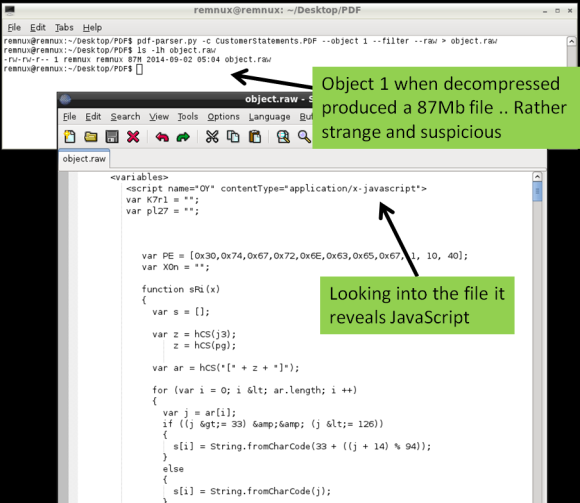
Following this indicator pdf-parser.py allows us to show the contents of an object and pass the stream trough one of the supporter filters (FlateDecode, ASCIIHexDecode, ASCII85Decode, LZWDecode and RunLengthDecode only) trough the –filter switch. The –raw switch allows to show the output in a easier way to read. The output of the command is redirected to a file. Looking at the contents of this file we get the decompressed stream. When inspecting this file you will see several lines of JavaScript that weren’t on the original PDF file. If this document is opened by a victim the /XFA keyword will execute this malicious code.
mal-pdf-step1-img3

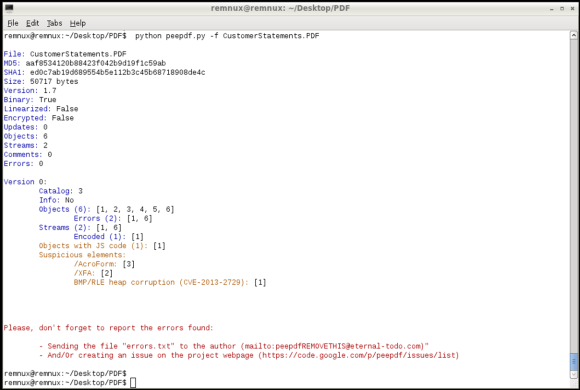
Another fast method to find if the PDF file contains JavaScript and other malicious elements is to use the peepdf.py tool written by Jose Miguel Esparza. Peepdf is a tool to analyze PDF files, helping to show objects/streams, encode/decode streams, modify all of them, obtain different versions, show and modify metadata, execution of Javascript and shellcodes. When running the malicious PDF file against the last version of the tool it can show very useful information about the PDF structure, its contents and even detect which vulnerability it triggers in case it has a signature for it.
mal-pdf-step1-img4

2nd Step – Deobfuscate  Javascript

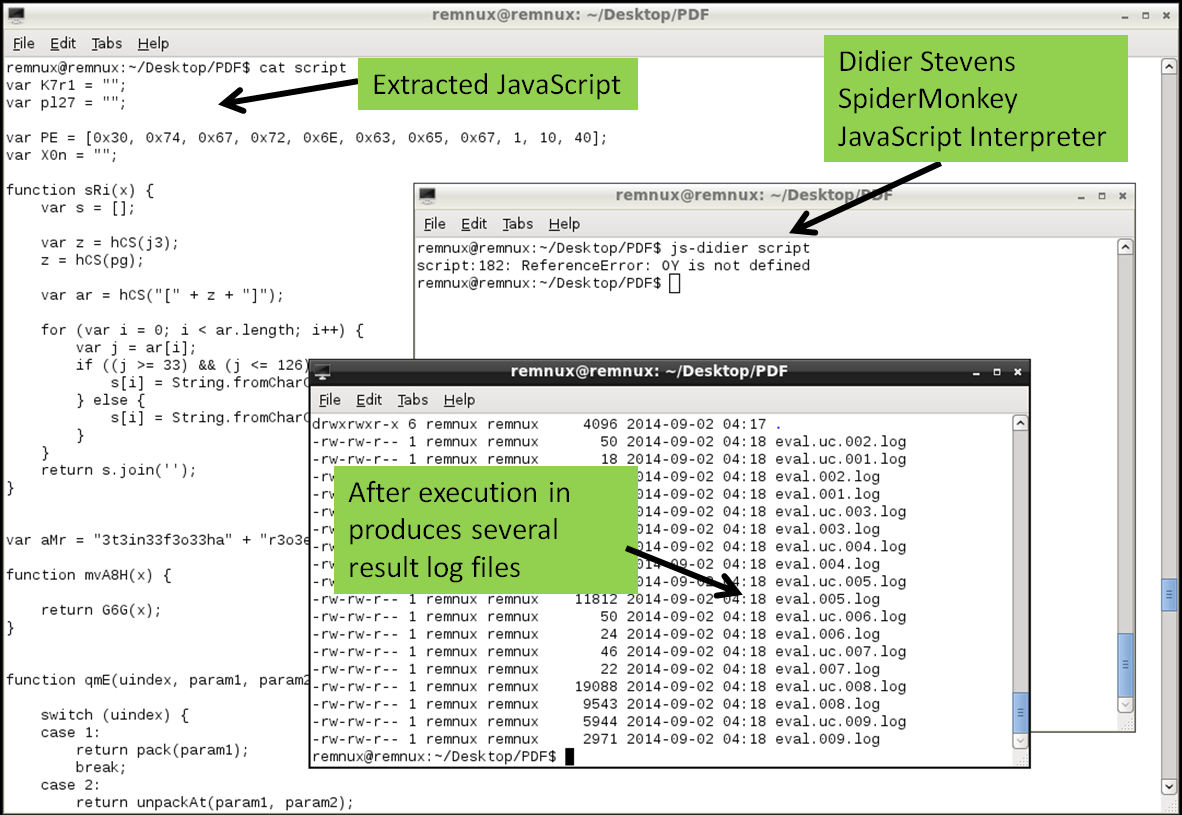
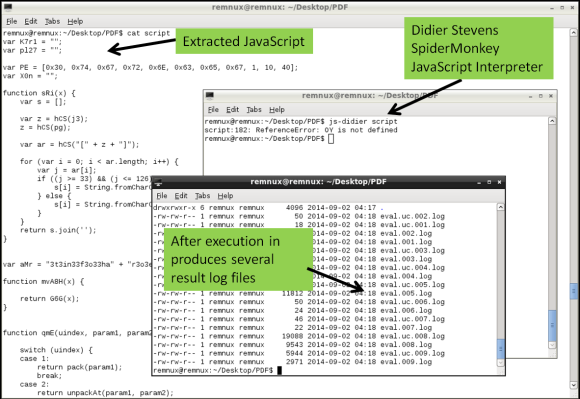
The second step is to deobfuscate the JavaScript. JavaScript can contain several layers of obfuscation. in this case there was quite some manual cleanup in the extracted code just to get the code isolated. The object.raw contained 4 JavaScript elements between <script xxxx contentType=”application/x-javascript”> tags and 1 image in base64 format in <image> tag.  This JavaScript code between tags needs to be extracted and place into a separated file. The same can be done for the chunk of base64 data, when decoded will produce a 67Mb BMP file.  The JavaScript in this case was rather cryptic but there are tools and techniques that help do the job in order to interpret and execute the code.  In this case I used another tool called js-didier.pl which is a Didier version of the JavaScript interpreter SpiderMonkey. It is essentially a JavaScript interpreter without the browser plugins that you can run from the command line. This allows to run and analyze malicious JavaScript in a safe and controlled manner. The js-didier tool, just like SpiderMonkey, will execute the code and prints the result into files named eval.00x.log.  I got some errors on one of the variables due to the manual cleanup but was enough to produce several eval log files with interesting results.
mal-pdf-step2-img1

3rd Step – Extract the shellcode

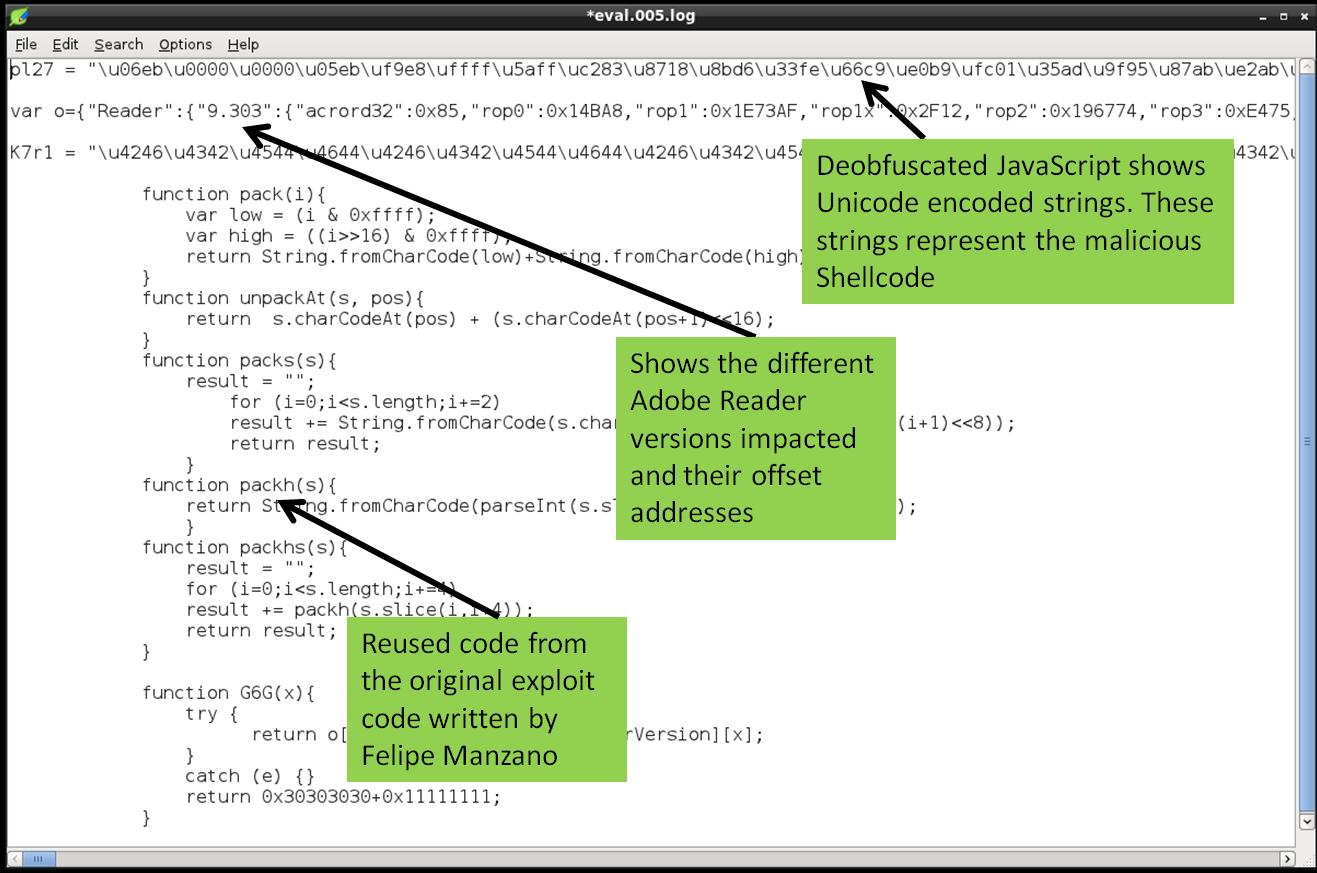
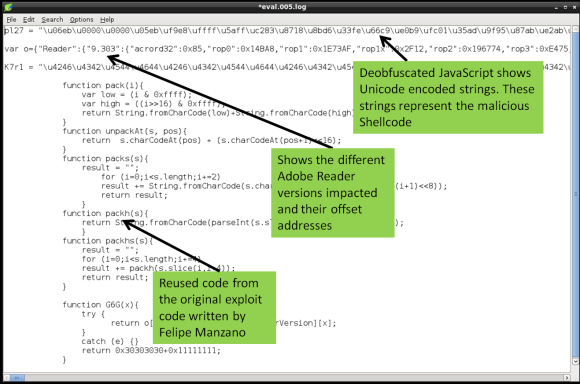
The third step is to extract the shellcode from the deobfuscated JavaScript. In this case the eval.005.log file contained the deobfuscated JavaScript. The file among other things contains 2 variables encoded as Unicode strings. This is one trick used to hide or obfuscate shellcode. Typically you find shellcode in JavaScript encoded in this way.
mal-pdf-step3-img1

These Unicode encoded strings need to be converted into binary. To perform this isolate the Unicode encoded strings into a separated file and convert it the Unicode (\u) to hex (\x) notation. To do this you need using a series of Perl regular expressions using a Remnux script called unicode2hex-escaped. The resulting file will contain the shellcode in a hex format (“\xeb\x06\x00\x00..”) that will be used in the next step to convert it into a binary
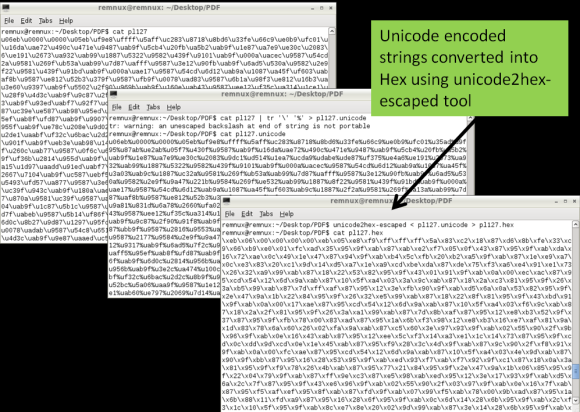
mal-pdf-step3-img2


4th Step – Create a shellcode executable

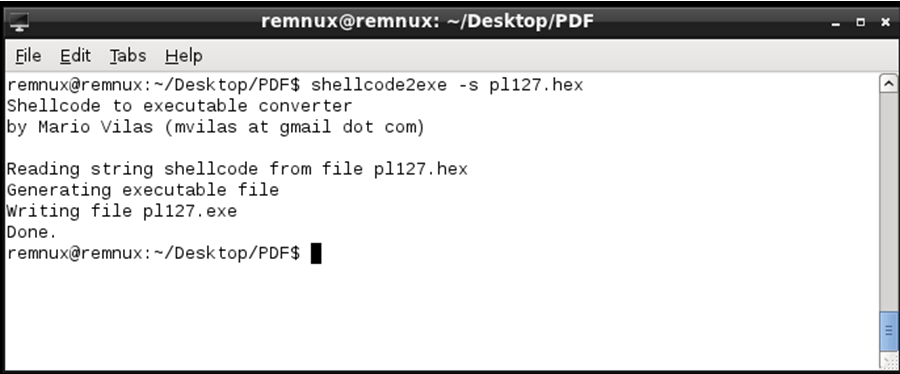
Next with the shellcode encoded in hexadecimal format we can produce a Windows binary that runs the shellcode. This is achieved using a script called shellcode2exe.py written by Mario Vilas and later tweaked by Anand Sastry. As Lenny states ” The shellcode2exe.py script accepts shellcode encoded as a string or as raw binary data, and produces an executable that can run that shellcode. You load the resulting executable file into a debugger to examine its. This approach is useful for analyzing shellcode that’s difficult to understand without stepping through it with a debugger.”
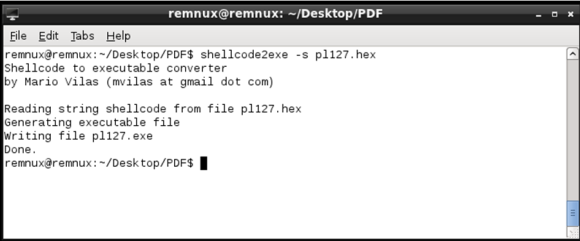
mal-pdf-step4-img1


5th Step – Analyze shellcode and determine what is does.

Final step is to determine what the shellcode does. To analyze the shellcode you could use a dissasembler or a debugger. In this case the a static analysis of the shellcode using the strings command shows several API calls used by the shellcode. Further also shows a URL pointing to an executable that will be downloaded if this shellcode gets executed
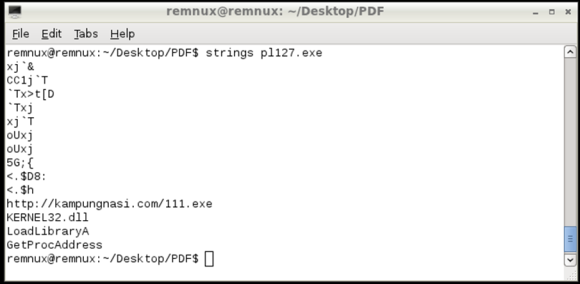
mal-pdf-step5-img1


We now have a strong IOC that can be used to take additional steps in order to hunt for evil and defend the networks. This URL can be used as evidence and to identify if machines have been compromised and attempted to download the malicious executable. At the time of this analysis the file was no longer there but its known to be a variant of the Game Over Zeus malware.

The steps followed are manual but with practice they are repeatable. They just represent a short introduction to the multifaceted world of analyzing malicious documents. Many other techniques and tools exist and much deeper analysis can be done. The focus was to demonstrate the 5 Steps that can be used as a framework to discover indicators of compromise that will reveal machines that have been compromised by the same bad guys. However using these 5 steps many other questions could be answered.  Using the mentioned and other tools and techniques within the 5 steps we can have a better practical understanding on how malicious documents work and which methods are used by Evil.  Two great resource for this type of analysis is the Malware Analyst’s Cookbook : Tools and Techniques for Fighting Malicious Code book from Michael Ligh and the SANS FOR610: Reverse-Engineering Malware: Malware Analysis Tools and Technique authored by Lenny Zeltser.

Download link for the malicious PDF file: https://0x0.st/sZyY.zip . MD5: 4f275c936b0772c969b2daf4688b7fc9
Password: infected

Tagged , , , , , ,

Malware Analysis

malwareanalysisMalware analysis is a very interesting topic, will continue to evolve in size, density and specialization. Additionally is intellectually challenging. One goal of performing this activity might be to analyze malware in order to determine its actions and get insight into its behavior and inner workings by analyzing its code. By doing this we can find answers to pertinent questions such as:

  • What are the malware capabilities?
  • What is the worst it can do?
  • Which indicators of compromise (IOC) could be used identify this malware in motion (network), at rest (file system) or in use (memory)?  – This IOCs can then be used across our defense systems.
  • What tactics, techniques and procedures (TTP) are used?
  • Which category does it falls i.e., criminal, commodity malware or targeted attacks?

To find answers to these and other questions there are several processes, procedures and tools. One well established process is called dynamic  or behavioral analysis. This process consists of executing the malware specimen in a safe, secure, isolated and controlled environment in order to determine its actions, behavior and how it interacts with host system at network, file system, registry and others. The instruments used during this process will allow us to gain better understanding of the malicious code and its capabilities and are mainly based on monitoring and capturing system changes at network, memory, I/O level, etc. Different tools exist to accomplish this. The tool choice is different depending on the operating system the malware runs on, the individual experience/preference and company culture. One great toolbox is the REMnux Linux distro which brings together a great number of tools for analyzing malicious executables.  Among other things it can also emulate a variety of networking services that assist during the behavioral analysis.

Another process is called static or code analysis and consists of analyzing the code or structure of the executable to determine its function. In contrast to the behavioral analysis, the static analysis does not execute the malware. Static analysis is normally a much more complex process that requires understanding of several techniques that should be ideally supported by knowledge of operating system internals and software development.  This process might consist of disassembling, debugging and decompiling the executable.  Different tools exist to assist this process and it might take you to complex topics such as unpacking and decrypting.  As so it might be overwhelming to find the needle in the haystack when going through this techniques. You might want to focus on the execution flow, code blocks, where it starts, what does it call? to start shaping an understanding.

So, which process should I use? Which tool to execute first? There is no right or wrong answer! Several approaches exist  and a combination of both process is normally used.  Start step by step in a incremental and controlled fashion. Use more than one tool to substantiate evidence.  Use the internet, books and research papers to assist you gathering knowledge about operating systems, networking, programming or security. How well are you educated in such topics will assist you during the malware analysis.  Jump from the behavior analyses process to the static code analysis and vice-versa in order to move forward.  If you get stuck, don’t give up!

As you look more and handle the tools better you slowly train yourself to determine what is normal and what is unusual. Soon you start recognizing differences and deviations from the norm.  If you are doing malware analysis as part of a forensic analysis, incident response or just for fun this is a fascinating journey!

For further reference you may want to look into the following books: Malware Analyst’s Cookbook and DVD: Tools and Techniques for Fighting Malicious Code, the Practical Malware Analysis and Malware Forensics: Investigating and Analyzing Malicious Code . More formal training is available from SANS with GREM course authored by Lenny Zeltser. Free resources are the Dr. FU’s Security blog on Malware analysis tutorials. The Binary Auditing site which contains free IDA Pro training material.  Finally, the malware analysis track  in the Open Security Training site is awesome. It contains several training videos and material for free!

Tagged , , , ,

Finding Evil on my Wife’s Laptop – Part II

[The first part of this article described the steps needed to do a live memory acquisition of a potentially compromised system using a free tool called Redline – version 1.11.1 -. In this case the system was my wife’s computer which had been complaining about the slowness of her system for quite some time. With the memory image done, I could start a full investigation with Redline and look for known threats hits against IOCs. ~Luis]

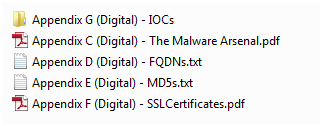
Back in February 2013, Mandiant released a unique report called APT1, Exposing One of China’s Cyber Espionage Units. This report is a must read for everyone in the security industry. It  exposed detailed evidence about a cyber espionage campaign that has been claimed to be carried out by the Chinese government.  The report is full of details, very well written and contains massive tactical intelligence. In two weeks following its release it generated a lot of comments and research. One important aspect of this report was that Mandiant released a separate appendix which contains huge number of indicators such as domain names, IP addresses, SSL certificates and MD5 hashes. The appendix can be downloaded here. The appendix C – The Malware Arsenal contains full details about the discovered malware capabilities including description, registry keys, mutex names, C&C addresses and others in a very structural fashion.  The appendix G – IOCs contains the indicators of compromise in OpenIOC format that can be imported into Redline to find Evil.

digitalartifacts

Basically, what I did was to import those digital artifacts in OpenIOC format into Redline and then analyze the memory image to find matches.
First, I opened the Redline tool and selected to open a recent analysis session – which was done in part I -.  Then clicked on the top left M button and selected Session information.

redline-recentanalysis

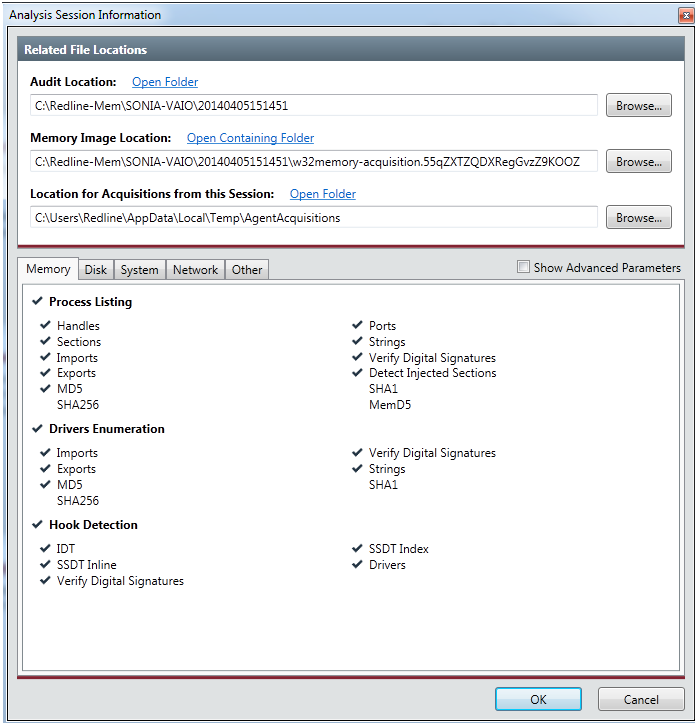
The Analysis Session Information box appeared. In the Memory Image Location,  I browsed into the collected data folder and selected the memory image. The file should be in the folder where the data was collected and it starts with the name w32memory-aquisition.xxx. This will allows us to acquire memory address space of processes and drivers. With this feature we can dump malicious processes or driver from memory into a file. Then we could eventually disassemble it to further determine its capabilities.  Clicked ok to finish.

redline-analysisinfo

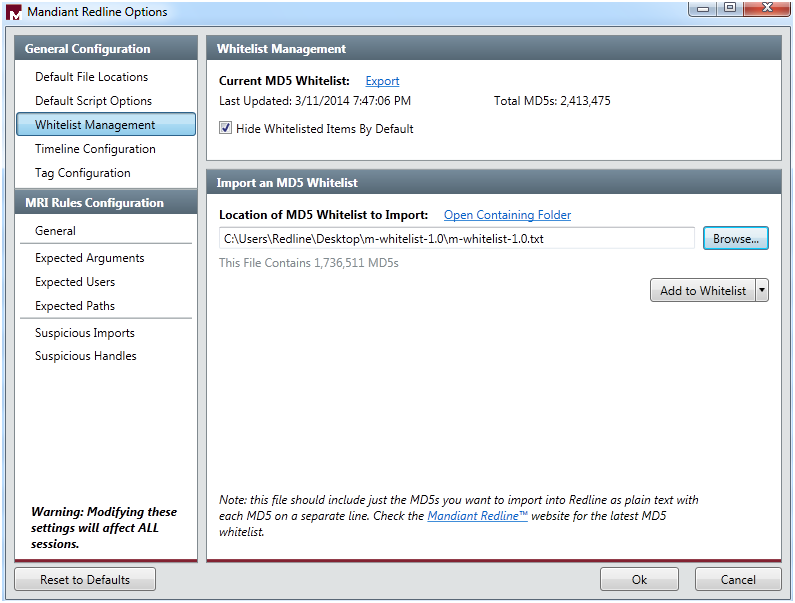
Next, I  went to Mandiant Redline Options trough the M button. Here I  selected the Whitelist Management and imported a MD5 Whitelist provided by Mandiant. This extra list is a set of hashes from common (known good) executable files to filter out some of the memory analysis entries. Includes known good DLL’s and executable hashes from Microsoft Windows Server Update Service and National Software Reference Library and can be downloaded here. Then clicked Add to Whitelist to append this hashes to the existing ones. Next clicked Hide Whitelisted Items by Default and clicked ok. This allows me to hide a great number of known good information because the tool does not display any file with an MD5 hash value in the whitelist.

redline-options

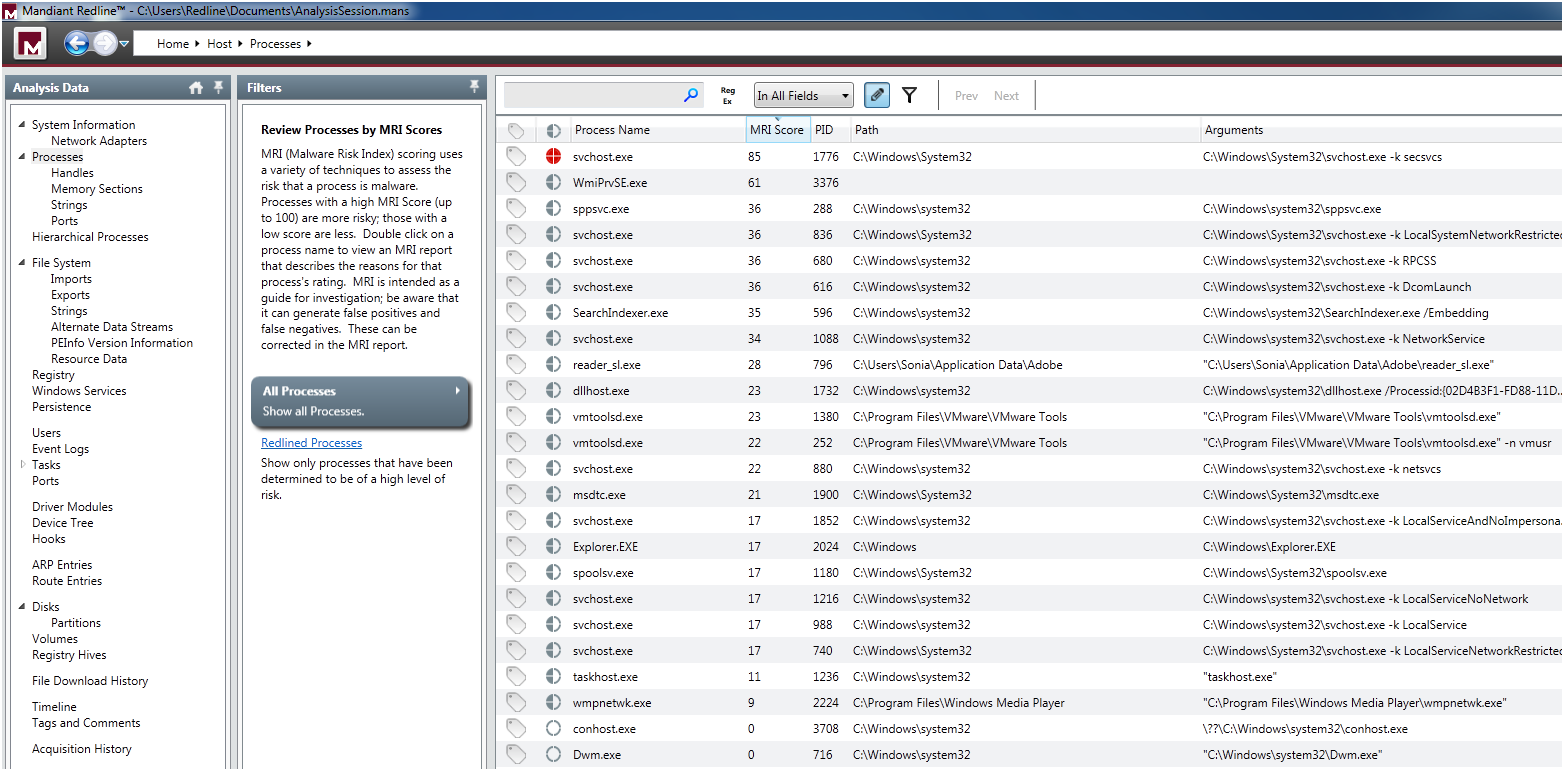
After that, in the Start your Investigation page – this is the home page of your analysis and contain different steps suggested by the tool to assist you in the investigation – I selected I am Reviewing a Full Live Response or Memory Image and clicked in Investigate. This took me to the navigation page where I could apply a set of filters to do a in depth analysis of the system. The tool automatically groups data by types, such as processes or users, and creates views to help you spot potential areas of compromise. First thing that called my attention was in the Processes filter where the svchost.exe was redlined with a malware risk index (MRI) score of 85. The MRI score allows me to prioritize the investigation. Higher the score more likely this process is involved in a potential compromisse.

redline-processes

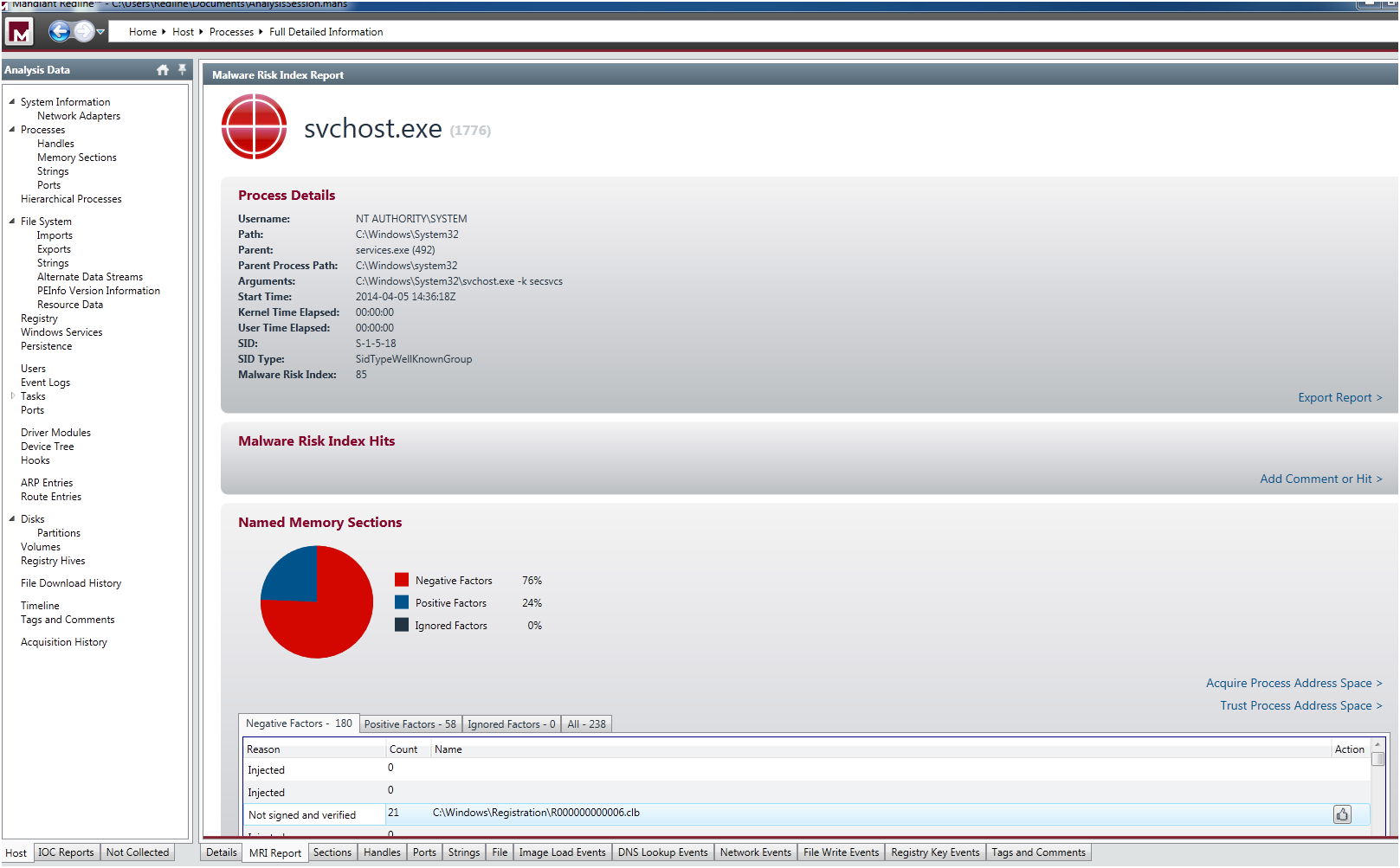
I double clicked in the process and it took me to the detailed information page. Then I select the MRI Report tab at the bottom of the window. Here I could see the reasons that  contributed to the high MRI score, a pie graph and various tables of risk factors  . One relevant aspect was that it contained a big number of  injected memory sections.

redline-processfulldetail

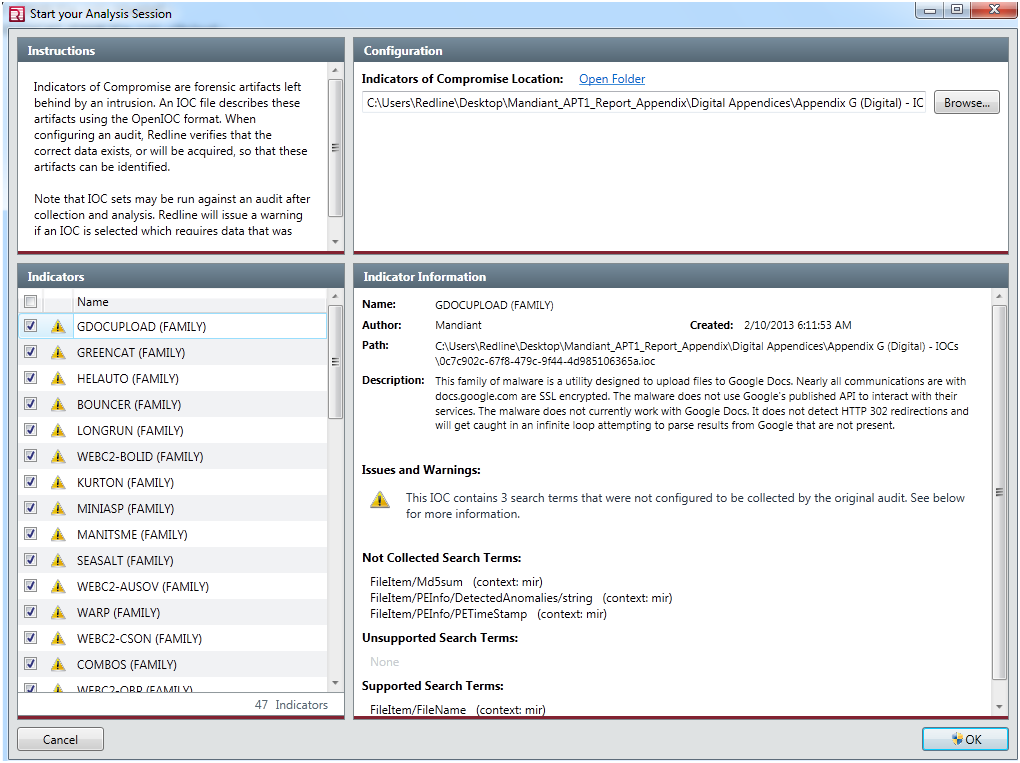
Next, without losing anymore time I went to the IOC reports section and clicked on Create a new IOC report.  The Start you Analysis section appeared. Here I  selected the folder in which the IOC files were  located which was the folder where I extracted the APT1 appendix report. A huge list of indicators were loaded. I could review them, enable and disable each IOC by checking it. The warnings indicates that Redline will evaluate the IOC, but it may falsely indicate there were no hits (a false negative) due to a lack of collected data or unknown terms.

redline-iocreportcreation

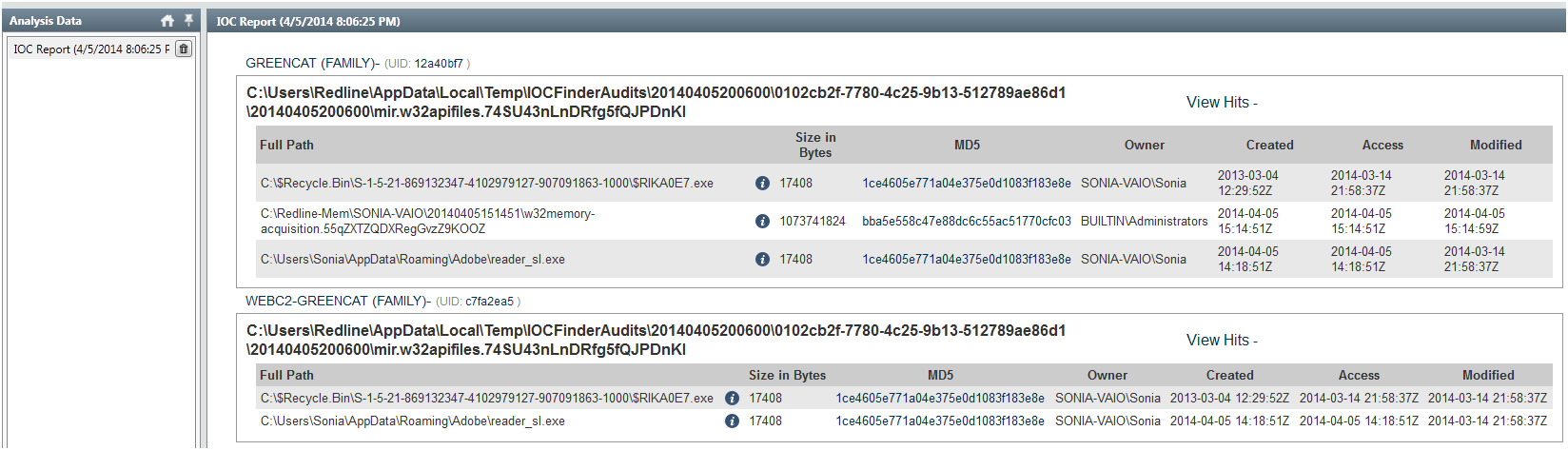
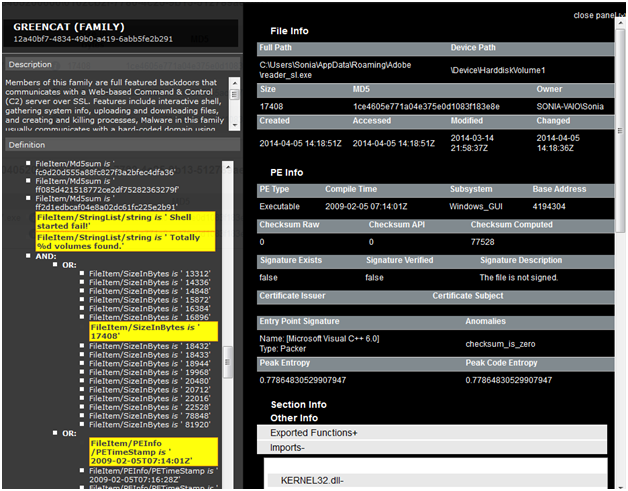
Then the data was evaluated and executed in the background. It took around 30m to finish. When the analysis was done I could browse the IOC report. In the report I could see details about the IOC, such as definition and author. Hits associated with each file that corresponds to an IOC. Detailed information about each hit and the number of indicators that generated hits. In this case the IOC characteristics of the GREENCAT and WEBC2-GREENCAT malware family matched the characteristics observed in the system!

redline-iocresults1

GREENCAT family was one of the malware profiled in the APT1 campaign and is described in the  appendix C – The Malware Arsenal . Basically is a backdoor that communicates with a C&C server and includes a variety of features such as gathering info about the system or creating a shell. When clicking in the details section I could see full hit details such as the file and PE info. In the PE Info I could get further details on PE Sections, Exported and Imported functions and strings.

redline-iocresults2

As you could see is extremely easy and accessible to everyone to do a memory analysis on a potential compromised system and use IOCs to find known Evil.  The tools are getting better, more sophisticated and automated. With this type of tools I even get the feeling that I could do memory forensics and hunting malware!

Additionally, In the resources section of the OpenIOC site you can find IOCs for malware including Zeus, Stuxnet, Duqu and others. You could then import them into Redline and scan your systems. You never know if someone might have implanted a Stuxnet variant on your home systems to compromise your wife’s nuclear centrifuge ; ).

As possible next steps, I  might get a copy of the malware sample by dumping it from memory or get the binary itself. Then take it to my malware analysis lab and determine its capabilities. Using behavioral and code analysis techniques combined with the assistance of tools available on REMnux you analyse it in a controlled environment. From an incident response perspective, I will now proceed with the containment phase. I will notify my wife about what happened and I will take her system offline in order to stop the damage and prevent the attacker from getting further. I will then go through the eradication, recovery and lessons learned phase.


References:
Redline User Guide

Tagged , , , , ,

Indicators of Compromise (IOC’s)

indicators20 days have passed since my last post about how to do a live memory acquisition of a windows system for malware hunting and forensics purposes. In that article, I  explained the details on how to create a collector, collect the data, and import the data into Mandiant Redline. The second part will be about the investigation and how to look for threats using indicators of compromise (IOC). However, before part II , I would like to give a brief introduction to IOCs.

For those who never heard about indicators of compromise they are pieces of information that can be used to search and identify compromised systems . These pieces of information have been around since ages but the security industry is now using them in a more structural and consistent fashion . All types of companies are moving from the traditional way of handling security incidents. Wait for an alert to come in and then respond to it. The novel approach is to take proactive steps by hunting evil in order to defend their networks. In this new strategy the IOCs have a key role. When someone compromises a systems they leave evidence behind.  That evidence, artifact or remnant piece of information left by an intrusion can be used to identify the threat or the malicious actor. Examples of IOCs are IP addresses, domain names, URLs, email addresses, file hashes, HTTP user agents, registry keys, a service configuration change, a file is deleted, etc. With this information one could sweep the network/endpoints and look for indicators that the system might have been compromised. For more background about it you can read Lenny Zeltzer summary. Will Gragido from RSA explained it well in is 3 parts blog here, here and here. Mandiant also has this and this nice articles about it.

Now, different frameworks and taxonomy exist in the security industry in order to deal with IOCs. These frameworks are important in order to share information in a consistent, scalable, automated and repeatable way across different organizations. One initiative is the OpenIOC sponsored by Mandiant. OpenIOC uses an extensible XML schema that allows to describe the technical characteristics of an intrusion or malicious actor.  Another initiative is from the IETF Working Group who defined two standards. One for describing the observables of security incidents which is  The Incident Object Description Exchange Format (IODDEF) described in RFC 5070. The other is the Real-time Inter-network Defense (RID) described in RFC 6545 and is used to transport and exchange the IODEF  information. Other initiative is from MITRE that developed CyboX, STIX, and TAXII , all free for the community and with high granularity. In order to read more about these initiatives Chris Harrington from EMC Critical Incident Response Center has a nice presentation about it. Other resource is a very interesting study made last October by ENISA named Detect, SHARE, Protect – Solutions for Improving Threat Data Exchange among CERTs.

That being said, we can now start using these IOCs to defend our networks. One way is by gathering information from the investigations made by security researches or vendors with actionable intelligence. For example back in September 2013 the campaign “ICEFOG : A tale of cloak and three daggers” was released by Kaspersky. This report contains great technical details and significant amount of actionable information. Another example was the  NetTraveler campaign which has been disclosed in June 2013. This report describes a piece of malware was used to successfully compromise more than 350 high-profile victims across 40 countries. The report is well written and contained great technical details. On chapter 5 it presents a huge list of IOCs to help detect and eradicate this threat. Following that, Will Gibb from Mandiant converted the information from the NetTraveler report into the OpenIOC format.  With this IOCs one could import it into  Redline. Of course this was an effort made by a vendor to incentive the usage of his format but others could use any other standard or framework to collect this observable’s and turn them into actionable information.

On my next post I will show how to import IOCs in OpenIOC format into Redline and find Evil on my wife’s laptop!

Tagged , , , , ,

Redline – Finding Evil on my Wife’s Laptop – Part I

[Editor’s Note: My wife has been complaining about her laptop running slow for quite some time. I am not sure if the system is really slow due to its specifications or the number of pictures it has : ) . But then I thought – This is a good opportunity to try Redline from Mandiant,  wear my Sherlock Holmes hat and maybe I find something interesting -.  Below are the steps taken to do a live memory acquisition using Redline  and its comprehensive agent collector for in depth malware hunting! ~Luis ]

Following the identification phase of the incident handling process,  where among others you have identified malicious acts or deviations from the normal operation. It comes the containment phase.  This is the third stage of responding to computer incidents.  Trough this step, one of the things we do  is a initial analysis of the compromised system by taking a low profile approach. Is also where we capture the relevant data from the system – in forensics terms this step is where you  preserve digital evidence.. Normally we would do a forensics image of the affected system for further analysis. One thing that should be part of our forensics image is the file system (disk imaging) and a memory dump (volatile data). One of tools that can help incident handlers looking at the memory/volatile data for further forensics analysis is The Volatility Framework and associated plug-ins. Another powerful one is Memoryze from Mandiant. Memoryze version 3.0 was released last July and it supports a variety of operating systems.  From the time Memoryze was released, Audit Viewer was the tool of choice to interpret and visualize its output. These two tools have evolved and are blended in Mandiant Redline. Last December, Redline 1.11 was released with support from Windows 8 and 2012.  “Redline is a free utility that accelerates the process of triaging hosts suspected of being compromised or infected while supporting in-depth live memory analysis.“. In addition this tool can also help you finding malware trough the use if Indicators of Compromise (IOC) which is a very powerful method and can be used to find threats at host or network level.

To execute Redline and to do the live system memory acquisition, the methodology used is the one suggested in the user guide. It’s very straight forward and consists on the following 6 steps:redline-steps

We went through the user guide and according to Mandiant you should install Redline in a pristine system. Mandiant recommends this approach due to inability to assure that your system is secure and free from malware. This way you would ensure the results and the IOC database is not compromised. Further, you don’t create the risk to overwrite or destruct evidence from disk or memory. Mandiant even recommends to run the Redline in a system fully disconnected from the network. That being said, I fire up my VMware workstation and installed a new Windows 7 32bit system.

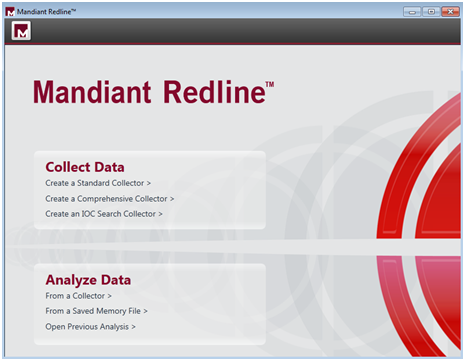
We didn’t fully disconnect the system from the network. We did position it in the Bridge VMnet in order to have access to our home network and be able to access internet to download stuff. We downloaded the tool and ran it.  First thing it will say is that  Redline requires Microsoft .NET 4. If is not installed it will redirect to the Microsoft .NET installation web page. The installation is quick and simple. Just follow the user guide. When the installation is finished you will be presented a nice web interface like shown below.

mandiant-redline

After glimpsing trough the user guide and getting acquainted, Redline has ways that it calls Collectors to acquire data from the suspicious system. The Standard Collector, Comprehensive Collector and IOC Search collector and the 3 methods supported. We decided to run the Comprehensive Collector to gather the most data out of the system for a full in depth analysis. Each one of the methods is well explained in the user guide.

redline-collectdata

In addition, we further selected to acquire a memory image which is not selected by default. We left the remaining options regarding memory, disk, system and network untouched. We selected a folder and saved the collector settings.

redline-collectorscript

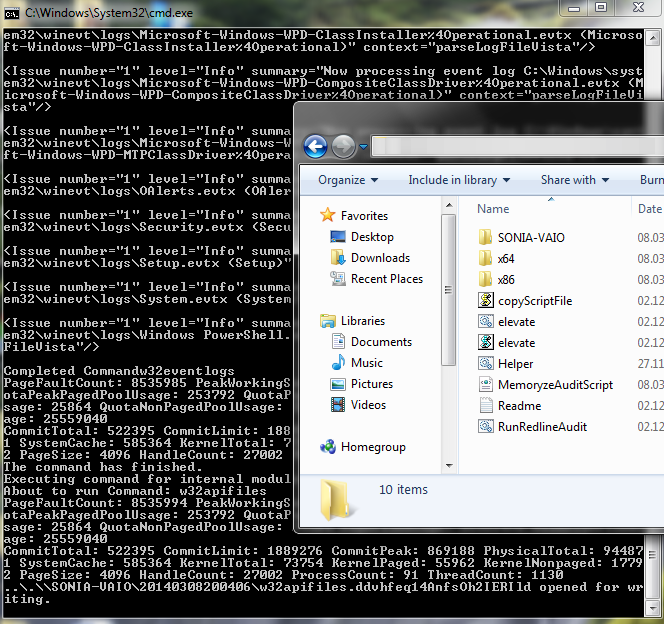
We then copied the collector folder into a USB stick.  Then we went with the USB stick into my wife computer and launched the “RunRedlineAudit.bat” script. This script will go through the Collector settings we defined and will acquire all the data and save the results into a folder with the computer hostname name. It took around 3 hours to acquire all the data – the system had 4 GB of Ram and a slow disk –

redline-agent

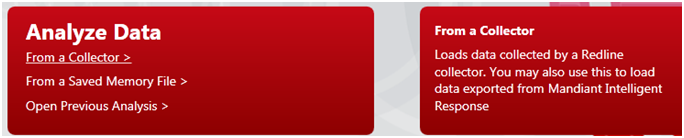
We then moved the USB stick back into the Redline system and used the Analyze Data option from the main menu. Then selected From Collector which allows you to load the data into Redline.

redline-analyzedata

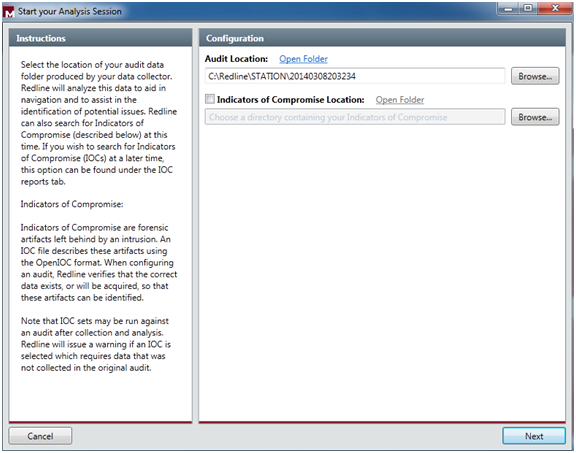
We selected the folder location of the data and at this stage you can also compare the data with IOC artifacts of your choice. At this stage we will skip the IOCs.

redline-startsession

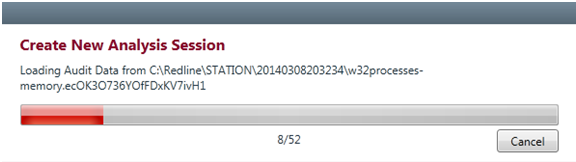
Then click next and you select the name for saving your analysis session. It then starts loading all the data and creating the analysis session.

redline-loadingdata

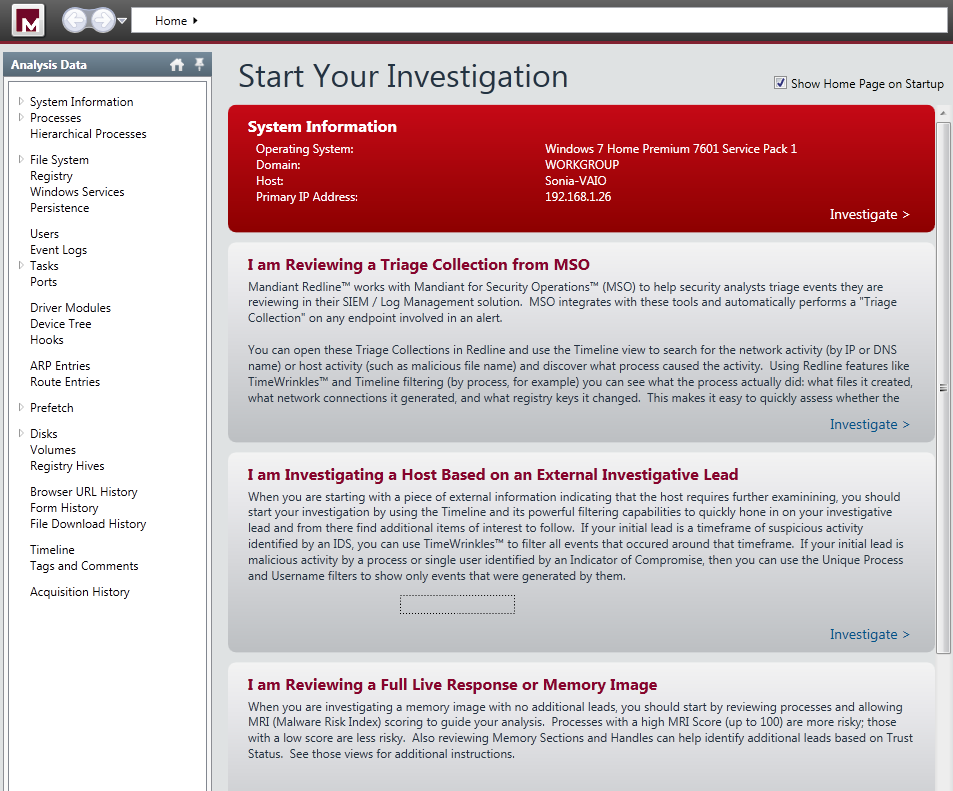
After finishing loading the data we are presented with a nice “Start your Investigation” page. This is the home page of your analysis and it contains several steps suggested by the tool to assist in your investigation:

  • I am Reviewing a Triage collection from MSO.
  •  I am Investigating a Host Based on a External Investigative Lead.
  • I am Reviewing a Full Live Response or Memory Image.
  •  I am Reviewing Web History Data.
  •  I Want to search my data with a set of Indicators of Compromise.

redline-investigationsteps

We will go trough the Investigation Steps in another post. But, It is impressive to see the how easily you can capture a enormous amount of information in an automated fashion. The tool capture the entire file-system structure, the network state, the system memory, the contents of the registry, processes information, event logs, web browser history, service information, etc. The interface is also well designed and provides an interesting workflow (collect, import, investigate) that presents suggested investigative steps that you should take in order to examine the data and look for signs of Evil.  

As you could see this part is the boring part  (collecting and importing). The interesting part (investigation)  is to start to get familiar with these live system captures collected from a variety of good an evil systems. Which then allows you to get a sense of what to look and start your investigations and look for threats. This will require practice. Practice these kind of skills, share your experiences, get feedback, repeat the practice, and improve until you are satisfied with your performance.

Tagged , , ,

Reverse-Engineering and Malware Analysis

malwareLast year I had the chance to go to SANS Orlando 2013 in Orlando, Florida – thank you Wes! – which is one of the yearly’s biggest SANS conferences only outpaced in size by SANS FIRE in Baltimore, Maryland.  I went there to take the 5 days course – FOR 610 Reverse-Engineering Malware: Malware Analysis Tools and Techniques – with Lenny Zeltser. Apart of the course the main choice was due to the instructor. Lenny is a brilliant fellow and top rated SANS instructed. Awesome writer and fantastic lecturer.

I was very enthusiastic about taking out the most of it. One reason was  because I had read the Malware Fighting  Malicious Code book from Ed Skoudis where Lenny wrote chapter 2 and 4.  This book is 10 years and it’s still a classic, a historical object and definitely a must read to someone who is part of the security community. Other reason was that l wanted to get the skills to be capable of securely analyze, debug, and disassemble malicious programs in order to translate this capability into actionable threat intelligence.

On the first day of the training we got introduced to 2 approaches to examine malicious programs. Behavior analysis and static/code analysis. To perform this we started by setting up a controlled and isolated environment. A simple and inexpensive malware analysis lab running on VMware. Using this lab we used a set of free tools that allowed us to determine what the malicious program does and how it interacted with the file system, network, registry and memory. We also got introduced to REMnux . A lightweight Linux distribution for assisting malware analysts with reverse-engineering malicious software. The distribution is based on Ubuntu and is maintained by Lenny Zeltser.  Using a set of Windows tools, the REMnux distro plus a variety techniques we  got a better understanding how we could analyze malware and determine its capabilities.  Then we got deeper in order to make a detailed analysis of the malware by using reverse engineering tools and different methods. By using techniques to find strings in the executable, run a disassembler (IDA Pro),  load the executable into a debugger (OllyDbg) and execute it and look at the API calls being made we got a glimpse in the world of code analysis. After the lab was set and we got an understanding of the processes we will follow the fun started! With several hand-on labs and different specimens we observed what the malware does and we could document the findings and translate them into indicators of compromise and actionable intelligence that can be used to proactively detect and monitor threats.

Day two started with additional malware analysis approaches. We started to get introduced into packed executable’s and what patching means. Also we unpacked malicious executables using simple packing techniques. Here is where we began the journey on x86 Intel assembly. On the second half of day two we covered browser malware and flash based malware and how to use REMnux to use behaviors and code analysis techniques to analyze web malware. It was impressive to see the amount of ingenious techniques enforced by the bad guys to deliver malicious stuff.

Day three is a deep dive into malicious code analysis. Its starts with core reversing engineering concepts and you spend the rest of the day playing with malicious code at the assembly level. It’s the all day looking at a dissasembler and a debugger. Throughout the material and the exercises you get more and more exposed to x86 assembly stuff. We manage to use the debugger to control malicious program execution (step in, over, breakpoints) and monitor or change its state (registry and memory).   On this day we also covered user mode rootkits, key loggers, sniffers, DLL injection and downloader’s – great stuff!

Day four, even after 10 hours sleep I doubt I had enough processing power on my neurons to absorb all Lenny had to say. As complementary strategy I gave a lot of use to my pencil and wrote as much notes as possible in my courseware material. During the first half of the day we were shown the techniques that the malware writes use to protect their programs. Packing was one. But more complex techniques such as anti-disassembly, anti-debugging and anti-VMware and others were demonstrated. It’s an extraordinary arms race between good and evil. A huge amount of hands on exercises were made so we could reinforce all these concepts and techniques. Was also amazing to see Lenny describing how different malware specimens use mazes of code and junk code to frustrates the analyst and mislead him. By enforcing this techniques, in case the analyst does not have enough resources (time/money) he will soon stop doing his analysis and move on to something else – Evil will win – an interesting trade-off. Apart of the techniques we were taught different techniques to bypass those malware defenses. One example was to infect a system with a piece of malware that was packed/obfuscated. When execute, the malware  loaded its unpacked code into memory which allowed us to examine it. By staying resident in memory because in the file system it was encrypted we used techniques do dump it from memory. To do this we used Chimprec to extract the process from memory and then rebuilding its  PE header import table in order to be executed. Other technique was the usage of a debugger to patch an executable to avoid anti-debugging mechanism. Other tools like LordPE and OllyDump are also used. On the second half of the day, shellcode analysis and Web malware anti-deobfuscation techniques were described and practiced.

Finally on day 5 we spent the first half of the day learning the techniques and tools for analyzing malicious Microsoft Office (Word, Excel, PowerPoint) and Adobe PDF documents. The second half of the day is spent on memory analysis forensics with the help of Volatility Framework and associated plug-ins. The course ends with explanation of the different techniques used by root kit infections and its deceptive techniques and how you could use memory and code analysis to determine and un-hide their capabilities.

The course is extremely technical and deep and very hands-on. I was overwhelmed with the amount of information. After day 3 I was feeling like I was drinking from the fire hose. The course is part of the SANS digital forensics and Incident response curriculum. It is very well structured and the sequential steps it follows are very well thought out.

This particular security field is a very interesting one, it will continue to evolve and it is challenging. Also as the security industry continues to progress from a reactive approach to a more proactive one, the malware analyst type of skills will have an increased demand. More and more companies are funding their own threat intelligence operations with this kind of capability in-house.

If you are an incident handler, sysadmin, researcher or simple want to be the next digital Sherlock Holmes you may also want to look into the Malware Analyst’s Cookbook and DVD: Tools and Techniques for Fighting Malicious Code book and the Practical Malware Analysis. Other relevant and free resources are the Dr. FU’s Security blog on Malware analysis tutorials. Thet Binary Auditing site which contains free IDA Pro training material.  Finally, the malware analysis track  in the Open Security Training site is awesome. It contains several training videos and material for free.

Tagged , , , ,