Category Archives: Digital Forensics and Incident Response

Unleashing YARA – Part 3

yara-logoIn the second post of this series we introduced an incident response challenge based on the static analysis of a suspicious executable file. The challenge featured 6 indicators that needed to be extracted from the analysis in order to create a YARA rule to match the suspicious file. In part 3 we will step through YARA’s PE, Hash and Math modules functions and how they can help you to meet the challenge objectives. Lets recap the challenge objectives and map it with the indicators we extracted from static analysis:

  1. a suspicious string that seems to be related with debug information
    • dddd.pdb
  2. the MD5 hash of the .text section
    • 2a7865468f9de73a531f0ce00750ed17
  3. the .rsrc section with high entropy
    • .rsrc entropy is 7.98
  4. the symbol GetTickCount import
    • Kernel32.dll GetTickCount is present in the IAT
  5. the rich signature XOR key
    • 2290058151
  6. must be a Windows executable file
    • 0x4D5A (MZ) found at file offset zero

In part 2 we created a YARA rule file named rule.yar, with the following content:

import "pe"

If you remember the exercise, we needed the PE module in order to parse the sample and extract the Rich signature XOR key. We will use this rule file to develop the remaining code.

The debug information string

In part 1 I have introduced YARA along with the rule format, featuring the strings and condition sections. When you add the dddd.pdb string condition the rule code should be something like:
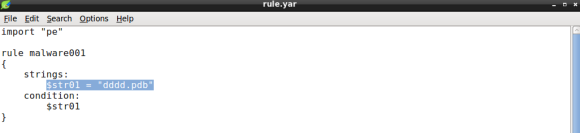
yara_3_1

The code above depicts a simple rule object made of a single string variable named $str01 with the value set to the debug string we found.

The section hash condition

Next item to be added to the condition is the .text section hash, using both PE and HASH modules. To do so we will iterate over the PE file sections using two PE module functions: the number_of_sections and sections. The former will be used to iterate over the PE sections, the latter will allow us to fetch section raw_data_offset, or file offset, and raw_data_size, that will be passed as arguments to md5 hash function, in order to compute the md5 hash of the section data:
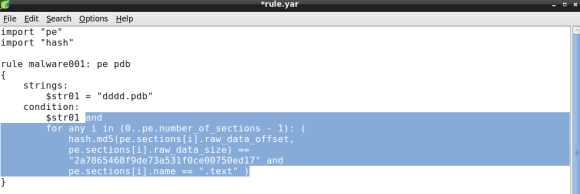
yara_3_2

The condition expression now features the for operator comprising two conditions: the section md5 hash and the section name. In essence, YARA will loop through every PE section until it finds a match on the section hash and name.

The resource entropy value

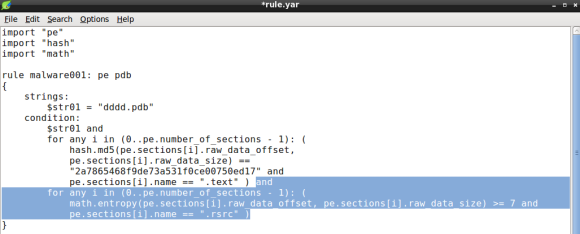
Its now time to add the resource entropy condition. To do so, we will rely on the math module, which will allow us to calculate the entropy of a given size of bytes. Again we will need to iterate over the PE sections using two conditions: the section entropy and the section name (.rsrc):
yara_3_3

Again we will loop until we find a match, that is a section named .rsrc with entropy above or equal to 7.0. Remember that entropy minimum value is 0.0 and maximum is 8.0, therefore 7.0 is considered high entropy and is frequently associated with packing [1]. Bear in mind that compressed data like images and other types of media can display high entropy, which might result in some false positives [2].

The GetTickCount import

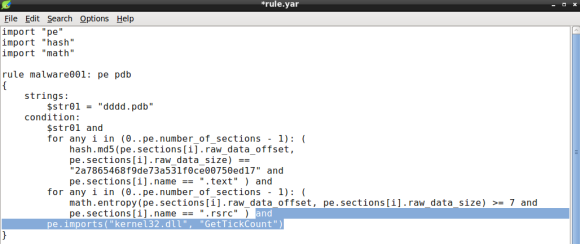
Lets continue improving our YARA rule by adding the GetTickCount import to the condition. For this purpose lets use the PE module imports function that will take two arguments: the library and the DLL name. The GetTickCount function is exported by Kernel32.DLL, so when we passe these arguments to the pe.imports function the rule condition becomes:
yara_3_4

Please note that the DLL name is case insensitive [3].

The XOR key

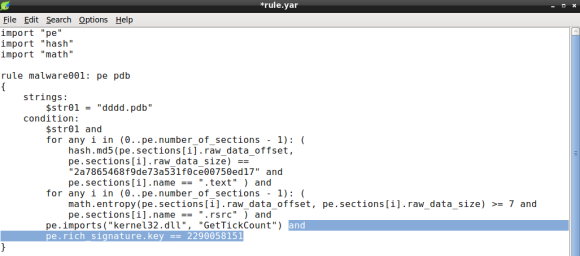
Our YARA rule is almost complete, we now need to add the rich signature key to the condition. In this particular case the PE module provides the rich_signature function which allow us to match various attributes of the rich signature, in this case the key. The key will be de decimal value of dword used to encode the contents with XOR:
yara_3_5

Remember that the XOR key can be obtained either by inspecting the file with a hexdump of the PE header or using YARA PE module parsing capabilities, detailed in part 2 of this series.

The PE file type

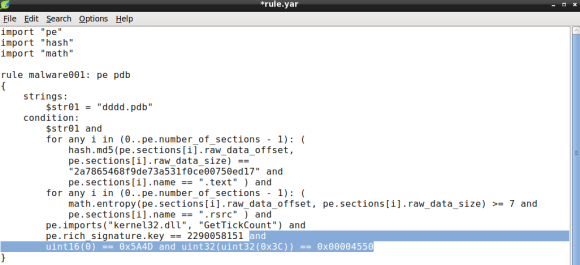
Ok, we are almost done. The last condition will ensure that the file is a portable executable file. In part two of this series we did a quick hex dump of the samples header, which revealed the MZ (ASCII) at file offset zero, a common file signature for PE files. We will use the YARA int## functions to access data at a given position. The int## functions read 8, 16 and 32 bits signed integers, whereas the uint## reads unsigned integers. Both 16 and 32 bits are considered to be little-endian, for big-endian use int##be or uint##be.

Since checking only the first two bytes of the file can lead to false positives we can use a little trick to ensure the file is a PE, by looking for particular PE header values. Specifically we will check for the IMAGE_NT_HEADER Signature member, a dword with value “PE\0\0”. Since the signature file offset is variable we will need to rely on the IMAGE_DOS_HEADER e_lfanew field. e_lfanew value is the 4 byte physical offset of the PE Signature and its located at physical offset 0x3C [4].

With the conditions “MZ” and “PE\0\0” and respective offsets we will use uint16 and uint32 respectively:
yara_3_6

Note how we use the e_lfanew value to pivot the PE Signature, the first uint32 function output, the 0x3C offset, is used as argument in the second uint32 function, which must match the expected value “PE\0\0”.

Conclusion

Ok! We are done, last step is to test the rule against the file using the YARA tool and our brand new rule file rule.yar:
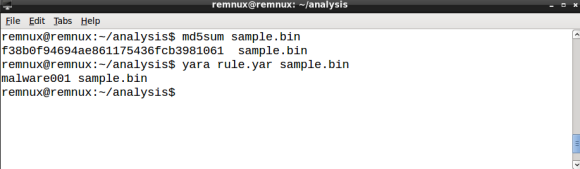
yara_3_7

YARA scans the file and, as expected, outputs the rule matched rule ID, in our case malware001.

A final word on YARA performance

While YARA performance might be of little importance if you are scanning a dozen of files, poorly written rules can impact significantly when scanning thousands or millions of files. As a rule of thumb you are advised to avoid using regex statements. Additionally you should ensure that false conditions appear first in the rules condition, this feature is named short-circuit evaluation and it was introduced in YARA 3.4.0 [5]. So how can we improve the rule we just created, in order to leverage YARA performance? In this case we can move the last condition, the PE file check signature, to the top of the statement, by doing so we will avoid checking for the PE header conditions if the file is an executable (i.e. PDF, DOC, etc). Lets see how the new rule looks like:
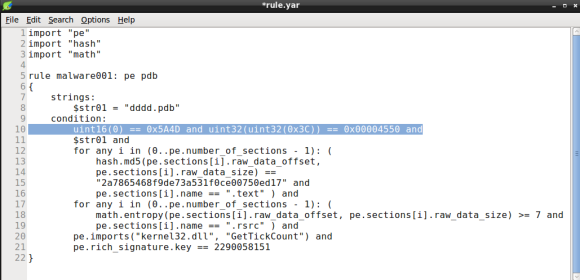
yara_3_8

If you like to learn more about YARA performance, check the Yara performance guidelines by Florian Roth, as it features lots of tips to keep your YARA rules resource friendly.

References

  1. Structural Entropy Analysis for Automated Malware Classification
  2. Practical Malware Analysis, The Hands-On Guide to Dissecting Malicious Software, Page 283.
  3. YARA Documentation v.3.4.0, PE Module
  4. The Portable Executable File Format
  5. YARA 3.4.0 Release notes
Tagged , ,

Unleashing YARA – Part 2

yarapart2In the first post of this series we uncovered YARA and demonstrated couple of use case that that can be used to justify the integration of this tool throughout the enterprise Incident Response life-cycle. In this post  we will step through the requirements for the development of YARA rules specially crafted to match patterns in Windows portable executable “PE” files. Additionally, we will learn how to take advantage of Yara modules in order to create simple but effective rules. Everything will be wrapped-up in a use case where an incident responder, that will be you, will create YARA rules based on the static analysis of a PE file.

Specifically, the use case scenario will be split into two posts. In part 2 we will start with an incident report that will introduce a simple rule development challenge, solely based on static analysis. In the part 3,  will cover rule creation, performance tuning and troubleshooting.

Prerequisites

Before we begin you will need a Linux distribution with the following tools:

If you are in a hurry I advise you to pick REMnux, Lenny Zeltser’s popular Linux distro for malware analysis, which include a generous amount of tools and frameworks used in the dark art of malware analysis and reverse engineering. REMnux is available for download here.

Additionally you will need a piece of malware to analyse, you can get your own copy of the sample from Malwr.com:

Malwr.com report link here

Sample MD5: f38b0f94694ae861175436fcb3981061

WARNING: this is real malware, ensure you will do your analysis in a controlled, isolated and safe environment, like a temporary virtual machine.

Incident Report

Its Wednesday 4:00PM when a incident report notification email drops on your mailbox. It seems that a Network IPS signature was triggered by a suspicious HTTP file download (f38b0f94694ae861175436fcb3981061) hash of a file. You check the details of the IPS alert to see if it stored the sample in a temporary repository for in-depth analysis. You find that the file was successfully stored and its of type PE (executable file), definitely deserves to be look at. After downloading the file you do the usual initial static analysis: Google for the MD5, lookup the hash in Virustotal, analyse the PE header of the file looking for malicious intent. Right of the bat the sample provides a handful of indicators that will help you to understanding how the file will behave during execution. Just what you needed to start developing your own YARA rules.

The challenge

Create a YARA rule that matches the following conditions:

  1. a suspicious string that seems to be related with debug information
  2. the MD5 hash of the .text section
  3. the .rsrc section with high entropy
  4. the symbol GetTickCount import
  5. the rich signature XOR key
  6. must be a Windows executable file

Static Analysis

Before we continue let me write that the details concerning the structure of the PE file are omitted for the sake of brevity. Please see here and here for more information on PE header structure. Onward!

The first challenge is to find a string related with debug information left by the linker [1], specifically we will be looking for a program database file path (i.e. PDB). Lets  run the strings command to output the ASCII strings:

yara_2.1_1

strings output

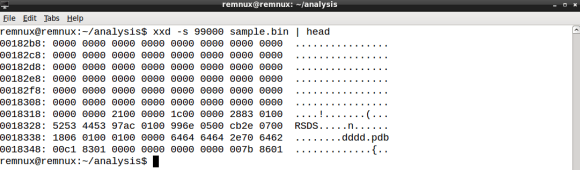
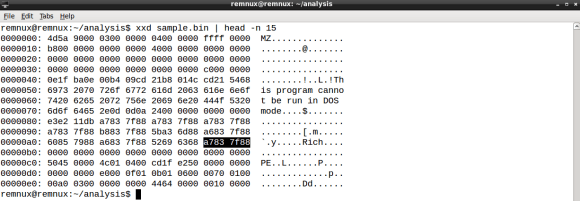
Amid the vast output the dddd.pdb string stands out. This is probably what we are looking for. Note that is important to output the file offset in decimal with -t d suffix so that you can pinpoint the string location within the file structure. If the string is indeed related to debug information it should be part of the RSDS header. Let’s dump a few bytes of the sample using the 99136 offset as a pivot:

yara_2.1_2

xxd output

The presence of RSDS string gives us the confidence to select the string dddd.pdb as the string related to the debug information.

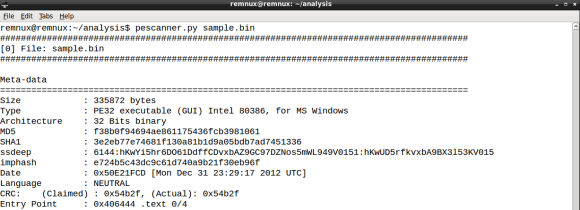
Next we need to compute the hash of the .text section, that typically contains the executable code [2], for this task we will use hiddenillusion’s version of pescanner.py [3] using the sample name as argument:

yara_2.1_3

pescanner.py initial report

yara_2.1_4

pescanner.py report on sections, resources and imports on the PE file

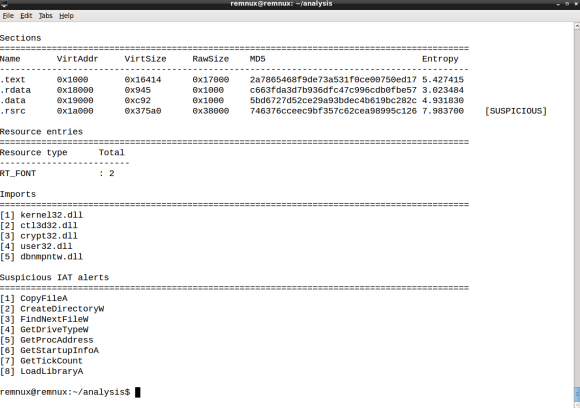
pescanner.py outputs an extensive report about the PE header structure, on which it includes the list of sections along with the hash. Take note of the .text section MD5 hash (2a7865468f9de73a531f0ce00750ed17) as we will need to use it later when creating the YARA rule.

Also in the pescanner.py report we are informed that the .rsrc section as high entropy. This is a suspicious indicator for the presence of heavily obfuscated code. Please keep this in mind when creating the rule, as this info will help us answering the third item in the challenge. Lastly the report also features the list of imported symbols, in which we can see the presence of GetTickCount, a well known anti-debugging timing function [4]. This will be required to answer the fourth entry of the challenge. By the way, the report also mentions the file type, indicating we are in the presence of a PE32 file, which matches the sixth item of the challenge.

Lastly we need to get our hands on the XOR key used to encode the Rich signature, read more about the Rich signature here. You can check existence of this key in two ways: traditionally you would dump the first bytes of the sample, enough to cover all the DOS Header in the PE file, the Rich signature starts at file offset 0x80, and the XOR key will be located in the dword that follows the Rich ASCII string:

yara_2.1_5

Bear in mind that the x86 byte-order is little-endian [5], therefore you need to byte-swap the dword value, so the XOR key value is 0x887f83a7 or 2290058151 in decimal.

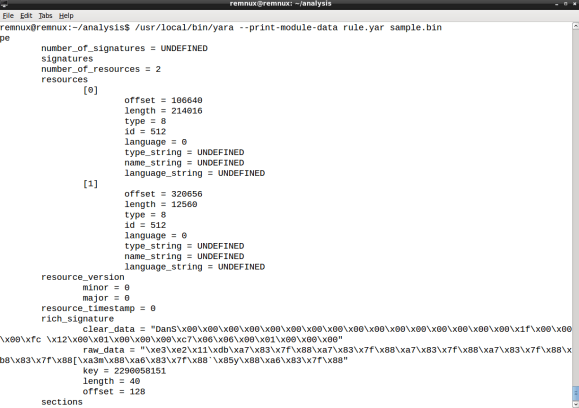
Now for the easy way. Remember when I have mentioned in the first post of this series that the YARA scan engine is modular and feature rich? This is because you can use YARA pretty much like pescanner.py, in order to obtain valuable information on the PE header structure. Let’s start by creating the YARA rule file named rule.yar with the following content:

 import “pe”

Next execute YARA as follows:

yara_2.1_6

strings command output

By using the –print-module-data argument YARA will output the report of the PE module, on which will include the rich_signature section along with the XOR key decimal value.

Ok, we now have gathered all the info required  to start creating the YARA rule and finish the challenge. In the part 3 of this series, we will cover the YARA rule creation process, featuring the information gathered from static analysis. Stay tuned!

References

  1. http://www.godevtool.com/Other/pdb.htm
  2. Practical Malware Analysis: The Hands-On Guide to Dissecting Malicious Software, (page 22)
  3. https://github.com/hiddenillusion/AnalyzePE/blob/master/pescanner.py
  4. http://antukh.com/blog/2015/01/19/malware-techniques-cheat-sheet
  5. http://teaching.idallen.com/cst8281/10w/notes/110_byte_order_endian.html
Tagged , , ,

Unleashing YARA – Part 1

[Editor’s Note: In the article below, Ricardo Dias who is a SANS GCFA gold certified and a seasoned security professional demonstrates the usefulness of Yara – the Swiss Army knife for Incident Responders. This way you can get familiar with this versatile tool and develop more proactive and mature response practices against threats. ~Luis]

Intro

yara_logoI remember back in 2011 when I’ve first used YARA. I was working as a security analyst on an incident response (IR) team, doing a lot of intrusion detection, forensics and malware analysis. YARA joined the tool set of the team with the purpose to enhance preliminary malware static analysis of portable executable (PE) files. Details from the PE header, imports and strings derived from the analysis resulted in YARA rules and shared within the team. It was considerably faster to check new malware samples against the rule repository when compared to lookup analysis reports. Back then concepts like the kill chain, indicator of compromise (IOC) and threat intelligence where still at its dawn.

In short YARA is an open-source tool capable of searching for strings inside files (1). The tool features a small but powerful command line scanning engine, written in pure C, optimized for speed. The engine is multi-platform, running on Windows, Linux and MacOS X. The tool also features a Python extension providing access to the engine via python scripts. Last but not least the engine is also capable of scanning running processes. YARA rules resemble C code, generally composed of two sections: the strings definition and a, mandatory, boolean expression (condition). Rules can be expressed as shown:

rule evil_executable
{
    strings:
        $ascii_01 = "mozart.pdb"
        $byte_01  = { 44 65 6d 6f 63 72 61 63 79 }
    condition:
        uint16(0) == 0x5A4D and
        1 of ( $ascii_01, $byte_01 )
}

The lexical simplicity of a rule and its boolean logic makes it a perfect IOC. In fact ever since 2011 the number of security vendors supporting YARA rules is increasing, meaning that the tool is no longer limited to the analyst laptop. It is now featured in malware sandboxes, honey-clients, forensic tools and network security appliances (2). Moreover, with the growing security community adopting YARA format to share IOCs, one can easily foresee a wider adoption of the format in the cyber defence arena.

In the meantime YARA became a feature rich scanner, particularly with the integration of modules. In essence modules enable very fine grained scanning while maintaining the rule readability. For example the PE module, specially crafted for handling Windows executable files, one can create a rule that will match a given PE section name. Similarly, the Hash module allows the creation on hashes (i.e. MD5) based on portions of a file, say for example a section of a PE file.

YARA in the incident response team

So how does exactly a tool like YARA integrate in the incident response team? Perhaps the most obvious answer is to develop and use YARA rules when performing malware static analysis, after all this is when the binary file is dissected, disassembled and understood. This gives you the chance to cross-reference the sample with previous analysis, thus saving time in case of a positive match, and creating new rules with the details extracted from the analysis. While there is nothing wrong with this approach, it is still focused on a very specific stage of the incident response. Moreover, if you don’t perform malware analysis you might end up opting to rule out YARA from your tool set.

Lets look at the SPAM analysis use case. If your team analyses suspicious email messages as part of their IR process, there is great chance for you to stumble across documents featuring malicious macros or websites redirecting to exploit kits. A popular tool to analyse suspicious Microsoft Office documents Tools is olevba.py, part of the oletools package (3), it features YARA when parsing OLE embedded objects in order to identify malware campaigns (read more about it here). When dealing with exploit kits, thug (4), a popular low-interaction honey-client that emulates a web browser, also features YARA for exploit kit family identification. In both cases YARA rule interchanging between the IR teams greatly enhances both triage and analysis of SPAM.

Another use case worth mentioning is forensics. Volatility, a popular memory forensics tool, supports YARA scanning (5) in order to pinpoint suspicious artefacts like processes, files, registry keys or mutexes. Traditionally YARA rules created to parse memory file objects benefit from a wider range of observables when compared to a static file rules, which need to deal with packers and cryptors. On the network forensics counterpart, yaraPcap (6), uses YARA for scan network captures (PCAP) files. Like in the SPAM analysis use case, forensic analysts will be in advantage when using YARA rules to leverage the analysis.

Finally, another noteworthy use case is endpoint scanning. That’s right, YARA scanning at the client computer. Since YARA scanning engine is multi-platform, it poses no problems to use Linux developed signatures on a Windows operating system. The only problem one needs to tackle is on how to distribute the scan engine, pull the rules and push the positive matches to a central location. Hipara, a host intrusion prevention system developed in C, is able to perform YARA file based scans and report results back to a central server (7). Another solution would be to develop an executable python script featuring the YARA module along with REST libraries for pull/push operations. The process have been documented, including conceptual code,  in the SANS paper “Intelligence-Driven Incident Response with YARA” (read it here). This use case stands as the closing of the circle in IOC development, since it enters the realm of live IR, delivering and important advantage in the identification of advanced threats.

Conclusion

The key point lies in the ability for the IR teams to introduce the procedures for YARA rule creation and use. Tier 1 analysts should be instructed on how to use YARA to enhance incident triage, provide rule feedback, concerning false positives, and fine tuning to Tier 2 analyst. Additionally a repository should be created in order to centralize the rules and ensure the use of up-to-date rules. Last but not least teams should also agree on the rule naming scheme, preferably reflecting the taxonomy used for IR. These are some of the key steps for integrating YARA in the IR process, and to prepare teams for the IOC sharing process.

References:

  1. https://github.com/plusvic/yara
  2. https://plusvic.github.io/yara
  3. https://blog.didierstevens.com/2014/12/17/introducing-oledump-py
  4. https://github.com/buffer/thug
  5. https://github.com/volatilityfoundation/volatility
  6. https://github.com/kevthehermit/YaraPcap
  7. https://github.com/jbc22/hipara
Tagged , , ,

Malware Analysis – Dridex & Process Hollowing

[In this article we are going to do an analysis of one of the techniques used by the malware authors to hide its malicious intent when executed on Windows operating systems. The technique is not new but is very common across different malware families and is known as process hollowing. We will use OllyDbg to aid our analysis. ~LR]

Lately the threat actors behind Dridex malware have been very active. Across all the recent Dridex phishing campaigns the technique is the same. All the Microsoft Office documents contain embedded macros that download a malicious executable from one of many hard coded URLs. These hard coded URLs normally point to websites owned by legitimate people. The site is compromised in order to store the malicious file and also to hide any attribution related to the threat actors. The encoding and obfuscation techniques used in the macros are constantly changing in order to bypass security controls. The malicious executable also uses encoding, obfuscation and encryption techniques in order to evade antivirus signatures and even sandboxes. This makes AV detection hard. The variants change daily in order to evade the different security products.

When doing malware static analysis of recent samples, it normally does not produce any meaningful results. For example, running the strings command and displaying ASCII and UNICODE strings does not disclose much information about the binary real functionality. This means we might want to run the strings command after the malware has been unpacked. This will produce much more interesting results such as name of functions that interact with network, registry, I/O, etc.

In this case we will look at the following sample:

remnux@remnux:~$ file rudakop.ex_
 rudakop.ex_: PE32 executable for MS Windows (GUI) Intel 80386 32-bit
remnux@remnux:~$ md5sum rudakop.ex_
 6e5654da58c03df6808466f0197207ed  rudakop.ex_

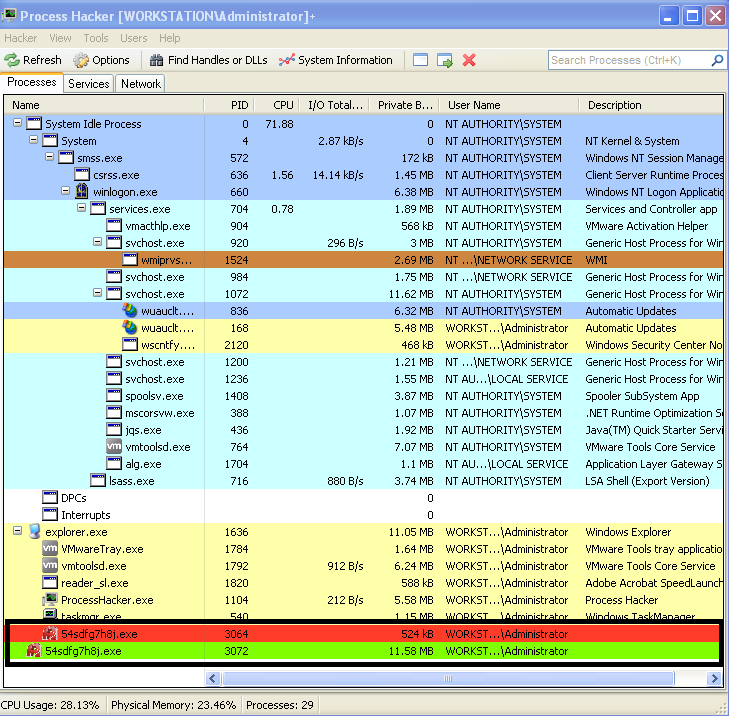
The environment used to do this exercise is the one described in the dynamic malware analysis with RemnuxV5 article. The Virtual Machine that will be used runs Windows XP.  First we just run the malware and we can observe it creates a child process with the same name. This can be seen by running the sample and observing Process Explorer from Sysinternals or Process Hacker from Wen Jia Liu. The below picture illustrate this behavior.

dridex-processcreation

This behavior suggests that the malware creates a child process where it extracts an unpacked version of itself.

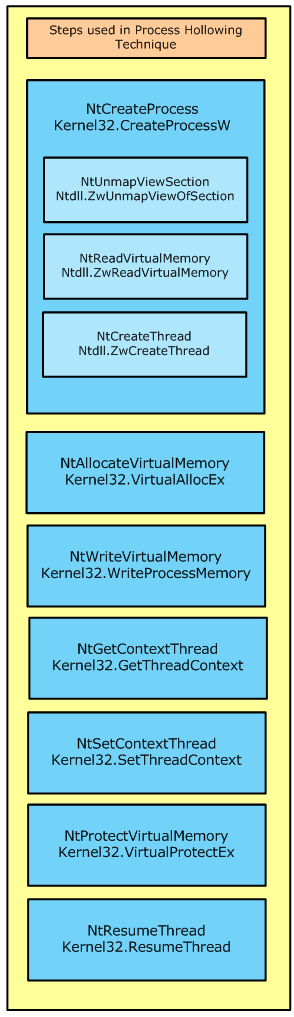
In this case we will try to unpack this malware sample in order to get more visibility into its functionality.  Bottom line, when the packed executable runs it will extract itself into memory and then runs the unpacked code. Before we step into the tools and techniques lets brief review the concept around process hollowing.

processhollowing

This technique, which is similar to the code injection technique, consists in starting a new instance of a legitimate process with the API CreateProcess() with the flag CREATE_SUSPENDED passed as argument. This will execute all the necessary steps in order to create the process and all its structure but will not execute the code.

The suspended state will permit the process address spaced of the legitimate process to be manipulated. More specifically the image base address and its contents.

The manipulations starts by carving out and clearing the virtual address region where the image base of the legitimate process resides. This is achieved using the API NtUnmapViewOfSection().

Then the contents of the malicious code and its image base will be allocated using VirtualAlloc(). During this step the protection attributes for the memory region will be marked as  writable and executable. And then the new image is copied over to the carved region using WriteProcessMemory()

Then the main thread, which is still in suspended state, is changed in order to point to the entry point of the new image base using the SetThreadContext() API.

Finally, the ResumeThread() is invoked and the malicious code starts executing.

This technique has been discussed at lengths and is very popular among malware authors. If you want to even go deeper in this concept you can read John Leitch article. Variants of this process exist but the concept is the same. Create a new legitimate process in suspended state, carve its contents, copy the malicious code into the new process and resume execution.

Now lets practice! In order to debug these steps we will use OllyDbg on a virtual machine running Windows XP.

OllyDbg is a powerful, mature and extremely popular debugger for x86 architecture. This amazing tool was created by Olesh Yuschuk. For this exercise we will use version 1.1. The goal is to extract the payload that is used during the process hollowing technique.

When loading this sample into OllyDbg we are presented with two messages. First an error stating “Bad or unknown format of 32bit executable”. OllyDbg can load the executable but it cannot find the entry point (OEP) which suggest the PE headers have been manipulated. Following that the message “compressed code?” is presented. This warning message is normally displayed when the executable is compressed or encrypted. This is a strong indicator that we are dealing with a packed executable. Here we click “No”.

codealert

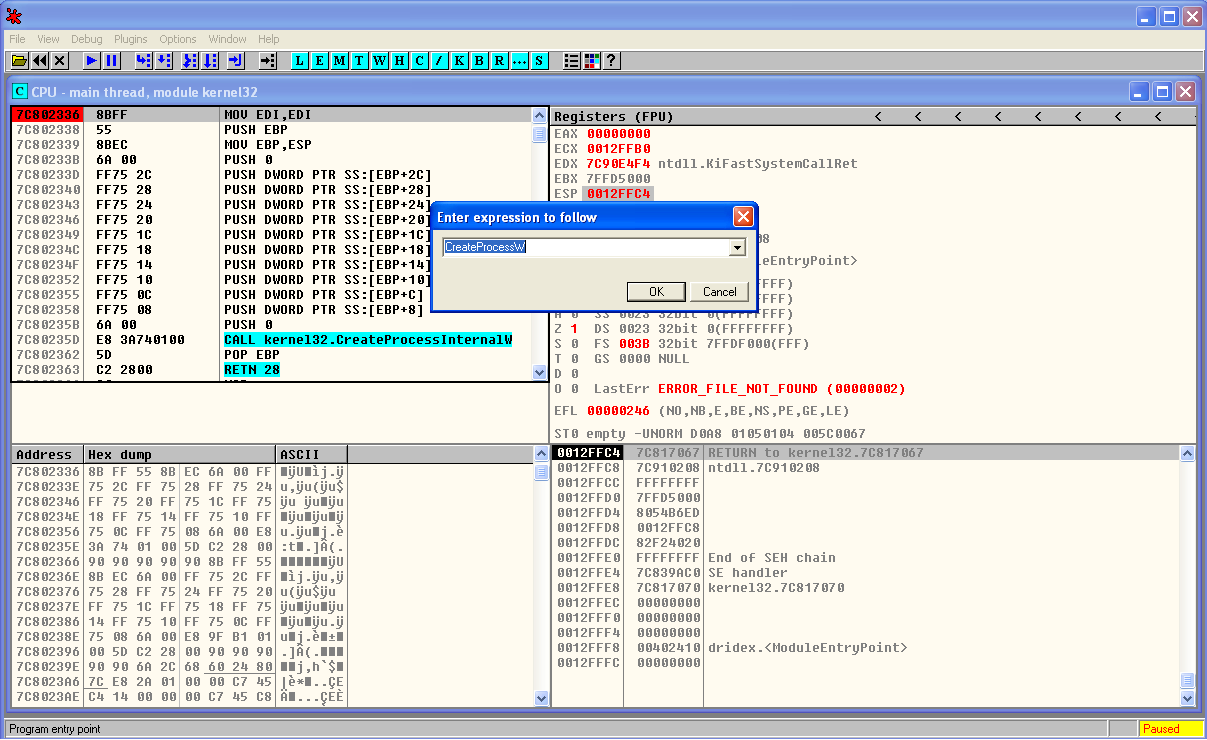
When the sample is loaded we start by creating a breakpoint in CreateProcessW. This is a key step in the process hollowing technique. We do this by clicking in the disassembler window (top left) and then Ctrl+G. Then we write the function name we want to find. When clicking ok this will take us to the memory address of the function. Here we press F2 and a break point is set. The breakpoints can been seen and removed using the menu View – Breakpoints (Alt+B).

dridex-ollydbg-brkpoint

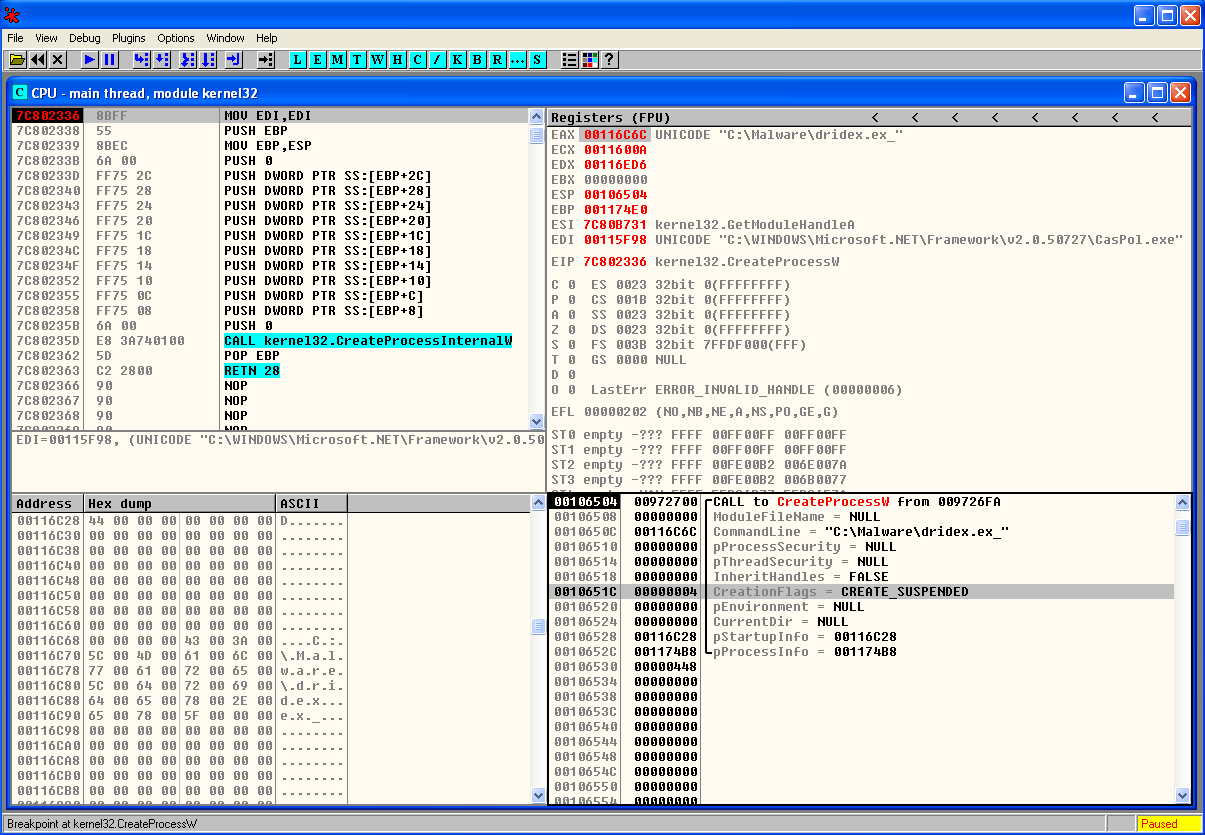
Then we start debugging our program by running it. We do this by pressing F9 or menu Debug – Run. Once the break point is reached we can see the moment before CreateProcessW function is invoked and the different arguments that will be loaded into the stack (bottom right).  One of the parameters is the CreationFlags where we can see the process is created in suspended mode.

dridex-createprocessw

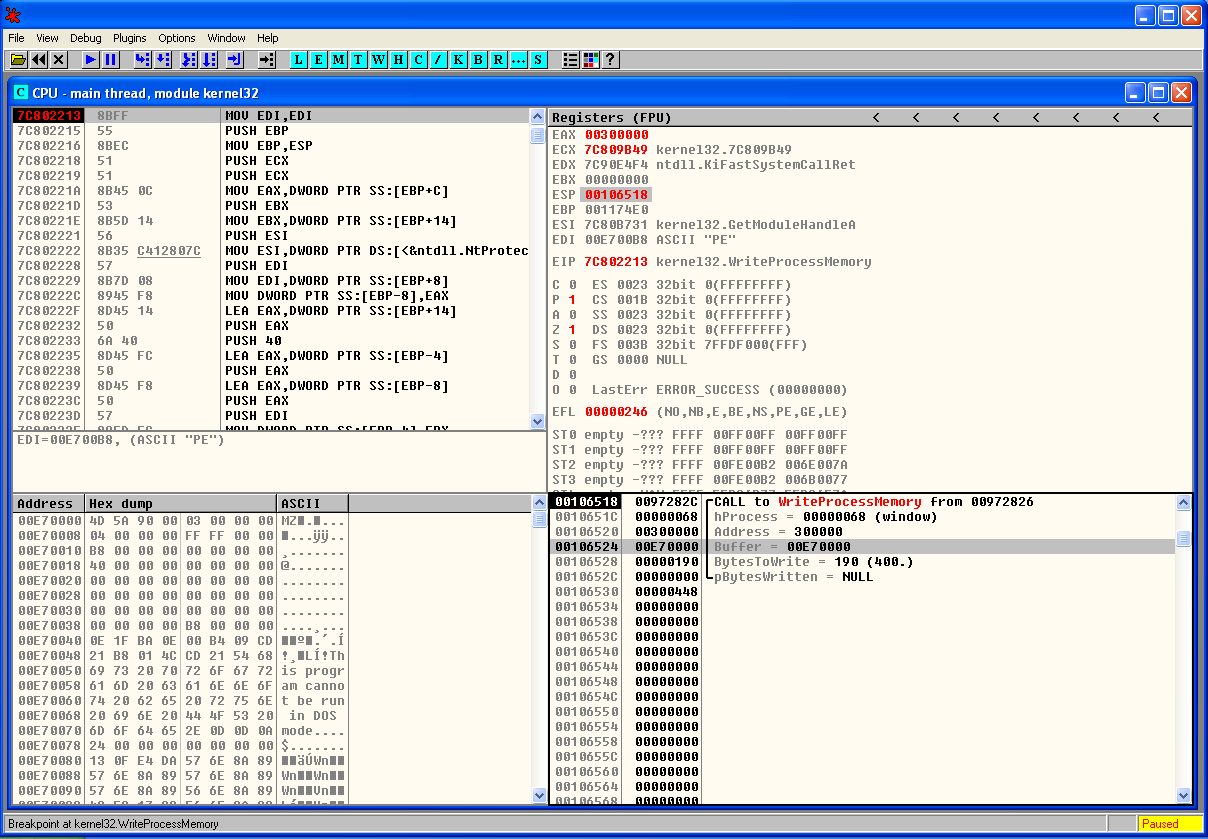
For the sake of brevity we wont perform the breakpoint steps for the other function calls. But the methodology is to set breakpoints across the important function calls. Before we start debugging the program we can set a break point for the different function calls that were mentioned and review how this technique works. In this case we will move into the end of the process hollowing technique were we hit a breakpoint in WriteProcessMemory() . Once the breakpoint is reached we can see the moment before WriteProcessMemory() function is called and the different arguments. In the stack view (bottom right) we can see that one of the parameters is the Buffer. The data stored is this buffer is of particular interest to us because it contains the contents of the malicious code that is going to be written to the legitimate process. In this case might give us the unpacked binary.

dridex-writeprocessmem

Following this step the code is resumed and executed. During the debugging process if we have Process Hacker running in parallel we can see the new process being created. We can also edit its properties and view the memory regions being used and its suspended thread. Finally when the code is resumed we can see the parent process being terminated.

That’s it for today. In the next post we will carve this buffer out and perform further analysis on this sample in order to understand its intent and capabilities.

The threat actors behind malware have many incentives to protect their code. The world of packing , unpacking, debugging and anti-debugging is fascinating. The competition between malware authors and malware analysts is a fierce fight. The malware authors write armored malware in order to evade AV and Sandboxing detection. In addition they go great lengths ensuring the analysis will be difficult. For further reference you may want to look into the following books: Malware Analyst’s Cookbook and DVD: Tools and Techniques for Fighting Malicious Code, the Practical Malware Analysis and Malware Forensics: Investigating and Analyzing Malicious Code . More formal training is available from SANS with GREM course authored by Lenny Zeltser. Free resources are the Dr. FU’s Security blog on Malware analysis tutorials. The Binary Auditing site which contains free IDA Pro training material.  Finally, the malware analysis track  in the Open Security Training site is awesome. It contains several training videos and material for free!


References:

SANS FOR610: Reverse-Engineering Malware: Malware Analysis Tools and Techniques
Malware Analyst’s Cookbook and DVD: Tools and Techniques for Fighting Malicious Code
http://www.autosectools.com/Process-Hollowing.pdf John Leitch
https://www.trustwave.com/Resources/SpiderLabs-Blog/Analyzing-Malware-Hollow-Processes/
http://journeyintoir.blogspot.ch/2015/02/process-hollowing-meets-cuckoo-sandbox.html

Tagged , , , , ,

Digital Forensics – SuperTimeline & Event Logs – Part I

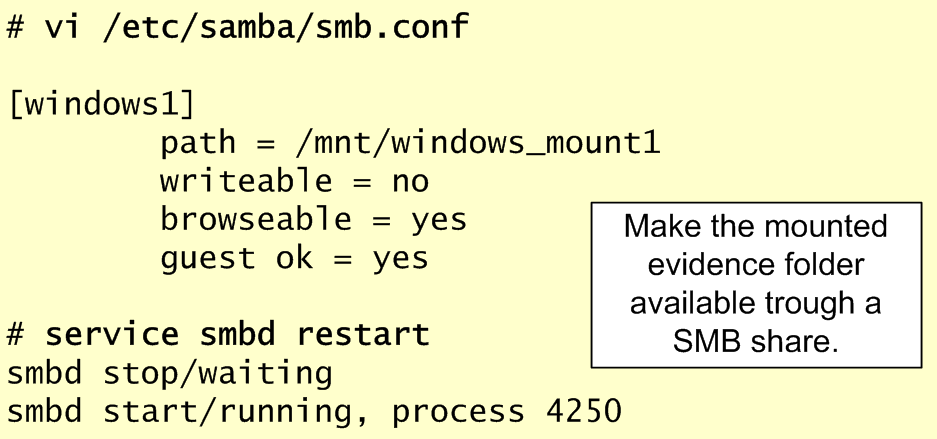
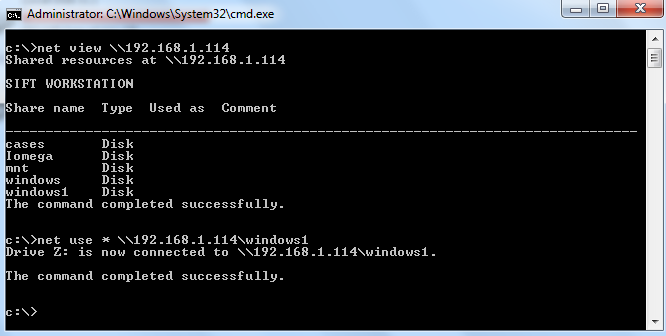
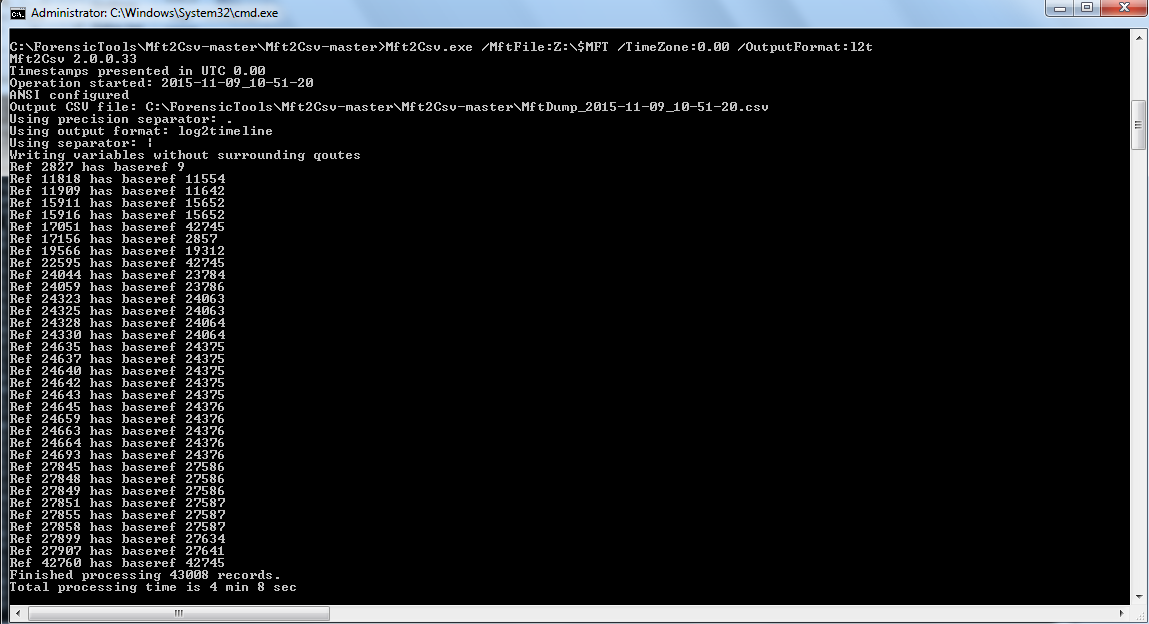
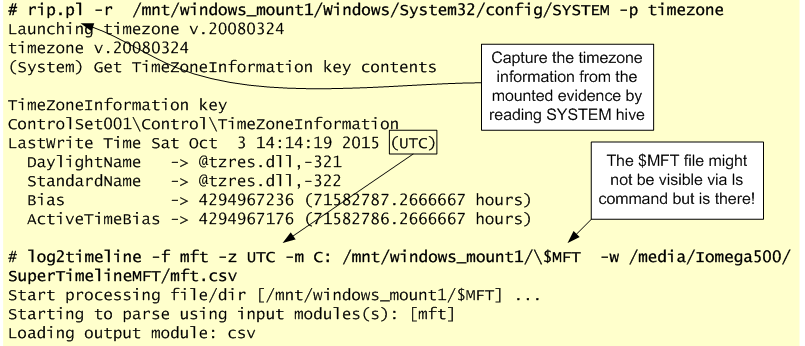
In these series of articles about performing file system forensics on a Windows system we covered the evidence acquisition in the first article. The second article was about processing the evidence and creating a timeline of the NTFS metadata. The one below will be split in two parts and will cover the analysis of a Super Timeline and the different artifacts. The main focus will be on parsing and analyzing Windows Event Logs.

In this article we will not cover the creation of the super timeline because has been covered already in this article using Plaso engine. We will move on directly to the analysis and artifacts.

For contextualization  Plaso is a Python-based rewrite of the Perl-based log2timeline initially created by Kristinn Gudjonsson and enhanced by others. The creation of a super timeline is an easy process and it applies to different Microsoft Windows operating systems. However, the interpretation is hard. The Plaso engine is able to parse different type of artifacts such as Windows Event Logs, Windows Registry, Windows Prefetch files and many others. During the analysis it helps to be meticulous, patience and it facilitates if you have comprehensive file systems, operating system artifacts and registry knowledge.

One thing that facilitates the analysis of a Super Timeline is to have some kind of lead about when the event did happen. Then you start to reduce the time frame of Super Timeline and narrowing it down. Essentially we will be looking for artifacts of interest that have a temporal proximity with the event.  The goal is to be able to recreate what happen based on the different artifacts.

A good starting point is looking at the different Windows Event Logs that were recorded in the Super Timeline. But before we dig into our Super Timeline and the WinETX artifacts let’s review some concepts about the Windows Event Logs.

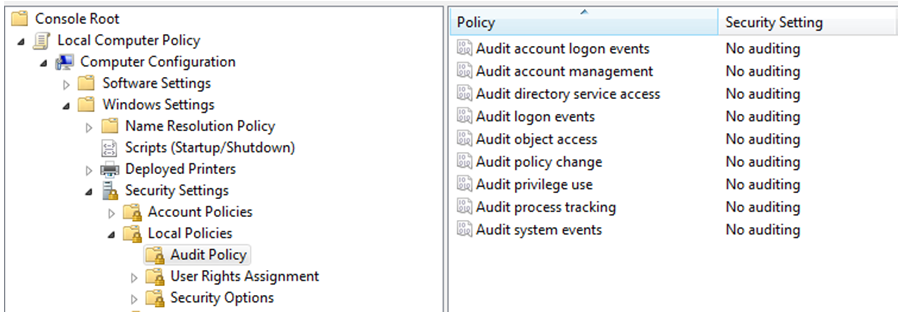
The Windows Event Logs are a good source of information when looking for potential attacks or misuse of the system. The Windows Event Logs include all the records that are a result of the enforced auditing policy i.e., the amount of information is dependent on the Audit Policy settings. For example on a standalone Windows 7 default installation the Audit Policies state that there is no auditing. This can been seen in the local group policy settings as you could see in the below image.

windowsauditpolicy

However, there is some auditing enable and you could verify it using the command line auditpol.exe tool. The below picture shows the auditpol.exe output in the same Windows installation from where the group policy stated that there was no auditing enable. This inconsistency is describe by Microsoft here.

windowsauditpolicy2

From Windows Vista onwards the Windows Event Logs are stored in the  %SystemRoot%\System32\Winevt\Logs folder and contain a .EVTX extension. This new format called Windows XML Event Log (EVTX) format super seeds the EVT format used in Windows XP. Apart of Event Logs from Vista onward there are Application and Service logs that record events about a particular component or application rather then system. On a Windows 7/2008 System many event log files can be found depending on the roles performed by the system. In here you can even find application event logs. For example if the system has Symantec Endpoint you will have a “Symantec Endpoint Protection Client.evtx” file.  The different categories are described here. Nonetheless, there are three important files. The description was taken from Microsoft Technet website.

Application.evtx – “The Application log contains events logged by applications or programs. For example, a database program might record a file error in the application log. Program developers decide which events to log.”

System.evtx – “The Security log contains events such as valid and invalid logon attempts, as well as events related to resource use, such as creating, opening, or deleting files or other objects. Administrators can specify what events are recorded in the security log. For example, if you have enabled logon auditing, attempts to log on to the system are recorded in the security log.”

Security.evtx – “The System log contains events logged by Windows system components. For example, the failure of a driver or other system component to load during startup is recorded in the system log. The event types logged by system components are predetermined by Windows.”

To be able to parse and read these files there are good open source tools available. The work pioneered by Andreas Schuster in 2007  and afterwards by Joachim Metz on Libevtx were key to develop this capability.

One tool is the Plaso engine but that we already covered in another post. Another is the Python-evtx created by Willi Ballenthin. This tool written in Python has the ability to read the EVTX format. The tool is available on Github and contains different modules. One is the evtxdump.py that allows us to dump the contests of the Event Log files. The following picture shows the installation and a simple usage of this tool in the SIFT workstation.

python-evtx

Other than using open source tools you can also use Windows Event Log Parser from TZworks. Or you can use the native Microsoft tools. For example using the Windows GUI and use Event Viewer or you could use Windows CLI and use wevtutil.exe. Another option is the versatile  Microsoft Log Parser.

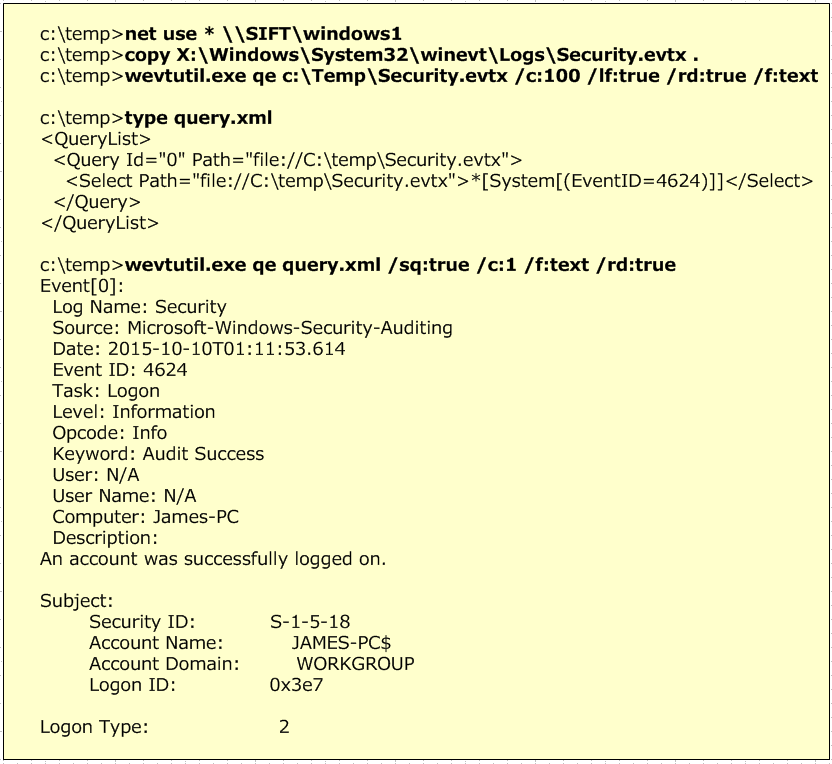
The below pictures illustrates an example where we map a network drive to point to our evidence that is mounted on the SIFT workstation. Then we use wevutil.exe to query the Event Logs. First example with no filter and second example with a XML filter that was created using the Windows Event Viewer.

wevtutil

Please note that in this exercise the Security.evtx contains logon events because the system is not part of a Active Directory Domain. If that was the case the logon events will be recorded on the Domain Controllers.

Now, that we briefly covered the Windows Event Logs let’s review Audit Policy Settings. This is important because will allow us to to know what to expect on the Event Logs. The Audit Policy Settings control which events will be recorded on the Event Logs.

To be able to read the Audit Policy settings we need to read a special Registry key.  At the time of this writing I could not find an open source tool that allowed us to retrieve these settings from a forensic image. The Audit Policy settings are stored in the registry under the HKEY_LOCAL_MACHINE\Security\Policy\PolAdtEv key. RegRipper is able to parse and output the contents of this key on Windows XP but seems to have issues on Windows 7 as you could on the below image. Nonetheless, it can retrieve the contents of the key. By having the contents of the registry key we can use the paper created by Teru Yamazaki that describes the structure of this key on newer Microsoft operating systems. With the information we can understand which audit settings are defined. The below image illustrates a manual mapping between the different events and the possible settings.

windowsauditpolicy3

Teru Yamazaki also has an online tool on his website that allows you to parse this information automatically. You can get the audit policy from the SECURITY registry file using RegRipper and paste the contents into his tool. The output will be in Japanese but you can use Google Translator. In this exercise as seen by the Audit Policy settings we have Success and Failure turned on for all the event types.

Now that we know which kind of auditing settings we can expect and we reviewed some of the tools we could use to read the Event Logs we can start analyzing our Super Timeline and WinEVTX artifacts. This will be done on part II.

Tagged , , , , , , , ,